



Pixelmator for Mac Updated With Redesigned Interface, OS X Yosemite Support [Mac Blog]
Popular Mac Photoshop alternative Pixelmator was today updated to version 3.3 “Limestone,” introducing a redesigned interface, a repair tool extension, and support for several OS X Yosemite features including iCloud Drive and Handoff. The update also brings support for the new iMac with Retina 5K display.
Pixelmator‘s subtle redesign was inspired by OS X Yosemite, bringing a flatter look and translucency to many interface elements to help the editing app blend in better with Apple’s newest Mac operating system.

The app now includes full iCloud Drive support, making it easy to access images on any iOS device or Mac, and with Handoff, users can start editing an image on a Mac and instantly switch to Pixelmator‘s recently released iPad app with just a tap. There are also new Repair Tool Action Extensions, letting users edit images in Mail or TextEditor using Pixelmator tools.
Pixelmator 3.3 Limestone adds complete OS X Yosemite feature and technology support and embraces new Continuity features, like Handoff, so you can switch instantly between Mac and iPad apps, as well as iCloud Drive support, so you can safely store and access all your images on the device you have at that time.
Support for OS X Extensions offers an advanced-technology Repair Tool in apps like Mail or TextEdit. You can now easily remove objects and repair images right in the app you are using, without even having to open Pixelmator. Just add your picture to the message or document and use the extension tool to enhance it.
The 3.3 update is rolling out now and is available for free to all existing Pixelmator users. Pixelmator can be downloaded from the Mac App Store for $29.99. [Direct Link]

Microsoft Launches New Office Apps for iPhone, Makes Creating and Basic Editing Free on iOS
Back in March, Microsoft launched dedicated Word, Excel, and PowerPoint apps for the iPad in a first effort to bring Office capabilities to everyone, everywhere. The apps have been highly successful, garnering more than 40 million downloads, and as of today, Microsoft is expanding its Office for iOS suite, offering dedicated Word, Excel, and PowerPoint apps on the iPhone.
While Microsoft’s Office apps for the iPhone have been designed with the existing iPad apps in mind, offering full feature parity, the iPhone versions have been built to adapt to the iPhone’s smaller interface and optimized to put touch controls first.
All three apps take advantage of an innovative “vertical ribbon” that puts a full suite of editing tools right within thumb’s reach at the bottom of the device’s screen. Each individual app also has built-in tools to make the viewing experience more streamlined on the iPhone’s Retina screen.

Word for iPhone, main view and review changes view
In Word, there’s a Reflow button (located at the top menu bar) that shifts to a mobile-optimized view for reading and previewing what’s been added to a document, and in Excel, Microsoft has focused on making it simple to edit formulas. Tapping on a cell brings up editing buttons and a dedicated formula keyboard.
Excel has a fullscreen view that lets users have an unobstructed view of their spreadsheets, and PowerPoint has similar tools, including the ability to project slides from the iPhone using AirPlay.

Excel for iPhone, main view and Pivot Table view
Today’s Office update that brings Microsoft’s popular productivity apps for the iPhone also includes new features and functionality for the iPad versions.
In addition to expanding its Office apps to the iPhone and updating its iPad apps, Microsoft has also decided to offer the core Office experience on the iPhone and iPad to all users for free. That means Office users will no longer be required to have an Office 365 subscription in order to access features like basic editing.
Word, Excel, and PowerPoint users on iOS will be able to view, edit, create, and print documents for free, but many advanced editing capabilities will still be reserved for Office 365 subscribers. For example, advanced change tracking features in Word such as accepting or rejecting changes are reserved for subscribers, as are Pivot Tables in Excel and Presenter View in PowerPoint. Office 365 subscribers also get 1TB of OneDrive storage.
Microsoft’s Office apps for the iPhone are compatible with the iPhone 5, 5c, 5s, 6, and 6 Plus, and include full optimization for the two larger-screened iPhones. iOS 7 or later is required.
Since releasing Office for iPad in March, Microsoft has added 150 new features. Microsoft’s Principal User Experience Manager Han-yi Shaw told MacRumors that the company will continue to aggressively add features in the future, and it is investigating new iOS 8 technologies like Handoff.
Microsoft’s updated apps, which are now universal, will be available today from the App Store.
Do you wake up tired? The Runtastic Sleep Better app can help

I have never been a sound sleeper. Even when I was a little kid, it would take me forever to get to sleep. This wasn’t such a big deal when I was younger, but now that I’m leaving my twenties in the rearview, sleep has become much more important. I’ve found that getting a good nights rest takes more than simply getting to bed at a decent hour. It helps to exercise, maintain a good diet, avoid caffeine later in the day and other things. Everyone is different though, what might work for me, might not help you in the slightest. If you’re like me and could use a little help getting a good nights rest, I have some good news for you. The new Runtastic Sleep Better app can help you make the most of the hours spent in bed.
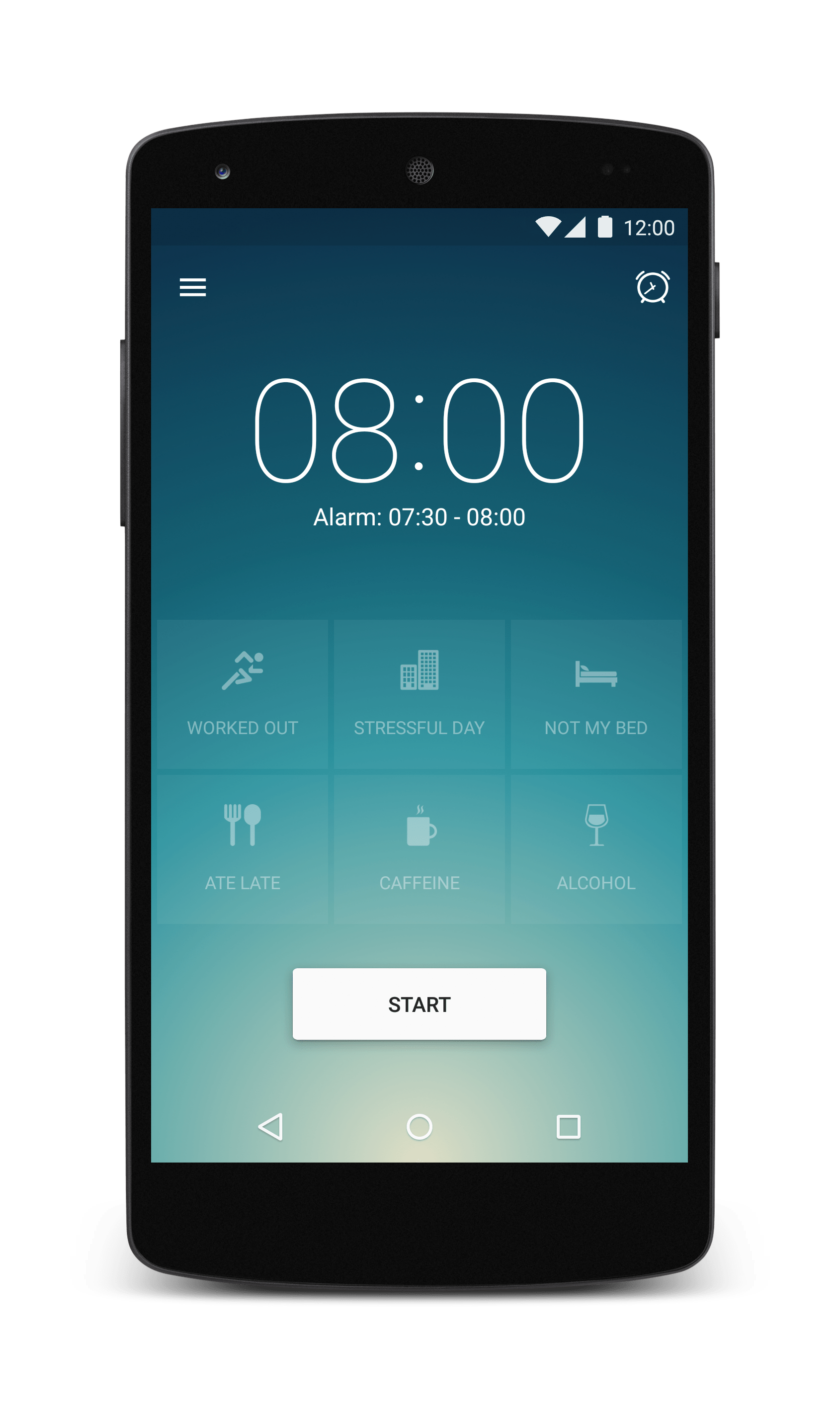
The Runtastic Sleep Better app takes some features that you usually find in fitness apps and combines them with an alarm clock. When you go to bed you set your alarm and then place it by your pillow. The sensors in your phone monitor your movement as you sleep so the app can then determine what sleep phase you are in. When it comes time to get up, the Sleep Better app picks a time when you’re in a light sleep phase to wake you. If you wake up during a light sleep phase, you wake up quicker and feel more energetic throughout the day. If you are dragged out of a deep sleep phase, you take longer to wake up and feel tired for the rest of the day. Instead of picking an exact time for your alarm, you pick a window of about 30 minutes. The app then determines the best time during that window to wake you. You can adjust this window in the settings so it can be longer or shorter depending on what you want.
When you wake up you’re presented with a summary screen. You can see how long you slept, how much time you spent in each sleep phase and how efficient your night of sleep was. Basically, the longer you spent in the deep sleep phase, the more efficient your sleeping is. There are little icons on this page that help you keep track of important notes about that night of sleep. For example, there is a little guy that looks like he is running. You press that icon if you worked out before bed. There are six of these icons, all here so you can keep track of activities you took part in the day before. This makes it easy for you to learn what helps or hurts your sleeping patterns. At the bottom of the summary page there is a spot where you can jot down notes about your dreams. It’s never easy to remember what happened in your dreams, but if you take some quick notes when you wake up, you can keep track of the most interesting ones.

I have to admit that I had my doubts about the Sleep Better app when I began testing it. After using it for about a week, I began to see the simple genius of this app. By keeping track of my habits leading up to bedtime, I was able to gain a better understanding of what helped or hurt my sleeping. While the app might not be a hundred percent accurate when tracking your sleep phases, I felt noticeably better on mornings that I had a higher sleep efficiency. Furthermore, I can take what I have learned using the app and make changes to improve my sleep efficiency. If you have had issues sleeping, the Runtastic Sleep Better app might be able to help you get a better nights rest. By keeping track of what helps or hurts you getting to sleep, you can come up with a routine that should help you get a great night of sleep. The Runtastic Sleep Better app should be available in the Google Play app store today.
Source Runtastic

The post Do you wake up tired? The Runtastic Sleep Better app can help appeared first on AndroidGuys.

Accessory of the Day: Samsung Galaxy S3 replacement battery, $9.40

Can’t get enough power? If you’re looking for a replacement battery for your Samsung Galaxy S3, this is one heck of a deal. This OEM battery has terrific ratings and costs only $9.40 (Prime eligible). At this price, we may be grabbing two. How’s your S3 holding up?
Join Prime and get this deal with FREE two-day shipping!
Also worth checking out:
- Samsung Galaxy SIII [White] (Unlocked) – $157.47
- Motorola Moto G [Black] (Unlocked) – $199.99
- Western Digital 1TB USB 3.0 Hard Drive – $59.99
The post Accessory of the Day: Samsung Galaxy S3 replacement battery, $9.40 appeared first on AndroidGuys.

OnePlus reveals how many phones it’s sold

Ever since OnePlus first unveiled the One, Android fans have been clamoring for the limited invites needed to buy their own. It’s been an infuriating wait for many, but it seems the company is slowly starting to meet demand. Co-founder Carl Pei told Forbes that OnePlus has now sold 500,000 smartphones and is aiming for one million by 2015. So why hasn’t OnePlus just opened the floodgates already? Well, the company argues that to sell the device at such a low price-point, it can’t risk having excess inventory lying around. The company is slowing opening its doors though, after holding a (albeit botched) pre-order window that meant anyone could at least get in line. The firm says it racked up “tens of thousands” of sales and is offering fans a second chance to pre-order on November 17th, assuming they haven’t given up already and OnePlus has fixed its problems from last time.
Filed under: Cellphones
Source: Forbes

Netflix will make ‘A Series of Unfortunate Events’ TV show

It’s been 10 years since Lemony Snickets’ A Series of Unfortunate Events was made into a movie, and you’ve probably accepted by now that there won’t be a second one. We’re not about to tell you that there will be (that’s the sad truth), but you will see the Baudelaire orphans on screen again, now that Netflix has secured the rights to adapt the 13 books into a live-action TV program. For those who’ve never heard of the title: the books tell a rather dark children’s tale, revolving around the terribly unfortunate lives of three orphaned siblings and their nefarious uncle Count Olaf (portrayed by Jim Carrey in the movie), who’d stop at nothing to steal the fortune they’re bound to inherit.
“After years of providing top-quality entertainment on demand, Netflix is risking its reputation and its success by associating itself with my dismaying and upsetting books,” the story’s author, Daniel Handler, wrote in the press release, taking on the identity of the series’ ever pessimistic fictional author, Lemony Snicket. Netflix is still looking for the right director to turn the books into a show for your TVs and computer screens, so it’s yet to announce when it’ll be available to stream. In addition to A Series of Unfortunate Events, Netflix is also developing other original chidlren’s programs in the next few years, including a How to Train Your Dragon spin-off and a King Kong cartoon series.
Filed under: Home Entertainment, HD
Source: Deadline

BT, HTC and EE develop tech that can pinpoint 999 calls to within metres

Every second counts for the emergency services. So to speed up response times, a new system developed by BT, HTC and EE can now pinpoint the location of a distress call to within just 30 metres or less (down from several kilometres). As soon as you dial 999, a text message with your position is sent to the operator in one of BT’s call centres, verified and forwarded to the relevant emergency service. It should help police officers, paramedics and fire fighters arrive at the scene quicker, and assist the 330,000 emergency callers each year who are unable to speak on the phone. Right now, the feature is (unsurprisingly) only supported on EE’s network and a selection of HTC phones, but it’s hoped the technology will be picked up by other UK networks and handset makers in the future.
[Image credit: West Midlands Police, Flickr]
Filed under: Cellphones, Networking
Source: BT

Sensor helps you watch your diet by tracking your chewing

Tired of having to catalog every meal in your favorite fitness app just to get a sense of whether or not you’re burning enough energy? You might get some relief in the near future. The University of Alabama has built an ear-worn sensor that estimates your food intake by tracking your chewing. The Automatic Ingestion Monitor (AIM) combines imagery of your meals with jaw vibrations to determine both the volume and energy levels of whatever you’re eating. It’s smart enough to filter out talking, so you won’t throw it off by holding conversations in between bites.
The sensor exists just as a 3D-printed prototype for now. In the long run, though, a finished version could help a wide range of people. Doctors could better understand the patterns behind eating disorders, while you could slip on an earpiece whenever you want to measure your comestibles. An ear-based diet monitor is still going to be a bit awkward, but it should be more sophisticated than clunky wristbands and vibrating forks.
Filed under: Wearables, Science
Source: University of Alabama

South Park skewers ‘freemium’ games

If your business model is conning kids into spending their parents’ hard-earned app-store cash on in-app purchased “rewards,” it’s fair to say you deserve to be ripped. South Park did the honors with its “Freemium isn’t Free’ episode involving a Terrence and Philip-branded Candy Crush-style game created by Canada’s “Minister of Mobile Gaming.” After he exposits that it’s just “harmless fun” (see the clip below) it turns out that its a diabolical scheme involving Satan and addiction. The (delightfully silly) plot is just a wrapper for the satire, of course — which points out that such games suck players in by letting them spend virtual cash before introducing real lucre. As any Farmville addict can attest, they’re also just “barely fun” enough to keep you playing. It starts off a bit slow, but ends with a rollicking finish including Satan’s spot-on sum-up of the whole phenomenon. You can grab the episode here (US-only, sorry to say).
Filed under: Gaming
Via: Kotaku
Source: Comedy Central

Nexus 9 demand is causing HTC to increase production capacity
 In no way should this news be surprising, but here it is anyway. It is being reported that the Nexus 9 demand in the world is so great that HTC is having to increase production capacity just to meet its targets. HTC North Asia president, Jack Tong, was interviewed by the Taipei Times yesterday and said that the Nexus 9’s incredible popularity with pre-orders has been a flow-on effect of the Nexus 7’s success. As the phablet market heats up, Tong says that HTC may be looking toward higher-end tablet models to help differentiate themselves as part of their greater strategy.
It’s small wonder that the Nexus 9 is so popular. Despite not being particularly competitively priced or even at times the best in class, it serves as an example of how good the next generation of Android tablets are going to be once they start being able to harness the 64-bit processors and unlock the wonders of Android Lollipop. It’s certainly a great time to be an Android tablet enthusiast as the Nexus 9 is spearheading the way for more tablets to follow in its wake, even as the market starts to make a slow decline.
What do you think about the Nexus 9 demand? Let us know your thoughts in the comments below.
Source: Taipei Times via Phone Arena
//<![CDATA[
ord = window.ord || Math.floor(Math.random()*1E16);
document.write('‘);
//]]>
The post Nexus 9 demand is causing HTC to increase production capacity appeared first on AndroidSPIN.
 AIVAnet