


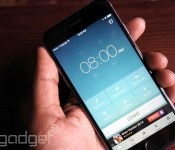
Runtastic’s Sleep Better app aims for a good night’s rest

Runtastic, best known for its fitness apps and hardware, just unveiled its first sleep-tracking app: Sleep Better. The app, which is available for both iPhone and Android, offers most of the features you’d expect. You can track the overall quality of your sleep by laying your phone beside you (it relies on your phone’s sensors to determine how much you toss and turn). And since it knows how you’re sleeping, you can set up a smart alarm to wake you up when you’re not in deep sleep, which typically leaves you feel more well-rested.
You can starting using the app for free, but you’ll have to pay $1.99 to unlock the full version, which gives you an ad-free experience and enables more features. Those include the ability to jot down notes about your dreams and chart things that could affect your sleep cycles, like caffeine intake. The app can also determine which moon phase gives you the best rest (which is a real thing, no joke).
Given that Runtastic has its fingers in so many pies — including separate apps for cycling and its own fitness tracker, the Orbit — it was only a matter of time until the company specifically targeted sleep tracking. The Orbit can also track your sleep with the company’s original app, but it’s fairly basic compared to what Sleep better can do. While we didn’t see any mention of the Orbit’s integration with Sleep Better so far, I’d wager that’s coming soon. After all, wearables are far more accurate than an app that relies on keeping your smartphone in bed.
If you’re already using a sleep tracking app, gadgets like Jawbone’s Up, or dedicated sleep monitoring solutions like Misfit’s Beddit, there doesn’t seem to be much of a reason to use this app. It just doesn’t offer much that differentiates it from the competition.
Via: Engadget ES
Source: PR Newswire, Runtastic Sleep Better (iOS), (Android)

German news publishers want Google to rip their content after all

Photo: Nico Trinkhaus – Brandenburg Gate West, Berlin
At some point, we’ve all said no to an offer of help before realizing that some help would actually be rather useful. It’s a situation that German news publisher Axel Springer has found itself in after spending months lobbying Google to stop indexing stories for Google News, it’s now doing a U-Turn. As part of the original deal, Google pledged to only display the headlines from Springer’s stable of sites, including Bild and Die Welt, while rivals would be shown with a thumbnail and a snippet of text. Unsurprisingly, without the extra content, people began to take their clicks elsewhere, causing Bild’s traffic to drop like a stone with a weight problem. After a trial period, the publisher has decided that it’d really rather Google went back to indexing its stories after all. In a statement, boss Matias Doepfner admitted that the company had shot itself “out of the market,” but threw a little shade at the search engine, saying that its power was simply too great to resist.
[Original image credit: Nico Trinkhaus, Flickr]
Source: Reuters
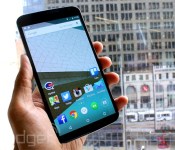
Google’s Nexus 6 finally gets priced in the UK: £499 for 32GB, £549 for 64GB

It’s been almost a month since Google officially unveiled the Nexus 6, but UK fans have been left in the dark over a price and a release date. Today, we can tick one of those off the list. In preparation for its local launch, the search giant has finally updated the Play Store to show how much the Motorola-made Nexus phone will cost. You’ll need to pay £499 to get your hands on the 32GB model or £549 is the 64GB variant is more your style. Google is staying quiet on when the Nexus 6 will actually go on sale, but with Vodafone and other resellers recently announcing they will stock the device, we bet that a release is just around the corner.

Filed under: Cellphones, Mobile, Google
Source: Google Play
Amazon Unveils Echo, a Speaker With a Siri-Like Voice Assistant
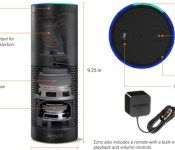
Amazon today unveiled a new product called Echo, a cylindrical piece of hardware with a built-in Siri-style voice assistant that’s able to answer a variety of requests and perform functions like playing music.
The cloud-connected Echo is entirely controlled by voice and will wake to answer a question when the word “Alexa” is spoken. Like Siri, it can answer questions like “What time is it?” “What’s the weather like?” and more, plus it’s able to complete tasks like setting an alarm, playing music, or creating a shopping list.
According to Amazon, Echo uses far-field voice recognition capabilities with seven microphones to detect a request from anywhere in a room, and its downward-firing speakers “can fill any room with immersive sound.” Echo lets users have access to Amazon Music, Prime Music, iHeartRadio and TuneIn, and with built-in Bluetooth, Echo is also able to play music from a phone or tablet.
As it’s connected to the cloud and Amazon Web Services, Echo is designed to learn and gain functionality over time, and an accompanying Amazon Echo app (Android/Fire OS only) or web interface is what lets Echo create alarms, music playlists, shopping lists, and more.

Echo is priced at $99 for Amazon Prime members and $199 for non-Prime members, but currently users must request an invitation from Amazon to be allowed to purchase the device.
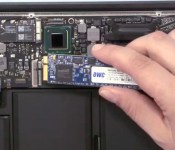
OWC Launches 1 TB SSD Upgrade Kits for 2010-2012 MacBook Air [Mac Blog]
Other World Computing today announced the launch of new 1 TB (960 GB) solid state drive options for 2010-2012 models of the MacBook Air.

Priced at $549 for the drive alone or $579 for a package including tools and an Envoy enclosure to repurpose the original drive for external storage, the new 1 TB option complements existing 120, 240, and 480 GB options for the various MacBook Air generations.
– 2010 MacBook Air SSD upgrades
– 2011 MacBook Air SSD upgrades
– 2012 MacBook Air SSD upgrades
With Apple’s move to PCIe-based SSDs beginning with the 2013 MacBook Air, OWC has yet to launch new SSD upgrade kits for the latest notebooks, but the company has promised it is hard at work on kits for these machines.
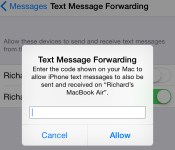
How to Enable Text Message Forwarding and Answer Phone Calls on Your Mac [iOS Blog]
With the release of OS X Yosemite, Apple has included a new set of “Continuity” features that connect iOS devices and the Mac in a number of ways. Most notably, Continuity allows users to place and answer calls with their Macs and iPads that are forwarded through the iPhone.
Similarly, Macs and iPads can now receive SMS messages, even ones sent from non-Apple devices. Before the launch of iOS 8.1 and OS X Yosemite, Macs and iPads could only receive iMessages, as SMS messages were limited to the iPhone via traditional delivery. iMessages are a part of Apple’s proprietary messaging service made for the iPhone, iPad, and Mac, while SMS messages are usually intended for communications between mobile phones. Users can now also send SMS messages to any kind of device from the Mac and iPad. Apple previously referred to this feature as “SMS Relay” before the debut of iOS 8.1, but officially refers to it as “Text Message Forwarding” in the Settings app.
The ability to answer calls and SMS messages on a Mac is especially useful when an iPhone is across the room charging or otherwise inaccessible. The iPhone being used to relay calls and texts can even be in sleep mode, meaning that users can manage all incoming calls and text messages entirely through their Mac and iPad.
Before You Start
You need iOS 8.1 and OS X Yosemite in order to forward phone calls and SMS messages from your iPhone to your Mac or iPad. You also need to make sure that both your Mac and iPhone are logged into the same iCloud account. Phone calls and SMS routing are compatible with any iPhone and iPad running iOS 8.1 and any Mac that supports OS X Yosemite. Also, the Wi-Fi calling feature needs to be off to enable call forwarding, so ensure it is disabled by going to by going to Settings > Phone > Wi-Fi Calls.
Steps to Enable Text Message Forwarding
1. Turn on Wi-Fi on your iPhone (Settings -> Wi-Fi) and Mac (Menu Bar -> Wi-Fi -> Turn Wi-Fi On. SMS forwarding will still work between the Mac and an iOS device even if both are using different Wi-Fi networks.
2. Turn on Bluetooth on your iPhone (Settings -> Bluetooth) and Mac (Menu Bar -> Apple -> System Preferences -> Bluetooth -> Turn Bluetooth On).
3. On your Mac, open the Messages app and navigate to Menu Bar -> Messages -> Preferences -> Accounts -> Click on iMessage account -> Check the boxes next to your phone number and email. If your email is not listed, click Add Email and enter your email.
4. On your iPhone, add your email address to your iMessage by going to Settings -> Messages -> Send & Receive. A registered email for iMessage is required in order to enable text message forwarding.
5. Turn on Text Message Forwarding on your iPhone by going to Settings -> Messages -> Text Message Forwarding -> Turn Text Message Forwarding On. A prompt will appear asking you to enter an activation code. The activation code will appear in your Mac’s Messages app. Enter the activation code from your Mac in the prompt shown on your iPhone. An activation code is required for every device that you want to include in text message forwarding.

6. You will now be able to answer any incoming text message on your Mac. Text messages sent to your iPhone will also automatically appear as a push notification on your Mac in the upper-right corner. When a text message appears, you can answer it by clicking “Reply”. Text messages will also appear in the Messages app on your Mac.

Steps to Enable Phone Call Forwarding
1. Turn on Wi-Fi on your iPhone (Settings -> Wi-Fi) and Mac (Menu Bar -> Wi-Fi -> Turn Wi-Fi On. Call forwarding requires both of your devices to be on the same Wi-Fi network.
2. Turn on Bluetooth on your iPhone (Settings -> Bluetooth) and Mac (Menu Bar -> Apple -> System Preferences -> Bluetooth -> Turn Bluetooth On).
3. Turn on iPhone Cellular Calls on your Mac (FaceTime -> Preferences -> Turn On iPhone Cellular Calls) and iPhone (Settings -> FaceTime -> iPhone Cellular Calls).
4. You may now begin placing and answering phone calls on your Mac. Incoming calls to your iPhone will appear as a push notification on your Mac in the upper-right corner. When a call appears, you have the option to answer it by clicking “Accept” or ignore it by clicking “Decline”. You can also click on the arrow to the right of the Decline option and can then choose to send a text message or create a reminder to return the call later.

When you’re on a call, you can silence yourself by clicking “Mute” or switch to a FaceTime video call by clicking “Video”. If another person calls during your current phone call, you will also have the option to click “Hold & Accept” and can even switch between calls by clicking the connected arrows. You can also click “Merge” to merge both calls. If you want to transfer the call from your Mac back to your iPhone, unlock your iPhone tap the “Touch to return to Call” banner.

You can also make phone calls from a number of apps on the Mac, including Contacts, Safari, Mail, Maps and Spotlight. For example, you can call a business after searching for its information in Maps, and can highlight and call a phone number when one is displayed in Safari.

Troubleshooting
A number of users have had difficulty with trying to enable text message and phone call forwarding for their Macs. For text message forwarding, users on our forums have reported that a combination of logging out and back into iCloud on their devices, turning iMessage off and on in the iPhone’s Settings app, disabling and enabling Bluetooth, and restarting both devices fixed their problems. If the activation code to set up text message forwarding is not showing up on your Mac, ensure that an email address is activated for iMessage on your iPhone. Once again, you can activate an email for iMessage on your iPhone by going to Settings -> Messages -> Send & Receive.
Meanwhile, users attempting to fix problems with call forwarding have found that the most common solutions include rebooting both devices, logging out and back into iCloud on their devices, and turning FaceTime off and back on in the iPhone’s Settings app. Other users have found that having Wi-Fi Calling enabled on the iPhone has caused call forwarding to not work, so once again ensure that setting is off by going to Settings > Phone > Wi-Fi Calls.
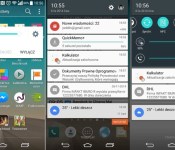
Leaked screens show LG’s take on Android 5.0 Lollipop

While questions about which devices are going to be receiving Android 5.0 Lollipop, LG users may not have to worry about anything. Even though Google has just released the source code, LG European branches are telling their customers that the LG G3, released earlier this year, will definitely be updated to Lollipop. If you’re one of those who picked up last year’s flagship, the LG G2, you shouldn’t worry either due to the fact that it’s reported that the G2 will also be updated to Lollipop.
The screenshots give us an idea of what LG is doing in regards to adding their take onto Android 5.0. The biggest change that we can see from the aforementioned screenshot, is the updated notification dropdown. However, it seems that the updated version of LG’s software will still be heavily laden with their own layout, with just touches of Lollipop spread around. It will definitely be interesting to see how everything plays out with how LG works Lollipop into their interface.
Even though stock images are being delayed due to Wi-Fi battery draining bugs, everyone can expect to see their devices updated within the next few weeks or so. Although the images have to go through their paces with the respective carriers for the Moto X 2014, we should still start seeing the roll-outs for those devices soon as well.
Are you excited to see Android 5.0 Lollipop on your LG G3 or your LG G2? Let us know in the comments below.


The post Leaked screens show LG’s take on Android 5.0 Lollipop appeared first on AndroidGuys.

Verizon Buyer’s Guide for Android (November 2014)

In the hunt for a new smartphone from Verizon? Regardless of whether you’re buying your first Android or upgrading for the fourth time there’s something for everyone. And, as you might suspect, Big Red has plenty to choose from. In fact, counting variations, there are roughly two dozen models to choose from today.
As the lone carrier to offer the Droid series, Verizon transitioned the family away from other hardware makers into an exclusive relationship with Motorola. Beyond that, you’ll also find some devices that are exclusive to the nation’s largest wireless provider.
Defining high-end
Today’s top Androids feature big, gorgeous displays, fantastic high-resolution cameras, and lots of memory. Toss in some quad-core and octa-core processors and some killer high capacity batteries and you’ve got mobile devices that would rival your computer from just a few years back.
As 2014 draws to a close and we look at the hardware from late model Androids it’s not uncommon to find screens hovering at 5-inches or larger. Thanks to ever-shrinking bezels we have phones with massive displays that also happen to fit comfortably in our hand. And, they’re not only big, but they’re sharp, too. Resolutions across the the top models are 1080p and higher. For what it’s worth, we’re starting to get our first glimpses of 2K and Ultra HD screens. It can be argued that average users cannot discern much beyond 720p/1080p on such a small device.
If you’re not coming to the table with at least a quad-core processor and 2GB RAM then you’re not going to sit at the big boy’s table. Most of the bleeding edge stuff you’ll find today comes with 3GB memory and chipsets of around 2.3GHz – 2.7GHz.
Storage capacities, for the most part, haven’t moved forward quite as quickly as other areas. You’ll still routinely find 16GB and 32GB models in most models though some are creeping into the 64GB space. Given that many handsets offer external storage via microSD cards it should matter little where you start out – especially if cost is a factor.
Another important factor in determining a smartphone purchase is the version of Android. Typically, it’s a simple case of “the newer the phone, the newer the operating system”. Today’s most recent phones are powered by Android 4.4.4 KitKat but anything running at least 4.4 should suffice for the average person. You will still find an occasional straggler, though, running something older.

Flagships & Exclusives
- Samsung Galaxy Note 4: Launched in October, this is Samsung’s annual plus-sized experience. Thanks to the release time-frame, these are typically a step-up from the Galaxy S series of smartphones. Standout specs include 32GB storage, a 5.7-inch Quad HD display, 3GB RAM, an S Pen stylus, and a 3220mAh battery. Verizon | Best Buy
- Samsung Galaxy S5: Released in spring 2014, it’s the most popular series of Android models to date. Hardware includes a 5.1-inch display, 16-megapixel camera, 16GB storage, and a 2800mAh battery. Verizon | Best Buy
- LG G3: LG’s increasingly popular family of phones, this one is unique in that it features rear button configuration under the camera. Verizon | Best Buy
- Motorola Moto X (2014): Motorola’s now annual flagship model, the Moto X is significant for its stripped down Android experience. Slightly bigger than last year’s model, this one has been very well received in the space. Verizon | Best Buy
- Sony Xperia Z3v: The first Sony smartphone for Big Red, it’s sleek, sexy, and waterproof. Featuring a 5.2-inch 1080p display, the handset also boasts a stellar 20.7-megapixel rear camera, and 3200mAh battery Verizon
- Motorola Droid Turbo: The first Droid from Verizon in over a year, it’s big and beautiful with a lean Android 4.4 KitKat experience. Standout features include turbo charging (8 hrs juice in 15 minutes) and a Quad HD display. Verizon | Best Buy
- HTC One M8: Perhaps the oldest model in this list, HTC’s flagship handset received very high marks for its build quality and toned-down custom UI. Often cheaper than others in the group, it’s still plenty of bang for the buck. Verizon | Best Buy

Mid-range
While not always the case, the mid-range Android is typically made up of last year’s top models. This is not to suggest, however, that there’s not a one-off model or variation that sneaks in every once in a while. Specs, as you can imagine, are often a step below. Processors, cameras, and batteries are sometimes the key difference though many of them also feature a screen resolution of 720p or 1080p. What follows what could be considered some of Verizon’s middle-of-the-pack handsets.
- LG G2: One of LG’s breakout devices over the last few years, the smartphone was the first to employ the rear button setup. Killer hardware and a refined UI make this one hard to resist even a year later. Verizon | Best Buy
- Samsung Galaxy S4: Quite possibly one of the most popular handsets ever, this Samsung features a 5-inch 1080p display, 13-megapixel rear camera, and a 2600mAh battery. Verizon | Best Buy
- Droid Maxx: Centered around its all-day battery life, the Droid Maxx is one big and powerful device. As often is the case with these signature Motorola handsets, this one features Kevlar coating and a splashproof screen. Verizon | Best Buy
- Droid Mini: Still powerful enough for the typical smartphone user, this Droid is smaller in hand. At 4.3-inches it might feel diminutive by today’s standards, however it gets the job done. Verizon | Best Buy
- HTC Desire 612: As a budgeted approach to the flagship One M8, you’ll find slightly less powerful hardware and a plastic housing. The 4.7-inch qHD display looks sharp and shows off the modern approach to HTC’s Sense UI. Verizon
- HTC One Remix: Also an offshoot of the One M8, this HTC packs a 4.5-inch screen and eschews Ultrapixels in favor of 13-megapixels. The front-facing 5-megapixel shooter is a selfie-lover’s dream. Verizon | Best Buy
- LG G Vista: A twist on the flagship G3, the G Vista boasts a massive 5.7-inch HD display and an 8-megapixel rear camera. Toss in a 3200mAh battery and a quad-core CPU and you’ve got an excellent option for plus-sized smartphone lovers. Verizon | Best Buy

Entry-level
- LG Lucid 3: Employing the more traditional button configuration, LG’s phone comes with a 4.7-inch qHD display, a 5-megapixel rear camera, and 1.2GHz quad-core chipset. Still present are some of LG’s custom software enhancements. Verizon | Best Buy
- Kyocera Brigadier: The most, if only, rugged Android in Verizon’s lineup today, the Brigadier can withstand water, dirt, drops, and even tough weather conditions. Strong enough to get the job done, you’ll get a 4.5-inch screen and an 8-megapixel camera, too. Verizon | Best Buy
- Samsung Galaxy S4 Mini: A smaller take on the 2013 flagship model, the S4 Mini has a very pocketable 4.3-inch display, an 8-megapixel rear shooter, and plenty of Samsung software features. Verizon
- Droid Razr M: Thanks to a 4.3-inch, nearly edge-to-edge screen, this Droid simply feels great in hand. Kevlar coating and a scratch resistant glass make this one tough phone. Specs, including software, are a step behind the others listed here. Verizon | Best Buy
The post Verizon Buyer’s Guide for Android (November 2014) appeared first on AndroidGuys.

Strategy RPG Title, Battle of Heroes: Land of Immortals, Launched by Ubisoft

Looking for another free-to-play strategy RPG game for your Android device? Ubisoft has just launched such a game called Battle of Heroes: Land of Immortals. The title gives you control over a your own fantasy world where you will control your Heroes to cast spells, train units, defend your city and fight to conquer Evagar.
There are multiple Heroes for you to unlock through your battles. Each one carries their own special skills and powers as well as being fully controlled by you which gives you the ability to select targets and carry out incantations on the battle field. The game brings you 5 types of units you can train with their own special skills. Like most games in this genre, you will need to build up your city, your citadel, and build up its defenses against attacks from others. You can assign units to guard city walls or patrol the inner sanctum. Add in outposts as well as catapults and fortifications.
Battle of Heroes: Land of Immortals features a standard PvE mode as well as PvP via online connection. It doe require an internet connection to play. Being a free-to-play title also means there are in-app purchases. Ubisoft has them listed from $4.99 to $79.99. I would assume that is for in-game currency to speed along construction and buy special items.


If strategy RPG style games are your thing, you might want to give this one an install. Be sure you have a sold connection and a little time to grab the title as it does weigh in at 99MBs. Hit the link below and let us know what you think of it.
Play Store – Battle of Heroes: Land of Immortals
Press Release:
UBISOFT INTRODUCES BATTLE OF HEROES: LAND OF IMMORTALS
New Strategy and Role Playing Game Takes Players on a Journey to Evagar
SAN FRANCISCO, CA – November 6, 2014 – Today, Ubisoft announced Battle of Heroes: Land of Immortals, a brand new free-to-play strategy and RPG mobile game is now available on the App Store, Google Play and the Amazon app store. Players will create their own fantasy world where they will be able to control their Heroes and cast devastating spells, train lethal units, defend their city and fight against other Heroes to conquer Evagar.
Players will use their Hero’s skills and abilities to cast meteoric spells and unlock new Heroes as they defeat foes and build up their citadel with outposts, catapults, archers, mages and warriors. Support units including archers, warriors, wall breakers, riders and mages can be trained to fight alongside Heroes to help turn the tide of battle. With 3D graphics players will get lost in the beauty and battlefields of Evagar.
Playable in single player or player versus player, Battle of Heroes: Land of Immortals lets players choose what type of experience they want to enjoy. For players looking for competition they can face off with rival players and pit their Heroes against each other to fight their way up the leaderboard.
Developed by Ubisoft Barcelona Mobile, Battle of Heroes: Land of Immortals will receive post-launch support with regular free content updates.


//<![CDATA[
ord = window.ord || Math.floor(Math.random()*1E16);
document.write('‘);
//]]>
The post Strategy RPG Title, Battle of Heroes: Land of Immortals, Launched by Ubisoft appeared first on AndroidSPIN.

The Turn-Based Strategy Gameplay of ‘Battle Worlds: Kronos’ Makes its way to the Play Store
Looks like there are a number of new strategy games launching today. Ubisoft just released a new strategy RPG title, Battle of Heroes: Land of Immortals, earlier this morning. Now we see Battle worlds: Kronos. This one is your more typical turn based strategy title that was built and designed for experienced players only. The developer, KING Art Games, even makes mention of this in the description. It made its debut on PC after a successful Kickstarter campaign last year that raised just over $260,00 of their $120,000 goal.

Battle World: Kronos was orgininally design for PC gamers around the globe and has now been ported to mobile device with the target device being tablets with at least 1GB of memory. You are given two single player campaigns with two different factions to choose from. The game boasts over 50 hours of gameplay, over 40 units that range from land to air to sea. All of which have their own upgrades. Toss in Asynchronous cross-platform multipler action, user generated maps and an online league and you are looking a pretty spectacular experience.
The title is available today on the Play Store with a 33% launch discount making the price tag right now $9.99. There aren’t any ads or in-app purchases, you buy the game and you play to your hearts content. The one initial review that is already up compares it to XCOMM:EU and Boulder’s Gate. Both of which are stellar games as well. Hit the link below to go pick it up. Make sure you have some time and a solid internet connection as the download is listed at 397MBs.

 Play Store – Battle Worlds: Kronos
//<![CDATA[
ord = window.ord || Math.floor(Math.random()*1E16);
document.write('‘);
//]]>
The post The Turn-Based Strategy Gameplay of ‘Battle Worlds: Kronos’ Makes its way to the Play Store appeared first on AndroidSPIN.
 AIVAnet