


Kick-ass mobile deals and steals (smartphones, tablets, games, and more)

Looking to save on your next Android smartphone, tablet, or accessory? Maybe you’re in the market for some new apps, games, or services. Whatever the case, we’ve got your back.
Check out the following hand-picked list of deals and steal which covers a whole range of products. Sure, some of this bleeds a little bit out of the area of Android, but we don’t think you’ll mind. See something out there that’s worth sharing? Drop us a line!
Hurry, many of these are limited-time sales and can disappear at any moment!
Smartphones
- Amazon Fire Phone with 1 year of Amazon Prime – $.99 (with two-year service agreement)
- Moto X (2014) – $1 (with two-year Verizon service agreement)
- LG G3 – $49.99 (with two-year Verizon service agreement)
- Save $100 on Droid Turbo when trading in old smartphone (requires two-year contract)
- HTC One M8 – 32GB – Verizon (Unlocked) Smartphone – Gold or Gray – $374.95
- Refurbished Moto X (2013) 16GB for Verizon – $169.95
- Refurbished 8GB Nexus 4 with white bumper case ($149.99)
- Refurbished 16GB Nexus 4 with white bumper case ($169.99)
- BLU Studio 5.0 LTE unlocked ($171.63)
- BLU Studio 6 HD unlocked ($187.81)
- Samsung Galaxy S5 16GB (Sprint) $79.99
- HTC Desire 816 (Virgin Mobile $194.99 (35% OFF)
- LG Optimus F3 (Virgin Mobile) $58.00 (68% OFF)
- Samsung Galaxy S3 (Boost Mobile) $186.80 (53% OFF)
- Moto G (Boost Mobile) $89.99 (31% OFF)
- LG Volt (Boost Mobile) $79.99 (60% OFF)
- Alcatel One Fierce Prepaid Phone – Silver (T-Mobile) $98.70 (40% OFF)
Chromebooks
- Acer 13 Chromebook with Tegra K1 $249.00 (17% OFF)
- Samsung – 11.6″ Chromebook $199 ($50 OFF)
- HP – 11.6″ Chromebook Wi-Fi + 4G LTE $199 ($100 OFF)
Accessories
- Amazon Fire TV for $84
- CHOE Qi Wireless Charger Charging Pad for $22.99 (67% OFF)
- Active Wrap Bluetooth headphones for $24
- Pre-Order Exclusive: The Limited Edition Code Black Drone + HD Camera for $89.99 (55% OFF)
- SanDisk Ultra 64GB MicroSDXC for $31.99 (68% OFF)
- Icon Bluetooth speaker for $20 (80% OFF)
Apps & games
- kovdev’s latest icon pack, AUDAX, is half off through November 10
- Double Dragon Trilogy $.99
- Pay what you want for the Humble Bundle Mo-boo!-ile game pack

Other awesome stuff
- Free two-month Hulu Plus or three-month Google Play Music All Access for Chromecast
- Sprint will cover your cancellation fees up to $350 per line (EXPIRES JAN 1 2015)
- Verizon’s official promotions
- Unlimited Cloud Storage for Amazon Prime members
- AT&T’s current Special Offers promotions
- Boost Mobile offering Data Boost plans
- Amazon Deal of the Day page
- Receive six months of Google Play Music All Access with the purchase of a Nexus 6 (EXPIRES JAN 31, 2015)
The post Kick-ass mobile deals and steals (smartphones, tablets, games, and more) appeared first on AndroidGuys.

10 reasons to join us at Engadget #ExpandNY!

It’s what you’ve all been waiting for! Engadget Expand is the place this week. We’re taking over the Javits Center in Manhattan on November 7th and 8th. We’re pretty damn excited for what’s on tap this year, and we think you should be too. But, in case you need convincing read on for ten reasons to get pumped.
There’s a speaker for everyone.
We all love tech for different reasons — its design, its utility, its ability to make the gear from Back To The Future a conceivable reality. Regardless, rest assured that we’ve got you covered with speakers like Benjamin Heckendorn of The Ben Heck Show, James Dietrich of Aldebaran Robotics and four-time Olympic medalist Angela Ruggiero.
You can get intimate with some circuitry.

Get your minds out of the gutter, people. We’re talking about our interactive workshops that let you build your own gadgets with your bare hands. DODOcase is even letting you build your very own VR headset!
Hang out with cutting-edge exhibitors
Leading names in technology will be on the Expand show floor and ready to demo what they’re working on. You can even get your hands on smartphones like Huawei’s Ascend and the elusive OnePlus One. Head over to our microsite to meet all of our sponsors.
All the Free Things
We have it on good authority that some of our sponsors will be giving away pretty cool swag. Be sure to follow us on Twitter at @EngadgetEvents so you can be first in line for #ExpandNY contests and giveaways. (Warning: this in no way guarantees that you will actually be first in line.)
You’ll be front row for our Insert Coin contest
We’ve got some killer contenders this year — everything from drones to a weird little pod that will nag you about your bad posture. Our Judges Choice winner will be walking away with $10,000. But, more importantly, you get choose who takes home our $15,000 Reader’s Choice award. Now is probably a good time to read up on the semi-finalists.
Dancing robots!

Just one of many unique events on our schedule is a robo dance party. A squad of Nao robots shaking their, er, hinges. We’re also hearing from robotics and animatronics expert Mark Setrakian on building mechanical creations for the silver screen.
Meet your favorite Engadget editors!
Say hello to the writers and reviewers you’ve come to know, love and occasionally disagree with. Our editorial staff will be roaming the show floor and thrilled to talk tech with Expand attendees.
Find out if you could hack it on Mars
We’re sitting down with the CEO of MarsOne, Bas Lansdorp. On stage, he’ll tell us what it would take to put a settlement on the red planet, and divulge his ambitious goals to get humans there in the next 11 years.
We’re asking the tough questions
Whatever happened to Dippin’ Dots? What are the dos and don’ts of wearable tech? What the heck is Project Ara? We’ll answer all of this and more — all you have to do is show up. And if you’re not going to be in New York this weekend, don’t worry, we’re live streaming from our stage at Engadget.com. (Where else?)
Best of all…It’s Completely Free!

We know you’ve been spending all of your money on the gadgets we cover, so come enjoy a weekend of tech reverie on us. RSVP now so you don’t get caught in a registration line at the door!
[Photo: Mark Lennihan/AP Photo (Skyline), Aldebaran (NAO robot)]
John Colucci contributed to this report.
Filed under: Announcements, HD, Mobile, Alt

Emoji characters are getting skin tones to reflect human diversity

Remember how companies were working with the Unicode Consortium to get more diversity into the emoji characters you use? Well, there’s now a clue as to how those more accommodating characters are likely to work. A newly proposed update from Apple and Google would build a skin tone modifier into Unicode; you’d only have to add it to existing emoji to change skin color and better reflect your identity. The technique would be easy to implement on a phone (a press-and-hold button would work), and it would fall back gracefully when you’re chatting with someone whose phone can’t handle the new code. The Consortium still has to accept and implement the new emoji before you’ll see them, but it’s hard to see the organization turning down such a straightforward approach.
Filed under: Cellphones, Internet, Mobile
Via: Gizmodo
Source: Unicode
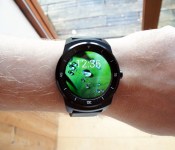
LG G Watch R review: good looks and improved battery are a step in the right direction

I think it’s fair to say by now that smartwatches are no longer the “hot new thing.” It’s an established product category. The paint might still be a little wet on the whole idea, and some might argue there are areas that still need improving, but these clever timepieces are officially here to stay. That’s thanks in no small part to Android Wear, Google’s platform that brought some sanity/unity to the wild west of wrist-worn Android tech that came before. With the software side of things taken care of, hardware manufacturers can now focus on the gear.
So far, in terms of Android Wear devices, we’ve seen efforts from LG, Motorola, Samsung and today, well, LG… again! Barely four months after launching the LG G Watch, the Korean firm is back with another one: the G Watch R. Whereas the G Watch was a square, unpolished and, perhaps, unfinished affair, the G Watch R we’re looking at today is a different beast altogether. It has a much more traditional design with a round display, leather strap and more. Was LG just eager to catch the first wave of Wear devices? Is the G Watch R the Wear device it should have released to begin with? More importantly, at $300 through AT&T (making it the priciest Wear device yet), do you want one?
Hardware
http://www.engadget.com/embed-5min/?sid=577&playList=518485800&responsive=false
I’m not saying that LG rushed the original G Watch to market, but on first sight, if you had told me, with its bland, square design and generic rubber strap, it was a prototype, I’d have believed you. The G Watch R (and that R is important), is a whole other kettle of fish. As I mentioned already, the big hardware difference isn’t some nifty hardware feature (though it does have a heart rate monitor this time); it’s that design. It does seem a little surprising that we’ve seen many, many smartwatches and, to a lesser degree, Android Wear devices, yet still we’re excited to see one that looks like a regular watch. We should be excited about features, not just because a device finally looks like a proper watch. LG’s latest effort isn’t going to give Rolex any cause for concern, but if you snuck it among a bunch of men’s watches (it is definitely more masculine than unisex) in a retail store, it wouldn’t stand out like a sore thumb.
If that sounds like a backhanded compliment, that’s because it kinda is. The G Watch R might be a step forward for Wear devices in terms of design, but it’s still fairly neutral-looking in horological terms. A steel body houses the circular display, and there’s a (non-rotatable) dial with the minute/five-minute/quarter-hour markers on it. Not so handy if you opt for a digital face, but it certainly adds to the effect when using an analog-style one. There’s also a button on the side where the crown would normally go. It doesn’t wind; instead it returns you to the home screen, wakes the watch from standby and takes you to the settings on a long press. A nice touch.

The strap is also an improvement from the original G Watch’s rubber one. This time it’s real leather. Nice as that is (it certainly passes the smell test), I found it to be a little stiff — almost cardboard like. It seems to have softened a little with use, but it’s not the most luxurious-feeling hide I’ve experienced. It’s also not the most comfortable. It’s not constantly irritating or unpleasant, but I do find myself adjusting it from time to time. The good news is, if you don’t like it, you can replace it with any standard 22mm strap of your choice.
Looks are one thing, but it’s what’s on the inside that counts, right? It’s here that the G Watch R suddenly becomes less of a departure from the original (or any other Wear watch for that matter). It has the same 1.2GHz dual-core Snapdragon 400 configuration, the same 512MB of RAM, 4GB of internal storage, Bluetooth 4.0, accelerometer and IP67 waterproof rating (submergible to one meter for about 30 minutes). The battery gets a very minor boost from 400mAh to 410, and the G Watch R gets a heart rate monitor as mentioned — which is new this time round. Lastly, if you were hoping for wireless charging, no dice there, sadly. This, too, uses a proprietary cradle, along with a micro-USB cable.

If you’re wondering how big it is, the body of the watch is 46.4 x 53.6 x 11.1mm. By comparison, the Moto 360 is 46mm in diameter by 11.5mm high. The G Watch R feels slightly less chunky than the Motorola thanks to the smaller, recessed screen (1.3 inches across against the 360’s 1.6). The thicker bezel on the LG gives the optical illusion of the whole face being even smaller. With most of the specifications between the 360 and the G Watch R being so similar, it’s details like these that are going to be deciding factors. One of those we’re about to tackle next.
Display
You might have made it through the hardware section thinking, “I can’t believe they didn’t mention that fully circular display!” Right, because I’m giving it its own section. We’re assuming the “R” in G Watch R is for “round.” Either way, LG’s clearly delighted that the display is a complete circle, and doesn’t have the black bar at the bottom that the Moto 360 has. How do we know? The company may have made reference to it filling the gap — not to mention, the press materials start with “Smart Comes Full Circle.” Motorola’s “flat tire” (as it has become known) is caused by the 360’s ambient light sensor needing somewhere to live. LG solved this problem by not including one. This means the G Watch R won’t auto-adjust screen brightness relative to your surroundings, but I think this was the right choice, given the clear aesthetic win. There are other trade-offs, though. At 1.3 inches across, the LG’s Plastic OLED display is smaller than the 360’s, but on the flipside, with the same 320 x 320 resolution (or mostly same; Motorola’s is 320 x 290) it has a small edge (no pun intended) on the sharpness front.

Another advantage of LG’s OLED display is that it’s going to be gentler on the battery. A scourge of smartwatches has been that they tend to go into standby to save battery, sorta negating their use as a timepiece you can glance at (aka, a watch). A backlit LCD (like on the Moto 360) theoretically requires about the same power to light one of its LEDs, as it does all of them. An OLED works differently, broadly speaking, only requiring enough power for the LEDs that are currently lit. So, when the G Watch R is in “always on” mode, after a few seconds, the watch face changes to a minimal black screen, just showing the time, and any active notification — meaning you can always have the time showing, without it zapping the battery. It seems to work, too, as I’ll cover later.
The display itself is bright and crisp. Colors look natural, with maybe just a hint of oversaturation, while blacks are nice and deep (as you’d hope with an OLED). You won’t find yourself looking at too many photos of course, but some of the watch faces you can choose include wallpaper/pictures, and they look great on the small display. While there’s no auto-brightness feature, I found it easy enough to view in daylight, only having to jack up the level in the most direct sunshine. As for viewing angles, these are great, meaning you can clearly read the watch face while typing or glancing down while walking (no need to lift your arm all the way).

Android Wear’s interface, with all its cards and pastel colors, translates well to the circular layout for the most part, though some of the text can be bunched up, or cut off from the notifications, which is frustrating at times (you can swipe to see all the text, but hey, I’m lazy…). Some might argue this negates the benefit of a smartwatch (after all, you could just slide out your phone), but I didn’t find it inconvenient to the point of annoyance. Another downside specific to a circular screen is that you can see the corners of pixels breaking the smooth line, as you follow the edge of the OLED around. It’s not distracting, but it can catch your eye from time to time.
In use

If you’ve not used Android Wear before, then the brief summary is that it’s a mix of Google Now and phone notifications boiled down to a watch-friendly format. Given that the software on Wear devices is always the same (unlike Android on phones, which is famously customized by manufacturers), there’s little to add here that we haven’t covered already. Instead, I’ll focus on those features that made themselves more useful on the G Watch R.
First up is the heart rate monitor. It’s hardly the first smartwatch to offer one — not even the first Wear device (Samsung’s Gear Live). But, it is the first LG Wear watch with this feature, so that’s something, right? The good news is, it actually works really well. In other devices I’ve tried (looking at you, Galaxy S5), it can feel like a bit of a last-minute add-on, but the sensor here is quick and (compared to taking my own pulse) accurate. Just ask the watch “What’s my pulse?” or “Show me my heart rate” and in a few seconds you’ll get your number. This then pipes into Google’s Fit app, to keep all your activity data in one place. This will be even more useful when combined with the step counter that’s standard in Android Wear. As more watches get GPS support (not the case here; Sony’s SmartWatch 3 will be the first), the fitness credentials will suddenly become even more useful — let’s just hope battery life doesn’t take too much of a hit.

One other new feature is actually not specific to the G Watch R, but it’s new to Wear, and we’ve not covered it before on Engadget beyond the news: the ability to store and play music directly from the watch. So, if you want to go running (for example), you no longer have to bring your phone along if you want some music. I followed Google’s instructions for transferring music to the letter, and nothing happened. The LG G Watch R later prompted me that there was an update, so I installed this. I tried following the instructions again (basically there’s a tick box in the Play Music Android app) and again nothing. Then some time later, a card popped up saying it was transferring music. Great. Despite the unclear setup process, it’s definitely nice-to-have functionality, and it shows that Android Wear as a platform is growing with the hardware that’s running it. It’s still pretty basic for now — you can’t choose exactly which music to sync, for example — but hey, it’s progress. Currently there are no alternative music player apps for Wear, but that’s something we’d expect to change soon.
As for actually navigating around the G Watch R, again, it’s more of the same. If nothing else, it’s a testament to how much Google is trying to ensure the experience is the same, which is something that can’t be said for its mobile OS. The side button wakes and puts your device to sleep. Lifting your wrist will also (theoretically) wake the watch too, and activate the voice recognition, for a seamless experience. The reality, however, does leave a few stitches showing (but maybe not full seams). By that I mean, not every time you lift your wrist, hoping for the watch to spring to life, will it do so. This leaves you in an awkward pose, expectantly staring at your watch. In fairness, this has been true of all watches I’ve tried with this feature, but I do feel the LG is perhaps slightly less responsive than those I’ve tried so far.

No bother, when this situation arises, you just casually touch the screen — as that will also wake it. So, really, you have three options when it comes to waking up the device, which should cover most bases. As for the voice recognition itself, I’ve always found it to be pretty good. For example, when you receive a Hangout, or SMS, et cetera, you can swipe left, and find a “reply” option. This sets the watch listening, and you simply speak your message. I managed to conduct continued “chats” using just the watch and this method. Again, it’s not perfect — about a third of the time there was a slight error, and perhaps 15 to 20 percent of the time I had to cancel the message and try again. But, if you’re chatting with a friend that will let things like “see you laker” slip, then you’re good. Especially as it often seems to send the message even though you thought you canceled it! Also, the feature whereby notifications (for all those replies!) can be dismissed from view, for addressing later is present this time around also. Which is good news, as it’s great to be able to clear them from your display, while knowing you can check back later.
Battery life and performance

Ok Google, what about the battery life? That’s pretty much what most Android Wear users have been asking. With good reason, too. So far, none of the watches we’ve tested have managed to last much longer than a day’s use. Even then, you’ll basically wake up needing to charge it right away. LG only added a tiny 10mAh boost to the cell from its last watch, so we weren’t expecting much. But, I am fairly pleased to report that I regularly got two days’ use out of the thing between charges. That’s with a decent amount of interaction with it: lighting up the screen, voice commands, getting plenty of notifications and so on. Also, this is with the screen set to “always on” (the mode that dims everything, but still shows the time). With the watch set to time-out to black, and with more moderate use, there might be hope of reaching day three. I’m just incapable of moderate use, it seems.
Another positive side effect, and of course one of the selling points of smartwatches generally, is that because you likely end up using your phone less — by not constantly checking it, and dealing with some basic tasks right through Wear — you also get better battery life from your phone. You might counter that by saying, “But you do have two batteries on the go/in the mix,” and we won’t argue with that, but as a combined experience, it should help you reach two days between charges for both devices that little bit easier. Don’t get me wrong — even two days is still way off from what we’d like to see for a smartwatch’s battery life, but again, progress.

Measuring a smartwatch’s performance isn’t an exact science, but as you can imagine, with a 1.2GHz, dual-core Snapdragon running the show (something that would have been in a flagship phone not all that long ago), and relatively light tasks to take care of, performance is smooth. I never experienced any screen stutters, or pauses between menus and opening messages, etc. The biggest factor, if anything, is going to be how close you are to your phone, and how speedy its internet connection is.
The competition
As of this writing, if you’re in the market for an Android Wear device, you have a total of four options (five if you include the pre-orderable Smartwatch 3). One of them is the device that (as many will see it, even if both will remain on sale) the G Watch R replaces (unless you really like the design of the original G Watch). We called Samsung’s Gear Live the best Android Wear watch at launch, but its tenure on the throne was short-lived. The Moto 360 soon usurped it, but then at $250, it is more expensive (about 20 bucks more than the original LG and 50 over the Samsung). Right now, LG hasn’t revealed the official price for the G Watch R, but AT&T is the first retailer to break cover, offering it for $300 starting November 7th. This price at least means Motorola won’t be having too many headaches. If it had been priced around the same, then, it might have been a different story. Personally, I think the LG is a smidge better, but I’m not sure it’s a full $50 better. In fairness, $300 is too much for any Android Wear device right now. I would be very surprised if you can’t pick it up for less once more retailers announce availability.
Wrap-up

With better battery life and a fully circular display, the G Watch R has two distinct advantages over its nearest rival. In many ways, that makes it an open-and-shut case. But, of course, with wearables it’s never as simple as that. You may well prefer how the Moto 360 looks. Or, heck (we’re not judging), maybe you think the Samsung and OG G Watch are the last word in fashion. And of course, there’s the question of that $300 asking price. Ultimately, bar a few minor details (a heart rate monitor here, an ambient light sensor there), you’re getting pretty much the same experience whichever Wear watch you choose. The parting of money will come down to two things: design preference and price. LG made the G Watch R nice to look at and more watch-like, so I have no complaints there. For now, the Android Wear throne hasn’t been toppled, but Motorola might well have to shuffle over and make room for a neighbor.
Filed under: Cellphones, Wearables, Mobile, LG

‘Call of Duty: Advanced Warfare’ is having a rocky launch on Xbox One and PlayStation 4

Call of Duty continues to be a pretty big deal. Despite annualized releases and the occasional stinker (we’re looking at you, Modern Warfare 3!), people still love to wage virtual war on Activision’s battlefields. Hey, we hear this year’s game is pretty good! And when you’ve got a new Xbox One or PlayStation 4 this holiday, there’s a strong possibility you’ll want to check out this year’s entry, Call of Duty: Advanced Warfare — statistically speaking, anyway. Should you be one of those folks: beware! Both Xbox One and PlayStation 4 versions of CoD are having issues. The kind of issues that make the game outright unplayable.
Somewhere in Los Angeles, Kevin Spacey is shedding a single tear and he doesn’t know why.

So, what’s going on with Call of Duty? It’s down to platform. First up:
PlayStation 4
If you pre-loaded the game on PlayStation 4, Sony suggests deleting the file (nearly 40GBs) and pulling down the whole shebang once more. More specifically, it looks like Advanced Warfare issues on PS4 are strictly limited to folks who pre-loaded the game before launch (today). If you took advantage of said functionality, that may be why you’re experiencing issues starting the game.
Here’s what Sony suggest you do, in full:
- “Restore PS4 licences. [Settings] > [PSN] > [Restore License].
If this doesn’t solve the issue continue to [following steps]:
- Go to Library, highlight Call of Duty: Advanced Warfare and press Options.
- Delete Game Content.
- While still in the Library highlight Call of Duty: AW and press X to re-download the content.
Please ensure you download all available updates for Call of Duty: Advanced Warfare and your system is running the latest system software.”
Activision has yet to acknowledge the issues publicly, and we’ve not heard back from reps.
Xbox One
We’ve got firsthand experience with this one, and the issue is a little more prevalent than PlayStation’s equivalent. If you buy Call of Duty: Advanced Warfare on disc, beware not to allow the game’s update to download when you first insert the disc into your Xbox One. We said yes, and the game was unable to install from the disc. It ends up looping between “Installing” and “Queued,” occasionally spinning up the disc, then quitting, then spinning again, then quitting again, ad infinitum. In the business, we call that “pretty whack.” If you end up in this situation, we’ve got a tested solution — and it works, at least on my Xbox One — care of Crave Online:
- Remove the Call of Duty: Advanced Warfare from the Xbox One disc tray.
- Navigate to My Games & Apps, then select the Call of Duty: Advanced Warfare and hit the Xbox One gamepad’s Menu button.
- Select “Uninstall game” and hit A
- Re-insert your Call of Duty: Advanced Warfare game disc
- When asked whether you want to install the game’s update, select “Update later”
- The game will install like normal! Hooray!
Again, Activision has yet to acknowledge the issues publicly. We’ve asked. The company has forum threads set up to address issues with digital versions of the game, and an overall setup/installation page (which warns against playing the game before it completely installs, despite current-gen consoles allowing you to start before installation is finished). There’s even a page dedicated to Xbox One installation issues, but nothing regarding the installing/queued loop that some folks are experiencing with disc versions of the game on Xbox One.
We’ll update this piece as we hear more, but for now: Beware!

Michael Fassbender in Talks to Play Steve Jobs in Upcoming Sony Biopic
 Following yesterday’s news that Christian Bale had opted to pull out of Sony’s upcoming Steve Jobs biopic penned by Aaron Sorkin, Variety has shared news that Michael Fassbender is now in talks to take on the role of Steve Jobs.
According to the site, Fassbender is in “early talks” with director Danny Boyle and Sony executives about possibly starring in the film. Fassbender, while less well known than Christian Bale and previous Jobs candidate Leonardo DiCaprio, has been in several high profile movies including Inglourious Basterds, Prometheus, 12 Years a Slave, and The Counselor. He’s perhaps most widely known for his role as Magneto in X-Men: First Class and X-Men: Days of Future Past.
Aaron Sorkin’s upcoming Steve Jobs biopic focuses on three continuous 30-minute scenes that depict three of Jobs’ product launches including the debut of the Mac, the introduction of the NeXT Computer, and the release of the iPod.
While it is unclear who will take on the role of Steve Jobs, Seth Rogen is reportedly in talks to play Apple co-founder Steve Wozniak. Jessica Chastain, from The Help is also being considered for an unspecified role in the film.
Lookout releases list of ‘relentless’ mobile threats

Lookout, the guys behind some of our favorite mobile security software, is constantly looking at apps from around the world. In fact, they analyze some 30,000 titles per day, always keeping an eye on things. This week sees them compiling its first list of Relentless Mobile Threats to Avoid. As Lookout sees it, these are the sort of threats that anyone and everyone should be aware of and avoid. Even those living in the United States.
They represent the threats that our researchers see as being among the most likely to land on your mobile phone. These threats can steal personal data, spy on consumers, and potentially cause people to lose control of their device.
Below are some of the key threats of which you should be proactive and vigilant. Broken into four categories, you’ll not only learn about the bad stuff, but you’ll also learn ways to protect yourself.
Surveillanceware
It sounds like the stuff of James Bond, but “surveillanceware” can be scary because it can spy on everything you do with your phone. The malware accesses personal data stored on the device and continues to collect new information based on your activity on the phone (envision a husband looking for evidence of his spouse’s cheating). It can collect photos and videos, record audio conversations, and log websites visited. And with all this data at the malware author’s hands, victims could be at risk for identity fraud.
How can people stay safe? Lock the device with a pin or passcode. It’s more difficult for someone to install unwanted software if the phone is protected, although not impossible (see below).
Phones for Ransom
Ransomware is a nasty type of malware. Bad guys use it to lock a victim’s device and demand money in exchange for regaining control over the device. Some ransomware tries to frighten the device owner by, for example, falsely claiming that the FBI will investigate the victim, or using the device’s camera to take a picture of him or her. Ransomware is extremely difficult to remove, and even paying the ransom doesn’t guarantee that the device will be restored to its owner. The malware can be secretly downloaded to a victim’s device when he or she visits a “malicious” website. It may also be distributed through spam campaigns, installed on the device when the victim opens an email attachment.
How can people stay safe? When ransomware is downloaded to a phone from a malicious website, it takes the form of an APK (Android application package). Often, it will disguise itself as an antivirus app or may in some way trick you into launching the app. To avoid this, do not grant applications administrator access to the device unless the app is reputable. Only download apps from trustworthy sources. Install a mobile security app on all mobile devices to detect these threats before they are opened.
Malware That Uses Your Phone Without Your Permission
NotCompatible can trick websites into thinking that Web traffic is coming from an infected phone when it’s actually coming from another destination. For example, ticket scalpers use NotCompatible to buy tickets through a victim’s phone to later
be resold. When they use the infected phone as a “proxy” to access, say, TicketMaster, that website then believes it’s the victim accessing it and not the real culprits — the scalpers. In essence, NotCompatible lets would be criminals bury their identity and location by misdirecting their activities through an alternate unsuspecting user.
NotCompatible is downloaded to a person’s phone after they access a website that is secretly harboring malware. This is called a “drive-by download” and is only possible when the “unknown sources” setting on an Android is enabled. We’ve also seen links to sites secretly downloading NotCompatible in phishing emails.
How can people stay safe? Avoid opening spam email. Unexpected emails from long lost friends with generic titles such as ‘hot news’ or ‘Last all Night’ or ‘You Won $1000” are normally a good indication that an email is spam. Only click on websites you recognize, and avoid clicking on shortened links (like bit.ly) as it stops you from seeing what website you’re traveling to. Delete any file that your phone downloads unexpectedly. Disable the “unknown sources” setting in Android.
Adware
Some apps, like Candy Crush and Instagram, are free for consumers to use because they get money from advertisers. However, criminals have figured out how to sneak into ad networks and apps to reach consumer phones. Adware includes malicious ads masquerading as a legitimate advertisement, or malware hiding in legitimate ads in apps downloaded from app stores. Adware is by far one of the most common threats to mobile devices; In 2014, millions of people were affected by it. Lookout flags adware based on these guidelines.
How can people stay safe? Check the app reviews for complaints about ads, and review (and be ok with) the personal information the apps you download collect.
The post Lookout releases list of ‘relentless’ mobile threats appeared first on AndroidGuys.
 AIVAnet