



NVIDIA gives a sneak peek of Android Lollipop on the NVIDIA SHIELD Tablet
 With Android Lollipop officially released, the race is on to see which devices are going to be the quickest to be updated to the hugely overhauled operating system. Nexus devices are obviously a given to be one of the first, and Motorola devices are sure to be a close second, but who will follow after that? Well, if the latest sneak peek from NVIDIA is anything to go by, then Android Lollipop on the NVIDIA SHIELD Tablet appears to be a lock for sometime in November which would see it beat plenty of major Android players. Check out NVIDIA’s video which details some of the UI changes in Lollipop and NVIDIA’s own apps:
The speed of NVIDIA’s software update is presumably hugely helped by the fact the version on the SHIELD Tablet is incredibly close to stock Android, and it looks to take full advantage of the SHIELD Tablet’s Tegra K1 processor to make those new animations silky smooth. The SHIELD Tablet remains one of the most powerful Android tablets you can get at the moment – the Nexus 9 of course being the other tablet possessing a Tegra K1 – and is sure to benefit hugely from Lollipop’s improvements. As per the video, NVIDIA says the Android Lollipop on the NVIDIA SHIELD Tablet should be available sometime in November.
What do you think about Android Lollipop on the NVIDIA SHIELD Tablet being released in November? Let us know your thoughts.
Source: YouTube
//<![CDATA[
ord = window.ord || Math.floor(Math.random()*1E16);
document.write('‘);
//]]>
The post NVIDIA gives a sneak peek of Android Lollipop on the NVIDIA SHIELD Tablet appeared first on AndroidSPIN.

Download and Install Google Play Services version 6.1.88 APK (Material Design)

The updates keep rolling in for Google’s app real estate, and Google Play Services is next on the list to get updated to version 6.1.88, although the particular version will depend on your device.
To find out the right version of Google Play Services for your Android device, go to Settings -> Apps -> Google Play services, and look at the last 3 numbers in the parentheses. From there, you’ll something like -XYY where X is 0 for pre-Lollipop and 7 for Lollipop+, and YY is a specific variant id. -738 means you need the APK that has -738, etc.
The types are:
- Version number has -X10 – universal armeabi CPU
- Version number has -X12 – 160 DPI & armeabi CPU
- Version number has -X14 – 240 DPI & armeabi CPU
- Version number has -X30 – universal armeabi-v7a CPU
- Version number has -X32 – 160 DPI & armeabi-v7a CPU
- Version number has -X34 – 240 DPI & armeabi-v7a CPU
- Version number has -X36 – 320 DPI & armeabi-v7a CPU
- Version number has -X38 – 480 DPI & armeabi-v7a CPU
- Version number has -X70 – x86 CPU
The official Google Play Services version 6.1.88 APK can be downloaded by clicking here.
Why Download?
If you’re the type of person who likes to stay on the cutting edge of software then you’ll want to get your hands on the file. And, given software updates can take days or weeks to fully roll out, this ensures you’re moving up in the line.
What’s the Risk?
We’ll only share files or links to files that we feel can be trusted. Google does a great job of signing apps, checking them for malware, and protecting users. If you’re not sure whether you want to download the app at this time, simply wait for your update to arrive. No harm, no foul.
The post Download and Install Google Play Services version 6.1.88 APK (Material Design) appeared first on AndroidGuys.

Swype for iOS 8 understands 16 new languages and suggests emoji

Still sticking to the default keyboard on your iPhone or iPad? Nuance is hoping you’ll give Swype a try, that’s why the company has updated its virtual keyboard with support for 16 new languages. These include Hungarian, Romanian, Russian and even Hinglish (that’s a hybrid of Hindi and English, if you didn’t know), bringing the total number of supported languages to 21. Plus, Swype now automatically suggests emojis to use, depending on the words in your message. For instance, if you use happy, excited words, expect the keyboard to suggest some grinning, party-loving smileys — and vice versa.
You can now also access all available themes on the iPad, as well as switch to QWERTZ or AZERTY keyboard layouts (or another one designed specifically for the iPad) , if you’re tired of QWERTY. You can get all these, along with the new auto-space feature, when you update or download Swype from iTunes for $1. But if you’ve never liked Swype on Android and would rather try something else, check out our list of third-party keyboards for iOS8.
Via: 9to5mac
Source: Nuance

Hump Day: Google will make more Nexus 6 devices available every Wednesday
 The Nexus 6 has so far been an elusive beast, despite not even having been officially released. While pre-orders went live last week, it appears very few people have actually been able to place an order for the highly anticipated device, leaving plenty of people wondering when the next lot of devices are going to become available. As it turns out, new units will be available as soon as tomorrow as Google made a statement regarding the Nexus 6’s future availability:
“We are getting more Nexus 6 devices in stock as soon as possible. To make things simpler for you, we will work to make more devices available each Wednesday and encourage you to visit the site then.
The Nexus 6 will also be available in AT&T, T-Mobile, Sprint, and U.S. Cellular stores later in November. Please check with your local carrier store for more information.”
Google clearly has a penchant for doing things on Wednesday with most Google app updates falling on Wednesdays as well – soon enough, tit’ll be known as “Google Wednesday” or “Google-day”. It’s interesting that Google still isn’t giving a solid date for the availability of the Nexus 6 in brick and mortar stores, as if ti give themselves leeway in case the next few weeks don’t go entirely to plan. All I know is I’m going to buy the hell out of Nexus 6 once they become available.
Are you going to be waiting for the Nexus 6 to be back in stock tomorrow? Let us know your thoughts in the comments below.
Source: Google Play Store via Droid-life
//<![CDATA[
ord = window.ord || Math.floor(Math.random()*1E16);
document.write('‘);
//]]>
The post Hump Day: Google will make more Nexus 6 devices available every Wednesday appeared first on AndroidSPIN.

Motorola customizes a Moto X for Heidi Klum to match her extravagant Halloween costume
 Halloween has come and gone again for another year with plenty of crazy and awesome costumes circulating the Internet in its aftermath. One of the craziest costumes from the day definitely has to be Heidi Klum’s butterfly costume which looked equal parts accurate, elegant and kinda freaky. But what you might not have known about that outfit is that Motorola chimed in and customized a Moto X for Heidi Klum that matched her extravagant costume, a nice ploy to market its Moto Maker and its ability to customize its appearance however you want. Here’s another closer shot of the customized device:
 The 2014 Moto X is of course one of Motorola’s many devices that it has announced in the last month which includes the Moto G, Moto X, Moto 360, Motorola DROID Turbo and of course the Motorola-manufactured Nexus 6. For now though, the Moto X represents Motorola’s own flagship device and much like its predecessor, proves that Motorola is very much on the ball in this fast paced world of smartphones.
What do you think of this customized Moto X for Heidi Klum? Even better, what did you think of Klum’s costume? Let us know your thoughts in the comments below.
Source: Motorola Blog
//<![CDATA[
ord = window.ord || Math.floor(Math.random()*1E16);
document.write('‘);
//]]>
The post Motorola customizes a Moto X for Heidi Klum to match her extravagant Halloween costume appeared first on AndroidSPIN.

You can now download performances from Shakespeare’s Globe Theatre

If you don’t have the cash or time to visit the recreated Globe Theatre and see Shakespeare’s plays performed in a near-original setting, you’ll at least have access to the next best thing. The playhouse has just launched Globe Player, a store that lets you pay to watch full Shakespearean performances anywhere in the world. You can rent videos for a week (typically £4, or about $6) if you’re content to stream through the web; if you just have to keep that copy of Twelfth Night for posterity, buying the video (£8/$13) gives you a download that you can transfer to many modern devices. While the catalog is still thin at present (what, no Titus Andronicus?), there are quite a few classics to get you started. This won’t compare to the full experience of seeing two hours’ traffic on the stage, but it should do a good job of bringing those Elizabethan era verses to life.
Filed under: Home Entertainment, Internet, HD
Via: Shakespeare’s Globe
Source: Globe Player

Film company does the inevitable: shoots porn using a drone

Here’s the deal: if a device has a camera, it will be used to shoot porn. No exceptions — not even if that device is a drone. Brooklyn film company Ghost+Cow shot a project called, erm, Drone Boning, using only unmanned aerial vehicles. Despite the name, the film really is quite artistic and focuses more on the landscape than on the porn itself. In fact, you can barely spot the actors in some of the shots, as you can see in the image above (clue: they’re hidden somewhere behind the “censored” mark). One of the filmmakers even describes it as a “Where’s Waldo?” challenge, except you need to find naked people instead of a bespectacled man wearing a striped shirt.
While the filmmakers claim they didn’t shoot the film with a deeper meaning in mind, we wouldn’t be surprised if some people take it as a commentary on how drones can invade our privacy. You can decide for yourself after watching the video on the project’s website (in the source link below), but be warned that it’s still Not Safe For Work in spite of its artistic nature.
[Image credit: Drone Boning]
Via: NY Mag, Motherboard
Source: Drone Boning
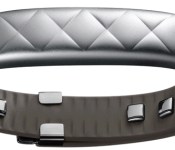
Jawbone Announces ‘UP3’ Wristband with New Sensors, ‘Smart Coach’ Functionality [iOS Blog]
Jawbone today announced the third iteration of its UP wristband, which features an adjustable design and a number of new sensors that more effectively track sleep and physical activity.

Jawbone has added a new tri-axis accelerometer, skin and ambient temperature sensors, and set of “bioimpedance” sensors that allow the UP3 to analyze a wide range of biometric data. The UP3 can measure resting heart rate and can track detailed sleep stages including REM sleep, light sleep, and deep sleep. The device can even identify the type of workout being performed and classify activities like tennis, running, cross-training, and more.
The UP3 uses the biometric data to power what Jawbone calls the “Smart Coach”, which is a feature built into the UP app that keeps track of progress and makes suggestions based on a user’s recent actions. For example, getting two hours of deep sleep causes the Smart Coach to inform the user about the extra energy they’ll have during the day, while completing an extended tennis match triggers a reminder to rebuild energy by eating a meal. The Smart Coach also improves its suggestions as more activities is tracked and more tasks are completed on the UP3.
The UP3 also now features a slim design that can be adjusted to fit wrists of different sizes, and is made out of a durable aluminum material. Jawbone says the UP3 gets up to seven days of battery life and is water resistant. The Jawbone UP3 will be available later this year for $179.99 at the company’s own website and will also be sold at Apple Stores and Best Buy locations. Jawbone is also launching the $49.99 UP Move, which includes an accelerometer and support for Smart Coach functionality.

Watch a drone take off from a flying aircraft carrier

The Avengers would be proud. Not content with simply flying drones, enthusiasts at Flite Test have built a remote-controlled helicarrier that can serve as a runway for smaller unmanned aircraft — yes, it’s a drone launching other drones. The example you see in the brief video below is crude and won’t handle more than modestly-sized vehicles, but it’s enough to show that the concept works. It’s easy to see well-heeled hobbyists (and the military, for that matter) refining the concept to boost the maximum altitudes and ranges of robotic vehicles that would normally have to take off from terra firma.
(function(d, s, id) var js, fjs = d.getElementsByTagName(s)[0]; if (d.getElementById(id)) return; js = d.createElement(s); js.id = id; js.src = “//connect.facebook.net/en_US/all.js#xfbml=1”; fjs.parentNode.insertBefore(js, fjs); (document, ‘script’, ‘facebook-jssdk’));
Filed under: Robots
Via: Popular Science
Source: Facebook, Flite Test

Samsung brings Korea’s elderly a new flip-phone with dual screens

Samsung’s Master range of flip-phones for the elderly only launched in May, and already the company is ready with a follow-up. The new Master Dual’s biggest new feature is, unsurprisingly, the addition of a 2.2-inch display above the clamshell that complements the 3-incher that’s tucked inside. In every other respect, we’re looking at a pretty basic device, with a 3-megapixel primary camera, GPS and 2G radios. On the upside, it does have a peace-of-mind feature if you’re concerned about your folks, since the phone will alert relatives if it hasn’t been used in a set period of time. If you’re in Korea and have 300,300 won in your back pocket (around $280) then you can grab one of these from your local branch of SK Telecom.

Filed under: Cellphones, Mobile, Samsung
Source: Samsung Tomorrow
 AIVAnet