


Bringing an app to Android TV is pretty simple, Google shows how
There is a lot riding on Android TV considering how Google TV flopped and drifted away. To ensure its success, Google wants to make it as simple as possible for developers to take their apps and games and bring them over to Android TV. Its Nexus Player is on the market, so consumers are going to expect content for consumption.
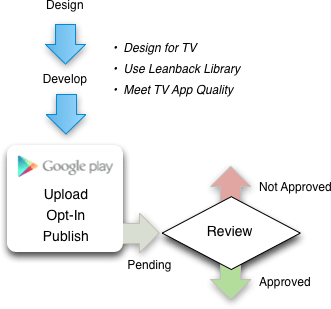
These are the steps necessary to distribute your app or game with Android TV:
- Understand guidelines and requirements
- Develop a great app for TV
- Test for TV App Quality
- Opt-in to Android TV and publish
- Track your review and approval
As always, Google wants developers to follow the recommended guidelines because everything should be familiar for an Android TV user. Tailoring an app or game for a television is vital because that is the platform’s go-to display. Scaling has to be just right. Then, the developer must aligns what it is publishing with Google’s TV App Quality test. From there, the developer has to submit the app or game and wait to see if Google approves upon review.
Source: Android Developers
Come comment on this article: Bringing an app to Android TV is pretty simple, Google shows how
 AIVAnet