


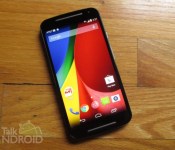
Residents in the UK can customize a Moto X for £359.99 to celebrate Moto 360 launch

To celebrate the launch of its first ever smartwatch in the UK, Motorola has kicked off an awesome sale on the Moto X. Instead of paying £419.99 to customise the smartphone using Moto Maker, residents in the United Kingdom can take advantage of the service for just £359.99 until 12pm noon tomorrow.
If you need a refresher on the specifications of the Second Generation Moto X, it packs a 5.2-inch AMOLED display with a resolution of 1080 x 1920 pixels, a 2.5GHz quad-core Snapdragon 801 processor, 2GB of RAM, 16GB of internal storage (expandable via microSD), an Adreno 330 GPU and a 2,300mAh Li-Ion battery.
So if you’re based in the UK and want to customize your own Moto X for less — click the link below.
Source: Motorola
Come comment on this article: Residents in the UK can customize a Moto X for £359.99 to celebrate Moto 360 launch

Pushbullet releases Material Design treatment for app

Although we are still waiting for the final, official release of Android Lollipop to be unwrapped along with the full implementation of Google’s new Material Design guidelines, we have benefited from Google’s prep work to get several of their own apps ready for the new platform. Now we have a third-party developer releasing an overhaul of their app to take advantage of Material Design. Pushbullet has announced the new version of their app that makes use of all the new design elements to improve the user experience.
An example of how Google’s new standards for interface design can impact the end user can be seen in how Pushbullet has redesigned the navigation drawer. One of the most common requests they received was a way to quickly turn on or off the notification mirroring with a PC. This has been achieved with the update through a switch right on the navigation drawer for the app.
In terms of notifications within the app on a mobile device, Pushbullet’s notification drawer now includes some preset filters for people, channels or devices. Google+ users may find the choices similar to how they can choose what to see when using the Google+ app. The notification drawer also provides a quick way to search for notifications.
Pushbullet also made some improvements to the push process itself. When sharing something from within another app, Pushbullet will now leave you in the app you were using through the use of a floating-type window. This should minimize disruptions for end users who may want to return to where they left off before pushing something. If a user starts a push from within the Pushbullet app itself, they will now be able to do so using a full-screen view.
Although it may seem like a minor issue, Pushbullet also spent time redesigning the Settings screen for the app to make it more streamlined. Language was improved to help uses understand what options they have available and all settings are now on one screen – no more drilling down looking for something.
If you want to give Pushbullet a try, hit one of the Google Play download links below.


source: Pushbullet
Come comment on this article: Pushbullet releases Material Design treatment for app
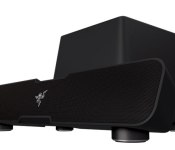
Razer has a $200 soundbar and subwoofer combo called ‘Leviathan’

Let’s face it: not everyone wants to go through the hassle of setting up a surround sound system piece by piece. As for other alternatives, even the best headphones are only viable for the person wearing them. In an effort to hit a sweet spot between the two (the price of headphones and room-filling audio of multiple speakers) the folks at Razer are launching the Leviathan soundbar and subwoofer kit. For $200 you get an adjustable speaker bar packing four drivers and a separate 5.25-inch subwoofer, which marry to handle your 5.1 surround needs for movies and games. The unit uses Dolby Virtual Speakers to fill in the audio gaps left by its 4-speaker system, while Dolby Digital processing will convert any incoming signal, be it analog stereo or multichannel from an optical cable, to surround sound.
Meaning, you can hook up a game console, a PC or a TV to it and be good to go for a simple sound system that’ll almost assuredly blow the doors off of your TV’s tinny built-in speakers.
Speaking of stereo, do you want to wirelessly beam Mastodon’s Moby Dick-inspired album Leviathan to the Leviathan? Thanks to the setup’s Bluetooth 4.0 connectivity you totally can! Perhaps most surprising of all, though, is the subwoofer that scrapes the depths of the 20Hz range. Many say that 24Hz is the lowest frequency that the human ear can hear, and anything under that is more along the lines of feeling a wave of sound pressure when the bass hits. But, considering the setup’s modest size and power ratings (30w for the sound bar and 30w RMS — meaning, continuous power — for the sub) overall, how well the bass-box actually performs at that ultra-low frequency is anyone’s guess. You can put Razer’s sea-beast through its paces starting this November.
Filed under: Desktops, Gaming, Home Entertainment, HD
Source: Razer

Engadget giveaway: win an Xbox One Sunset Overdrive Bundle courtesy of Microsoft!

If you’ve been waiting for a game that’s equal parts X Games and Tromaville, then you probably know that Sunset Overdrive (exclusively for Xbox One) is rolling out today. If you haven’t already dropped some cash on the pre-order, though, you may want to hold off for another day or two and try your luck on this week’s giveaway. Microsoft has given us an Xbox One Special Edition Sunset Overdrive Bundle and it’s going to find a home with one lucky Engadget reader this week. So, stock up on your energy drink of choice and get ready to experience Sunset City 2027 in all its mutated glory. With this bundle, you’ll get a Cirrus White console and controller, along with the full game download and Day One Edition in-game content giving you a head start in this anything-goes apocalyptic wonderland. All you need to do is head down to the Rafflecopter widget below for up to three chances at winning. Just make sure you don’t slake your thirst with Overcharge Delirium XT or you may experience some side effects…

- Entries are handled through the Rafflecopter widget above. Comments are no longer accepted as valid methods of entry. You may enter without any obligation to social media accounts, though we may offer them as opportunities for extra entries. Your email address is required so we can get in touch with you if you win, but it will not be given to third parties.
- Contest is open to all residents of the 50 States, the District of Columbia, and Canada (excluding Quebec), 18 or older! Sorry, we don’t make this rule (we hate excluding anyone), so direct your anger at our lawyers and contest laws if you have to be mad.
- Winners will be chosen randomly. One (1) winner will receive one (1) Xbox One Special Edition Sunset Overdrive Bundle.
- If you are chosen, you will be notified by email. Winners must respond within three days of being contacted. If you do not respond within that period, another winner will be chosen. Make sure that the account you use to enter the contest includes your real name and a contact email or Facebook login. We do not track any of this information for marketing or third-party purposes.
- This unit is purely for promotional giveaway. Microsoft/Xbox and Engadget / AOL are not held liable to honor warranties, exchanges or customer service.
- The full list of rules, in all its legalese glory, can be found here.
- Entries can be submitted until October 29th at 11:59PM ET. Good luck!
Filed under: Announcements, Microsoft

This is Verizon’s Droid Turbo: 5.2-inch Quad HD display, up to 48 hours of battery life

What’s black and Kevlar and screams “turbo”? Okay, yes, a modded BMW M3. But also Verizon’s latest smartphone, the Droid Turbo by Motorola. Regular Engadget readers assuredly know a lot about this phone already: it’s got a 5.2-inch Quad HD AMOLED display covered in Corning’s Gorilla Glass 3, a Kevlar back, and an incredibly long battery life. Verizon’s touting “up to” 48 hours of power and a quick charge feature that nets “up to 8 hours of use” from a 15-minute charge (using a specific charging cable included with the phone, naturally). The Droid Turbo’s not all charge and no oomph: a Snapdragon 805 processor is the heart of the Turbo (a 2.7GHz quad-core CPU) and an Adreno 420 CPU (running at 600MHz) handles graphics on that fancy Quad HD screen. 3GB of RAM handles memory, making all that processor power worth a damn. Should processor speeds not excite you, perhaps megapixel counts will? The camera out back on the Droid Turbo is a whopping 21-megapixels. And yes, relax, your selfies are safe: there’s a front-facing camera with 2MP resolution and 1080p video capability.
In terms of the rest of the specs, the Droid Turbo is keeping up with the Joneses with Bluetooth 4.0, 802.11 in all the flavors (a/g/b/n/ac), NFC, and microUSB for connectivity. Verizon’s XLTE comes inside the Droid Turbo as well — surprise! Honestly, it’s just a little frustrating to see this thing debut so shortly after the Moto X first hit the scene. After all, it basically improves on just about everything we didn’t dig about Moto’s recent flagship, so if you just bought one you might want to keep the receipt handy. In fact, all of the voice and gesture ability in Motorola’s Moto X is also in the Droid Turbo. How about that?!
Okay, now the elephant in the room: what’s powering that “up to” 48 hours of battery life? A 3,900 mAH battery is nestled behind that tough exterior, sitting next to 32GB of internal storage (64GB optionally if you wanna get crazy). It’s available October 30th; Droid Turbo starts at $199 (with a two-year contract) and jumps to $249 when you add the extra storage.
So, how does the phone feel? Is it any good? These are all good questions that we don’t have answers for just yet, but we’ll have a hands-on for you shortly. Hang tight!
Filed under: Cellphones, Handhelds, Mobile, Verizon

Google details the ways Android Lollipop protects your phone’s data

Android 5.0 Lollipop isn’t just about a shiny new interface or whiz-bang features; there are some new ways to safeguard your phone’s data, too. To underscore that point, Google has detailed Lollipop’s toughened-up security features. Some of them you may know if you’ve followed development closely. Smart Lock lets you unlock your device using a paired Bluetooth- or NFC-equipped gadget, such as an Android Wear watch. Tougher SELinux enforcement, meanwhile, should reduce the chances that a rogue app compromises the entire system. And as much as the FBI may hate it, full device encryption is both on by default (for new devices) and tied to hardware security — both law enforcement and thieves should have a much harder time spying on your locally stored content. It’s probably going to be a while before these new defenses reach your phone, and you’ll still want to be cautious when sharing things online. Nonetheless, it sounds like you won’t have to worry quite so much about data breaches in the near future.
Filed under: Cellphones, Tablets, Mobile, Google
Source: Official Android Blog

Sony’s PlayStation 4 2.0 update is here, go download it

Own a PlayStation 4? Today’s your day: the console’s big 2.0 update is finally live. Sony’s been teasing the update for weeks, lauding the console’s new ability to play music from a USB drive, the availability of system menu themes and promising new voice commands, party options and a less crowded home-screen. The update also gives the console’s unique “share” button a little more power: the ability to upload video clips directly to YouTube and, most notably, remotely stream your games to a friend over the internet. Sony invited me to try some of these features ahead of today’s launch and, yes, they all seem to work just fine — at least in a controlled environment.
Sony walked me through the update in its Palo Alto, CA office last week, showing me the new themes, party options and even a few updated voice commands. The most interesting demo, of course, was SharePlay — the console’s new ability to stream PlayStation 4 games from one console to another over the internet. Think of it as a localized PlayStation Now between your console and a friends. This worked too, but left me with some concern: even in Sony’s controlled demo environment, I noticed a perceptible amount of lag between the monitor displaying the host console and the guest. It wasn’t enough to effect gameplay in Infamous Second Son, but a flightier residential connection could easily render the game unplayable.
The demo left me with a little doubt, but even more optimism — the feature is brimming with potential: it not only gives players the ability to test out their friends’ libraries remotely, but even join them in local multiplayer sessions in games that don’t have online multiplayer! Will SharePlay live up to its potential for the average user? Well, now’s your chance to find out: SharePlay and the PS4 System Software v2.0 is available for download today. Let us know how it works for you in the comments below.

Verizon’s Droid Turbo is a souped-up Moto X (hands-on)

Verizon’s Droid Turbo is a curious little beast: it’s a distinct improvement over Motorola’s one-time flagship Moto X, but it lacks the sort of geek credentials that have gotten people drooling over the newly announced Nexus 6. That said, we were a little taken with just how seriously Motorola still takes its long-running Droid line, so join us as we take a quick look what’s worth knowing about the Turbo.
First, let’s consider the way this thing looks. As usual, Verizon has insisted that Motorola’s curvaceous design language and materials be replaced with a flatter look, not to mention a chassis hewn of either ballistic nylon or metallized glass fiber. The glass weave makes for a very familiar look (the Droid Ultra was made of the same stuff), but the Nylon is a step in a distinctly more rugged direction. Rubbing your fingers along that back is like caressing a pricey, outdoors-y backpack, but — thankfully — it lacks the heft you’d normally expect from such a tough looking package. In fact, it’s just about as light as the 2nd generation Moto X, give or take a few indiscernible ounces.
Let’s be honest though: the real star of the show is that Quad HD display sitting right up front. Motorola isn’t exactly new to the super high-res game — the Nexus 6 packs a screen with the same resolution — but with the Turbo, Motorola took all those pixels and crammed them into a a smaller 5.2-inch screen. Not only is it an incredibly crisp display, Motorola says it’s the most pixel dense screen you’ll find on a smartphone… though it makes more than just that to make a screen worth using. In our quick, extremely unscientific side-by-side test, color reproduction was mostly similar to the Moto X, though the screen seemed cooler and a smidgen less bright when cranked up to the maximum. Kind of a bummer, but we’ll see how it stacks up to other displays soon.
Thankfully, Verizon once again exercised a light touch when it came to the Turbo’s software — it runs a mostly stock version of Android 4.4.4, festooned with just a handful of Verizon apps to get in the way. Oh, and all the same contextual smarts we saw in the Moto X (like displaying notifications with a wave of a hand, and the ability to listen for your voice commands) are here too, and work as well as they did on the Turbo’s more customizable cousin. Really, the only substantive addition is Droid Zap (which lets you very quickly beam photos and media to people nearby) and the reappearance of that circular Command Center widget that shows your remaining battery life, upcoming calendar events and local weather forecast. The fact that there isn’t much software cruft here to get in the way also means the device runs terribly smoothly (which is surely helped by the quad-core Snapdragon 805 clocked at 2.7GHz thrumming away in there). Getting a feel for performance in the field is always a tricky proposition, but when it came to firing up apps and furiously scrolling through every website we could think of, the Turbo handled it all with ease.
And then there’s the electrical elephant in the room. The Turbo packs a whopping 3,900mAh battery, which Verizon says will power the thing for up to 48 hours (thanks to some helpful software tweaks). Alas, Verizon probably wouldn’t like us squatting in their space for the next two days, so you’ll have to wait for our full review to see how well that big ol’ battery actually works. Fingers crossed!

SnapDonate makes giving to charity as simple as taking a photo on your phone

Everyone likes the warm, fuzzy feeling that comes with donating some of your hard-earned to charity, but sometimes you simply don’t have any change to pop in the bucket. Many of us also have chugger-dodging down to an art form, but now there’s a simple, quick way to give to charity that doesn’t involve a ten-minute lecture. A new app called SnapDonate, available on Android and coming soon to iOS, turns your smartphone’s camera into a “magic lens” capable of identifying the logos of 13,000 UK charities. After you’ve “snapped” a logo, the app then allows you give up to £50 to the charity in question, or save the donation to a to-do list for revisiting when you’ve got some spare dough. The payment can be taken from any PayPal account or bank card, with that part handled by trusted online donations platform JustGiving — a name you’ll recognise all too well if you work in an office full of marathon-loving masochists.
Filed under: Cellphones, Software, Mobile
Via: The Next Web
Source: SnapDonate
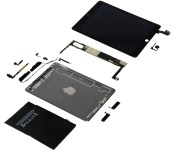
iPad Air 2 Material Costs Hold Steady Starting at $275, but New Storage Tiers Erode Profit Margin
As it always does with Apple’s major new iOS devices, research firm IHS iSuppli has torn down the new iPad Air 2 in an attempt to estimate Apple’s component costs for the device (via Re/code). According to IHS iSuppli’s estimates, the 16 GB iPad Air 2 costs Apple roughly $275 to build, just one dollar more than last year’s iPad Air.

The report unsurprisingly points out that Apple benefits from stronger profit margins as users move to higher capacity models, with Apple paying only about $50 more for 128 GB of storage compared to the base 16 GB configuration while charging users $200 for the upgrade. Still, Apple’s move to eliminate the 32 GB option and slide the 64 GB and 128 GB models down $100 has slightly eroded Apple’s profit margins at the top end.
The latest report from the research firm IHS, due later today and shared exclusively with Re/code, shows that the base model of the iPad Air 2, the 16-GB Wi-Fi version, which sells for a price of $499, costs $275 to build, exactly one dollar higher than the previous base model. The top-end model, the 128-GB LTE version costs which sells for $829 costs $358.
Apple’s implied profit margin on the iPad Air 2 has dropped slightly to a range for 45 percent to 57 percent depending on the device, compared with the original at 45 percent to 61 percent.
Many of the components have remained the same between the iPad Air and the iPad Air 2, with Apple’s use of essentially the same display unit allowing the company to reduce costs of that component from $90 to $77. But with Apple’s move to bond the display to the device’s cover glass and the addition of a new antireflective coating, the same display offers a significantly better user experience.
Other changes include the move to a powerful new A8X chip currently unique to the iPad Air 2, and improved cameras that have resulted in slightly higher component costs.
As always, it is important to note the estimates from IHS iSuppli cover only the cost of the individual components that make up the device and do not include other costs involved in product development, manufacturing, and sales, such as research and development, software, patent licenses, marketing, and distribution expenditures. All of these costs contribute to significantly reduce Apple’s true profit margin from the levels cited by IHS, but the basic component cost remains an interesting glimpse at how Apple brings everything together to consistently hit its retail pricing goals.
 AIVAnet