


New 2014 Mac Mini Has Soldered RAM, Not User Replaceable
 After going more than two years without an update, Apple’s Mac mini was refreshed yesterday, adding Haswell processors, Intel HD 5000/Iris graphics, 802.11ac Wi-Fi, and PCI-based flash storage options for the higher-end models.
Unfortunately, the upgrade was disappointing to some Mac mini fans as Apple stopped offering a build-to-order quad-core processor upgrade and dual-drive storage options that exceed 1TB.
Many have speculated that the Mac mini also includes soldered RAM, which has now been confirmed by Macminicolo’s Brian Stucki. According to Stucki, the RAM in the Mac mini is “not user accessible,” which means those who purchase Mac minis are limited to 16GB of RAM that must upgraded when purchasing the machine from Apple.
All three Mac mini models can be upgraded to a maximum of 16GB of RAM, with the upgrade priced at $300 for the base model and $200 for the mid and high-end models.
While the RAM is not upgradeable, Stucki says that it is possible to replace or upgrade the hard drive, but doing so may void the warranty.
Apple’s new Mac mini starts at $499 and comes in three separate base configurations. On the low end, the Mac mini ships with a 1.4Ghz dual-core Core i5 processor, 4GB of RAM, a 500GB hard drive, and Intel HD Graphics 5000. At the middle tier, the Mac mini comes with a 2.6Ghz dual-core Core i5 processor, 8GB of RAM, and a 1TB hard drive, and Intel Iris Graphics. At the high end, the Mac mini ships with a 2.8Ghz dual-core Core i5, 8GB of RAM, a 1TB Fusion Drive, and Intel Iris Graphics.
Base configurations of the Mac mini are currently available for purchase from the online Apple Store and will ship in one to three days. Custom configurations ship within three to five days.

Engadget Daily: unlimited clean power, why there’s no Retina MacBook Air and more!

So, why hasn’t Apple updated its MacBook Air line with a Retina display? Here’s our two-word answer: battery life. That’s not all we have on deck though — check out the rest of our news highlights from the last 24 hours, including a breakthrough in fusion power, further decline of the record industry, a Comic Sans typewriter and more.
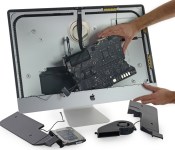
iFixit takes a peek inside Apple’s new ‘5K’ iMac

Sure, we were only just introduced to Apple’s 27-inch iMac with Retina 5K Display, but the folks at iFixit are already tearing one apart. Inside they found a screen made by LG Display, and a setup similar to previous iMacs, including easily-accessed RAM slots for memory upgrades. Overall, the layout is almost exactly like last year’s 27-inch iMac, plus that new display controller Apple bragged about and a slightly wider display data cable, enhanced to feed all those pixels. Repairing things might be tricky given its design, but you should check out the teardown for more details and a look at the carnage.
iMac Intel 27″ Retina 5K Display Teardown
Source: iFixit

Nexus 6 is basically Android Silver

‘Nexmas 2014′ has come and gone, and the previous leaks all seemed to be correct… surprisingly. I truly did not believe that “Shamu” would actually be the Nexus 6. And if it was, I was really expecting a smaller 5.2″ variant to be announced as well. So when the official announcements were live, I was a bit thrown off by how different the Nexus program is this year. Very different indeed.
Earlier this year, a mysterious program called Android Silver was being tossed around news sites, with reporters claiming it would replace the Nexus program entirely. Android Silver was rumored to bring a very premium device or set of devices with stock android to be sold through carriers at a premium price. There’s a lot of Android enthusiasts out there like me who didn’t want to see this happen because of the love for Nexus phones, so I didn’t want to believe it. The rumors began to fade though throughout the year, and eventually it was reported that Android Silver didn’t quite make it past the discussion board as one of the heads of the project left.
I thought that would’ve ended the possibility of Android Silver once and for all, and honestly I was happy about that. I love Nexus phones not only for stock Android, but the high-end hardware and $350 price tag felt perfect to me, even if there were always a couple cut corners. But the year is 2014, and Google’s got a new vision for Android.

Silver….
Everything about the Nexus 6 lines up with what Android Silver was rumored to be. It is a 100% premium device that did not skip anything. Moto X quality build with a metal frame, 2K AMOLED display, Snapdragon 805 chip, 3GB RAM, dual front-facing speakers, big battery… It’s a dream phone. Obviously the monstrous size of it is a turn off for many, myself included, but maybe in the future I’ll warm up to it once I actually hold it. Back to the topic though, Android Silver also included the fact that the phone will be carried by all carriers. The Nexus 6 is heading to all major carriers in the US in November, most likely with an on contract price of $199-299.

Oh hey, more silver!
The Nexus 6 is basically a high-end phablet by Motorola with the Nexus name on it and a new version of Android on it. I have no complaints about this really, I’ve always wanted to see a perfect high-end Nexus phone. The price is just what scares me a little.

So much silver!!!
I’ve seen theories around the internet that the Nexus phone in 2015 will be a 5.2 inch model and sort of like an updated Nexus 5. In all honesty, the Nexus 5 is still a champ when it comes to specs and could go another year before a refreshment is necessary. The theory is that Google will alternate between a new Nexus 5 and a new Nexus 6 phablet every year. Next year we will also see a new Nexus 7 instead of a Nexus 9. It’s an interesting theory, and it’s one I can definitely see happening. There’s no way the Nexus 5 will be Google’s last “one-handed” Nexus phone.
What do you guys think? Are you put off by Google ditching the idea of an affordable new Nexus phone in favor of this giant, or are you stoked to get your hands on the beauty that is the Nexus 6?
 |
The post Nexus 6 is basically Android Silver appeared first on AndroidGuys.
OS X Yosemite: An In-Depth Look at Markup and Mail Drop in the Mail App
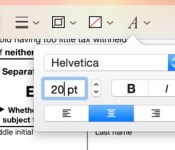
OS X Yosemite has brought some major changes to Apple’s Mail app, and those changes aren’t limited to a simple visual overhaul. Mail may have a new look, but it also has several new features like Mail Drop and Markup.
With Markup, you can annotate images and PDFs from directly within the Mail app. For example, when composing an email message and attaching a PDF, it’s possible to use various tools to add signatures, emphasis, and more. The same is possible with an image — simply attach a file in a message that’s being composed and right click on it, selecting Markup.
Markup has a set of tools at the top that allow users to create shapes, write text words, and insert signatures. There are different brushes that can be used, along with a color palette and various font options.

Users can enter various shapes, such as stars, circles, squares, speech bubbles and more, and there’s a magnifying glass that will magnify sections of text or photos. A crop tool also allows for simple image edits, and there’s a pen tool for free-handed writing or drawing.
Markup’s neatest feature is a signature tool that lets users insert a signature using the trackpad of a MacBook or a camera. With the trackpad, clicking begin and then signing a name with a finger on the trackpad will create a signature that’s automatically entered into a document.

There’s also an option that allows users to write a signature on a white piece of paper and use a Mac’s FaceTime camera to import it into the document. It’s a little bit finicky getting the camera to recognize the signature, but once it’s lined up properly, the feature works well.

Along with Markup, Mail has a new feature called Mail Drop that lets users send large file attachments of up to 5GB using iCloud. Composing an email message and attaching a file that would normally be too large to send will prompt Mail to ask a user if they would like to use Mail Drop to deliver the message.

When the Mail Drop option is selected, the person receiving the email will receive the file attachment as normal if they’re using Mail, while non-Mail users will receive a message with a download link that allows them to download the file directly from iCloud. Files are stored in iCloud for several days before being deleted.

MacRumors did not experience any issues getting Mail Drop to function with files ranging in size from 10MB to over 1GB, but some users on the Apple Support forums have been having trouble with the feature. Because Mail Drop works based on a sender’s file size limits rather than a receiver’s, users have run into an issue where they can send a file that is below their own maximum file size threshold, but above a receiver’s file size limits.
For example, sending a 10MB message from an email account that has a 30MB file size limit to an email account that has a 6MB file size limit will not activate Mail Drop and turn the file into a clickable link that can be downloaded from iCloud. Therefore, the person sending the message will get a bounce back reply that the user can’t accept a message of that size, even if the receiver also has Mail Drop.
According to Apple, Mail Drop can only be used to send files that “exceed the maximum size allowed by the provider of your email account,” which means there is no way for a user to select a custom file size threshold to activate Mail Drop to avoid the above situation. It is not clear if Apple has plans to implement manual size controls for Mail Drop, but for the time being, it appears that Mail Drop may not be useful for all users in certain situations.
Released to the public yesterday, OS X Yosemite can be downloaded from the Mac App Store at no cost. It runs on all machines that were capable of running OS X Mountain Lion and OS X Mavericks, and it requires 8GB of storage space and 2GB of RAM. [Direct Link]
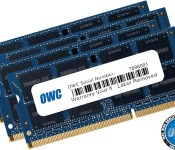
OWC Announces RAM Upgrade Kits for New Retina iMac, Up to 32GB for $399 [Mac Blog]
Following yesterday’s launch of the new iMac with Retina 5K display, Other World Computing has announced new RAM upgrade kits for the machines.
OWC is offering three separate 1600MHz DDR3L kits to upgrade the Retina iMac’s memory to up to 32GB at prices lower than Apple offers. The 8GB kit, priced at $101.99, will increase the RAM of a base Retina iMac configuration from 8GB to 16GB.

The 16GB kit, priced at $197.99, will increase the RAM of a base Retina iMac configuration from 8GB to 24GB, and the 32GB kit, priced at $395 kit will allow users to replace all memory for a total of 32GB of RAM.
When purchased from Apple, upgrading to 16GB of RAM total costs $200, while upgrading to 32GB of RAM costs $600. OWC’s 32GB kit is $200 less than Apple’s price, and while the 16GB OWC kit is priced the same at $200, it ultimately lets users install 24GB of RAM rather than 16GB of RAM.
OWC is also offering a trade-in rebate for original factory memory, giving customers a credit towards the purchase of a memory kit. OWC’s memory kits come with a limited lifetime warranty along with a lifetime advanced replacement program.
Released yesterday, Apple’s iMac with 5K Retina display can be purchased from the Apple Store for $2,499. Current orders ship out in three to five business days.

Sound Off! Would you pay for HBO’s standalone streaming service?

At last, our long national nightmare is nearly over. Earlier this week HBO announced plans to introduce a standalone streaming service in 2015. This is especially exciting for those of us who’ve been “borrowing” our parents’ HBO GO access. Are you ready to put your money where your mouth is? Stop by the Engadget forums to let us know if you’d be willing to pay for access to HBO’s catalog — how much.
Filed under: HD
Source: Engadget Forums

Playdate: We’re livestreaming ‘The Evil Within’ on PS4!

Welcome, ladygeeks and gentlenerds, to the new era of gaming. The one where you get to watch, and comment, as other people livestream gameplay from new-gen consoles. Because games! They’re fun!
Are you ready for a few scares? We hope so because we’re going to be streaming The Evil Within today. If you aren’t familiar with Shinji Mikami’s name, you’ve almost assuredly played his games — Mikami is the mastermind behind the Resident Evil franchise, and, specifically, he was the director on perhaps its best moment, Resident Evil 4. Since then he’s been doing a little of this and some of that, but nothing quite horror related. That changes with The Evil Within, the first effort from his Tango Gameworks studio. How’d it turn out? Check back at starting at 7 p.m. Eastern / 4 p.m. Pacific as we go in blind on PlayStation 4. Since you folks liked our Alien: Isolation stream as much as you did, instead of getting a head start we’re going to be playing from the very beginning and have no idea what to expect. Surely there’ll be a few shrieks involved. Have you even looked at the screenshot above?
[For the record, I’m playing The Evil Within on a PlayStation 4, using a retail copy (download) provided by Bethesda. I’m streaming the game over wired internet using the PlayStation 4 Twitch app. All that to say, “This game will likely look prettier and run more smoothly on your home equipment. Streaming conditions vary!”]
Filed under: Gaming, Home Entertainment, HD
Source: Twitch
Google explains how it fights piracy in search results

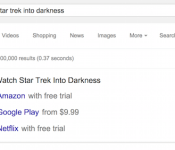
The anti-piracy road hasn’t played out easy for Google, to the point where past claims have stated that the company’s efforts simply aren’t working. But Google says it’s doing everything it can to combat piracy across its services, of which Search is likely the most important one — at least to copyright holders. With this in mind, the technology giant has released an updated version of its document “How Google Fights Piracy,” in which it dives into detail about what steps it’s taking to crack down on pirated content. Google says this includes new ad formats in search results, such as what’s pictured above; improved downranking of known delinquent sites; and removing more autocomplete predictions based on DMCA takedown notices. Part of it is also pointing people to trusted sources when searching for music or movies, including services like the Play store or Spotify — Google plans to do this only in the US for now, but the idea is to make it a global feature at some point in the future.
Source: Google

Google to loosen restrictions on Android Wear
Android Wear has been quite an interesting release, as manufacturers have shown their own take on the hardware of a smartwatch. What has not been very flexible up until this point though is the software of Android Wear, with manufacturers only loading a handful of watch faces. It seems that starting with the Asus Zenwatch,… Read more »
The post Google to loosen restrictions on Android Wear appeared first on SmarterWatching.
|
Read the rest at SmarterWatching.com!
The post Google to loosen restrictions on Android Wear appeared first on AndroidGuys.
 AIVAnet