


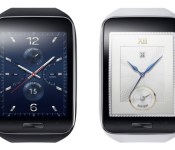
Samsung Gear S will have own Plan on Sprint
 Samsung’s Gear S is going to be the first popular SmartWatch with a 3G connection, so there are a lot of questions to be answered about how the device will be used practically as a separate device on a wireless plan.
It seems that as far as Sprint goes, your Gear S can be used on one of two plans: as a standalone device, and as a Family Share Pack device. Both options cost the same at $10 per month. The Standalone device includes 1000 minutes, 1000 text messages, and 100 MB of data, with a 40 cents/min and 20 cents/msg overage charge. The Family share pack gives unlimited talk and text and shares whatever data package you have.
If you’re connected to your phone via Bluetooth, you won’t be using your messaging or minutes for handling calls or texts. You can also connect to Wi-Fi to avoid using up your data package when you’re somewhere with the option available.
The other main carriers should follow suit soon and announce plans designed for the Gear S and other standalone smartwatches since Samsung is unlikely to be the only one working on this type of device. Stay tuned for more information about the Gear S, including release date, carrier availability, and pricing.
Source: Phandroid
Come comment on this article: Samsung Gear S will have own Plan on Sprint
You can’t upgrade the new Mac mini’s RAM

If you’re planning to snag the new Mac mini and load it up with aftermarket memory, you may want to reconsider your strategy. Macminicolo owner Brian Stucki (among others) has discovered that the RAM in Apple’s latest tiny desktop isn’t upgradable, much as you’d expect with the company’s laptops and the 21-inch iMac. The move isn’t completely surprising given that the Mac mini is basically a MacBook in different clothing, but it’s a step backward given how relatively easy it was to upgrade the previous generation. All that you can do now is replace the hard drive, provided you’re willing to void your warranty. You’ll have to consider buying either a higher-end model or a custom order to get more RAM, and both of those options are typically more expensive than adding RAM yourself. This limitation isn’t necessarily a deal breaker, but it’s unfortunate if you like the idea of upgrading a Mac on your own terms.
Confirmed: RAM in the new Mac mini is not user accessible. Hard drive can be replaced/upgraded, though not keeping warranty.
– Brian Stucki (@brianstucki) October 17, 2014
Via: MacRumors
Source: Brian Stucki (Twitter)
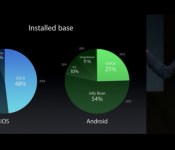
Nice try Apple: Apple says 54% of Android devices running a 2-year-old OS
 It’s not like we would have expected anything else, but I’m not entirely sure why anybody believes them anymore. Earlier this week, Apple launched some new devices (or something) during which the above slide was shown to compare Apple’s iOS status compared to Android’s. Apple VP of Software Engineering, Craig Federighi, then felt the need to say that only 25% of Android devices are using the latest Android operating system, Android KitKat, and that 54% of users are using a “more than 2-year-old” operating system in Android Jelly Bean.
While the objective facts are correct, let’s put a little perspective into this argument – Android owns a 80% global smartphone market share whereas Apple owns less than 20%, and anyone good at maths will tell you 25% of that 80% is just about equal to all of Apple’s smartphone install base. Similarly, the comment about Jelly Bean being 2 years old is correct, however this enables many more devices, some which cost only a fraction of the iPhones and iPads, access to an operating system which is pretty fluid – compare this to installing iOS 7 or iOS 8 onto an iPhone 4 or iPhone 4S and rendering it almost useless. Federighi also mentions that iOS 8 has achieved 48% install rates on their devices since its launch, but neglected to cite the statistic that 46% of iOS owners had already installed iOS 8 five days after launch, meaning that the install base has only increased by 2% over the last three weeks.
Now, I don’t mean to bash on Apple, but arguing moot points like install rates and comparing it to Android, an operating system that is known for fragmentation (but arguably has a good reason for it), seems more than a little desperate. But enough of what I think, what do you think of what Apple has said? Let us know your thoughts in the comments below.
Source: Phone Arena
//<![CDATA[
ord = window.ord || Math.floor(Math.random()*1E16);
document.write('‘);
//]]>
The post Nice try Apple: Apple says 54% of Android devices running a 2-year-old OS appeared first on AndroidSPIN.

Air Force’s mysterious space drone returns after two years in orbit

Following its longest-ever mission by far, the 11,000 pound X-37B unmanned spacecraft has returned to Earth bearing… well, we don’t actually know. You see, after NASA and Boeing developed the craft (about a fifth the size of the Space Shuttle), it bounced over to the Air Force, which is using it for top-secret missions. The X-37B’s longest previous flight lasted about 15 months, and this time, it stayed in orbit just shy of two years. As for what it was doing up there, exactly, cue the speculation. Some experts think it was launching spy gear from the pickup-bed-sized payload bay, while others believe it was designed to capture or impair enemy satellites. The Air Force denies all that, saying it was just testing space tech like advanced guidance, robotic systems and autonomous orbital flight. It certainly nailed the latter — with no human at the controls, the X-37B made a perfect touchdown following a 218 mile-high descent. To see it, check the all-too-brief video below.
[Image credit: Boeing]
Filed under: Science
Via: Slate
Source: Boeing
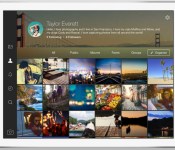
Flickr Launches Updated iOS App with Full iPad Optimization [iOS Blog]
Yahoo-owned photo sharing service Flickr today updated its iOS app to Version 3.2, bringing full optimization for the iPad along with other new features. Flickr for iPad allows users to browse images on their feeds in high resolution and contains a full camera interface and editing suite for shooting and editing photos. In addition to a new interface, Flickr also now comes with its own iOS 8 share extension that allows photos to be shared through social media services like Tumblr, Facebook, and Twitter.

This version of the Flickr iOS app is optimized to take full advantage of the larger screen on iPad, while delivering the gorgeous design you expect of Flickr, our powerful camera, and the versatility you need to manage your photos while on the go. On iPad, Flickr can now display images in high resolution by pushing up to 3,000,000 pixels per photo.
Flickr launched a redesigned app for the iPhone earlier this year, which brought new features like live filters and HD video recording. The service was acquired by Yahoo in May 2013, which led to a major overhaul and 1TB of free photo storage space for all users.

Flickr is a free app for the iPhone and iPad and can be downloaded through the App Store. [Direct Link]
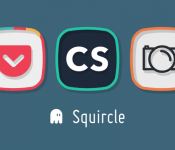
Squricle Icon Pack Review: Greg Ives marries squares and circles in beautiful matrimony
 Squircle: A squircle is a mathematical shape with properties between those of a square and those of a circle (Wikipedia). And unsurprisingly, a perfect theme for an Android icon pack. Greg Ives, a designer who we’ve featured doing things like this Nexus phone mock-up, has released the Squircle icon pack just a few weeks back, and we’ll be taking a quick look at them today. As you might expect, the icons are predominantly square, but with rounded corners and bulging edges and with a great colour palette makes for a great looking icon pack. Take a look at our video review to get a closer look at the Squircle icons.
As I mention in the video, the icon pack already has over 800 customized icons as well as an assortment of wallpapers that are cloud based and updated regularly. As with all icon packs, there is an icon request option in the dashboard app that will allow you to request icons that haven’t yet got themed masking. If you’re interested in picking up the icon pack, you can grab it from the Google Play Store now for free (link below), and there is also a donate version – If you like what you see in the free version, I’d strongly recommend getting the donate version to help Ives keep things going. As always, circle Greg Ives on Google+ to get updates and the like.
//<![CDATA[
ord = window.ord || Math.floor(Math.random()*1E16);
document.write('‘);
//]]>
The post Squricle Icon Pack Review: Greg Ives marries squares and circles in beautiful matrimony appeared first on AndroidSPIN.
Apple’s new iPads, the Nexus 6 and other stories you might’ve missed

Get ready, ya’ll. It’s been a doozie of a week. Not only did Apple unveil new iPads and a Retina iMac, Google took the wraps off the Nexus 6 and its own media streamer. That’s not all we have on deck, though — click on through for the rest of our news highlights from the last seven days. Oh, and be sure to subscribe to our Flipboard magazine!
Android L will be coming to Wi-Fi Nexus devices on November 3rd
 If you’re the owner of a Nexus device, you’re no doubt wondering when you’re going to get your first official taste of Android L. Well, we now know that Android L will be coming to Wi-Fi Nexus devices on November 3rd, which includes the Nexus 7 2012, Nexus 7 2013 Wi-Fi and the Nexus 10. Of course, that means owners of the Nexus 4, Nexus 5 and Nexus 7 2013 LTE will have to wait until “later that month”, presumably due to the intricacies of making a new software update play nice with cellular functions.
This news comes via an anonymous source speaking with Android Police, but it does seem legitimate and does just about line up with previous rumours that we have heard regarding the actual release date of Android L to the general public, namely Nexus devices. Mark the date on your calendar, folks.
Source: Android Police via TalkAndroid
//<![CDATA[
ord = window.ord || Math.floor(Math.random()*1E16);
document.write('‘);
//]]>
The post Android L will be coming to Wi-Fi Nexus devices on November 3rd appeared first on AndroidSPIN.
Google Play Movies & TV 3.4.23 gets that Material Design feeling and more [APK Download]

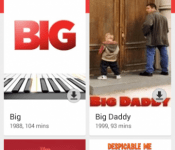
 With the official release of Android Lollipop, we’re expecting all the Google core apps to be updated with the Material Design UI that everyone has been going bananas over. The next app to get this treatment is Google Play Movies & TV 3.4.23 which was found after some diving into an Android TV device. As you can see from the above screenshots, the UI has now been flattened and now looks a lot brighter than it did before. Of course, this means that the Play Movies & TV icon has changed as well and is now a much simpler icon.
Apart from the major UI overhaul, there are quite a few changes that have been made to the app itself, not all of which are obvious at first glance of the app. The full list of changes listed are:
Brings material design to the Movies & TV app. New App icon too, will update soon.
- Reds changed to the brighter red banner
- Movie and TV shows in Watch Now are full width, offer download button, episode and season info and a marker where you left off.
- Full size recommendations with prices, ratings, add to wishlist and trailer.
- Slide out tab has been shrunk and looks like the Play Store with the gray icons.
- Manage Downloads section in the settings.
- Restrict Quality options in the Settings
- Much more
If you want to try the new Play Movies & TV app, you can download it from the link provided below:
Google Play Movies & TV 3.4.23 APK download
Feel free to let us know in the comments if you spot something that isn’t listed above.
Source: Christian Carr via GappsEarly
//<![CDATA[
ord = window.ord || Math.floor(Math.random()*1E16);
document.write('‘);
//]]>
The post Google Play Movies & TV 3.4.23 gets that Material Design feeling and more [APK Download] appeared first on AndroidSPIN.
Android TV Developer Kit able to sideload Android 5.0 Lollipop

There are not many out there, but the ADT-1 does exist. It was the Android TV device given to select Google I/O attendees in June. Today, owners of the set-top box can sideload the latest version of Android. It is Android 5.0, version LPX13D. It is rolling out as an over-the-air software update, but the sideload option is for the impatient people.
We should tell you that the update does bring the overall temperature of the ADT-1 down. The device does not run at scalding hot levels anymore. On the software side, the home screen, Play Store, Movies, Play Games, and settings have been altered. Basically, these areas have been given some more details or visual fixes. The entire user interface is now closer to what you would see on another Android device.
Here are the instructions provided by the folks from Android Police:
- Download the update zip from Google (link).
- Boot your ADT-1 into Recovery mode. This can be done in two different ways:
- Hold down the button the back while powering on the ADT-1. This will load up the bootloader. Now short-press the button until you’ve selected the Recovery kernel option, then long-press the button to activate it.
- Or, enable adb debugging on the ADT-1 through developer options and run this command from a terminal: ‘adb reboot recovery‘
- Once you’re in Recovery mode, you’ll see the Android maintenance logo. Long-press the button for a couple of seconds to reveal the recovery menu.
- Short-press the button until you’ve selected the option to apply an update from ADB. Long-press to select it.
- Enter this command from a terminal: adb sideload 92b93576d67d8e41850996813de09757666c347a.signed-molly-LPX13D-from-LPW39.92b93576.zip
- Wait for the update to finish. It takes a few minutes.
Via: Android Police
Come comment on this article: Android TV Developer Kit able to sideload Android 5.0 Lollipop
 AIVAnet