


Apple Pay With iPhone 6 Demoed in McDonald’s Purchase
With Apple Pay enabled through an update to iOS 8.1 earlier today, users are now able to use Apple’s payments service in a variety of retail locations. Apple’s Apple Pay launch partner McDonald’s is one location that’s already accepting Apple Pay payments, as demoed in the video below.
Making an Apple Pay purchase is so simple that giving a food order becomes the most lengthy part of the ordering process. As seen in the video created by YouTube user John Ross, McDonald’s payment systems are set up to accept contactless payments.
Ross, who is using an iPhone 6 with iOS 8.1 installed, makes his order and then his credit card (stored within Passbook) opens automatically as he nears the payment terminal. While holding a finger on the Touch ID fingerprint sensor, he holds his phone near the point-of-sale system to make the payment for the food. It takes a couple of tries as the cashier appears to forget to press a button, but once a payment is ready to be accepted, it took only seconds for Ross to make the payment.
After the payment was accepted by McDonald’s, the Passbook screen displayed a check mark and there was a confirmation beep to let Ross know his payment had gone through. The transaction data was also displayed directly on the Passbook screen after payment was made.
During the transaction, at no point did the cashier see Ross’s card or his name, and his card number (replaced with a unique Device Account Number in Passbook) was not stored by McDonald’s, keeping the transaction completely private.
Apple Pay is limited to the iPhone 6 and iPhone 6 Plus in retail locations as it requires the NFC chip built into those devices to function. The iPhone 6 and 6 Plus along with the iPad mini 3 and the iPad Air 2 will be able to make purchases in participating apps, however, and when it is released, the Apple Watch will be able to be used in retail stores to make Apple Pay payments.
Apple Reports Q4 2014 Year-End Results: $8.5 Billion Profit on $42.1 Billion in Revenue
 Apple today announced financial results for the third calendar quarter and fourth fiscal quarter of 2014. For the quarter, Apple posted revenue of $42.1 billion and net quarterly profit of $8.5 billion, or $1.42 per diluted share, compared to revenue of $37.5 billion and net quarterly profit of $7.5 billion, or $1.01 per diluted share in the year-ago quarter.
Gross margin for the quarter was 38 percent compared to 37 percent in the year-ago quarter, with international sales accounting for 60 percent of revenue. Apple also declared an upcoming dividend payment of $0.47 per share, payable on November 13 to shareholders of record as of November 10. The company currently holds $155.2 billion in cash and marketable securities.

For the full fiscal year, Apple generated $182.8 billion in sales, a new record for the firm, with $38.5 billion in net income. In fiscal 2013, Apple made $35 billion on $170.9 billion in sales. In 2014, Apple sold 18.9 million Macs and just shy of 14.4 million iPods, its lowest total for that category since 2004.
It sold a record 169.2 million iPhones on the year, up 150 million from 2012, and the company has now sold more than 590 million smartphones in total. It sold 68 million iPads in 2014 and the company has now sold 237.2 million tablets.
“Our fiscal 2014 was one for the record books, including the biggest iPhone launch ever with iPhone 6 and iPhone 6 Plus,” said Tim Cook, Apple’s CEO. “With amazing innovations in our new iPhones, iPads and Macs, as well as iOS 8 and OS X Yosemite, we are heading into the holidays with Apple’s strongest product lineup ever. We are also incredibly excited about Apple Watch and other great products and services in the pipeline for 2015.”
Apple’s guidance for the first quarter of fiscal 2015 includes expected revenue of $63.5-66.5 billion and gross margin between 37.5 and 38.5 percent.

Apple will provide live streaming of its fiscal Q4 2014 financial results conference call at 2:00 PM Pacific, and MacRumors will update this story with coverage of the conference call highlights.
Live Updates – No need to refresh 


Chinese store makes sure that iPhone 6 Plus fits in your pocket

Let’s face it: When it comes to the iPhone 6 Plus, size really does matter.
Filed under: Cellphones, Misc, Internet, Mobile, Apple
Via: Techinasia
Source: Sina Weibo (Amakura)

Portable cardboard desk keeps you standing while you type

Many will tell you that it’s unhealthy to sit in front of your computer for hours at a time, but you can’t usually bring a standing desk with you to a remote studio or the park. However, you won’t have to make do with chairs and laps now that Refold’s cardboard standing desk is on the way. Think of it as origami office furniture — so long as you’re willing to lug about 14 pounds with you, you can set up a leg-friendly workstation in about two minutes. It’s sturdy enough to handle the weight of many desktop PCs, and there are different sizes to accommodate both kids and taller adults. Like the concept of computing anywhere? You can pledge $160 NZD (about $125 US) to Refold’s already-funded Kickstarter to get the American-made desk, which should arrive sometime in June.
Filed under: Peripherals
Source: Kickstarter

Netflix’s next original series is a collaboration with Canada’s Rogers

Video-streaming titan Netflix is set to continue its original production efforts with Between, an upcoming six-episode drama series. The story will be produced in partnership with Shomi, a video on-demand service from Canadian wireless carrier Rogers; and City, a television station based out of Toronto. Strangely enough, when Shomi’s VOD offering was launched roughly a couple of months ago, it was pegged as a direct competitor to Netflix — though that’s clearly not going to be the case. Plot-wise, Between follows the story of a strange disease in a small town that has abolished everyone under 21 years old, and was created by Canada’s own Michael McGowan, director of Still Mine and One Week, among other relatively popular indie films. No definite timing yet, but the series is going to premiere on Shomi and City in Canada, while the rest of the world will be able to catch it on Netflix.
Source: Rogers Media

Lollipop’s keyboard can now be installed on any Android device without root

If you’re hankering for a taste of Android L but don’t have a Nexus device to install the SDK on, you could always check out its new keyboard, which is now available for almost any Android-powered device running Ice Cream Sandwich or later.
A third-party developer has extracted the keyboard APK from an official Android L developer preview build and made it available to download from a secure file sharing website. It’s free, has no ads, and does not require root access.
Hit the break for the download link and instructions on how to install the file on your smartphone/tablet.
Installing the keyboard is easy. Simply navigate to this page, tap the download button and click install when you’re prompted to do so. You may have to allow installations from third-party sources if you haven’t already. To do this head into settings, then security and check the box entitled ‘Unknown sources’ and you’re good to go.
If you happen to run into any issues along the way do be sure to drop a comment in the section below, and we’ll do our very best to get you back on track.
Download: Android File Host
Source: XDA
Come comment on this article: Lollipop’s keyboard can now be installed on any Android device without root

Nexus 6 pre-orders to begin October 29

Details surrounding the ordering status of the Nexus 6 was somewhat of a mystery following the Google event a few days ago, but it seems the Moto X inspired device has finally gotten a pre-order date.
For those wanting to order the Nexus 6, you will be able to do so as of October 29th from the Google Play Store. The 5.96″ 2560 x 1440 QHD device is the next iteration from the hugely popular Nexus 5, featuring a Quad core Krait 450 CPU 2.7 GHz processor and 3GB of RAM, this is definitely a power house.
If you’re on the fence about pre-ordering the Nexus 6, we compared it against the latest Apple iPhone 6 Plus to see how it stacks up.
Will you be pre-ordering the Nexus 6?
 |
The post Nexus 6 pre-orders to begin October 29 appeared first on AndroidGuys.
How to Set Up Apple Pay and Add Credit Cards
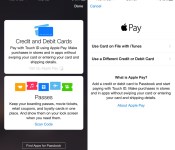
Now that iOS 8.1 has been released to the public, we’re getting our first look at what Apple Pay looks like on the iPhone 6 and the iPhone 6 Plus. Apple Pay isn’t immediately obvious when iOS 8.1 is installed — users will need to open up Settings or Passbook to see various Apple Pay features.
The initial setup for Apple Pay can be done through Passbook. Tapping the “+” icon in Passbook will allow users to add a card. If a card is already associated with an iTunes account, users can tap choose to use that card, or enter another one using the camera.

The camera roll will capture a card number, expiration date, and user’s name, requiring the security code on the card to verify the number with the bank.
The verification process takes just a few seconds for most cards that are currently working with Apple Pay, after which the card can immediately be used for purchases. Some cards require additional verification steps, such as phone calls and emails. All cards stored in Passbook will be stacked on top of each other in Passbook’s traditional style, with tap pulling a specific card to the forefront of the app.

Apple Pay’s neatest features are buried in the Settings menu, located under the new “Passbook and Apple Pay” section. Each credit card listed added to Passbook is listed here, along with Transaction Defaults like billing address, shipping address, email, and phone number.

Tapping on one of the cards provides specific information about the card, allowing users to see the last digits of the card number, the last digits of the Device Account Number that replaces the card number in transactions, and it also provides contact information for the bank behind the card, as well as an app download.
Each card also includes a list of recent transactions that have been made, and with some cards, transactions made in stores that don’t support Apple Pay will be listed right alongside Apple Pay transactions. This settings area is also where a card can be removed from Apple Pay.

After being set up, Apple Pay can be used within stores and within participating apps to make purchases with a single touch. When in a store, making a purchase is as simple as holding an iPhone 6 or 6 Plus near a contactless payment terminal with a finger on Touch ID, can be seen in the demo video below from The Verge.
According to Apple, Apple Pay will work with more than 200,000 stores that support contactless payments, and it has partnered with several retailers like Walgreens, Macy’s, and Whole Foods to ensure support in those locations. Apple Pay also works for purchases made in participating apps like Uber, Starbucks, and Apple’s own Apple Store app.

List of Stores and Apps That Accept Apple Pay Payments
While Apple Pay will work in any store that accepts contactless payments, Apple has partnered up with several retailers for the launch of Apple Pay, to ensure the mobile payment service will work smoothly in those locations. In retail stores, only iPhone 6 and 6 Plus users can take advantage of Apple Pay, as payments require NFC.
Retail partners that will begin accepting Apple Pay payments today or in the immediate future include Aeropostale, Babies R Us, BJ’s Wholesale Club, Bloomingdales, Champs, Chevron, DuaneReade, Foot Locker (including Lady Footlocker, Run by Footlocker, Kids Footlocker, and House of Hoops), FootAction, Macy’s Nike, Office Depot, Petco (and Unleashed), Radioshack, Six:02, Sports Authority, Texaco, Toys R Us, Walgreens, and of course, Apple’s own retail stores.

Fast food locations now accepting Apple Pay include McDonald’s, Subway, and Panera Bread, while grocery stores accepting the payments service include Wegmans and Whole Foods Market.
Apple Pay can also be used within apps on devices that support Touch ID, which includes the iPhone 6, the iPhone 6 Plus, and Apple’s upcoming iPad mini 3 and iPad Air 2. Apple’s iPhone 5s does not appear to be compatible according to the Apple Pay website, even though it has Touch ID. Over the weekend, Apple’s iTunes chief Eddy Cue said that he expects most initial Apple Pay transactions to take place within apps.
Apple’s app launch partners, which will begin accepting Apple Pay payments through app updates going out today, include AirBnB, Chairish, Disney Store, Fancy, Groupon, Hotel Tonight, Houzz, Instacart, Lyft, MLB.com, OpenTable, Panera Bread, Spring, Staples, Target, Tickets.com, and Uber. Apple’s own Apple Store app now accepts Apple Pay payments as well.
Apple Pay updates for the above listed apps should be trickling out beginning today now that Apple Pay is live. Bank apps are also being updated with Apple Pay support, and Capital One and Navy Federal Credit Union have already launched apps with Apple Pay updates.

Apple to Continue Offering Public Beta Versions of OS X Software
With the release of Yosemite, Apple introduced a public beta test for the first time, allowing more than a million consumers to sign up for and participate in the Yosemite beta. In past years, beta testing new Mac software has been left up to developers and a select number of Apple Seed members.
It appears that Apple found Yosemite’s public beta testing to be successful, as the company today sent out an email that suggests it will continue to offer public beta tests for OS X software in the future. In an email that thanks Yosemite testers, Apple says that members of the OS X Beta Program will continue to be offered beta versions of OS X software updates.

Thanks for participating in the OS X Yosemite Beta Program. As you know, OS X Yosemite brings an elegant redesign, continuity features for using your Mac, iPhone, and iPad together, and major enhancements to the apps you use every day. And it’s now available for free from the Mac App Store.
Please install the release version of OS X Yosemite. As a member of the OS X Beta Program, you will continue to be offered beta versions of OS X software updates on any Mac that you installed the beta on. However, if you prefer to stop receiving beta updates, please click here.
Over the course of the beta testing period, Apple seeded six separate public betas to beta testers. While public beta testers received fewer updates than developers early on, towards the end of the beta testing period, updates became more frequent and the final beta that was sent out mirrored the third golden master sent to developers.
It is unclear if Apple will seed minor OS X updates to the beta testing public, or if the next major public beta test will come in 2015 with the release of the next-generation OS X 10.11 Mac operating system.
 AIVAnet