



All ‘Simpsons’ episodes are now available for streaming

The wait is over, people of the interwebs. Right on cue, Fox has launched Simpsons World, the online hub where it will be streaming every Simpsons episode ever broadcasted. Even though the content is free to browse, you do need a cable login to start watching — it’s simple, if you’re subscribed to a package that offers FXX, a channel owned by Fox, then you’re good to go. In addition to the Simpsons World website, all Simpsons episodes can also be streamed via the FXNow mobile application, which is available on iOS and Android. Sure, it’s only Tuesday, but at least now you have a clue of what you’ll be doing this weekend.
Filed under: Home Entertainment, Internet, HD
Source: Simpsons World
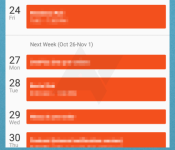
Shots of Google Calendar material design overhaul surface

The calendar app on a smartphone may not be the most interesting app users access, but it is typically one of the core functions of our mobile devices. Although they may not be “sexy,” calendars play an important role and people are interested in attempts to make the data contained within their calendars easy to access. With the updates rolling out for a host of Google apps to implement their new material design guidelines and appear as part of Android Lollipop, the calendar app is on the list. Some new screenshots of the updated app have been obtained that reveal some of the work Google has done to refresh the calendar.
The main view for the new Calendar app is called the “Schedule” which puts the month on top with a bottom pane displaying weeks or days with events embedded therein. Users can quickly pull down the month to see a small display of the entire month similar to how some third-party calendar apps display things. Using the overflow icon, users can access other views for days or weeks as well as a search option.
Using the hamburger icon, users can select the calendars to be shown and figure out which colors go with which calendars. Speaking of colors, users will likely notice the abundant use of colors and headers throughout the app, consistent with other material design based apps. Like much of what Google has been pushing for, things like the event creation function feature a clean, concise interface. Sources indicate some of the fields will include an auto-suggest type feature that brings up suggestions as users are typing things like a name or a location.
We will be on the lookout for this latest update to appear in the Play Store and start hitting devices sometime in the next couple weeks leading up to the Android Lollipop official release.


source: Android Police
Come comment on this article: Shots of Google Calendar material design overhaul surface
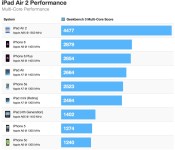
iPad Air 2 Up to 55% Faster Than iPhone 6, Up to 68% Faster Than iPad Air
A short time ago, we highlighted a new benchmark appearing to show an iPad Air 2 device carrying an A8X chip with a triple-core 1.5 GHz processor and 2 GB of RAM.
While we mentioned that the enhanced specs have led to huge performance gains compared to the A8 chip found in the iPhone 6 and 6 Plus, Primate Labs has now published a nice pair of charts showing just how dramatic this improvement really is, making the iPad Air 2 far and away the fastest iOS device ever.
The most striking improvement comes in the multi-score benchmarks, where the A8X with its three cores of processing power blows away the dual-core A8 found in the iPhone 6 and 6 Plus. As a result, the iPad Air 2 registers over 55 percent faster than the iPhone 6 and 6 Plus in the multi-core benchmark. Comparing iPad to iPad, the A8X in the iPad Air 2 measures 68 percent faster than the A7 in last year’s iPad Air according to the multi-core benchmark.

The iPad Air 2 also sets new high scores in the single-core benchmarks thanks to the 1.5 GHz cores in the A8X, with much of the nearly 13 percent gain over the A8 coming from the 100 MHz speed improvement compared the 1.4 GHz cores found in the iPhone and 6 Plus. The iPad Air 2 of course also compares favorably to the original iPad Air, with single core scores up 23 percent.



Sean Parker’s post-wedding punishment includes making a beach-finding app

A few things happened after Napster co-founder and former Facebook president Sean Parker got married in a gorgeous redwood forest in Big Sur, California. The California Coastal Commission took him to task for creating a bizarre fantasy realm without the proper permits. Journalists gleefully jumped into the fray. He wrote a nearly 10,000 word defense of his wedding that also served as a meandering takedown of “internet journalism”. As it turns out, Parker’s penance wasn’t just limited to a $2.5 million charity payout — SFGate reports he’s working on a beach-locating app for the very agency that he ignored when creating his dream wedding.
In case you don’t live on the West Coast, all of California’s beaches are public beaches. Theoretically they shouldn’t be that hard to get to, right? Well, there’s plenty of real estate (some of it belonging to profoundly rich old men who try sometimes block beach roads) dotting the landscape, making it tricky for visitors to find the ocean without stumbling into private property first. Parker’s app is meant to help visitors navigate their way to the water, and it looks like his crew’s got plenty of time to finish it up. According to a document made available the commission, the app will be iOS-only — Google fans like the beach, too, California — and should be available no later than mid-2015.
Via: The Verge
Source: SFGate

From Friendster to Facebook: Social networking do’s and don’ts

Have you ever heard of Pownce? How about Jaiku? Maybe even something called Yahoo 360?
If you haven’t, don’t worry. You’re probably not alone. These are just a few of the many social networks that have come and gone, most of them vanishing either through acquisition or simply due to lack of audience adoption.
That’s surprising, when you think about the sheer volume of social networks that have come our way over the years and the few that remain. Let’s face it: There are only a handful of social networks these days that people care about; namely, Facebook, Twitter and, to a certain extent, Google+, even as newcomers like Ello emerge. Some oldies like Myspace and Friendster are still hanging on, but as very different incarnations of themselves. Myspace, for example, is now almost entirely about music discovery, while Friendster currently describes itself as a social gaming site; a far cry from its heyday as one of the “original” social networks.
So what does it take for a social network to resonate with the public? And what makes one succeed where others fail? Here, we examine lessons learned from social networks past and present to see if we can suss out what they should or should not do to prevail in the ever-changing winds of the fickle internet.
1) Don’t be difficult
It seems like a no-brainer, but just like any site on the internet, social networks need to be easy to use. Yet, not everyone follows this simple philosophy. Myspace, for example, became a bloated nightmare, with profile pages that were so heavily bogged down with customizations and media embeds that it was a mess to navigate. It even had to introduce a “Lite” version to lighten some of that load. Yahoo 360 was also widely touted as complicated to set up, as it attempted to be your one-stop shop for blogs, photos and, well, too much of everything. Facebook’s settings aren’t exactly easy to navigate either, but many forget that it used to be much more complex than it is now. Still, it could stand to be even simpler — upstarts like Ello are already capitalizing on a supposed cleaner and more minimalist interface that’s free from clutter and ads.
2) Do keep up with the times
Perhaps one of the most important lessons when it comes to surviving the ever-changing whims of the internet is the willingness and ability to change. As is evident with sites like Myspace, Friendster and Orkut, many of the ones that fell by the wayside failed to keep up with the competition. While Facebook adapted readily by building News Feed, opening up its site to third-party developers and tweaking its site constantly, Myspace was content with its flashy profile pages and celebrity news site. Friendster, too, was weighted down with glitches and stagnation. Today, Facebook and Twitter seem mindful to not repeat the mistakes of their predecessors, with their constant experimentation and willingness to try something new.
3) Don’t be the same as everyone else
One of the problems with so many social networks is that it’s difficult for one to rise above the rest; many of them look the same after a while. That’s why copycat networks typically don’t fare well. Jaiku and Pownce were too comparable to Twitter, and though both offered unique features, they didn’t quite differentiate themselves enough to stand out from the pack. Google+, though not quite perfect, set itself apart with a unique Circles feature plus a robust photo-sharing system that rivals, and possibly exceeds, that of the competition. There are also many niche networks in place; LinkedIn is aimed at folks doing business, while Snapchat made ephemeral messaging its standout feature.
4) Do be mindful of privacy
Privacy is, without a doubt, the most important factor that social networks need to get right. Unfortunately, this is a concern that even the big ones have stumbled on, especially Facebook. The social networking giant’s privacy settings are famously complicated, and it’s faced controversy in the past by experimenting on its users and publicizing activities on third-party sites via its now-retired Beacon advertising program. While Facebook has managed to curb and rectify some of these concerns, some other sites aren’t so lucky. Google Buzz, for example, got into hot water almost immediately by combining its social network with your personal email account, which meant people could see who you emailed the most frequently. Though that wasn’t the sole reason Buzz died, it certainly didn’t do it any favors.
5) Don’t forget the community
A social network wouldn’t be a social network without its users, and the key part of any online community is that people should come first. This is easy to say, of course, and many networking sites do attempt to appease their users as much as possible, but it seems like they could do more. Facebook, for example, might want to reexamine its real name policy so as not to alienate those who wish to remain anonymous or have a different online persona. Twitter’s recent act of surfacing tweets in the timeline from people you don’t follow is another example of an action that doesn’t seem to be mindful of why most people like Twitter in the first place (i.e., the fact that you can curate your own feed). On the whole, it would behoove most social networks to have a more active dialog with their users on what they want out of their community and be more transparent with their actions.
Of course, these are just a few of our ideas on what social networks can do to be better. If you have any more suggestions, feel free to let us know, either in the forums or in the comments below. And if you want a little more history about some of the defunct social networks mentioned here, stroll down memory lane in this gallery.
[Image credit: Dimitri Otis]
Filed under: Internet

MLB is bringing Apple Pay to the 2014 World Series

Tonight, Kansas City Royals and San Francisco Giants will begin battling it out for Major League Baseball’s biggest prize: the World Series. And to make things better for ballpark attendees, MLB and MasterCard have announced that Kauffman Stadium (Royals) and AT&T Park (Giants) are going to support Apple Pay and other NFC-based payments throughout the series and beyond. Given how MLB usually adopts new technologies quickly, this shouldn’t come as a surprise — both stadiums are the first in sports to do this, and chances are the league will bring the feature to more places soon. While MasterCard and MLB are touting Apple Pay, the Cupertino company’s recently launched payment system for iPhone 6 and iPhone 6 Plus, services like Google Wallet also work with the newly implemented terminals. Don’t worry, we know Google Wallet has been a thing for a while.

[Lead mage credit: Getty Images]
Filed under: Cellphones, Misc, Peripherals, Mobile, Apple
Source: MasterCard

All that money Yahoo spent on mobile is paying off

There’s no doubt about it: the future is mobile, and it looks like Yahoo’s finally making the pocket-friendly needle move. The company’s quarterly earnings dropped not too long ago, in which CEO Marissa Mayer had pointed out that Yahoo’s mobile revenue were finally “material,” specifically to the tune of $200 million. Not too shabby for a company whose CEO openly admitted it missed the boat on mobile, no? As far as Mayer’s concerned, Yahoo isn’t really a company that makes webpages any more — it’s “a company that makes mobile apps and monetizes them through native ads.”
Frankly, that’s heartening. Some of Yahoo’s mobile products are, well, really damned good, and that’s thanks in part to the startups it’s snapped up since Mayer take control of the company. Over the past ten months, Yahoo has acquired four startups meant to firm up its mobile presence: there was Snapchat clone Blink and Whatsapp analog MessageMe, along with intelligent homescreen Aviate and an super-popular mobile analytics startup called Flurry. Some of those products live on in one form or another (Yahoo’s News Digest is based on Summly for instance, a startup it bought a year ago). Others were acquired for the brainpower behind them. All are meant to firm up Yahoo’s future in your pocket, as a source of indispensable stuff you’ll return to again and again. So what’s next?
More acquisitions, naturally. Mayer has basically been buying up smaller companies since day one, and with a $5 billion windfall thanks to Alibaba’s insane IPO, don’t expect that spree to stop. The Wall Street Journal reported earlier this week that Yahoo’s got one or two more big acquisitions in the works — none of us would be surprised to see it pour even more dough into it’s mobile future.
Source: Yahoo Investor Relations

You can now pre-order the Xperia Z3 Tablet Compact for a hefty $499.99

Sony’s latest slate, the Xperia Z3 Tablet Compact, is now available to pre-order in the United States from both the manufacturer’s online portal and from any of its nationwide bricks-and-mortar stores.
According to the listing page, the unit will be available for shipping from Sunday, November 2 and will set you back a whopping $499.99, which, I’m pretty sure you’ll agree, is an awful lot to pay for a 32GB, 8-inch, mid-range device.
With regards to specifications, the Z3 Tablet Compact packs a 2.5GHz Snapdragon 801 processor, 3GB of RAM, an Adreno 330 GPU, an 8.1-megapixel rear-facing camera, a 2.1-megapixel front-facing shooter and a 4,500mAh non-removable battery.
Out of the box, the tablet will run the latest build of Android 4.4.4 KitKat with Sony’s Xperia user interface plastered over the top. The device is, however, expected to be one of the first on the market to receive the much-anticipated Lollipop update when it’s distributed later this year.
If you like the sound of the Xperia Z3 Tablet Compact and want to reserve one for yourself — hit the source link below.
Source: Sony
Come comment on this article: You can now pre-order the Xperia Z3 Tablet Compact for a hefty $499.99

T-Mobile’s HTC One (M8) now receiving Eye Experience update

If you own a T-Mobile-branded HTC One (M8) you may want to listen up as the operator is now rolling out the much-anticipated Eye Experience camera user interface update to all variants of the smartphone currently located in the United States.
Hit the break to see the full changelog.
System Improvements:
- Radio stability improvement
- Transition improvements
Eye Experience Implementation:
- Split Capture
- Crop-Me-In
- Photo Booth
- Auto Selfie
- Voice Selfie
- Swipe-To-Switch
- Video Face Tracking
- Live Makeup
- Video Screen Sharing
Application Improvements:
- Camera stability
- Video highlight stability
- Zoe 1.0
To initiate the upgrade manually, make sure you’re connected to a Wi-Fi network. Then, from the home screen, press the Menu key, followed by Settings. Scroll to the bottom and tap ‘About Device’, followed by ‘Software Update and ‘Update Now’.
Source: Twitter
Come comment on this article: T-Mobile’s HTC One (M8) now receiving Eye Experience update

PPLNOTIFY sends Android notifications straight to your web browser on another device

Sometimes there can be too many devices in front of you. You are working on your computer and then have to check your phone for a notification. It is just way too messy and, more importantly, distracting. With PPLNOTIFY, it all goes to one place. The app, from PPLCONNECT, sends Android notifications to the user’s browser without the need for a desktop extension or plug-in.
With the PPLNOTIFY app installed on an Android device, you just need to login to the app’s website on a browser. Then, in real-time, notifications will be forwarded to you. A pop-up window appears with anything from SMS to incoming calls and battery updates. PPLNOTIFY works with both computer and tablet browsers.
Hit the break for the video, gallery, and download links.
Click here to view the embedded video.


Come comment on this article: PPLNOTIFY sends Android notifications straight to your web browser on another device
 AIVAnet