


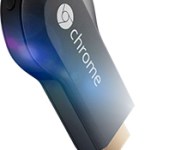
Chromecast users Cast 650 million times and its successor is on the way

The Chromecast is an incredibly valuable piece of equipment for anyone. The device was launched in 2013 by Google and no one knew what to expect. Well, the Cast feature for the $35 darling has been used 650 million times. This is up from 400 million back in August. That shows just what you can expect from Chromecast. It is so powerful due to the tens of thousands of applications available. In fact, there are more than 6,000 developers working on upwards of 10,000 apps.
Hit the break for a Google executives comments about what is next for Chromecast.
As we already know, a new version of Chromecast is incoming. When? No one knows. Google’s Mario Queiroz did not give Gigaom much information about the successor, but did maintain that the specifications will be boosted. Queiroz said “The hardware capabilities will give us a better opportunity to take full advantage of a large screen paired with a small screen.”
What do you think the next Chromecast will be able to do?
Source: Gigaom
Come comment on this article: Chromecast users Cast 650 million times and its successor is on the way

Verizon pushing Eye Experience update to its HTC One (M8) on Wednesday

Either the hardware manufacturers are getting things right or the carriers are easing up on the testing phase. Tomorrow, owners of the HTC One (M8) on Verizon will be getting a software update. The update includes the new Eye Experience that was announced alongside the Desire Eye and RE Camera. HTC expects the over-the-air (OTA) update to arrive around noon on Wednesday.
Mo Versi, HTC’s VP of Product Management, tweeted the news on Tuesday:
HTC One (M8) Verizon owners! We have technical approval on Eye SW! OTA target for tomorrow at noon! #HTCAdvantage
Source: @moversi (Twitter)
Come comment on this article: Verizon pushing Eye Experience update to its HTC One (M8) on Wednesday
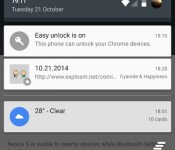
Users of Chrome OS and Android 5.0 reporting Easy Unlock feature is operable

In April, we learned that Google would be implementing a way for an Android phone to unlock a Chrome OS device. That feature is reportedly operable for some users with Android 5.0 Lollipop. It is called Easy Unlock and just asks Chrome OS users to hit a single button to login when their phone is nearby, forgoing the need to manually enter a password. It all works through Bluetooth Low Energy.
Have you found the Easy Unlock feature to be available yet? Let us know in the comments.
Via: OMG! Chrome!
Come comment on this article: Users of Chrome OS and Android 5.0 reporting Easy Unlock feature is operable

Google backs Magic Leap, a mysterious augmented reality startup

Google has just thrown its weight behind an augmented reality startup shrouded in mystery. Along with Qualcomm and film production Legendary Entertainment (among many other companies), Mountain View has funded Magic Leap to the tune of $542 million. According to The New York Times, that puts the startup’s value at a whopping $2 billion, even though we still don’t know much about the product it’s developing. Here’s what we do know about Magic Leap, though: it’s not making a chunky headset like the now Facebook-owned Oculus Rift, and while company CEO Rony Abovitz wouldn’t tell TechCrunch specifics, he said his team is working on a “lightweight wearable” solution, presumably powered by a mobile device.
He also told the publication that Magic Leap’s technology goes well beyond virtual or augmented reality and can superimpose objects that truly look real onto the world, using something called dynamic digitized lightfield signal. Legendary Pictures CEO Thomas Tull (who has already spent time with the product) even described the startup’s technology as “so badass” to Fast Company, adding that it is “a marker of the future.” Magic Leap will use the money from the latest funding round to accelerate development, in order to launch its product (which might be available to consumers almost as soon as it’s revealed, TechCruch said) in the near future.
Via: The New York Times, TechCrunch
Source: Magic Leap

Windows 10 brings Windows Phone’s notification center to the desktop

If Windows 10 is going to unify your experiences on devices ranging from smartphones to PCs, it only makes sense that key mobile features would reach the desktop, right? Microsoft certainly thinks so. The team in Redmond has released an updated version of the Windows 10 Technical Preview that brings Windows Phone’s Action Center (that is, a notification area) to PCs. Whether there’s an app update or an important meeting coming up, you can now find about it all in a single place; you won’t have to check Live Tiles or jump into the apps themselves. No, it’s probably not worth installing Microsoft’s pre-pre-pre-release operating system just to try this out, but it’s definitely worth an update if you’re already living on the bleeding edge.
Filed under: Desktops, Laptops, Software, Microsoft
Source: Blogging Windows
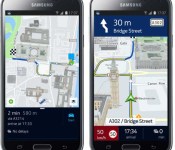
Nokia’s HERE Maps now available on all Android devices

Well that exclusive was short lived. About 2 weeks ago, Nokia’s HERE maps made its debut on Android, but only for Samsung devices through the Samsung Apps Store. I’m not sure I ever understood the exclusive, but I definitely don’t understand the fact that it only lasted 2 weeks.
Nokia has made the HERE Beta app available to the rest of Android. Unfortunately it’s not in the Play Store. You will have to hit the source link below to grab the APK and manually install it yourself.
Being a Beta, you’re sure to run into a bug or two. For example, it was found that some cache cleaner apps will delete the navigation voices. Nokia has promised a fix, but they are still a couple of weeks away from accomplishing it.
If HERE maps is something you would like to try, then hit the source link below to get started.
sources: Nokia / Download Beta
Come comment on this article: Nokia’s HERE Maps now available on all Android devices
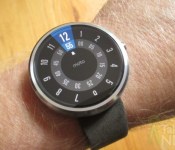
Motorola seeding 4.4W.2 update to Moto 360 with loads of improvements

We reported earlier that the LG G Watch is now receiving an update (4.4W.2) so it’s no surprise that the Moto 360 is also receiving the same update. However there are a few things that are specific to the Moto 360 such as that now ambient mode will automatically turn off when your battery hits 15% and a new feature called Mood Lighting. This will adjust how bright the charging screen is based on how bright or dark the room is. The update also includes the same stuff that other Android Wear watches are getting like the ability to connect Bluetooth headsets to the watch itself, store music, and a new UI tweak allowing you to swipe down on the most recent notification card so you can see your entire watch face.
Hit the break for the full change log.
- Smart Battery Saving – When your battery hits 15%, your Moto 360 will turn off ambient mode, so you don’t have to remember to.
- Timely Time Checks – Moto 360 will synchronize the time with your phone more often to make sure it is up to the minute.
- User Interface Tweaks – We observed with consumers that there are many times where you want to use your Moto 360 as truly a classic watch—a beautiful way to see the time. A new gesture now lets you see the full watch face without permanently dismissing a notification. Just touch the top of a notification and swipe down. You’ll see the notification again when you have another high priority notification.
- Mood Lighting – Moto 360 will adjust to the lighting of the room while charging, so that it isn’t too bright or too dark.
- Readying the wires for Bluetooth – There are a couple of under-the-hood enhancements that will pave the way for connecting Bluetooth headsets to the watch.
- Bug Squashing – As usual, bugs are squashed to enhance the overall user experience.
The update is rolling out now and you will get a notification card on your Moto 360 when it’s ready for you to install it. You will need at least 80% battery life. You can also head into Settings > About > System Updates on your Moto 360, but I doubt that will do you any good.
source: Motorola
Come comment on this article: Motorola seeding 4.4W.2 update to Moto 360 with loads of improvements
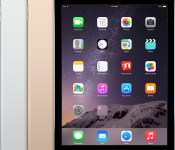
First iPad Air 2 Reviews: ‘Ridiculously Fast’, ‘Vibrant Display’, Thinner Profile Comes at the Cost of Battery Life
Following Apple’s October 16 event that saw the debut of the iPad Air 2 and the iPad mini 3, Apple provided multiple publications with review units. The embargo has now lifted on review posts, so we’ve gathered some of the relevant excerpts from each site in order to highlight general release reactions to the new tablet.

Apple’s iPad Air 2 is an entire millimeter thinner than the original iPad Air, and Apple has billed it as the thinnest tablet in the world. It offers a new A8X processor, Touch ID fingerprint support, an anti-reflective screen coating, 802.11ac Wi-Fi, and an improved 8-megapixel rear camera.
Walt Mossberg, Re/code:
So when Apple brought out new iPads last week, and I had a chance to test them over the past four days, you might think I’d be pretty excited about them — but I’m not. They are, in most respects, the best iPads ever made. But for average users, they represent only a modest evolutionary improvement over last year’s models, not the kind of big change that the first iPad Air or the Retina display iPad mini did last year. […]
The Air 2 didn’t allow me to hold or carry the tablet longer and more comfortably than the Air. Its weight of 0.96 pounds isn’t discernibly lighter than the Air’s weight of one pound. And its thickness of 0.24 inches is a barely noticeable reduction from the Air’s 0.29 inches.
Nilay Patel, The Verge:
The Air 2 has a vibrant, sharp display that looks almost painted on. Apple says the new antireflective coating on the Air 2 reduces glare by 56 percent, but I didn’t really notice it making a huge difference; you definitely can’t use it in bright sunlight. […]
Inside the iPad Air 2 lies Apple’s new A8X chip, which is a variant of the A8 found in the iPhone 6 and 6 Plus with additional graphics capabilities. It’s ridiculously fast — noticeably faster to load web pages and launch apps than my iPad Air, and it has so much graphics headroom that I’m eager to see how game developers take advantage of it.
Darrell Etherington, TechCrunch:
The 6.1 mm chassis just makes all the difference when it comes to the Air feeling like something that you could comfortably hold for long periods of time, and even for all-day computing, should you need it (and it’s easy to imagine an event coordinator, for instance, needing exactly that).
Our review unit came in Apple’s gold finish, and let me just say that on the iPad, that means there’s a lot of gold going on. Apple’s take on this particular metal color is better than most, but this definitely isn’t my favourite finish. The Air 2 in either space grey or silver still looks fantastic however, and the gold is definitely going to stand out in a crowd, especially if you’re also using the iPad as a camera.
Brad Molen, Engadget:
A thinner profile comes at the expense of battery size. The new Air’s is 5.1Whr smaller than the old one, but Apple still promises that you’ll get the same 10-hour battery life because the A8X is more power-efficient. Real-life use shows that the original Air still rules the roost; after a day of heavy use, I typically went to bed with around 20 percent left in the tank. If you’re only using it moderately — say, for casual content creation or consumption — you should get a little over two days. In our video test, in which an HD movie plays through the life of the battery, the Air 2 squeezed out 11 hours and 15 minutes, significantly lower than last year’s Air and about an hour short of the Samsung Tab S. […]

The Air 2 also doesn’t have a mute switch, which I didn’t think would be a huge loss until I actually found myself trying to use it and becoming frustrated more frequently than I expected. Your new options are to press and hold the volume down button or go into the Control Center and press the mute key; if you used the switch to lock screen orientation, you’ll need to do that in the Control Center as well. A microphone now sits where the mute switch once was; there’s another one right next to the camera.
Joanna Stern, The Wall Street Journal:
That anti-reflective screen also makes a great, though admittedly ginormous, viewfinder for snapping nature shots with the revamped 8-megapixel camera. It takes much crisper shots than before, and in many cases, ones as good as those I can take with my iPhone 6. But I won’t bring my iPad to some mountain peak, as some Apple promo shots suggest.
Besides, when I set the iPad Air 2 down for a second on a bench, it slid off and hit concrete, shattering the screen. Sure, I’m to blame, but if Apple wants me to climb every mountain armed with nothing but an iPad, ruggedness should be as important as anti-reflectivity.
Harry McCracken, Fast Company:
The weirdest fact about the iPad Air 2 is that Apple isn’t publicizing (or even acknowledging) one of its best new features. The tablet now has 2GB of RAM, up from the rather cramped 1GB allotment in the original iPad Air. (Some competitors, like the Galaxy Tab 10.1, have even more.)
Doubling the RAM means that the iPad can keep more apps and browser tabs in memory without having to reload anything. That results in a speed boost which which is very apparent as you hop between apps and load new web pages.
Lance Ulanoff, Mashable
To get an anecdotal sense of the performance, I installed a pair of console-level games: Asphalt 8 Airborne and Modern Combat 5: Blackout. Each of these games is notable for rich imagery and physics including smoke, water, rain, and reflections. The games looked and worked great on the original iPad Air and worked just as well — if not better — on the iPad Air 2.

However, Apple isn’t just blowing smoke when it says the A8X is more powerful. I ran Geekbench 3 on both Airs and found that that Apple’s A8X has 3 cores (the A7 had 2) and that the multicore score for the iPad Air 2 is nearly double that of the original Air. The singlecore score for the iPad Air 2 is only slightly better than that of the iPad Air.
Other Reviews:
Farhad Manjoo, The New York Times
Samuel Gibbs, The Guardian
David Pogue, Yahoo Tech
Chris Davies, Slashgear
Matt Warman, The Telegraph
The iPad Air 2 is currently available for pre-order from Apple’s online store, with prices starting at $499. Apple has not yet revealed when the new tablets will be available in stores, but the first pre-orders will be arriving to customers this week.
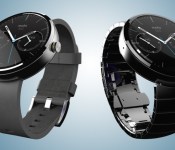
Moto 360 System Update

Motorola continues to try to deliver a “timeless” timepiece with the Moto 360. A new update has struck with additional features like “Timely Time Checks” and “Mood Lighting”.
You can view what this update entails below, or visit the Official Motorola Blog to read about what they have to say about their system update.
- Smart Battery Saving – When your battery hits 15%, your Moto 360 will turn off ambient mode, so you don’t have to remember to.
- Timely Time Checks – Moto 360 will synchronize the time with your phone more often to make sure it is up to the minute.
- User Interface Tweaks – We observed with consumers that there are many times where you want to use your Moto 360 as truly a classic watch—a beautiful way to see the time. A new gesture now lets you see the full watch face without permanently dismissing a notification. Just touch the top of a notification and swipe down. You’ll see the notification again when you have another high priority notification.
- Mood Lighting – Moto 360 will adjust to the lighting of the room while charging, so that it isn’t too bright or too dark.
- Readying the wires for Bluetooth – There are a couple of under-the-hood enhancements that will pave the way for connecting Bluetooth headsets to the watch.
- Bug Squashing – As usual, bugs are squashed to enhance the overall user experience.
 |
The post Moto 360 System Update appeared first on AndroidGuys.

The iPad Air 2 and iPad mini 3 review

It’s a conflicting time for Apple. On one hand, it’s a joyous occasion for the company because its latest iPhones, which come in larger screen sizes than the last, set new sales records worldwide; but on the other hand, its lineup of iPads just experienced its third straight quarterly decline. Coincidentally, this comes just a week after Apple announced its annual tablet refresh, which includes a thinner and more powerful version of the iPad Air along with a Touch ID-enabled mini with Retina display.
Just because it’s down doesn’t mean it’s out. Giving up on a product category isn’t really Apple’s style, and last week, it offered up the Air 2 as exhibit A. The company made it clear that making a solid top-of-the-line tablet is on the top of its to-do list, so naturally the new 10-inch device got plenty of upgrades in nearly every aspect of its design. Curiously, it didn’t give the mini lineup the same kind of treatment: The mini 3 got so little love this time around that the best news about it is the fact that last year’s version is now $100 cheaper. Should the new iPads still get a place in the consumer’s backpack? Read on to find out.
Hardware
iPad Air 2
Thinner, lighter, more powerful. It sounds a lot like last year’s iPad Air, which was reduced to the thickness of a pencil, but in fact, I’m talking about the sequel. At 6.1mm thick, an 18 percent decrease from the original Air’s 7.5mm, you’ll be hard-pressed to find a thinner tablet; Samsung’s Tab S comes close at 6.6mm. It’s not easy to build such a thin device that feels just as sturdy as its thicker brethren, but Apple nailed it with the Air 2. The new slate has lost weight, too, but not as much as the last one did: While the first Air managed to lose nearly half a pound over the iPad 4, the next version only trims off 0.04 pound (32g) for a total of 0.96 pound (the LTE-enabled version is a few grams heavier). So, it’s lighter, but the change isn’t anywhere near as noticeable this time around.
The design language hasn’t changed: The Air still features an aluminum build, chamfered edges and the same footprint as before. But Apple insists that it rebuilt the new tablet from the ground up. After all, cramming better specs into a thinner package requires some creative thinking. The good news is that it looks and feels fantastic, and it comes with a no-gap display, better camera, more powerful chipset, Touch ID and stronger wireless connections. The bad news is that some compromises were made — specifically in the area of battery size, which has plummeted from 32.4Whr to 27.3 (more on this later).

Aside from being thinner, there are a couple other ways you can tell a new Air from an old one. The first is the inclusion of Touch ID, Apple’s fingerprint sensor that was introduced last year in the iPhone 5s. It’s certainly a welcome feature, and one I’ve been hoping to see on an iPad ever since the iPhone 5s debuted; I can’t count how many times I tried unlocking my iPad this way before remembering it doesn’t have this feature. What’s more, Touch ID is even more useful now than it was before; iOS 8 enabled third-party developer support for the fingerprint sensor, so you can use it to access sensitive account information or passwords. It also facilitates online payments through Apple Pay, but since no new iPad comes with NFC, you won’t be able to use your huge tablet at a tap-to-pay station.
The Air 2 also doesn’t have a mute switch, which I didn’t think would be a huge loss until I actually found myself trying to use it and becoming frustrated more frequently than I expected. Your new options are to press and hold the volume down button or go into the Control Center and press the mute key; if you used the switch to lock screen orientation, you’ll need to do that in the Control Center as well. A microphone now sits where the mute switch once was; there’s another one right next to the camera. This means the antenna on the top of the WiFi+Cellular model is no longer interrupted by mic holes.

Inside, the Air 2 comes with a new A8X chipset, which I’ll discuss later on. In short, Apple has added another CPU core, boosted graphics performance and doubled the RAM. But it’s also followed the iPhone 6 by adding the M8 motion coprocessor, which includes a barometer so you can track flights climbed. Other additions include 802.11ac WIFi, which can get you faster connections (provided you have a compatible router); 20 LTE bands, which should be more than enough for most international travelers; and up to 150 Mbps cellular download speeds if your carrier offers it.
iPad mini 3

Apple’s message for the iPad mini changed dramatically in the past year. When it debuted last fall, the iPad mini with Retina display was given feature parity with the Air. The two devices were nearly twins, with the exception of size and a difference in color accuracy (which we’ll get into soon). In the end, iPad buyers found that the toughest decision was which size to pick. Fast-forward a year, and the mini 3 has been largely forgotten. Even the fourth-gen iPad, which was released only eight months after the previous version with a performance boost and Lightning port, looks like a bigger upgrade.
Indeed, there’s only one major feature change on the mini 3: Touch ID. Yep, that’s all, unless you count a gold color option as an actual feature (I don’t). Otherwise, the hardware is completely identical to last year’s mini. All of the stuff you just read (and will continue to read) about getting improved on the Air 2? Nowhere to be found. The dimensions and design style all remain the same as the last mini. Whereas Apple says it built the Air 2 from the ground up, the mini 3 just seems like an afterthought to make it look like the mini line hasn’t been forgotten. Well, it hasn’t been, but it does look strange that the larger tablet is once again considered the premier option with the best specs. The sudden change in product strategy doesn’t add up.
Apple SIM

This may be the very first time a SIM card has earned its own section in an Engadget review. But a new type of nano-SIM card preinstalled in the Air 2 and mini 3 is worth a mention. Buried in the last few lines of a press release is Apple’s first mention of a new “Apple SIM,” a first-of-its-kind card that lets you change your cellular carrier without also changing the SIM card. This convenience is limited to just a few countries and carriers at launch — Sprint, T-Mobile and AT&T in the US and EE in the UK — but over time, the selection of willing operators may improve. It’s still very much in the early stages right now, but the idea is a natural fit for an iPad, which doesn’t come with a carrier lock or a contract; people will want to switch among carriers depending on what kind of coverage they need and what types of data plans become available.
My review units came with carrier-branded SIMs, but the Apple-specific chips should come preinstalled when they’re shipped. (If you prefer a non-supported carrier, such as Verizon, a new chip will be provided for you.) There’s still no way of knowing whether this is a proprietary technology or if Apple is licensing it; if it’s the latter, it’s possible that the option will eventually be available for non-Apple devices as well.
Display

The Air 2 has the same 2,048 x 1,536 resolution as all the Retina iPads that have come before it; Retina HD does not exist in the tablet lineup. But as I mentioned earlier, Apple was able to trim down the iPad by using a laminated, optically bonded, no-gap display similar to the ones used on the iPhone and even the Microsoft Surface tablets. Not only does the new panel save vertical space by eliminating any gaps of air between the display layers, but it also makes the screen significantly less reflective. This is meant to reduce the amount of glare hitting the screen, whether you’re reading in direct sunlight or watching movies under harsh fluorescent lights. I’m happy to report that it works as advertised; I was able to read text and look at photos much better on the Air 2 than the previous version. Tapping on the screen also doesn’t feel as hollow on the new tablet as it did on last year’s. Still, Apple seems to have achieved this at the expense of white balance, which seems slightly colder than on the first Air.
For the iPad mini, I have a confession to make. As I reviewed last year’s model, I praised the display for its high pixel density and good looks — and in many ways this still rings true a full year later — but I didn’t catch a glaring difference between it and the original iPad Air’s display: The colors on the mini with Retina display have a narrower gamut than the Air, so the hues are flatter; they simply don’t provide the same kind of punch that the Air does. That was something I didn’t want to miss again, so I took a closer look to see if Apple had corrected anything on the mini 3, or if the color gamut would remain consistent among all three devices in the series. If you didn’t like it before, expect to see more of the same; any changes in color accuracy are extremely minor, as the Air lineup continues to offer a better experience here than the mini. The below image shows the difference between the Air 2 and the mini 3 displays.

iOS 8.1
iOS 8.1 is the third update to Apple’s new mobile OS in just over a month, after a bug fix that was immediately followed by another fix to correct the problems introduced in that initial update. The refresh was made available to every compatible iPhone and iPad yesterday, and the new iPads will come with it preinstalled, bypassing the lengthy download and install process.
Because the Air 2 and mini 3 both use Touch ID, they can take advantage of the biggest new feature in the update: Apple Pay. But since they don’t have Near-Field Communication (NFC) chips installed, you can’t do tap to pay; you can only use the service for online payments. This isn’t a huge issue, since most people will prefer using their phones (or Apple Watch) to buy stuff in retail outlets; it’d be much easier to whip out my wallet and swipe my card than take an iPad out of my bag to use tap-to-pay.
Apple Pay isn’t the only benefit you get in 8.1. In the initial iOS 8 release, the company oddly left out the Camera Roll. You could still see all of the images you took on your phone or tablet, but if you were using iCloud and had multiple devices, there was no way to tell which photo or video was taken on which product. This week, it’s back in the Albums tab.
With 8.1, you’ll also get to beta test the iCloud Photo Library, which uploads and stores your collection o’ memories so that you can edit and share them from any of your Apple devices. If you have less than 5GB in your album and don’t want to pay anything, it’s definitely worth doing. If you’ve got more than that, you’ll need to pony up some cash in order to store it all: 20GB costs a dollar per month in the US; 200GB is $4; 500GB is $10; and 1TB is $20.
Finally, 8.1 enables some of the Handoff and Continuity features I discussed in the iOS 8 review, such as sending and receiving text messages on your Mac, and Instant Hotspot, which makes it possible to automatically tether your computer to your mobile device. These features were announced as part of iOS 8 in June, but needed Apple’s new desktop operating system, OS X Yosemite, to work properly.
Camera
I’ll be the first to admit that I’m not the target demographic for a tablet camera. I used to make fun of the whole idea of taking pictures with a 10-inch gadget, but clearly it’s a trend that’s not going away, as a brief visit to any theme park, tourist attraction, concert or Vegas sidewalk will prove. So, I can’t blame Apple for catering to this growing group of people who prefer a large viewfinder. The iPad Air 2 is a prime example of this. While the mini 3 doesn’t gain improved imaging capabilities, the Air 2 steps up to 8MP resolution (versus 5MP in the Air) and has a new Image Signal Processor (ISP) as part of the new A8X chipset. On the software side, the new camera comes with Burst Mode, as well as slow-motion video capture in 720p at 120fps. There’s still no LED flash on front or back this time around, however.
Overall, the improvement in detail is obvious, and imaging is noticeably better in a few other areas as well. The white balance is slightly improved; colors are a little more accurate; and harshly backlit images aren’t as blown out as they were on the previous Air. And although the f/2.4 aperture is the same on both cameras, the new ISP manages to filter out more noise in low-light situations; it still won’t catch as much errant light as the iPhone, however. Apple also says the 1.2MP FaceTime camera should do a better job of reducing noise, but I couldn’t see any real difference in side-by-side comparisons.
(You can see full-res images taken by the Air 2 camera here, and samples from the original Air can be found here.)
Performance and battery life
| iPad Air 2 | iPad Air | iPad mini 3 | NVIDIA Shield Tablet | |
|---|---|---|---|---|
| Geekbench 3.0 | 4,510 | 2,646 | 2,470 | 3,423 |
| Basemark X | 29,518 | 15,231 | 14,839 | TBD |
| 3DMark IS Unlimited | 21,659 | 15,536 | 14,595 | 30,970 |
| SunSpider 1.0 (ms) | 303 | 404 | 439 | 463 |
| GFXBench 3.0 Manhattan Off/onscreen (fps) | 32.4/24.6 | 13.0/8.8 | 13.0/8.8 | 31.0/29.7 |
| SunSpider: Lower scores are better. | ||||
Strap on your seat belts, kids — the iPad Air 2 is speedy. The irony is not lost on me as I say it, given that we seem to say the same thing with every new iPad. Indeed, the Air 2 fits that bill perfectly: It’s predictably more powerful than its predecessor, thanks to the A8X chipset inside, but there’s a bit more to the tablet’s oomph this time around. Apple’s making a jump from a dual-core processor to one with three cores; the CPU is clocked at 1.5GHz, a 100MHz bump from the original Air; the L2 cache doubled from 1MB to 2MB; and it also comes with 2GB of RAM, twice as much as the last few iPads. It’s no surprise, then, why the company is boasting a 40 percent boost in CPU performance and an increase in graphics prowess by a factor of 2.5.
So yes, the iPad was powerful before, and it’s even more so now. Apple says the new chip is optimized for apps and games that use Metal, a framework that gets rid of a lot of the overhead that gets between a developer and the GPU. It also takes advantage of 3D graphics processing and other advanced computing capabilities. The A8X will increase the performance of every app regardless of whether or not they use Metal, but I focused more heavily on apps and games that do.
One such app was Replay, a video highlight tool featured in last week’s keynote. The app takes images you’ve curated from your photo library and puts them into a cool montage-like video; you can add music, text and other effects to give some extra pizzazz to your Facebook slideshow of the family trip to Disneyland. The A8X showed its chops when it was time to save and render the video; I did the same exact video on both iPad Airs (iPads Air?), and the original wasn’t even halfway through the job when the Air 2 completed the task.
It’s clear that the A8X can make a huge difference over the A7 in many areas, but I didn’t see as drastic a performance improvement with existing games that use Metal. I tried several, such as Asphalt 8, Beach Buggy Racing, Modern Combat 5 and Epic Zen Garden. As expected, I experienced fewer frame skips, smoother play and faster load times, all of which are nearly givens anytime there’s a boost in graphics capacity. And the Air 2 is a winner for this alone. The only downside was that I saw the same number of fine details in the A8X during gameplay as I saw in the A7. When comparing the two Airs side by side, I saw the same reflections in puddles, blazing fires, other characters, falling buildings, exploding helicopters and other elements. Still good, but not a night-and-day difference. The improvements in this area were not as noticeable as I’d anticipated, but hopefully A8X-optimized games will come out soon that push the chip’s graphics capabilities to the limit.
The benchmarks sided with Replay in terms of performance. I saw massive bumps in test scores on Geekbench 3 and Basemark X (nearly double that of the Air), as well as a 6,000-point increase on 3DMark. I also notched a 25 percent decrease in SunSpider, which was the lowest score I’ve ever seen on any mobile device (SunSpider scores are like golf — the lower the better); finally, I was also impressed by the onscreen and offscreen GFXBench results. However, while the iPad is still among the most powerful tablets on the market, it’s got some serious competition; the NVIDIA Tegra K1-powered Shield Tablet crunches some numbers that surpass the Air 2’s scores, with others getting incredibly close.
| Tablet | Battery Life |
|---|---|
| iPad Air 2 | 11:15 |
| iPad mini 3 | 13:45 |
| Microsoft Surface 2 | 14:22 |
| iPad Air | 13:45 (LTE) |
| Apple iPad mini | 12:43 (WiFi) |
| Samsung Galaxy Tab S (10-inch) | 12:30 |
| Apple iPad mini with Retina display | 11:55 (LTE) |
| Apple iPad (late 2012) | 11:08 (WiFi) |
| Apple iPad 2 | 10:26 |
| Samsung Galaxy Note Pro 12.2 | 10:04 |
| Apple iPad (2012) | 9:52 (HSPA) / 9:37 (LTE) |
| Acer Iconia W4 | 9:50 |
| Nexus 7 (2012) | 9:49 |
| Microsoft Surface RT | 9:36 |
| Toshiba Encore | 8:45 |
| Sony Xperia Tablet Z | 8:40 |
| Sony Xperia Z2 Tablet | 7:57 |
| Nexus 10 | 7:26 |
| Dell Venue 8 Pro | 7:19 |
| Samsung Galaxy Note 8.0 | 7:18 |
| Nexus 7 (2013) | 7:15 |
| Samsung Galaxy Tab Pro 8.4 | 7:13 |
| Samsung Galaxy Tab 3 10.1 | 6:55 |
A thinner profile comes at the expense of battery size. The new Air’s is 5.1Whr smaller than the old one, but Apple still promises that you’ll get the same 10-hour battery life because the A8X is more power-efficient. Real-life use shows that the original Air still rules the roost; after a day of heavy use, I typically went to bed with around 20 percent left in the tank. If you’re only using it moderately — say, for casual content creation or consumption — you should get a little over two days. In our video test, in which an HD movie plays through the life of the battery, the Air 2 squeezed out 11 hours and 15 minutes, significantly lower than last year’s Air and about an hour short of the Samsung Tab S. That said, I’m using the WiFi+Cellular version, so keep in mind that the WiFi-only option should get longer results. On the flip side, the mini 3 actually improved in battery life over the last model, getting nearly 14 hours of video before dying.
On the plus side, the loudspeakers have improved. In side-by-side tests with the original Air, the sequel’s speakers produced even louder and fuller sound than its predecessor, which came in handy while listening to podcasts and streaming music around the house.
The competition

As usual, the new iPads come in WiFi-only and WiFi+Cellular options, with the WiFi-only models beginning at $499 for the Air 2 and $399 for the mini 3. In both cases, the base models have 16GB of storage. Meanwhile, the cellular options start at $629 for the Air 2 and $529 for the mini 3. If you need more storage — and given how much available space is required just to update your devices these days, I strongly recommend it — you’ll need to add an extra $100 to get 64GB of storage and $200 for 128GB. As with the new iPhones, the iPads are no longer offered with 32GB.
The new iPads aren’t the only show in town. Google’s Nexus 9, which comes out in two weeks, will likely be a strong performer thanks to its NVIDIA K1 chip, a 2.3GHz dual-core processor with 64-bit support. (This is the same silicon inside the Shield Tablet, so the Nexus 9 should keep up with the Air 2.) Apple got a nice head start on 64-bit support when it released the A7 chip last year, so it’ll take some time for developers to take full advantage of their newfound abilities. The baseline, WiFi-only Nexus 9, which includes 16GB of internal storage, will go for $399; this puts it as solid competition against the mini 3, although its screen size is right in between the mini and Air. There’s also the Sony Xperia Z2 Tablet, which is now going for around $460 and packs plenty of punch, and the Samsung Tab S, which comes with an octa-core chip and 3GB of RAM for the same price as the Air 2.
The mini 3 will also soon have to compete against Sony’s Z3 Tablet Compact, an 8-inch waterproof slate that is now available for pre-order. It’s 6.4mm thin and comes with a 2.5GHz quad-core Snapdragon processor with 3GB of RAM, but you’re also paying for the extra features: it’s priced starting at $499, which is a fair amount higher than Apple’s already high-priced option.
If you like the smaller form factor, but don’t love the price, there’s also the Shield Tablet, which comes with the aforementioned K1 chip and is available starting at $299; it’s more gaming-minded than your usual Android tablet, but it’s a fantastic performer that soundly beats out the mini 3. There’s also the Google Nexus 7, which was discontinued, but still available on Amazon and other retailers for around $200. And finally, last year’s iPad mini with Retina display is now $100 cheaper at $299, while the original mini is $249. However, that $50 difference also means you lose the Retina display; it’s definitely worth the money to go with the higher resolution. Likewise, the original Air is now $399, $100 cheaper than its successor.
Wrap-up

In the wake of dire sales, the Air 2 is exactly what Apple needed to keep the lineup fresh. It may not be a brand-new design, per se, but its thin frame helps keep the marquee tablet looking sleek and exciting, and the extra burst of performance ensures that it stays among the most powerful tablets on the market for the next year. It could use a little help with battery life compared to the Air, but it’s still an improvement over the iPad fourth-gen and older. Most importantly, the Air 2 feels like Apple hasn’t given up on the tablet form factor, even if it’s experiencing a dip in sales.
That said, I’m not sure where the mini 3 fits into Apple’s strategy. Since the only hardware improvement to the new slate is Touch ID, the mini lineup is no longer on par with the Airs; it’s now a second-class tablet citizen. I love Touch ID, and I favor the screen size of the mini, but it’s not worth paying an extra $100 for Apple’s fingerprint sensor unless you use a ton of passwords or want to make a lot of online Apple Pay purchases. It’s still a great performer, but I can’t help but wonder if the mini lineup can remain relevant at its price point — especially now that 5.5-inch iPhones are even more portable and still offer a large screen.
 AIVAnet