


From beginning to breakup: a history of HP’s highs and lows

HP’s recent decision to split into two companies is undoubtedly a big deal. It’s a cornerstone of Silicon Valley, and it has been synonymous with PCs for much of its lifetime. However, this is really just the latest chapter for a technology legend that has witnessed plenty of triumphs and disasters throughout its 75-year history. We’ve rounded up some of its greatest and lowest moments in a gallery, ranging from its humble beginnings in a garage to the webOS era and a series of scandals — check them out if you want to know how HP reached yet another turning point.
[Image credit: Kimihiro Hoshino/AFP/Getty Images]
Filed under: Cellphones, Desktops, Laptops, Tablets, HP
.CPlase_panel display:none;
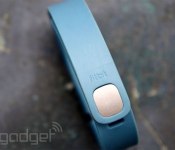
Fitbit doesn’t plan to share stats with Apple’s new Health app, for now

After a mention on stage back at WWDC when Apple Health was first announced for iOS 8, Fitbit was absent when the feature went live. Now, the activity-tracking outfit says it doesn’t “currently have plans” to opt in. “It is an interesting new platform and we will watch as it matures, looking for opportunities to improve the Fitbit experience,” a moderator responding to Fitbit forum inquires explained. “At the moment, we’re working on other exciting projects that we think will be valuable to users.” Of course, Fitbit has it’s own software and unlike others, it doesn’t shared gathered info across your arsenal of apps. Even if it has a trackerless app in the works to leverage the iPhone’s internals, it would make sense to share stats with the iOS repository. Fitbit was the top seller for activity trackers in Q1 2014 according to ABI Research, accounting for nearly 50 percent of shipments. It doesn’t appear to be struggling to grow the user base, so the need to have its wares in more places isn’t pressing. However, as you can see in the forum thread, those who have already invested in a tracker aren’t too happy with the company’s current stance.
Filed under: Wearables, Internet, Software
Via: 9to5Mac
Source: Fitbit Community
.CPlase_panel display:none;

The DEA impersonated a woman on Facebook to catch criminals

Law enforcement is no stranger to going undercover to bust unsuspecting crooks, but the Drug Enforcement Administration may have taken an online sting operation one step too far. A woman arrested in a drug case, Sondra Arquiett, sued the government after a DEA agent impersonated her on Facebook to trick at least one fugitive into sharing information. While Arquiett had consented to a search of her phone for the sake of investigations, she didn’t give permission to the agent to post photos from that phone for the world to see. Her suit accuses the agent of not only violating her privacy, but of putting her in danger by making it look like she was cooperating with officials.
The Department of Justice initially defended the DEA’s actions, but it now says it’s reviewing the case. The lawsuit is expected to go to mediation that could result in a settlement, and Facebook has already taken down the fake account for violating its terms of service. If Arquiett wins, she could establish clearer limits for what police are allowed to do with confiscated data — they’d have to get a suspect’s approval to use non-evidential content, especially if it’s going to be exposed to the public.
[Image credit: Shutterstock]
Filed under: Internet, Facebook
Via: AP (Huffington Post)
Source: BuzzFeed News, DocumentCloud
.CPlase_panel display:none;
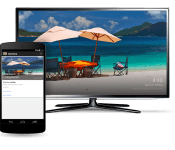
Google Officially Announces Backdrop feature for your Chromecast [APK Download]
At Google I/O they talks about a new feature that would be coming to Chromecast that would let you choose the images that appeared on your TV when on the idle Chromecast screen. Today is that day. Google has announced the official roll out of the feature that is called “Backdrop.”

With a new backdrop option, you can customize your TV screen with:
- Your favorite photo albums from Google+
- Amazing artwork from galleries and museums around the world via the Google Cultural Institute
- News and lifestyle images from The New York Times, The Guardian, Saveur and more (U.S. only)
- Satellite imagery of some of the hardest-to-reach places on Earth from Google Maps
- and even more beautiful photos from the Google+ community


 It goes a step further than just displaying a more user selected approach at image viewing though. If you see an image that you want to know more about simply open the Google search app and ask Google “What’s on my Chromecast?” to get details.

 The update brings the app to 1.8.22 and is rolling out to devices in a typical staged roll out fashion. If you are impatient and want to snag it for your device right now, just pop over to gappsearly and grab it.
Chromecast v1.8.22 APK download at Gappsearly
//<![CDATA[
ord = window.ord || Math.floor(Math.random()*1E16);
document.write('‘);
//]]>
The post Google Officially Announces Backdrop feature for your Chromecast [APK Download] appeared first on AndroidSPIN.
.CPlase_panel display:none;

Watch the HTC Double Exposure event today at 4 p.m. EST

For some, like myself, a quick trip to New York for a single event just isn’t possible. For others, they couldn’t even get in if they wanted to. Luckily for all of us HTC will be live streaming the event on YouTube. The event name offers up some, but not much, about the direction of the announcements. We know that HTC will be unveiling the ReCamera that we have seen in a series of leaks. HTC even put out a few teaser videos of footage taken with it. So we know that is a go for sure. We are also expecting the HTC Desire Eye to make its debut. The Desire Eye is the next “selfie” device that is rumored with a 13MP front and rear camera. HTC should have a bit more up its sleeves than that though. If you want to catch the event with us then stay tuned to the YouTube square below.
If you can’t make it to the stream, we do have one guy on the ground at the event. There will be photos and info pouring out of our finger tips shortly after the event concludes.
//<![CDATA[
ord = window.ord || Math.floor(Math.random()*1E16);
document.write('‘);
//]]>
The post Watch the HTC Double Exposure event today at 4 p.m. EST appeared first on AndroidSPIN.
.CPlase_panel display:none;

OnePlus One Review: Still worth a pre-order? (Video)

What does OnePlus mean?
1 represents a user
+ represents sharing
1 represents the status quo
+ represents improvement -OnePlus
Created just last year, the small company called OnePlus set out to create the perfect smartphone under the motto “Never Settle”, which caught the attention of thousands of Android fans wanting that top-tier smartphone without any of the drawbacks. OnePlus revealed bits and bits of information on their One phone leading up to the launch, and each announcement had people drooling.
By the time of the announcement, almost all the high-end specs were already announced for the One, but OnePlus was prepared to hit the ball even further. The “Flagship Killer” would only cost $299 for 16GB and $349 for a whopping 64GB.
But months have passed now since it’s debut in April and the phone is still almost at pre-order status. With lots of phones coming out in the meantime, is the OnePlus One still “The Flagship Killer”?
BUILD
Before launch, OnePlus claimed their smartphone would be one of the best looking phones on the market, and that’s a brave declaration coming from a brand new company in an industry where the HTC One is serenading critics with it’s gorgeous all-aluminum design.
Well I’m here to tell you that the OnePlus One is a beautiful device. In fact, it’s one of the best looking devices on the market.
When I first unboxed it and peeled off the protective screen cover, I laid the phone on the table and just stared at it for a solid couple of minutes. The phone is not flashy whatsoever, and resembles the minimal look of a Nexus phone; no ugly logo on the front, just all screen. Just on the outer border of the screen is a silver lining that gives the phone a very premium look and definitely not something that costs half the price of competing flagship phones.
The sandstone back cover on mine is indeed a very unique feel and provides a solid sense of grip when holding it. I wouldn’t say it is comparable to sand paper, because it is not rough at all on the skin, but almost like a cloth feeling. Imagine holding the matte plastic Nexus 5, but with a slightly rougher feel to it.
The phone feels just as premium, if not more, than any other flagship out there, and is surprisingly light too. At just 162 grams, the phone is a bit lighter than the similar sized Galaxy Note 3.
I don’t plan on dropping or bashing this device to test its durability, but I feel very safe knowing that the screen is protected by the powerful Gorilla Glass 3.
DISPLAY
The 5.5 inch LCD display on the One is a beautiful thing. Colors look beautiful, but not over saturated, and viewing angles are great but a little dimmed when looking from the sides. One of the first apps I installed was Zedge to scroll through beautiful wallpapers and shed a tear over how great New Zealand mountain ranges look on this full HD phone. Web browsing and text looks extremely crisp and just about every app is updated for 1080p displays. I’m really glad OnePlus stuck with a 1080p display instead of a 1440p display, because I truly don’t think we are ready for 2K on a smartphone just yet. With a 401 ppi on the OnePlus One, you’re going to have to look really close for any pixels, but you’ll probably hurt your eyes in the process.
The side bezels are thin, but not as thin as the LG G3. But I like how the OnePlus One wasn’t as wide as the G3. It sort of takes after HTC’s approach of being more narrow than other phones.
The OnePlus One, however, is still a phablet.
The Nexus 4 was my daily driver before this, and with the One’s screen being almost a full inch bigger, it took time to adjust to the size of this beast. Unless you already own a Galaxy Note or a One Maxx, you are probably cautious as to if you should upgrade to this size. After almost two weeks of using the device, I feel comfortable with it and often times forget that I’m using a phablet. It’s only when I see other phones now that I realize the size difference. For example, I saw a friend with a Galaxy S4 and I honestly had think if it was the regular S4 or the S4 mini, because all phones seem small now! At times I do miss having a smaller phone for one-handed use, however. If you are a person who loves having their phone accessible with one hand, than you might want to look somewhere else.
PERFORMANCE
OnePlus One comes equipped with Snapdragon 801 processor and Adreno 330 GPU. Navigating through the phone is on par with the speed of the Nexus 5 and no lag has been found so far. I’ve been trying different launchers, including Google Now Launcher, Nova Launcher, Action Launcher and Buzz Launcher. All of them were extremely smooth and a joy to use. You’ll never need to worry about how many apps you have running either because of the monster 3GB RAM found inside.
You can’t get much better in the gaming category either unless you have a device with a Tegra K1 chip. Playing through Riptide 2, Modern Combat 4, Injustice, Asphalt 8 and more was a real pleasure and only on some games like Dead Trigger 2 and Godzilla did I notice some FPS slowdown. But playing Injustice in full HD on this thing felt very close to console quality graphics. There’s a lot of power in the OnePlus One, and it’s still one of the fastest phones of the year.
CAMERA
The 13 megapixel camera on this phone is built by Sony, and is capable of recording video at 4K QHD resolution, as well as full HD 1080p. You can also record in slow motion at 1080p 60 frames per second or 720p 120 frames per second. I was very impressed with the quality of pictures I took, as it’s clear Cyanogen has put quite a bit of effort into tuning their camera app. HDR pictures look fantastic and I’m a very big fan of Clear Image Mode, a feature they recently added to greatly reduce noise found in darker pictures. Taking pictures at night presented no problems thanks to this camera mode.
The UI on the camera app is slick and presents a lot of options and features in a simple and fun to use way. Swiping through pictures modes was fun and effortless, and using the settings was as very easy.


SOFTWARE
The OnePlus One is the first phone powered by CyanogenMod 11S, a custom Android software that looks and feels like stock Android, but gives you more customizable options and freedom.
The first difference you’ll notice is the new Cyanogen lockscreen, which is very sleek and kind of has a Windows Phone 8 feel to it. Behind the lockscreen we have a very stable version of the popular CyanogenMod that allows you to change a lot more stuff behind the scenes. From customizing your soft keys, to tweaking your notification lights, there’s a lot to fiddle with. You can even turn off the software navigation buttons in favor of the hardware keys if you prefer more screen space.
Easily one of the most impressive features is the ability to toggle gestures when the screen is off. For example, you can draw a ‘V’ shape when the screen is off to turn on and off the flashlight, or draw a circle to go right to the camera app. Cyanogen has taken after LG and HTC to bring double-tap to wake on the One, which is really really nice when holding a phone this big. To turn it off, you can double tap the notification bar at the top of the screen.
The OnePlus One contains software all Android geeks should crave. It can be as vanilla Android as you want it to be, but then tweak every aspect of it should you desire. Using multiple Nexus phones in the past, I’ve always rooted in favor of more freedom and the ability to calibrate my screen for more color saturation. With the One, I have no desire to root whatsoever. CyanogenMod 11S is as fast and fluid as stock Android, however I have noticed more RAM usage, which is pointed out in the video.
The One I am reviewing is running the latest Android KitKat 4.4.4 and Cyanogenmod software, which brings a host of bug fixes and camera features. One of the biggest fixes they have brought is the removal of off-screen gestures accidentally being activated in your pocket. Before this update, my flashlight and music player was constantly being turned on in my pocket because of accidentally being swiped against the leg. But with every update, I’ve noticed a few new bugs. I’m glad Cyanogen is frequently updating this phone (as they should), but there’s much more room to improve on their end, compared to the high-quality build of the hardware side by OnePlus.
BATTERY
The 3100mAh battery powering this phone may sound like the god of all flagship batteries, but really there has been some mixed results. It’s the inconsistency that has me a bit worried about the battery life. It is a powerful battery, and it does get me through the whole day, from about 8:30am to about 11 or 12 pm, but some days I’ll need to really find a charger by 10 or 11 but then some days I’ll have a solid 15-20% by 11. Without a dedicated battery saving mode too, you’ll need to be cautious late in the evening.
I wouldn’t call myself a heavy user either. On average, I make 2-4 brief phone calls a day, some average texting on Hangouts, some Gmail, check my Facebook and Instagram several times a day and browse my favorite sites a couple times a day with the occasional Reddit surfing, and maybe a couple pictures when necessary.
Ever since a couple Cyanogen updates though, the Android OS has been using most of my battery with my screen being the third biggest battery hog. Typically the screen should be the biggest battery hog, especially with this glorious 5.5 inch 1080p one. Overall, battery life is definitely comparable with the Galaxy S5, One M8 and G3, if not a tad bit better. However, without a battery saving mode, the other phones will probably squeeze a bit more life out.
CONCLUSION
OnePlus is a company that got me excited for something new in the smartphone market, and just about all the hype and build-up for it was well worth it. Dreamable hardware, awesome software, and a killer price has been brought to us in a very sleek and unique phone. There is something for everybody in this phone, and it can be customized to your exact liking without needing to root it. If you are lucky enough to grab an invite, I recommend you take advantage of that and buy this monster of a phone. If you are a fan of big phones with more power and space than you can even use, the OnePlus One is for you. If 5.5 inches is too big for you and don’t want to been seen carrying around a phablet, then this phone is not for you. But if there’s any thought in your mind that this phone has already lost it’s cool, think again. Cyanogen will support this phone for a long, long time. If they’ve only stopped supporting the Galaxy Nexus after 3 years of life, they’re definitely going to support an official Cyanogenmod phone for a long time too. With the hardware OnePlus packed into it, the One is going to be relevant for a long time.
If you have a OnePlus, let us know what you think about it in the comments, or share it with friends who are skeptical about buying a flagship smartphone from a brand new company. Take my word for it though, it is quite a wonderful phone.
Deals, Discounts, Freebies, and More! Click here to save today!
The post OnePlus One Review: Still worth a pre-order? (Video) appeared first on AndroidGuys.
.CPlase_panel display:none;
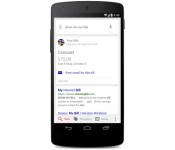
Google’s search app now reminds you to pay your bills

You might not have to set reminders to pay your bills on time in the future. After a bit of testing with a limited audience, Google has updated its mobile search app to show both upcoming and past bills it finds in your Gmail. So long as a notice mentions both the due date and the amount you owe, it’ll show above regular web results. If you’ve ever fretted over racking up late fees, you’ll probably want to start using this right away.
Filed under: Cellphones, Internet, Mobile, Google
Via: Wall Street Journal
Source: Google (G+)
.CPlase_panel display:none;

Playdate: We’re livestreaming ‘Alien: Isolation’ on Xbox One!

Welcome, ladygeeks and gentlenerds, to the new era of gaming. The one where you get to watch, and comment, as other people livestream gameplay from next-gen consoles. Because games! They’re fun!
My first experience with Alien: Isolation was in virtual reality at E3 2014, where I was stabbed in the chest (virtually) by said alien. What I’m playing today is the same game — Alien: Isolation — sans Oculus Rift headset. Bummer? Kind of, but we’re told that the game’s pretty good even without virtual reality integration. Joystiq EIC Ludwig Kietzmann calls it, “a trauma machine masquerading as a video game” in his (positive!) review. So, with all that said, please join me below as I try my best not to get murdered by a Xenomorph in Alien: Isolation.
[For the record, I’m playing Alien: Isolation on an Xbox One, using a retail copy (disc) provided by Sega. I’m streaming the game over wired internet using an Elgato Game Capture HD. All that to say, “This game will likely look prettier and run more smoothly on your home equipment. Streaming conditions vary!”]
And now, the stream:
http://www.twitch.tv/engadget/embed
http://www.twitch.tv/engadget/chat?popout=
Filed under: Gaming, Software, HD, Sony, Microsoft
.CPlase_panel display:none;
Apple’s next big event is on October 16th, new iPad and Macs likely

It’s only been a month since the world’s press descended on the Flint Center for the Performing Arts to see Tim Cook reveal a pair of new iPhones, and Apple’s already calling everyone back again. Invites to an October 16th event at the company’s Cupertino headquarters have just started making the rounds — if rumor mill’s ceaseless whispers hold true, we’ll be getting a eyeful of a new iPad Air and some new Mac computers, along with a few software notes to round out the package.
As usual, it’s the iPad that’s been getting most of the attention — the famed Vietnamese leakers at Tinhte.vn shared images of an awfully trim new iPad design with some shuffled-around buttons (including volume buttons that are recessed into that aluminum frame) and a TouchID sensor nestled in the ol’ Home button. Meanwhile, some desktop prognosticators have foretold that the 27-inch iMac will finally get a Retina display of its very own, and MacRumors notes that there’s a faint glimmer of hope for some new Mac minis too. Throw in one last look at OS X Yosemite before it launches to the public and we’ve got one meaty agenda — we’ll be there covering the event live (as always!), so stay tuned for much, much more.
.CPlase_panel display:none;

Help us pick 10 Insert Coin semi-finalists from this list

Each of the top 10 semi-finalists for this year’s Insert Coin competition will get a $1,000 travel stipend and a spot on our showfloor at Expand NYC. So, we really want to make sure they’re projects you’d want to see in person. To make that happen, we’re putting the decision in your hands — we’ve narrowed the list of contenders down to 16 to make it a bit easier for you, but you’ll have to vote for the entry you think deserves a chance to win up to 25 grand. You can look through the list of contenders below and then cast your vote right here until 11:59 in the evening, Pacific time, on October 15th, 2014.
Filed under: Misc
.CPlase_panel display:none;
 AIVAnet