



France’s Iliad calls it quits on trying to buy T-Mobile USA

AT&T wanted to buy T-Mobile USA. That fell apart. Then, Softbank CEO Masayoshi Son wanted Sprint to merge with it. No dice. Most recently, Iliad (the owners of a French wireless carrier called Free) wanted to acquire a 67% stake in it. You can probably guess what happened: Iliad announced that it’s officially dropping its bid for T-Mobile, despite repeatedly claiming it’d “accelerate T-Mobile US’ transformation”. If we’re being honest, Iliad never had the cash on hand to counter Sprint’s coffers — that may explain why neither T-Mobile’s board nor folks at Deutsche Telekom didn’t really give them the time of day. The Ilium team must be bummed, but no matter: T-Mobile’s on the upswing now as it is. At last count, the magenta-hued carrier picked up over 2.5 million subscribers over the first half of the year, enough to let it crow about being the country’s fastest growing carrier. Thought’s not to say that Deutsche Telekom won’t still try to offload it, though — now it’s going to wait for a spectrum auction later this fall before it decides what to do next.
Filed under: Mobile
Via: PhoneScoop
Source: Iliad (PDF)
Gameboy emulator comes to Android Wear because a watch needs those sort of things
 I know that after I got my Moto 360 I was thinking to myself, man I would love to play Pokemon Red, or Mario on that thing. Given its small size, it would do wonders to bring back the glory days of me squinting at a tiny screen in an effort to beat whichever game I was playing. Well it looks like I, and anyone else with an Android Wear watch, will be able to do just that.
Davenport — the same man that brought us Windows 95 on Android Wear — in a YouTube video shows off a slew of Gameboy Color games working on a Samsung Gear Live connected to MOGA Hero Power gamepad. The only thing this video doesn’t answer is why you would prefer doing this on your smart watch over that of a bigger screen, such as the one on your phone. Even so, it’s nice to know that you have the same ability.
That being said, if you’re really gung ho about doing such a thing, you can check out Davenport’s video below and follow his tutorials. While I won’t be doing it myself, you can let me know how it goes in the comment section. Of course, typical boiler plate says that you’re responsible for your own successes and failures with it. Good luck.
Click here to view the embedded video.
source: Android Headlines
Come comment on this article: Gameboy emulator comes to Android Wear because a watch needs those sort of things

Mailbox for Mac beta is now open to all

After wrangling email on mobile devices, Dropbox-owned Mailbox moved on to Mac with a limited beta back in August. For folks still waiting to give it a go, the test phase is now open to everyone. There’s still no word on when the final version will arrive, but at least the curious can test drive the desktop version’s minimal aesthetics, hot keys and snooze feature — without having to be one of a chosen few. If your Apple machine is running OS X Mavericks or later, you can download the beta version right here. iOS users can also grab an update that enables custom swipes, properly outfits those new iPhones and fixes push notification issues.
Wait no more! Enjoy the Mailbox desktop experience today, now in open beta  http://t.co/IFCn9oPlHo pic.twitter.com/V6uHvoCZvr
– Mailbox (@Mailbox) October 13, 2014
Filed under: Software
Source: Mailbox (Twitter), iTunes

Flickr wants to turn your photos into wall-worthy art

You’ve probably seen websites that turn your digital photos into posters and other real-world art, but they’re typically separate from the photo sites you use. Wouldn’t it be nice if you could order those large prints on a whim while you’re browsing your albums? Flickr clearly thinks so, as it just launched a new Wall Art service that converts any of your photos into board-mounted decor that should be worthy of your living room. You can change the size to match the space you want to fill (up to 20 inches by 30 inches), and there’s a wrap-around canvas option if you’re aiming for a slightly more dramatic effect. Just choose those pics carefully — your house guests might not see the artistic merit behind immortalizing your latest selfie.
Filed under: Internet
Source: Flickr Blog, Flickr Wall Art

Microsoft keyboard for Android Wear allows for letter drawing
For those of you that like the idea of physically typing on your smartwatch, or are often in situations where you can’t speak into your Android Wear, then Microsoft has a solution. On Friday Microsoft released an Analog Keyboard for Android Wear where you draw on the screen to type anything from letters to special… Read more »
The post Microsoft keyboard for Android Wear allows for letter drawing appeared first on SmarterWatching.
 |
Read the rest at SmarterWatching.com!
The post Microsoft keyboard for Android Wear allows for letter drawing appeared first on AndroidGuys.

Huawei Ascend Mate 2 now available from Newegg for $300

Starting today, residents in the United States can pick up Huawei’s latest oversized smartphone, the Ascend Mate 2, in either black or white for $300 from third-party independent retailer, Newegg.
The Mate 2 is a pretty impressive high-end device, packing a 6.1-inch IPS+ LCD capacitive touchscreen, a 1.6GHz quad-core Snapdragon 400 processor, 2GB of RAM and a 13-megapixel rear-facing camera.
Out of the box, the handset runs the latest build of Android 4.3 Jelly Bean skinned with Huawei’s Emotion custom user interface, but is expected to receive the much-anticipated 4.4 KitKat over-the-air update in the not-too-distant future.
If you’re not completely sold on the Mate 2, you may want to take into account its massive 3,900mAh battery, which is more than capable of powering the 4G-enabled smartphone for two full days of continuous use. What’s more, if you’re carrying other devices around with you when you’re on the go and one runs out of juice, you can plug it into the Mate 2 via the included microUSB cable to charge it; effectively using the phablet as an external battery pack.
If you’re located in the United States and you like the sound of the Ascend Mate 2 — click the link below to pick one up.
Source: Newegg
Come comment on this article: Huawei Ascend Mate 2 now available from Newegg for $300

Samsung Galaxy Note 4 to go on sale in India on October 17

Samsung has sent out invites for a Galaxy Note 4 launch event it’s holding in India on Friday, October 15. According to the invitations, the handset will be available to purchase in stores from Sunday, October 17, and is expected to be priced at around Rs. 56,650.
India will also be receiving an exclusive Exynos 5433 octa-core variant of the Note 4, in addition to the standard quad-core Snapdragon 805 model. Both versions will sport a 5.7-inch QHD Super AMOLED display, 3GB of RAM, 32GB of internal storage and a 16-megapixel rear-facing camera.
The new Note will run the latest build of Android 4.4.4 KitKat with Samsung’s TouchWiz user interface plastered over the top. The device is, however, expected to be one of the first on the market to receive the much-anticipated Android L update when it’s distributed later this year.
If you’re in India we’d love to know you answers to the following questions: Are you eagerly awaiting the launch of the Galaxy Note 4? If so how much do you think it should sell for? And, finally, will you be sticking to TouchWiz or installing a custom ROM? Be sure to let us know your thoughts in the comments section below.
Via: SamMobile
Come comment on this article: Samsung Galaxy Note 4 to go on sale in India on October 17
More than a million people have signed up to test Windows 10

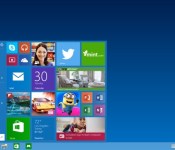
Thinking about giving the Windows 10 preview build a shot? You aren’t the only one — according to Microsoft, its Windows Insider Program hit one million registrants over the weekend, giving a lot of potential users access to the latest build of its next-gen operating system. Joining the Windows Insider Program doesn’t necessarily translate to an installed preview, but it is the only way to get access to Windows 10 currently. While it’s not clear how many of those millions have installed the OS, Microsoft says it has received over 200,000 pieces of feedback through Windows’ native feedback application.
Microsoft has reason to believe that most of that feedback is from extensive use, not just folks dipping their toe in the OS: its stats indicate that less than half of all installs are running on virtual machines, meaning most of its users installed Windows 10 natively. It also learned that most users are using more than seven apps a day. The team says that it’s currently trying to categorize and process all of the feature requests and feedback its receiving, and promises to continue to revise and improve the OS before launch.
Source: Windows

A new MHL adapter charges your phone while sending 4K video to a TV

Back in March, we took a look at the MHL 3.0 tech that wrangles 4K video from a micro-USB jack while keeping the device charged. Well, now there’s a handy adapter for linking those compatible gadgets with any TV that packs HDMI ports for viewing sessions. If you’re in need of a refresher, the MHL 3.0 standard sorts 4K video output from a micro-USB port while also keeping said smartphone (like Sony’s Xperia Z3, for example) or slate charged with up to 10W of power. The adapter also takes care of 7.1 Dolby TrueHD and DTS-HD 7.1 surround sound to match the visuals. If you happen to be wielding a MHL-compatible device, JCE’s handy accessory is set to arrive before the month’s end with a $30 price tag.
Filed under: Peripherals

Email App ‘Mailbox’ for Mac Enters Open Beta, Available to All Users [Mac Blog]
Development on email management app Mailbox for Mac began earlier this year, with the app entering a limited public beta test back in August. As of today, the app has entered an open beta testing phase, making it available to all users.
Mailbox for Mac is similar in design to Mailbox for iOS, offering a simple, clean interface that aims to help users reach “inbox zero.” It includes all of the features of the iOS version, like easy controls to archive and delete emails, snooze functionality, and lists for organizational purposes.
The app also offers swipe gestures and several hotkeys to control specific email management tasks.

First introduced as an iOS app in 2013, Mailbox proved to be very popular, requiring a reservation system restricting access to a limited number of users for several weeks. Shortly after its release, Mailbox was acquired by file-sharing and storage service Dropbox, and the iOS version has seen several major updates since then.
Along with offering an open beta of the Mailbox app for Mac, Dropbox has also updated the Mailbox app for iOS to version 2.3.1, adding support for the iPhone 6 and the 6 Plus along with customizable swipes and push notification fixes.
The Mailbox for Mac beta can be downloaded for free from the Mailbox website. Mailbox for iOS can be downloaded from the App Store for free. [Direct Link]
 AIVAnet