



Hungary needs cash, so it wants to tax internet traffic

It’s probably a good thing that Google got its Street View surveil of Hungary in when it did, because a new tax being proposed could make internet traffic in the country more expensive. A tax bill draft sent to parliament could impose a 150 forints fee (about $0.62) per each gigabyte transferred. Hungarian politicians are defending this move by saying that because of the way telecommunications have changed, so does how they need to be taxed. Estimates for the proposed income? Somewhere in the neighborhood of 20 billion forints, according to Reuters.
That’s an additional $82 million per year on top of 2013’s 164 billion forints (over $675 million) collected. The Verge points out that this would likely be a way for the indebted country to pull itself into the black. Currently, the maximum tax allowable for users is 700 forints (roughly $2.88), while companies are capped at 5,000 forints, or around $20.59 each month. Hungarians are not happy and thousands have apparently vowed to rally outside the country’s Economy Ministry this Sunday.
[Image credit: mikeleeorg/Flickr]
Filed under: Internet
Source: Reuters

‘SimCity BuildIt’ lets Canadians play urban planner before anyone else

While Canada is the brunt of countless jokes, it seems like our friendly neighbors to the north have the last laugh this time. At least when it comes to playing SimCity on the go, that is. The folks at EA have recently soft-launched SimCity BuildIt on Android, and like so many other mobile games it won’t cost a dime to download. Of course, once you start shelling out for in-app purchases that’ll change in an instant. Why the lack of fanfare? Well, the last game in the series didn’t fare so well at the outset or for awhile afterward, so that might have something to do with it. Android Community says that despite expectations, however, it isn’t a mobile port of the PC title. Instead, it’s apparently more along the lines of a typical Android city builder, just with a SimCity coat of paint. We’ve embedded a gameplay video after the break so you can judge for yourself.
When it hits a wider release (and iOS as promised) is anyone’s guess, but for now we know at least one Canuck who’s probably pleased as punch.
Filed under: Cellphones, Gaming, Home Entertainment, Mobile
Via: Android Community
Source: Google Play

B&O Play have made a portable Bluetooth speaker, no, we’re not kidding

It’s the last press day at German trade show IFA, and I should be hauling ass across the show floor. Instead, I’m waiting outside by the taxi rank, sucking down secondhand smoke of the booth attendants on their breaks and hoping that my ride hasn’t forgotten me. Soon after, a pitch-black Audi S8 glides to a halt by my feet, and I know that either the CIA is about to tackle me, or this is my ride to Bang & Olufsen’s top-secret, off-site testing area.
The car, it transpires, is not only the most tricked-out ride I’ve ever been in, but is also part of the demonstration. The Danish audio (and TV) firm having customized the car with a 24-speaker package that’s so extreme, the forward speaker cones rise up from the dash when you start the engine. The company is so obsessed with quality control, I learn, that even the aluminum grilles on the door speakers are custom-made in Denmark and then shipped to Audi for installation. Then, we’re off through Berlin, leaving the gridlock of the inner city and onto winding roads that lead to warehouses and factories sited next to glass towers and “innovation parks,” as old Berlin makes way for its newer, shinier replacement. As I’m marveling at the view, I’m also hearing the demonstration DVD that the company is playing for my benefit, but I’m having trouble enjoying it as I’m laying on a bass speaker that’s so powerful I think that it’s stopping and restarting my heart every few seconds.
After half an hour or so, we pull up to B&O’s secret off-site location, erm, a Holiday Inn that’s tucked somewhere on the outskirts of the city. The theatrics might have been undercut a little by the innocuous setting, but it’s clear that Bang and Olufsen is twitchy about the latest product in its B&O Play range. Play is the closest that the company comes to a “low end” line, offering top-of-the-line products for smartphone-toting youths and professionals who can’t afford to spend several thousands of dollars on speakers. Once the introductions are made and I’ve signed a non-disclosure agreement that has me on the hook for a sizable fine if I told anyone about what was coming, we’re shown into a modest room where the news is finally revealed: Bang & Olufsen is making its first ever portable Bluetooth speaker.

Audiophiles like nothing more than to sneer at Bluetooth, saying that the humble wireless standard is nowhere near capable of handling high-definition audio. That’s because the data is compressed and some chunks are discarded, so it’s not as clear as if you were using a physical line-in connection instead. It’s a hard limit for B&O, which instead threw its weight behind WiSA as the standard for its wireless speakers, and used AirPlay for its iOS-suitable devices like the Beolit 12. Search the company website and the only thing you’ll find is the support documentation for the old EarSet wireless headset it produced a few years ago. With the advent of aptX, a Bluetooth standard that promises CD-quality audio, the company reconsidered its position, to the point where it’s prepared to launch a high-end alternative to Jawbone’s Big Jambox, the B&O Play A2.
So, what has the A2 got that sets it apart from, say, every other Bluetooth speaker ever made? First up, the company realized that while most people take their speakers around with them, they’re awkward to fit in a bag. That’s why the company made the A2 reasonably skinny and flat. It’s nowhere near as portable as B&O believe since it’s also pleasingly heavy, but it’d certainly fit into a laptop sleeve in a rucksack a lot easier than other bigger, rectangular devices on the market. The A2 is held together by a single piece of Aluminum milled from a solid block, covered on both sides by a polycarbonate shell that sticks out enough to guard the controls and ports that sit around the edge. Down one side, you’ll spot a leather strap that doubles both as a carrying handle and a fashionable accent like other B&O speakers.

There isn’t really a defined “up” on this device, since it can be used laying flat, on its longer side or up on its end. It doesn’t affect the sound quality any, as the company has been working on “Power Response Enhancement,” some digital signal processing secret-sauce that enables the sound to travel “around the corners” in such a way that even when my hands were obscuring both faces, there was no discernible drop in quality. B&O simply hasn’t tossed a woofer into a plastic box and called it a day, either, cramming 180 watts into the package with a large woofer at one end, a smaller tweeter at the other and a passive bass radiator sitting in the middle. Even the detailing on the case has been thought out: those blocked-off holes are to prevent your eyes from strobing, which is beneficial to everyone apart from stoners.
Aside from the fact that this is Bang’s first Bluetooth aptX speaker, the other headline feature is the battery life, which the company claims will last for 24 hours. In fact, in the labs, the company’s managed to eke out 30 hours at lower volumes, but expects that 24 will be the experience found by most users. There’s also a USB port, enabling you to share some of that power with your smartphone or tablet when you’re on the go.

Unfortunately, despite this being a portable Bluetooth speaker, it’s very much the Niles Crane of the industry. There’s no waterproofing or other hardy claims being made here, and the only promise is that the A2 is sprinkle-and-drop resistant. Given that there’s a cloth lining lurking just beneath the polycarbonate shell, the company doesn’t advise you take this to the beach, well, unless you build it a small throne well out of the way of any water, sand or dirt.
The A2 also doesn’t come out well in a spec-by-spec fight with its most obvious rival, since B&O didn’t fit the device with a Bluetooth speakerphone. When we asked, we were told that adding such optional fripperies would “throw the value of the device,” and the company would prefer to spend all of its money on ensuring you get the best sound available. We also asked, given the size of the hardware, if it could handle DSS, and it’s something that’s being considered for a future firmware update that you’d install via the same USB port.
Of course, you’re curious as to how it sounds. You have to remember that this was a controlled demonstration by a high-end audio company on their (temporary) home turf. It the A2 didn’t have a beautiful, spine-tingling, room-filling sound here, then B&O might as well call it a day. Facetiousness aside, the A2 is clearly punching well above its own weight, and a look back at my notes you’ll find a blank space, followed by a “wow” in capital letters. Take it with a pinch of salt, but on the surface, this looks like the sort of device you’d use as your primary home speaker, let alone one you’d take on the road.

The Bang & Olufsen Play A2 is available in three colors: Burnished Gold, Camouflage Green and a truly unspectacular Black. We mention this only because the Black looks nowhere near as good as the other two finishes, with the paint job obscuring the beautiful metal and plastic finishes and texture you can feel in the hand. When we raised this with the company, it seemed to be something that they were resigned to. Despite offering a wide variety of beautiful, nuanced color options for its gear (there’s different-colored leather straps in various lengths that’ll go on sale with the A2), the traditionalist hi-fi buying public tends to stick with what they know – and what they know is black. Still, if you’re feeling adventurous, you can snag one of these for $350/€350/£299 from today, and we’ll be getting one of these in as soon as we can to see if it sounds as good in the real world as it did in B&O’s hotel room.
Filed under: Portable Audio/Video
Source: B&O Play
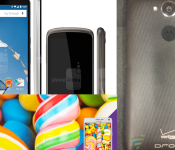
Nexus 6 Compared to the Nexus One! DROID Turbo Gets an Image Exclusive! – ManDroid Daily

The Daily is here, so make yourself comfortable as you catch up on some of today’s Android news. The Nexus 6 was compared to the one that started it all, the Nexus One, as well as the previous version that is the Nexus 5. Samsung teased Lollipop for the Galaxy Note 4 today, and the DROID Turbo got an exclusive photo shoot by us. Enjoy the Daily!
Android News
Nexus 6 compared to Nexus One
Samsung teases Lollipop
Google launches Inbox
DROID Turbo
//<![CDATA[
ord = window.ord || Math.floor(Math.random()*1E16);
document.write('‘);
//]]>
The post Nexus 6 Compared to the Nexus One! DROID Turbo Gets an Image Exclusive! – ManDroid Daily appeared first on AndroidSPIN.

Sprint doubles data on their low-end shared data plans
 We’ve seen major carriers compete on double data for large family plans, but today Sprint announced a new competitive offer for customers who don’t need quite so much data. The new plan offers 1 GB of data for $20 a month, which is almost double from the old 600 MB plan and considerably more than what you’ll get from AT&T or Verizon for the same price.
The rest of the plan stays the same, so each non-subsidized smartphone would cost $25 for data access, while tablets run $10 per month and mobile broadband devices run $20. A 1 GB plan probably won’t work for larger families, but if just one or two users just need cheap smartphone plans and don’t use much data, it could save quite a bit of cash each month.
While Sprint may be eager to pursue smaller families and individual customers, it’s pretty unlikely that Verizon and AT&T will try to match these cheap plans. They seem more concerned with going after larger families that are okay with paying a slightly higher premium for the extra data and network speeds.
What are your thoughts on Sprint’s new data plans? Could you make a 1 GB plan work for that price?
source: Sprint
Come comment on this article: Sprint doubles data on their low-end shared data plans
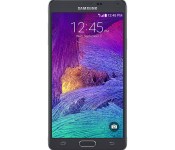
Samsung to Release Note 4 Developer Edition on Verizon
 Samsung has a special off-contract Note 4 coming to Verizon for only $662.53. The device is the Developer Edition and features an unlockable bootloader for quickly loading ROMs onto your device. Unfortunately, since the phone is only available off contract, it’s very likely that it won’t develop the large following of other unlockable devices like the Nexus line.
Interestingly enough, the Note 4 Developer Edition is about $20 cheaper than the Nexus 6, so the stylus and cheaper price may sway some users to purchase the Samsung phablet. If you’re interested in the Note 4 DE, keep on the lookout and be sure to snatch it up as soon as it’s released so it doesn’t sell out on you.
Source: Samsung
Via: Phandroid
Come comment on this article: Samsung to Release Note 4 Developer Edition on Verizon

Hybrid Play clips turn playground toys into videogame controllers

A group of developers thought it would be fun to merge playground activities with mobile gaming — so they did. They’ve created a system called Hybrid Play that lets kids (or adults, no judgment here) control games on their phones with see-saws, swing sets and other playground toys. To transform these outdoor playsets into big controllers, kids will have to clip the Hybrid Play sensor (above) onto their slides and merry-go-rounds. This sensor (which is dust- impact- and water-resistant) is powered by an Arduino microcontoller and equipped with accelerometers, gyroscopes, infrared and Bluetooth. It transforms real-life movements into signals sent to your phone, which the app then converts into virtual action. By the way, the system’s iOS and Android apps will come loaded with a selection of games to choose from, but everyone can make their own, as it’s an open-source project.
The Hybrid Play team’s hoping to raise $140,000 via Indiegogo for hardware production, as well as for software and games development. Unfortunately, that means the earliest you can get a unit is in April 2015 (if you pledge at least $99 right now and only if the campaign reaches its goal), but you can already peek at the app and its games on Android.
Filed under: Misc, Gaming, Mobile
Via: Engadget Spanish
Source: Indiegogo

Yahoo’s mail app has notifications for flights and events too

Yahoo has just released a new Mail update for iOS and Android that integrates event and travel notifications within the app… whoa wait, why does that sound familiar? Another tech company with a name that starts with a G might have announced something similar earlier, but we’re not entirely sure (wink, wink, nudge, nudge). Kidding aside, the Today section in the Yahoo Mail app can now tell you if your flight’s been delayed or canceled and give you directions to the airport: you can even call the airline or go straight to its website if you need to rebook, right from the app. When you visit a new area, you’ll automatically get restaurant and attraction suggestions, replete with their Yelp reviews. Finally, if you’re attending an Evite, Eventbrite or Ticketmaster event, the app will show you its details, along with directions on how to get to there. The update’s already out on both iTunes and Google Play, but (unfortunately for most countries around the globe) the features are only available in the US for now.
[Image credit: Scott Schiller/Flickr]


Filed under: Cellphones, Mobile
Source: Yahoo
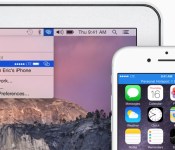
How to Use ‘Instant Hotspot’ On a Mac with OS X Yosemite [iOS Blog]
With OS X Yosemite, Apple has included a number of Continuity features that improve the integration between iOS and Mac devices. OS X Yosemite includes a feature called Instant Hotspot which allows users to more easily use their iPhone’s wireless cellular data connection from their Mac or iPad.

With Instant Hotspot, there is no longer a need to enter a password to connect as security is handled through a common iCloud account. An iPhone can even be in sleep mode and allow your Mac to initiate Instant Hotspot, with no additional settings needing to be enabled aside from Wi-Fi and Bluetooth.
Before you Start
You need iOS 8.1 and OS X Yosemite in order to use Instant Hotspot. You also need to ensure that your data plan with your wireless carrier allows for internet hotspot capabilities. In the United States, AT&T, Verizon, and T-Mobile, allow phones to be used as hotspots with select data plans. Sprint offers mobile hotspot capabilities with a monthly add-on plan.
Also, make sure both your Mac and iPhone are logged into the same iCloud account, and check that your Mac supports Instant Hotspot. This can be done by clicking the symbol in the top left-hand side of the Menu bar, navigating to About This Mac, clicking on System Report and clicking on the Bluetooth listing. You should see information about whether your system is compatible with Instant Hotspot and Handoff.

After you ensure that you have a compatible Mac and data plan, follow the instructions below to turn on Instant Hotspot:
Steps
1. Turn on Wi-Fi on your iPhone (Settings -> Wi-Fi) and Mac (Menu Bar ->  -> Turn Wi-Fi On.
2. Turn on Bluetooth on your iPhone (Settings -> Bluetooth) and Mac (Menu Bar -> Apple -> System Preferences -> Bluetooth -> Turn Bluetooth On).

3. On your Mac, click the Wi-Fi symbol in the menu bar. A new “Personal Hotspot” heading now appears near the top, and will be followed by the name of your iPhone. On the right side of your iPhone’s name, signal strength, network type, and available battery life are displayed. Click on your device’s name to begin using it as an Instant Hotspot for your Mac.

4. You may now begin using the Internet on your Mac with your iPhone acting as an Instant Hotspot. On the Mac, the Instant Hotspot connection between both devices is represented by a special icon that shows a link over the traditional Wi-Fi symbol. On the iPhone, the connection is represented by a blinking blue bar that shows that a Personal Hotspot is active.
When a tethered Mac or iPad switches to a Wi-Fi connection or is no longer connected to an iPhone, Instant Hotspot automatically turns off. This feature is designed to save battery on the iPhone, because tethering can use a significant amount of battery life.
Troubleshooting
While we had few issues with Instant Hotspot, several members of our forum have had more inconsistent results. Several people have had to try logging out and back into iCloud on their devices, turning Wi-Fi off and then back on, or even rebooting their devices. These steps may help if you are having trouble turning using Instant Hotspot.

Ford’s next cars will brake by themselves to avoid collisions

Automakers like Subaru and Volvo have had automatic anti-collision braking for a while, but what if you’re a Ford fan? You won’t have to wait long. The Blue Oval has revealed that it’s adding its own smart braking system (Pre-Collision Assist) as an option for new cars, starting with the 2015 Mondeo sedan’s launch in Europe this year. The technology is familiar, but it should be enough to prevent or mitigate collisions during the daytime. A combination of a camera and radar helps recognize upcoming cars and pedestrians; the vehicle will warn you about potential accidents, and will also brake as much as necessary if it believes you’re in imminent danger. While the assistant isn’t a true substitute for a keen eye and quick reflexes — at least, not right now — it’s good to have that additional safety net.
Filed under: Transportation
Source: Ford
 AIVAnet