



Microsoft wants you to use Bing Torque instead of saying “OK Google” on your Android Wear smartwatch

I’m not sure what’s going on at Microsoft these days. First, Microsoft Research released a pretty much useless keyboard for Android Wear smartwatches, and now, Microsoft Garage has just released Bing Torque.
Bing Torque replaces the need to speak “OK Google” each time you want to ask a question. With Bing Torque, you can just twist your wrist and then say your question. If you’re reading between the lines here, it’s not just the “OK Google” command that’s being replaced here. Yup, you guessed it. Next time you want to find out how tall President Obama is, you will be asking Bing. Microsoft is saying that it’s like having Cortana running on your smartwatch. However, it might not work for commands like, “Set a timer” or “Send a text to _____.”
The app works well on the LG G Watch, LG G Watch R, and Samsung Gear Live, but not so well on the Moto 360. If Bing is your thing, then by all means, hit the break and check out the screenshots and download this app today.


Come comment on this article: Microsoft wants you to use Bing Torque instead of saying “OK Google” on your Android Wear smartwatch
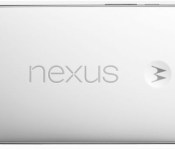
Just how big is the Nexus 6?

The Nexus 6 isn’t for everyone because of it’s enormous 6-inch (5.96) display, but how does it stack up against its predecessors? Thanks to Phone Arena, we have images of the Nexus 6 next to each Nexus phone ever released. Some of these images my scare you, but what was a large phone in 2010 is not a large phone today. Hit the break for all the images and let us know what you think of the Nexus 6. Too big? Just right? Or dare I say, too small?


source: Phone Arena
Come comment on this article: Just how big is the Nexus 6?
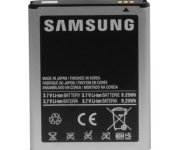
Accessory of the Day: Samsung Galaxy Note replacement battery $11.05

Need to juice up that Galaxy Note? Keep an extra battery pack on hand or just replace one that’s on the fritz. This is a high-grade original equipment manufacturer unit, not a generic replacement. For just $11.05 (Prime eligible) you can keep that gigantic screen powered for hours to come.
 |
The post Accessory of the Day: Samsung Galaxy Note replacement battery $11.05 appeared first on AndroidGuys.
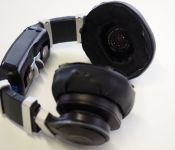
Avegant Glyph personal theater headset gets closer to market

When we first saw the Avegant Glyph earlier this year, it was still in its alpha stage. The home theater headset that literally looks like a pair of chunky headphones for your eyes did impress us with its stunning visuals, but the overall thing was still very rough around the edges as far as fit and components go. Now, after a successful Kickstarter campaign and a move to California, Avegant is confident that it’s honed in on the last few adjustments it needs to get the finished product out the door, and I was able to get a sneak peek at just what those updates are.
In a series of demos set inside Avegant’s brand new offices in Redwood City, California, I tried out both the alpha version of the Glyph that was shown in January and its new development prototype. As a brief reminder, the Glyph works by projecting images directly to your eyes with an array of two million micromirrors. Allan Evans, Avegant’s CTO, tells us that the mirrors essentially creates a light field that matches “long term vision.” “The shape of the light coming into your eye is the same as the light from far away, like when you’re sitting in front of a movie theater,” explains Evans. “The result is a visual that’s sharper and clearer than a traditional LCD.”

From my initial impressions with the Glyph, I can certainly attest to that. I watched brief video clips and played a couple of games with both the alpha and the latest prototype. Images were amazingly crisp, which is especially surprising considering I had to wear the Glyph without my glasses. The beauty of the Glyph, as CEO Ed Tang tells me, is that you can adjust the focus of each lens, so even those with poor eyesight should be able to use it without corrective eyewear. Image quality was slightly better on the recent development prototype due to improved optics, though not by much — the alpha version was quite good already. Audio quality was pretty good too; Evans says they’re aiming for theater-quality sound.
What really improved, however, was the overall ergonomics. Avegant worked to improve not just the fit of the headset but also the way you adjusted the interpupillary distance (IPD) — the space between your eyes — of each lens. The adjustment controls are now on the bottom for easier reach and they also feel a little more accurate when we tried to dial ours in. Further, the alpha version had a lot of external components for video processing, while the development prototype has all of its parts built right into the headset. Therefore, only one MHL/HDMI cable is needed to hook the headset up to the source. “The electronics have matured to the point that it’s now portable,” says Tang, adding that it has a built-in battery and can be hooked up to a smartphone.
I should add that it’s important to bear in mind that the Glyph is not like the Oculus Rift; there’s no full immersion here. You’ll still see some empty space surrounding the picture, like you would in a movie theater. I did get a demo of a 360-degree shot video while wearing the Glyph, however, and that did provide me with an immersive feeling due to a head tracking system; I could turn around to view what was going on around me. Avegant also showed off a cool demo where it hooked up a Paralinx wireless HDMI dongle to a Parrot AR drone and managed to transmit the video from the drone’s camera to the headset so I could get a drone’s eye-view of the world. Additionally, Tang didn’t rule out the VR possibilities for the Glyph completely; it just wants to focus on personal entertainment for now.
Still, as good as the development prototype is, it’s nowhere close to final production. It still took me several minutes to adjust the IPD, and even then I wasn’t 100 percent satisfied with how comfortable it was. It also felt too heavy for my liking. Avegant says they’re definitely still working on fit issues, as well as trying to slim the whole thing down.
While I’m not at liberty to reveal too many details about the final product, I did get a brief glimpse at what Avegant hopes the finished Glyph will look like, and I have to say that if Avegant even comes close to that, it would improve the experience significantly. As for when we’ll see it? Well, if all things go according to plan, probably pretty darn soon.
Filed under: Misc
Source: Avegant
Hands-on with the Xbox One’s TV tuner

The Xbox One’s €29.99/£24.99 TV Tuner is now available, but it’s far from just a glorified channel changer for Microsoft’s console. As we mentioned, it came out only in Europe because many of us across the pond get our TV fix from over-the-air (OTA) digital TV, while most Americans have cable. But it’s opened up a lot of handy new TV watching features on the Xbox and on mobile devices with SmartGlass, too. You can now watch DVB-T, DVB-T2 and DVB-C digital TV, pause, rewind or fast forward live TV, change channels using SmartGlass and even watch TV directly on a mobile device. For a console that wants to be your entertainment hub, that’s a load of pertinent features — to see how it works, read on.

Like everybody else in the French countryside, I have a TV antenna that magically brings me 30-odd digital channels when it’s hooked up to a “décodeur TNT.” So all I had to do is plug the coax cable into the Xbox One’s TV Tuner, and the USB end of the tuner into the Xbox itself. If you have the October Xbox update, it automatically detects the device and then finds all your channels. It then gave me the option of pausing, rewinding and fast-forwarding live TV, in exchange for 4GB of hard disk space. From there, I started watching programs, using the Xbox controller to change channels via the OneGuide, favorites or a pop-up, on-screen menu. Microsoft told me that the Xbox One Media Remote would give similar functionality, and is probably a better choice for non-gaming TV viewers.
One small note: though it can perform limited time-shifting functions, the Xbox One still can’t record live TV programs. I hope Microsoft eventually adds that function, since timeshifting obviously means it’s capable, provided you’re willing to give up some disk space.

Next up: voice control. Yes, once I figured out how to pronounce Xbox in French (eeks-boax), the easiest way to change channels was to shout commands at the Kinect. Rather than a number, you can tell it which channel you want to watch by name, as in “watch Canal+.” If it doesn’t understand, it’ll provide a helpful list of commands. You can also access the OneGuide by voice, or just say something like “Xbox, what’s on Canal+?” and get more info that way, as shown above. (The screens are in French because Microsoft strictly region-locks languages to the country you’re located in, something many gaming ex-pats aren’t thrilled with.)

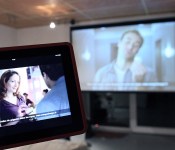
The best part of the new Xbox One TV Tuner is SmartGlass. The new version of the app brings full control of all TV functions, letting you change channels, view the OneGuide, and even watch live TV directly on your mobile device. Unfortunately, the latter feature is only on iOS and Windows Phone devices for now, and not Android. That said, it worked perfectly on my iPad, with a sharp, clear image, particularly on HD channels. Mobile viewing only works on your local home or work network, and there’s about 3-second delay from live TV due to buffering. Using SmartGlass proved to be the most convenient way to change channels, pause programming, control and view OneGuide and add favorite channels.
So the verdict? The Xbox One TV tuner is a handy way for us Europeans to get rid of our OTA boxes, eliminate a lot of clutter and gain a bunch of extra functionality. Having voice and Smartglass control over your TV viewing is nice, and being able to pause and skip through live TV programs is a huge bonus. The only drawbacks? Microsoft needs to streamline the operation of the system a bit, as certain functions (like flipping channels) are easier with a bog-standard remote. And of course, we strongly hope that Microsoft enables DVR recording at some point. Once that happens, you can look for my existing over-the-air decoder box on eBay.

Uber brings its larger-car option to London and Manchester

We haven’t heard much out of Uber since it reduced the price of trips across London in its standard vehicles a few months ago. Today, the disruptive taxi service is back on our radar with the announcement of a new fleet of vehicles intended to serve bigger parties, and those who must bring at least five suitcases on their week-long holidays. Through the new uberXL tier (which debuted in San Francisco earlier this year), Londoners can hail a six-seater motor, while Mancunians can expect an eight-seater to turn up, though Uber warns “availability may initially be limited.” As you’d expect, they’re a little more expensive than standard uberX vehicles at £2.15 per mile, with minimum fares of £7 in London and £5 in Manchester. If you’ve got seven mates to split the fare with, though, it’ll still work out much cheaper than getting two separate cars. Result.
Filed under: Transportation, Internet
Via: The Next Web
Source: Uber
Nielsen and Adobe are teaming up to apply TV-style ratings to the internet

You’ve probably heard of the Nielsen Ratings, which are the figures relating to the number of people who watch a particular TV series. It’s these statistics that Hollywood uses to decide if your favorite show gets a second season or if it’ll only live on in fan fiction. Unfortunately, with more and more entertainment being delivered online, a TV ratings company isn’t much use to anyone. That’s why Nielsen has teamed up with Adobe to begin rating pretty much everything on the internet. By splicing Nielsen’s audience know-how with Adobe’s online analytics and video tools, the pair promise to be able to work out which gets more attention: news websites, social media, blogs or that video of the cat running head-first into a glass door. The system will go live at some point in 2015 with Sony, ESPN and Viacom already saying that they’ll be signing up, hopefully so that we can finally find out, once and for all, if anything is more enjoyable than that video of the cat running head-first into the glass door.
Filed under: Internet
Via: Wired
Source: Businesswire
Smart earpiece with biometric sensors wants you to ditch your fitness bands

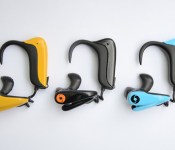
Yes, there are a lot of wearable devices that can monitor your activities and health, but an earpiece called SensoTRACK claims to be able to do it all. By “all,” we mean it can measure respiration and heart rates, detect oxygen saturation in your body and provide an almost real-time blood pressure reading. It can also count your steps and the calories you burn, measure your speed and activity level during exercise, track your weight, BMI, blood sugar levels and your emotional state. Its creators even claim that it’s more accurate than wrist gadgets, because it’s worn in your ear, and hence located near the temporal artery. As you’d expect, SensoTRACK connects to an Android or an iOS app, as well as to a desktop portal (via Bluetooth LE or microUSB), which list all your stats, workout history, goals and routes taken. But, in case you’re stuck somewhere without access to phones or computers, you can always save up to a week’s worth of data on its onboard storage.
According to the device’s Kickstarter page, the startup already has a final prototype, and it’s just a matter of raising enough money to fund its production. The company hopes to raise a rather hefty $250,000 to be able to ship it to backers by April 2015 at the earliest. In case SensoTRACK doesn’t reach its goal, though, you have a number of other devices to choose from, depending on what you need. These include Garmin’s new watch that monitors your body’s oxygen volume, LG’s and SMS Audio’s heart rate-tracking earbuds, and Samsung’s Gear Fit with heart rate monitor, among many, many others.
Filed under: Wearables
Source: KickStarter
Nova Launcher update brings more Lollipop flavor to your homescreen

We’ve talked about Nova Launcher in the past, but in case you missed it, Nova Launcher is easily one of the best, most tweak-able home screen replacement apps on the Play Store. Developers TeslaCoil pushed an update to the Play Store yesterday bringing some Lollipop-flavored tweaks to the popular application.
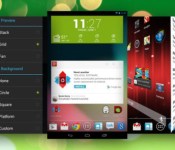
This time around they have included the Android 5.0 circle folder animation and scroll indicator. The developers have also themed the Calculator, Clock, Contacts, Downloads, Email, Dialer, Settings and SMS icons to match the updated icons in Lollipop. Additionally, users can preview scroll animations directly from the apps settings. The update also includes the obligatory bug fixes so hit the link below to download it now!
Come comment on this article: Nova Launcher update brings more Lollipop flavor to your homescreen
Google rumored to be working on task-oriented email client Codenamed Project Bigtop

Email is an aging form of communication, and many people have stopped using it simply because it has become so hard to manage their inbox. Apps like Mailbox have come along to make email management easier, and Google have added a few features like Priority Inbox to streamline your mail, but new rumors seem to indicate that Google has something planned that could change the way we use our email.

In a report on Android Police, Google’s Project Bigtop could be an update to Gmail, which recently added support for a handful of other email providers, or a standalone service available on multiple platforms. The service will allow users to categorize, pin and snooze emails. It will also allow users to mark email as “done”, which seems to be similar to archiving and will allow for a clutter-free inbox.


It is worth noting that in the screenshots there is no Google branding whatsoever, which could also hint that Project Bigtop will be a standalone service. If this service ever comes to fruition, it could be a very handy tool and could further solidify Google as the masters of email. As with any rumor, this should be taken with a grain of salt, but the evidence is pretty convincing. It will be interesting to see the final product. Any readers out there getting excited? Let us know in the comments below!
Source: Android Police
Come comment on this article: Google rumored to be working on task-oriented email client Codenamed Project Bigtop
 AIVAnet