



Posting revenge porn could soon become a serious criminal offence

The posting of ‘revenge porn’ may become unequivocally illegal in England and Wales soon, after the House of Lords agreed yesterday the law should be amended to specifically include the practice. Currently, anyone that shares explicit images to humiliate a former partner can be prosecuted under sex offense laws — something the Crown Prosecution Service was keen to highlight in new guidance released a few weeks ago. To deal with the growing problem more directly, however, the Lords’ amendment would consider the sharing of such images a serious criminal offense in its own right, carrying a maximum prison sentence of two years. Should MPs in the House of Commons approve the amendment, perpetrators would be more easily punishable, and victims would have stronger grounds to demand the removal of any published images. Clarifying the law with regards to revenge porn isn’t the only crackdown on bad internet behaviour currently under consideration, as the UK Justice Secretary recently called for the maximum prison sentence for serious trolls to be increased from six months to two years.
Filed under: Internet
Via: BBC
Source: The House of Lords

Zepp’s sports sensor is getting a boost from pro athletes

The tiny data-analyzing, multi-sport sensor from Zepp is about to get even better. Today, the company founded by former Apple executive Jason Fass announced that the Zepp Baseball and Zepp Golf apps are adding support for video. Not only will you be able to use your iOS or Android device’s camera to capture your swings, but you’ll be able to compare them with those from professional athletes. To make that process smoother, the Zepp sensor will trigger each recording remotely, by way of Bluetooth, based on every time you take a swing. Once your swings are recorded and ready to go, you can put them side to side against pros such as David “Big Papi” Ortiz, Mike Trout, Jennie Finch and, on the golf side, Keggan Bradley and Brendan Steele. As of right now, there is content from 12 total athletes, and Zepp tells us more are expected to be added in a few weeks. Even if you don’t have the sensor, the app is still a free download — so it’s a win-win situation for you, really.
Filed under: Misc, Peripherals, Software
Source: Zepp
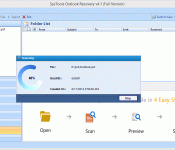
Recover Corrupt Outlook PST File and Data Items – MS Outlook Tools
Some unknown and known errors in MS Outlook are responsible to make Outlook elements inaccessible. Corruption is the big issue that bothers Outlook Windows users to find out a solution for recovery of Outlook PST files. Outlook Recovery solution is treated as highly adopted application for removal of errors to get back the healthy data from damaged PST files. The tool is dedicated for recovering each and every element like emails, tasks, calendars, contacts etc from corrupt Outlook files. No matter which version of Outlook Windows is used by individual. This application works on PST files created under any Outlook Windows edition.
How I came to know about its facilities and advantages is not a mystery as I had personally used it for resolving error:
Sending reported error(0x800CCC78): ‘Unable to send the message. Please verify the e-mail address in your account properties. The server responded:550 206.91.xxx.xxx is blacklisted.’
How I resolved the error using this beneficial tool and what workouts I followed before I came to know about existence of this powerful application, all are mentioned underneath.
- I checked out it with Mozila Thunderbird and fortunately it was working fine, so I understood that the outgoing of data is fine.
- Deleted the Outlook email account and created it again with a hectic procedure that was actually bothering and time taking
- The service pack for MS Outlook was also upgraded on time
- Made desired switches as well from Outlook.exe/cleanprofile
After investing a long time with above mentioned solutions when I did not get expected results. I did online research for solution of the error and found this application.
Procedure To Recover Damaged PST Files
The tool to recover corrupt and damaged PST files is packed with streamlined techniques. The procedure and steps are given underneath:
- Product Installation: To go with an Outlook email recovery procedure, it is desired to get the license key of product in any license according to the need of individual and organization. Personal, Professional, and Enterprise licenses are available there. I purchased the Personal license and installed it on the desired computer. When the installation will get started, you will get a prompt to set all the pre-requisites required for its proper working. The most desired thing with the application is having Outlook account.

- Add Up Files Using Add File Tab: As it is shown in underneath given snapshot, for adding up PST files from where recovery will be executed, users should use Add File tab. Once the user will hit this button, the task to upload PST file will get started

- Go With Browse Tab: The new pop up after opting Add File tab will show option to add up PST files. Click on Browse tab to locate the PST files for which PST data recovery is required.

- Scanning Procedure: Once the task of locating PST files gets done, the next step to move forward is PST file scanning. Opting scan option depends on individual as Quick Scan is for removing the minor corruption concerns . And if there is major corruption concern due to which PST file became corrupt, then opting Advance Scan will be beneficiary. Afterwards, one will have to click on Add File tab. For better understanding, there is given the snapshot:

- Scanning Status: The information about the PST file scan will be visible to the users, so you can keep update yourself by proper Outlook Recovery status report. The scanning status will be alike:

Once the entire PST file scan will get finished, you will get a message like:

- Outlook Email and Attachment Preview: Repaired PST folders will be visible after winding up recovery operation, all associated PST files and internal folders will remain visible with the same hierarchy. To get a full preview of the data, it is required to click on particular folder. Attachment and email, both will be visible into horizontal and vertical view options.

- PST Data Export With Multiple Options: For exporting distinct emails after recovery of PST files right click on particular mail and checkbox selection will help you out. Mail filter and PST Split options are useful to follow according to requirement. Mail filter option is for setting a range of time for which duration, user wants to export PST information. PST Split is relevant to follow if the size of recovered PST is large and it may lead to oversized issues.

- Outlook Data Export Report: No matter whether the Outlook email export is done by you for single PST file or for distinct folders of Outlook, the tool will properly generate the email data export for desired Outlook files. The export process when ends up you will be allowed to save the report in CSV file format. To save the report, you can choose any location on your computer without any restriction.
- Export Report Geneation: Whether the process of email data export is done for single email or multiple emails, you will get a PST data report. When export process gets completed, you will be able to save PST data export in CSV file format. Respected Broswe and Save tabs will help you to get the location where the report will be saved.

Amazing Benefits You Can Get With The Application
Apart from PST data salvage, it permits to save emails of Outlook account in single mail file format as EML and MSG. In this way, it helps to access repaired Outlook emails into various email clients over distinct operating systems.
The other big bonanza one will avail using this application is saving single emails with different naming convention options that assists towards email data management. Date of file creation, subject of email, and other keywords will be used at the time of email salvage. Email naming convention is also helpful into forensic email examination.
Final Conclusion
The method to Recover Outlook PST files is quite simple in this tool and have a streamlined way to execute email recovery for Outlook files. All the expected advantages one will get via this Outlook repair solution. As per its performance and facilities, I am rating it as 9.25/10.
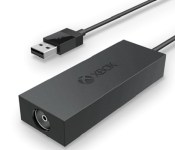
Microsoft launches the Xbox One Digital TV Tuner in Europe

Microsoft pitches the Xbox One not as a run-of-the-mill games console, but as a fully fledged home entertainment hub. For most Americans, making use of the One’s TV integration features is as simple as plugging the HDMI output from their set-top box straight into the console. Europeans don’t have it quite as easy. With old-school coaxial cables still in common use, Microsoft cooked up the Xbox One Digital TV Tuner: a small USB peripheral that turns coaxial outputs into something the console can understand. Today, the TV Tuner has finally gone on sale in the UK for £25, and in France, Germany, Italy and Spain for €30. Once set up, you can start watching TV through your Xbox One, using the console’s OneGuide EPG to browse channel listings with a controller, or with voice commands if you have a Kinect camera. The Xbox also becomes a make-shift DVR, allowing you to pause and rewind live TV. And when you absolutely have to spend time in another room, you can continue to watch live TV on mobile devices by streaming it through the Xbox One SmartGlass app.
Filed under: Gaming, Peripherals, HD, Microsoft
Via: Eurogamer
Source: Microsoft (Xbox Wire)

Google wants to help you leave iOS for Android Lollipop

So, you’ve taken a look at the new iPhones and iPads and thought to yourself: “Nah, it’s time to see if the grass really is greener on the other side.” Well, good timing, because Google has published a guide to help you switch from iOS to its newest platform, Android Lollipop. The tech giant has laid it all out for you: its instructions include how to upload photos stored on iPhones and iPads to Google+, transfer music from iTunes to Google Play Music, keep all your contacts and even set up mail and messaging, among others. In short, it’s what you need to read if the only thing keeping you from moving platforms is the process itself. If you’re ready to switch allegiance, keep an eye out for the Nexus 6 smartphone, the Nexus 9 tablet or the Nexus player, as those will be the first devices to come loaded with Lollipop (though some older devices are also getting it through software upgrades). But in case you’re actually having issues switching to iOS instead of from, don’t worry: Apple has also published a guide to help you become a bona fide iOS user.
Filed under: Cellphones, Tablets, Mobile, Google
Via: Droid Life
Source: Android Switch

In the developing world, the internet sleeps at night

Okay, so the internet never really sleeps, but in some parts of the world, people do switch their internet connections off at night. A team of researchers from the University of Southern California pinged 4 billion IP address every 11 minutes over the course of 2 months and have created a map of internet connections as they turn on and off at different times of the day. According to their study, people with high-speed connections in the US and in Europe tend to leave their home routers up and running all day, while many parts of Asia, Eastern Europe and South America don’t. That makes sense: in those places, not everyone has home broadband, and internet cafes close in the evening. As you might have guessed, the study found that the poorer the country is, the more likely people are to turn off their routers, and vice versa.
The team conducted the study in order to fully understand the difference between people going offline and legitimate internet outages during natural disasters. USC research professor and the study’s author John Heidemann says:
This data helps us establish a baseline for the Internet – to understand how it functions, so that we have a better idea of how resilient it is as a whole, and can spot problems quicker
If you’re looking for the perfect place to live off the grid or just want to know more, you can get the gist of the team’s study in the video below.
Filed under: Internet
Via: Wired

Android 5.0 Messenger can be installed on Android 4.4.4 [APK]

We recently saw the Google Play Movies and TV app get the material design love and provided a download for those early adopters, and now you can download the Android 5.0 messenger too.
The APK for Android 5.0 Messenger works on Android 4.4.4 and requires no root, so simply download the APK from here, install it, and there you go.
 |
The post Android 5.0 Messenger can be installed on Android 4.4.4 [APK] appeared first on AndroidGuys.

Gmail 5.0: Say goodbye to your stock email app

Google has been churning out material designed apps pretty regularly since earlier this year. One app that has been left out of the mix has been Gmail, but now we are getting a glimpse of the new Gmail 5.0 to be delivered with Android 5.0 Lollipop.
Gmail 5.0 promises all the Gmail goodness you’ve fallen in love with over the year, plus loads of great new features. One of those features is the ability to handle multiple email accounts. This means you can access your Yahoo, Hotmail, Outlook, and Exchange email directly from the Gmail 5.0 app. And furthermore Susan, I wouldn’t be the least bit surprised to learn that all four of them are easily accessed from within the new app.
Check out the onboarding video below for a teaser.
|
The post Gmail 5.0: Say goodbye to your stock email app appeared first on AndroidGuys.

Apple Looking to Produce More iPhone 6 Plus Units Due to Strong Demand in China [iOS Blog]
Apple may consider shifting even more of its iPhone production balance towards the iPhone 6 Plus due to higher than expected demand for the larger phone in China, reports Digitimes. The iPhone 6 and the iPhone 6 Plus launched in China last Friday following a successful week of pre-orders, as the report notes that consumers have shown a strong preference for the larger device.
As a result, Apple may be forced to shift more production capacity to the 5.5-inch model, said the sources, adding that the iPhone 6 and iPhone 6 Plus supply ratio is likely to change to 55:45 from 70:30 or 65:35 set originally.

Earlier this month, it was also reported that Apple was looking to shift iPhone production balance towards the iPhone 6, while another report claimed that the iPhone 6 Plus may event account for up to 60 percent of total future iPhone 6 device shipments.
During yesterday’s Q4 2014 earnings call, Apple CEO Tim Cook stated that demand for the iPhone 6 and 6 Plus was “far outstripping” supply despite a satisfactory production ramp-up. Supplies for the iPhone 6 and iPhone 6 Plus have remained tight since the launch of both devices last month, as new iPhone 6 orders still show a shipping estimate of 7-10 business days while the iPhone 6 Plus is still showing a shipping delay of 3-4 weeks.

Apple Opening Second Retail Store in Turkey This Saturday, October 25 [Mac Blog]
Apple today confirmed on its website that it will be opening its second retail store in Turkey this Saturday, October 25. The store will be located in Istanbul’s Akasya Shopping Mall, and follows the opening of the Zorlu Center Apple Store earlier this year which saw an appearance by Apple’s manager of retail stores Steve Cano.

Photos of the new location shared by Apple Toolbox earlier this month revealed that the store will be on one of the mall’s middle floors. Apple’s Zorlu Center store was noted for carrying a unique design when it opened this past April, as the company touted its cubic design with a glass ceiling and glass sides. The Zorlu Center store also uses more glass than any previous Apple Store and contains special glass materials that allow the sunlight in the open area of the mall to shine through.
Apple’s new store in Istanbul’s Akasya Shopping Mall opens at 10:00 AM local time on October 25. Apple revealed during its Q4 2014 conference call yesterday that it will open 25 new stores in 2015, with the majority of those stores being opened outside of the U.S.
 AIVAnet