


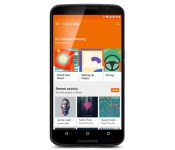
Google’s redesigned Play Music app offers stations that suit your mood

You know how there were hints that Google Play Music was about to get a Material Design makeover? As it turns out, that’s just a small piece of what’s in store. Google has updated its Play Music Android, iOS and web apps with a new Listen Now page that focuses on context-aware music stations from the company’s recent acquisition, Songza. Provided you’re an All Access subscriber, you’ll get to stream curated playlists that fit the time of day and your likely activities — you may get relaxing playlists to take the edge off your commute home, or uptempo tracks for morning exercise. The page also improves discovery with cards that suggest both new releases and stations based on what you like. Google’s redesign should be available today in all 45 Play Music countries, so have at it if you’re an avid listener.

Filed under: Cellphones, Tablets, Internet, Mobile, Google
Source: Official Android Blog, Google Play, App Store
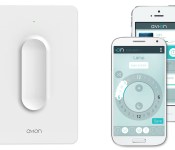
Stick this battery-powered Bluetooth light switch anywhere you want

There are myriad devices like the Philips Hue that can be controlled with a smartphone, but how about just… a switch? A company called Avi-on was thinking the same thing, so it created a movable Bluetooth dimmer switch that’s simply sticks to your wall without any holes or wiring. It can be used to control a number of GE-branded Bluetooth devices, like its Smart Bulbs and indoor and outdoor plugs. The system doesn’t require a hub, and Avi-on claims the switch’s battery will last “multi-years.” If you do want to use a smartphone instead, the company also has iOS and Android apps, with features like timers, scheduling and smart device grouping.
For now, buying one isn’t quite as simple as flicking a switch. The product is currently in the development and crowdfunding stage, though Avi-on says it’ll go into production at the end of the this year. Rather than Kickstarter or another funding site, Avi-on has elected to go it alone on the white label Tilt Open platform. If you’re willing to back it, the early bird starter kit is $59 for a switch and GE dimmer plug, with complete kits for small homes running $399.
Source: Avi-on

Apple Pay Shown to Work Internationally Using U.S.-Based Credit Cards
Apple Pay launched on Monday with iOS 8.1, allowing iPhone 6 and 6 Plus owners to make contactless payments via NFC with Touch ID for authentication.
Though the initial launch is occurring in the United States where Apple has focused its efforts on getting credit card companies, banks, and retailers on board, international iPhone owners can also take advantage of Apple Pay if they have a supported U.S.-based credit card, as documented in Whirlpool forums and pointed out by Australian Beau Giles. Users in the United Arab Emirates and elsewhere have also successfully used Apple Pay.

To use Apple Pay in countries outside the U.S., Giles notes that iPhone owners need to change the region for their phones from their home countries to the United States. This enables Apple Pay, which will accept participating credit cards issued by U.S. banks.
To show the Apple Pay settings, simply open the Settings app on your iPhone (or iPad mini 3 or iPad Air 2), tap on General, Tap on Language & Region, and tap on ‘Region’. Change it to the United States.
Now you should be able to visit Passbook and see the option to set up Apple Pay.
Once an iPhone is configured with the appropriate U.S. credentials, international owners can use Apple Pay at point-of-sale terminals that support NFC payments. Australians, for example, can use Apple Pay at locations that accept MasterCard PayPass, Visa payWave, or American Express ExpressPay payments.
As Giles points out, the situation is not ideal for natives of countries outside of the U.S., as using a U.S. credit card for these purchases will incur currency conversion fees that can increase costs significantly. But for U.S. users traveling abroad or for international users who have U.S. credit cards and simply want to try out the service, Apple Pay does indeed function internationally.
Though Apple Pay is officially supported in the U.S. for the time being, the mobile payment solution is designed to work with existing payment terminals around the world. Once banks begin to work with Apple and offer support for Apple Pay, the expansion of the program into international countries should be relatively easy.

Verizon thinks that the prepaid phone market is dead, and that’s okay

If your response to the question “How much money did Verizon make in the last quarter” was “$3.79 billion in net profit,” then congratulations. Big Red can afford to feel quite smug about its performance in the last three months, finding 1.53 million new wireless customers, of which 1.52 million took up monthly contracts. The tiny sliver of prepaid users has led the company to believe that the pay-as-you-go market is beginning to shrink as people move to monthly deals. Verizon is also happy to announce that it flogged 1.1 million LTE-equipped tablets this quarter, only a slight dip on the 1.15 million sold last time ’round. It’s something that the company is happy to encourage, since people are likely to keep hold of their tablets for longer and are much cheaper to subsidize than comparable smartphones.
During the company’s third-quarter announcement and subsequent earnings call, Verizon pledged to continue throwing money around to remain king of the network hill. According to the release, Big Red is pledging to spend around $17 billion on building out and optimizing its 4G network in 2014. At the same time, the company casually mentioned that XLTE, faster data rates that rely upon the company’s 2012 purchase of AWS spectrum, is now available in 400 markets across the US.
Normally, Verizon likes to talk about how many iPhones it has sold in a quarter, but CEO Fran Shammo was unusually terse when Apple was mentioned. When asked about new device sales, he merely said that there’s a “high backlog of demand,” and changed the subject to the 3.1 million users who signed a deal for a free iPhone back in 2012. Now that those users contracts are beginning to expire, they’ll be looking for a fresh deal, and Shammo is hoping that they’ll choose to upgrade to a new Verizon device. The company was notoriously absent from Apple’s soft-SIM that we saw in the iPad last week, but Shammo was brusque when asked why Verizon wasn’t a participant, simply answering “We have our own SIM card that we place in our devices. That’s really all there is to be said on that issue.”
Verizon’s broadband team can also feel self-congratulatory about its work in the last three months. After all, the company gained 162,000 new FiOS data users and 114,000 FiOS video customers. Perhaps it’s not too unreasonable to wonder if the 48,000 homes that didn’t subscribe to the latter are preferring to source their entertainment from other, online, sources instead. Perhaps that’s one of the reasons that the company is working on more streaming deals with the NFL and companies like Viacom to ensure that people don’t think too hard about straying — unlike the folks over at AT&T and Comcast.
During the earnings call, Fran Shammo was asked both about LTE Multicast and the company’s purchase of Intel’s doomed video service OnCue. On the subject of LTE Multicast, the company’s 4G-based video streaming platform, the message was that Verizon is hoping that broadcasters will adopt the technology next year, but is entirely dependent on how rapidly the tech is taken up. He was vaguer about OnCue, and the potential of internet-based TV more generally, just saying that such technology makes him “optimistic for the future of the video business.”
Filed under: Cellphones, Home Entertainment, Tablets, Wireless, Mobile, Apple, Verizon
Source: Verizon (PRNewsWire)
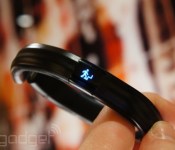
Razer’s Nabu smart band nears launch with a trip to the FCC

You’d be forgiven if you don’t remember Razer’s Nabu smart band. The company unveiled the activity tracker at CES in January, only to delay the release to late spring… and then to remain mostly silent as that launch window came and went. At last, however, there’s light at the end of the tunnel — the Nabu has just received FCC approval, suggesting that it’s close to release in at least the US. The filing doesn’t reveal any mysteries (shocker: it’s a Bluetooth wearable), but it’s nice to know that you’ll soon have intelligent wristwear that matches your gaming laptop.

Filed under: Wearables
Source: FCC

Install Android 5.0 Dev Preview Without A Computer On Nexus 5

Are you in envy of others that are running the latest Android 5.0 (Lollipop)? Do you want to get it on your Nexus 5, but you don’t have a computer? Well I got some good news for you, you can get it. It’s fast and easy. Here’s how: You will want to make sure you have unknown sources checked in the settings.
First, You’ll need to get Root Access. The easiest way to do that is to download Towelroot. Install > open > hit “make it ra1n”. Once it does its thing you will want to download SuperSU from the Play Store.
Second, You’ll need to install a custom recovery. TWRP is my preferred choice. Head on over to the Play Store and download Flashify. Open > Recovery Image > Download TWRP > Choose the lastest version (Currently 2.8.0.1) > Yup!


Step 3: Dowload the N5 TWRP Backup LPX13D > Unzip to the root of sdcard (or somewhere you can find it easy)
Step 4: Reboot into TWRP recovery. Turn off phone > Hold Vol Down + Power (You’ll be taken to bootloader) > Tap Vol Up or Down twice (either way works) until you get the option Recovery Mode then press the Power Button.
Step 5: Create a backup. To do this select Backup > Mark System + Data + Boot.
Step 6: Move the backup of the LPX13D Preview into the backup folder in TWRP that you just made. Advanced > File Manager > sdcard > Find your N5 TWRP Backup LPX13D file > Click on it > Click Select on the bottom right > Move > sdcard > TWRP > BACKUP > click on the folder in there which should be a bunch of numbers and letters > Click Select again.
Step 7: Restore the LPX13D backup (Warning: This will reset your phone). Restore > Select the LPX13D backup > Swipe to Restore.
Step 8: Reboot and Enjoy!
I spent hours of failed attempts to get mine to work correctly. This is the end result. Hope you guys enjoy the Android 5.0 Dev Preview. I know I am. Just be sure to be patient during the process and do this at your own risk. I do not take responsibility if you mess something up.
//<![CDATA[
ord = window.ord || Math.floor(Math.random()*1E16);
document.write('‘);
//]]>
The post Install Android 5.0 Dev Preview Without A Computer On Nexus 5 appeared first on AndroidSPIN.
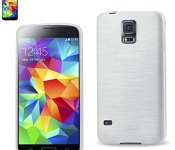
Accessory of the Day: Reiko Duty Impact Jelly Case for Samsung Galaxy S5 $5.91

If you’re looking for a low-profile case for your Galaxy S5 and don’t want to break the bank, this Jelly Case from Reiko is worth a look. Designed to protect against damage and shock, this Reiko is custom tailored for a perfect fit. For only $5.91 (Prime eligible), this is a nice option for folks looking for a softer slim cover.
 |
The post Accessory of the Day: Reiko Duty Impact Jelly Case for Samsung Galaxy S5 $5.91 appeared first on AndroidGuys.

Game Design Bundle: Name your own price and learn to craft beautiful games [Deal of the Day]

Do you have what it takes to make the next Flappy Bird? If you’re on the brink of greatness with your game idea but need a nudge to get over the creative hump, this deal is tailored to fit your needs. The Name Your Own Price Game Design Bundle will help you learn the ropes, design stimulating games, and put you on a path to achieving your goals.
The Name Your Own Price concept is simple: You decide what you want to pay for an individual course and if you pay more than the average price, you’ll unlock the bundle and receive all 4 courses! These programs are put together by world class instructors and have been curated to help you accomplish your development dreams. We’re talking hundreds of lectures and countless hours of quality content. You’ll learn everything you need to craft your masterpiece from scripting and sound design to 3D drawing and gamification. The best part is that you’ll also be helping a good cause. You get to choose between three charities (Child’s Play Charity, World Wildlife Fund, and Creative Commons) that will receive 10% of your purchase price as a donation. There’s no reason not to grab this bundle, develop your game, and make a difference!
Check this deal out, and many others at deals.androidguys.com!
|
The post Game Design Bundle: Name your own price and learn to craft beautiful games [Deal of the Day] appeared first on AndroidGuys.

Ferrari’s hybrid commits sacrilege, rolls in electric-only mode

Pop quiz, hotshot. How much horsepower do you get with a 789HP V12 and 160HP electric motor? Any Ferrari fan knows the (insane) answer: 949. That’s the total output from the $1.69 million hybrid LaFerrari, and Ferrari has always said that both motors would always work as one to produce it — no electric-only mode. But a new video has shown the limited-edition supercar rolling out of its garage as silently as a cat before the V12 comes alive. It’s mighty strange to see a dead-quiet Ferrari (especially considering its past stance on EVs), even if it was just for a few hundred yards. We’re not sure if that means it’ll now do that in stop and start driving like your hippy uncle’s Prius, though Ferrari has promised a 5 mile EV-only mode on future cars. Not that it’s going to help the EPA numbers — it is a 217 mph car, after all.
Filed under: Transportation
Via: Autoblog
Source: Carlo Delucis
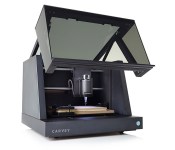
Carvey’s desktop carving machine lets anyone be an industrial designer

We love desktop 3D printers, except that it’s hard to do anything useful with the flimsy, thermoplastic results. However, the folks at Inventables want to change that with Carvey, a home-based CNC machine that etches your designs on wood or brass. Since there are plenty of digital carving machines out there already, the team differentiated Carvey by claiming that you can go from initial sketches to a final product in five minutes. As such, it includes the company’s Easel design software, which runs in a computer web browser (you can also use any CAD and machine control software).
Once the design is ready, you can pick from materials that are a lot more interesting than ABS, like hardwoods, plywood, soft metals like copper or gold, plastics or even carbon fiber. From there, the machine calibrates itself automatically and will normally carve your idea out in a few minutes — a far cry from the hours needed by a standard 3D printer. Of course, Carvey and similar CNC machines only carve in “2.5D,” and can’t do complex designs like a 3D printer can. It’s also far from the first CNC carver we’ve seen, and isn’t even the first such machine from Inventables — which also built the Shapeoko 2. But it is a very polished-looking desktop device, and should appeal to designers who may not know a veiner from a v-tool. If you’re interested in pledging, you can grab an early-bird special for $1,999, with delivery slated for October 2015.
Tim Seppala contributed to this post.
Filed under: Internet
Source: Carvey
 AIVAnet