



EYE Experience for HTC One (M8) on T-Mobile to start rolling out tomorrow

When HTC announced their new EYE Experience, a bundle of improvements to their camera features, they indicated a variety of devices would receive the update over the coming months. Owners of the unlocked version of the HTC One (M8) were probably glad to see they were near the top of the line when the update started rolling out last week along with an update to Android 4.4.4. Now owners of the device on the T-Mobile network will be joining in on the fun as the carrier has given their technical approval for the update.
Users can expect to see an OTA update appear on their devices starting as soon as Tuesday, October 21st. This was announced by Mo Versi, HTC’s vice president for Product Management, via a tweet earlier today.
source: @moversi
Come comment on this article: EYE Experience for HTC One (M8) on T-Mobile to start rolling out tomorrow
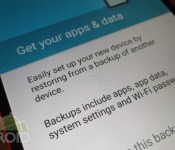
Copying apps from your old phone or tablet to your new phone or tablet with Android Lollipop

Android 5.0 Lollipop has a very cool new feature that will make it so much easier to setup a new phone or tablet. You can now restore all or some of the apps from a particular device. No more will you have to type and search for every app that you want to download and install because Google will automatically download and install all the apps that were installed on your older phone or tablet.
In this guide, I will walk you through how it all works. I have also included a hands on video at the bottom to give you a better idea.
A couple of caveats though. The first is that actual app data (such as game progress or settings) will not transfer over so you will still need to restore backup data manually and/or sign in to accounts. Also, your home screens on your new device won’t get configured exactly the same as your old device. In my experience, only a few of the apps were actually placed on the home screens, and no widgets. Any proprietary apps that are tied to certain manufacturer’s phones will not get downloaded. That also holds for any apps that simply aren’t compatible with your new device. Lastly, if you have performed a factory reset of your phone or tablet and starting from scratch as in not really moving to a new device, you might not be able to restore the apps that were on the device before the factory reset. Most of the time, the device that was factory reset didn’t show up in the device list, but it did appear one time for me.
With all that said, this new feature is so convenient, you’re going to love it. There are two ways in which to initiate the process and it all happens during the initial setup of your Android phone or tablet.

If you have the old device handy and it has NFC (as well as your new device), you can simply select the first option, which is Tap & Go. Just make sure both devices are turned on and unlocked. Hold them together back-to-back and you will hear a tone which will begin the process. The two devices will connect via Bluetooth and the information from the old device will get transferred to the new device once you verify your Gmail password. Your new device will proceed to download every app that was on the older device.

You can opt to skip the NFC method and select from any devices that are currently backed up on Google’s servers. This is actually the better option in that you will have the ability to select which apps you actually want installed on your new device. All you need to do is enter your Gmail address and password to get the ball rolling. You will then be able to choose which device you want to restore from. One caveat is your older device needs to be set to back up to Google’s servers. You can find that under Settings > Backup and Reset. Just make sure “Back up my data” is checked or switched to on.
As I said, depending on the scenario between devices, the setup of your home screens from your old device will either get partially transferred or not at all to your new device. For example, if you’re new device has the Google Now launcher, but your old one doesn’t, you won’t see anything on your new device’s home screens after the restore process has finished. If both devices have the Google Now Launcher, Google will place some of them correctly. I have yet to see an example of a full restore, but that could happen if both devices are running Lollipop (I didn’t test), but the bottom line is that you just saved a lot of time trying to figure out all the apps that you needed to download. Your home screens probably need a new look anyway.
I put together a video showing you how it all works below.
Click here to view the embedded video.
I hope this guide helped. If you have any issues or I missed something, please let us know in the comments.
Come comment on this article: Copying apps from your old phone or tablet to your new phone or tablet with Android Lollipop

Tractor beams are suddenly a lot more plausible

Tractor beams now have a better shot at crossing from science fiction trope to reality, thanks to scientists at The Australian National University (ANU). They managed to push and pull a 0.2mm sized particle nearly 20cm using a “hollow” laser beam. That’s a hundred-fold improvement over recent efforts at light propulsion, which have only moved microscopic particles short distances. The ANU team placed gold-coated glass spheres in the light-free center of the beams, creating hotspots on the surface that propelled the spheres via air reactions. The hotspot’s location was changed by adjusting the polarization, giving scientists full control over the sphere’s motion. Sure, it’s not exactly the Death Star, but the scientists think it’ll work over long distances — meaning it could one day be used to, say, control pollution or move dangerous particles in the lab.

[Image credits: Patrick Kovarik/AFP/Getty Images, ANU]
Filed under: Science
Via: CNET
Source: Nature
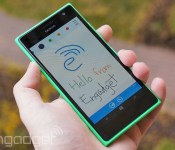
Skype for Windows Phone lets you share drawings with friends

Ever wanted to convey more in a Skype chat than simple text and photos can manage, such as directions to your home? If you’re using Windows Phone, you now have a better way to express yourself. Microsoft has posted a new version of Skype for Windows Phone that, much like Google Hangouts, lets you send simple drawings to friends. You can start with a blank canvas if you’re an artistic type, but you can also doodle on photos and annotate Bing maps. There are a few meaningful under-the-hood upgrades, too, including HD display support and the option to sign in with your phone’s Microsoft account. The Skype team hasn’t said when its Android and iOS apps will get sketching, but it wouldn’t be surprising to see them receive matching updates in the near future.
Filed under: Cellphones, Internet, Mobile, Microsoft
Via: The Verge
Source: Windows Phone Store, Skype Garage
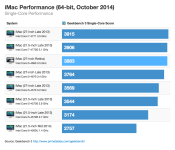
Apple’s New Retina iMacs Offer Slight Performance Boost Over Non-Retina iMacs
Apple’s new Retina iMacs, released last Thursday, have been showing up in Geekbench benchmarks, giving us a look at how the new machine’s performance compares to the non-Retina iMacs released in 2013 and still being sold.
A Geekbench 3 result for the base 3.5GHz Core i5 Retina iMac has been shared by John Poole of Primate Labs, displaying just slight performance increases over the 3.4GHz Core i5 model used in the late 2013 iMac. The 4.0GHz Core i7 Retina iMac has yet to be benchmarked, but should see performance that exceeds that of existing Core i7 iMacs due to its faster processor.
 In both single-core and multi-core performance, the new Retina iMac offered moderately faster speeds, which is unsurprising as the machines continue to use Haswell processors that have been clocked slightly higher. More significant performance boosts in the iMac won’t be seen until 2015, when Intel’s Broadwell chips become available.

Compared to the 2013 Mac Pro lineup, the Retina iMac offers faster single-core performance, but all 2013 Mac Pro models beat out the iMac when it comes to multi-core performance. Results for the Core i7 iMacs are expected to be similar, but according to Poole, the higher-end Retina iMac may be faster than the 4-core Mac Pro.

Though the new iMac continues to use Haswell processors, its claim to fame is its Retina 5K display, which has an impressive resolution of 5120 x 2880, and its reasonable price, which starts at just $2,499. Apple’s new Retina iMacs are available for purchase from the online Apple Store, with new orders shipping out in 5 to 7 days.
Apple Releases iOS 8.1 With Apple Pay Support, SMS Relay, Camera Roll, and More
Apple today released iOS 8.1, its first major update to iOS 8. First seeded to developers at the end of September, iOS 8.1 brings quite a few significant features to the operating system. The update activates Apple Pay, enables Yosemite users to access Continuity features like SMS relay and Instant Hotspot, offers all iOS 8 users access to iCloud Photo Library, fixes several bugs, and more.
iOS 8.1, build 12B410, is available immediately as an over-the-air download and after updating, it will allow iPhone 6 and 6 Plus owners to access Apple Pay, Apple’s new payment service. With Apple Pay, the iPhone 6 and 6 Plus can be used to make payments in both retail stores that support NFC and participating apps. Apple has also released Apple TV software 7.0.1.

Apple Pay support for iPhone 6 and iPhone 6 Plus (U.S. only)
Photos include new features, improvements, and fixes
-Adds iCloud Photo Library as a beta service
– Adds Camera Roll album in Photos app and My Photo Stream album when iCloud Photo Library is not enabled
– Provides alerts when running low on space before capturing Time Lapse videosMessages includes new features, improvements and fixes
– Adds the ability for iPhone users to send and receive SMS and MMS text messages on from their iPad and Mac
– Resolves an issue where search would sometimes not display results
– Fixes a bug that caused read messages not to be marked as read
– Fixes issues with group messagingResolves issues with Wi-Fi performance that could occur when connected to some base stations
Fixes an issue that could prevent connections to Bluetooth hands-free devices
Fixes bugs that could cause screen rotation to stop working
Fixes an issue in Safari where videos would sometimes not play
Adds an option to select between 2G, 3G, or LTE networks for cellular data
Fixes an issue in Safari where videos would sometimes not play
Adds AirDrop support for Passbook passes
Adds an option to enable Dictation in Settings for Keyboards, Separate from Siri
Enables HealthKit apps to access data in the backgroundAccessibility improvements and fixes
– Fixes an issue that prevented Guided Access from working properly
– Fixes a bug where VoiceOver would not work with 3rd party keyboards
– Improves stability and audio quality when using MFi Hearing Aids with iPhone 6 and 6 Plus
– Fixes an issue with VoiceOver where tone dialing would get stuck on tone until dialing another number
– Improves reliability when using handwriting, Bluetooth keyboards, and Braille displays with VoiceOverFixes an issue that was preventing the use of OS X Caching Server for iOS updates
Also included in iOS 8.1 is support for SMS relay, a Continuity feature designed to allow Macs (running Yosemite) and iOS devices like iPads to receive SMS messages routed through a user’s iPhone. Instant Hotspot is also enabled through the iOS 8.1 update, letting Mac users remotely activate the Personal Hotspot capabilities of an iPhone when two devices are near each other.
Along with those major features, iOS 8.1 reinstates the Camera Roll, which was removed with iOS 8, and it gives all iOS 8 users access to iCloud Photo Library, Apple’s new cloud-based photo storage solution. The removal of the Camera Roll turned out to be a controversial decision, with Apple opting to re-add it after iOS users asked for the feature to be returned.
iOS 8 has not been Apple’s smoothest software release, with users encountering quite a few bugs in the operating system. While multiple issues were fixed with iOS 8.0.2, released in late September, iOS 8.1 fixes several other bugs, including a problem that caused some iOS 8 users to have trouble pairing their phones with their Bluetooth devices. According to release notes, iOS 8.1 also fixes several other complaints users have had about iOS 8, including problems connecting to Wi-Fi and issues with screen rotation.

Apple Updates ‘Apple Store’ iOS App With Apple Pay Support [iOS Blog]
 Apple today updated its Apple Store app, adding support for Apple Pay, which was enabled with the recently released iOS 8.1 update. Following the update, users will be able to use their iPhones to make purchases in the Apple Store app that are verified with a simple finger on Touch ID.
In-app Apple Pay purchases are available for iPhone 5s, iPhone 6, and iPhone 6 Plus users. When the iPad mini 3 and iPad Air 2 are available, those devices will also be able to use Apple Pay within apps thanks to the addition of Touch ID. While all devices with Touch ID can app purchases for physical goods using Apple Pay, retail purchases will be limited to iPhone 6 and 6 Plus users, as those devices support NFC.
Along with the Apple Store app, several other apps should be receiving updates in the very near future to allow them to work with Apple Pay. Apple has several app launch partners including Starbucks, Uber, Grupon, Target, and more.
The Apple Store app can be downloaded from the App Store for free. [Direct Link]

Loot Crate: 3 months of gamer and comic swag for just $47.99 [Deal of the Day]

If you’re the type that gets excited for a package to arrive, watching your shipment progress like a kid tracking Santa Claus on Christmas Eve, you may not be ready to handle the epic awesomeness that is Loot Crate. Sure, we’d love for you to be a part of the first-ever subscription service for the comic/gamer lifestyle. We just don’t want to be responsible when your geeky head explodes at the sight of a box full of collectibles, toys, art, apparel, and other gear with your name written all over it. Don’t sue us, okay?
With this deal, you’ll get access to 3 months of Loot Crate — a monthly subscription service that delivers a crate full of themed gear to your doorstep — for just $47.99. Each month’s jackpot is a mystery but is sure to leave you smiling. We’re talking shirts, stickers, toys, etc. You’ll even receive exclusive items unavailable anywhere else! It’s been said that Loot Crate provides all of the swag from Comic Con without the Con flu.
For just $47.99, treat yourself to three months of nerd Christmas. You deserve it.
Check this deal out, and many others at deals.androidguys.com!
 |
The post Loot Crate: 3 months of gamer and comic swag for just $47.99 [Deal of the Day] appeared first on AndroidGuys.

Video of Nexus 6 compared to Note 4 appears

Eager as we are to see the Nexus 6 outside of commercial renders and in real life? Today’s your lucky day. Not only do we see the Nexus 6 in this video, but it’s briefly compared to the Galaxy Note 4 as well.
These two phone are quite similar when it comes to specs, with both including quad-HD displays, latest Snapdragon 805 chips, 3GB of RAM and more. You an check out a great comparison article here. The Galaxy Note 4 is available in all major retailers today while the Nexus 6 will go on sale for retailers in early November, most likely with the same price tag of $299 on contract.
It’s worth noting that the Nexus 6 is only a hair larger than the Note 4 in this video, while having a .2 inch bigger screen. Hopefully we see more hands on videos of the device in the coming days.
|
The post Video of Nexus 6 compared to Note 4 appears appeared first on AndroidGuys.

Android Lollipop easter egg is a Googley take on a familiar game

Everyone has come to love finding the easter egg that Google hides in their OS. From the dessert box in KitKat, to the jelly bean fling in Jelly Bean, and so on. Well, they aren’t stopping with Android Lollipop.
Below you see what you’ll find hidden in the settings currently on the Android Lollipop Developer Preview. It is a flappy bird clone, or flappy droid! It seems like you can actually get a score even.
There is no guarantee that this will be will be in the final build, but it’s doubtful that it wouldn’t be.

Who’s ready to see their high score on flappy droid? Who’s just ready for Android Lollipop on their phones?
via The Verge
|
The post Android Lollipop easter egg is a Googley take on a familiar game appeared first on AndroidGuys.
 AIVAnet