


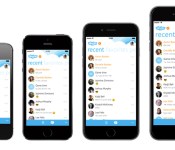
Skype for iPhone Now Optimized for iPhone 6 and 6 Plus [iOS Blog]
Skype today announced the release of version 5.6 of its iPhone app, bringing with it a user interface that is scaled for the iPhone 6 and 6 Plus. This is the second significant Skype update in less than a month and follows an iOS 8-optimized version that debuted at the end of September.

The latest version of Skype for iPhone now supports all device screen sizes from the 3.5-inches of the iPhone 4 up to the 5.5-inches of the new 6 Plus. The biggest difference will be seen by iPhone 6 Plus owners, who now will be able to view additional messages and chat logs on the larger screen.
The full change log for the 5.6 release includes changes to the contact profiles and general improvements to the app.
What’s New in Version 5.6
• Native resolution support for iPhone 6 and iPhone 6+
• Presence indicators are now displayed in the “recent” list
• Number of contacts and time zones are now shown on contact profiles
• Individual conversations can be marked as read/unread
• Notification sounds are disabled in “Do not disturb” mode
• General Improvements
Skype for iPhone [Direct Link] is available for free from the iOS App Store.
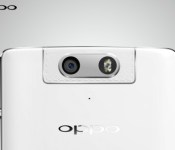
Oppo N3 smart rotating camera gets a demo video

Just like the Oppo N1, the Oppo N3 is going to feature a rotating camera. However, this time you don’t have to manually move it. It will sport a motor for automatic rotations.
How do we know this? A rather official video was posted showing how it works. It’s referred to a “Smart rotating camera,” which implies that it will automatically move based on what mode or setting the user selects. In other words, if you go into selfie mode, it will simply rotate on its own.
You can check out the video after the break.
http://player.youku.com/embed/XODAzODY5OTU2
What do you guys think? Is this just another gimmick or something that’s useful?
Come comment on this article: Oppo N3 smart rotating camera gets a demo video

Samsung SDI develops new batteries that are both flexible and rollable

As the smartphone market continues to get saturated, manufacturers will continue to invest in the wearable market. Samsung SDI already offers flexible batteries, but they just unveiled the next generation, which can be rolled in the shape of a paper cup.
Unfortunately, we won’t be seeing these batteries anytime soon since the technology isn’t ready yet. We are probably looking at about three years until the first devices start utilizing them.
We should also note that Samsung SDI also showed off a very small pin-type battery that is about the same size as the smallest pill capsule. It’s capacity is only 10 mAh, which doesn’t sound like much, but who knows what types of future wearable devices are in store.
source: tizenindonesia
via: G4Games
Come comment on this article: Samsung SDI develops new batteries that are both flexible and rollable
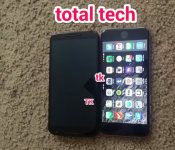
Nexus 6 poses with the iPhone 6 Plus

Wanna know just how big the Nexus 6 is going to be? Here it is right next to the iPhone 6 Plus. As you can see, it’s slightly longer, but it’s also much wider.
Either way you look at it, this going to be one huge phone. We should get the exact dimensions later today when it get’s officially announced, so stay tuned.
source: TKTechNews
Come comment on this article: Nexus 6 poses with the iPhone 6 Plus
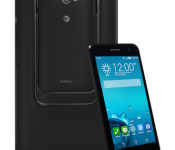
The ASUS PadFone X mini is coming to AT&T on Oct. 24, $199 contract free on GoPhone

ASUS, AT&T, and Intel sent out a presser this morning letting us know that the PadFone X will be available on AT&T GoPhone for $199. That means no contract or commitments.
The PadFone X mini features a 4.5-inch IPS+ 854 x 480 display, a 1.6 GHz 2×2 Intel Atom Z2560 dual-core processor, 1 GB of RAM, 8 GB of internal storage, microSD slot for up to an additional 64 GB of extra storage, 5 MP rear camera, 1 MP front-facing camera, an Intell XMM 7160 LTE modem, and Android 4.4 KitKat.
When the phone is docked, you get a 7-inch tablet experience utilizing the 7-inch IPS+ 1280 x 800 display. The phone itself has a 2060 mAh battery and the tablet dock sports 2200 mAh.
We have the full presser after the break.
ASUS, AT&T and Intel to Bring PadFone X mini to United States on Oct. 24
PadFone X mini Available Exclusively on the Nation’s Most Reliable 4G LTE Network[1] with No Annual Contract for $199.99
DALLAS and FREMONT, Calif. and SANTA CLARA, Calif., Oct. 15, 2014 /PRNewswire/ –
NEWS HIGHLIGHTS
- ASUS, AT&T and Intel introduce the ASUS PadFone X mini in the U.S. with no annual contract for $199.99 on GoPhone®.
- The PadFone X mini will be available in select national retailers in October and in all AT&T retail stores that offer GoPhone on Oct. 24.
- Powered by an Intel® Atom™ processor and Intel® XMM 7160™ LTE modem, the 4.5-inch 4G LTE smartphone transforms into a 7-inch tablet-like experience when docked.
ASUS, AT&T and Intel Corporation today announced the availability of the ASUS PadFone X mini, a 4.5-inch 4G LTE[2] smartphone powered by the Intel® Atom™ processor and Intel® XMM™ 7160 LTE modem. The PadFone X mini transforms into a 7-inch 4G LTE tablet-like experience when docked into its companion docking station. It will be available in AT&T retail stores on Oct. 24 and in national retailers by November. Exclusively on the nation’s most reliable 4G LTE network, covering more than 300 million Americans, the PadFone X mini will retail for $199.99 on GoPhone®, AT&T’s branded prepaid service.[3] Plans start at only $40 per month for 500 MB of data and 500 minutes of talk time.
“The PadFone X mini is a powerful device with great features from ASUS and Intel – and all on the nation’s most reliable 4G LTE network,” said Jeff Bradley, senior vice president – Device Marketing and Developer Services, AT&T. “Offered at budget-friendly prices, consumers that want a quality device with no annual contract will be thrilled with the performance and value of the PadFone X mini.”
For ASUS, Corporate Vice President and General Manager of Mobile Communication, Benson Lin stated, “ASUS is passionate about providing incredible experiences. We are excited to work with AT&T and Intel to bring the ASUS PadFone X mini to the U.S. This unique device offers the compelling combination of a 4.5-inch LTE smartphone and the power and versatility of a 7-inch handheld tablet that allows people the best of both world experiences.”
“The combination of Intel’s processor and cutting-edge LTE solution gives the PadFone X mini a robust, one-two punch for U.S. consumers,” said Hermann Eul, vice president and general manager of Intel’s Mobile Communication Group. “People are demanding more from their devices, and the phone’s unique smartphone and tablet form factor allows consumers to have more capabilities on one data plan, all at an affordable price. Intel, ASUS and AT&T have proven to be a powerful trio to deliver a fast and easy-to-use phone for on-the-go multi-taskers.”
Power, Convenience and Beauty Converge
The PadFone X mini is the first smartphone for the U.S. market powered by an Intel application processor and an Intel LTE solution. The device has an Intel XMM 7160 LTE modem and an Intel Atom processor with Intel® Hyper-Threading Technology, which supports four simultaneous application threads for smooth and seamless multitasking and responsive web browsing. Additional features include:
- Automatic charging with up to 28.3 hours of battery life when the phone is docked into the station, and up to 15.8 hours of battery life on a single charge when used in the smartphone mode.[4]
- ASUS exclusive 5-megapixel (5MP) PixelMaster camera for high-quality photos.
- ASUS DynamicDisplay[5] technology that resizes apps for the different display sizes, as well as the ASUS ZenUI, an exclusive user interface for smart devices that includes features such as ASUS ZenUI What’s Next and Do It Later. These new features put users’ next task in front of them or allows them to mark items for follow-up.
- The Side Flip Cover and TriCover, a stylish and practical cover lined with microfiber with a tough polyurethane outer cover for the phone and docking station that helps prevent scratches, scrapes, and dents in two different landscape orientations.
Availability and Pricing
On Oct. 24, customers can purchase an ASUS PadFone X mini from AT&T for $199.99 with GoPhone plans that start at only $40 per month. Customers can also get the PadFone X mini online at www.asus.com or www.att.com or in AT&T retail stores that offer GoPhone. Starting in October, the ASUS PadFone X mini will be available at national retailers.
ABOUT ASUS
ASUS is a worldwide top-three consumer notebook vendor and maker of the world’s best-selling, most award-winning, motherboards. A leading enterprise in the new digital era, ASUS designs and manufactures products that perfectly meet the needs of today’s digital home and office, with a broad portfolio that includes motherboards, graphics cards, optical drives, displays, desktop and all-in-one PCs, notebooks, netbooks, servers, multimedia devices, wireless solutions, networking devices, tablets and smartphones. Driven by innovation and committed to quality, ASUS won 4,256 awards in 2013 and is widely credited with revolutionizing the PC industry with its Eee PC™. ASUS has more than 13,600 employees around the globe with a world-class R&D team of 4,500 engineers. Company revenue for 2013 was approximately U.S. $14 billion.
ABOUT AT&T
AT&T Inc. (NYSE:T) is a premier communications holding company and one of the most honored companies in the world. Its subsidiaries and affiliates – AT&T operating companies – are the providers of AT&T services in the United States and internationally. With a powerful array of network resources that includes the nation’s most reliable 4G LTE network, AT&T is a leading provider of wireless, Wi-Fi, high speed Internet, voice and cloud-based services. A leader in mobile Internet, AT&T also offers the best wireless coverage worldwide based on offering roaming in more countries than any other U.S. based carrier, offering the most wireless phones that work in the most countries. It also offers advanced TV service with the AT&T U-verse® brand. The company’s suite of IP-based business communications services is one of the most advanced in the world.
Additional information about AT&T Inc. and the products and services provided by AT&T subsidiaries and affiliates is available at www.att.com/aboutus or follow our news on Twitter at @ATT, on Facebook at www.facebook.com/att and YouTube at www.youtube.com/att.
© 2014 AT&T Intellectual Property. All rights reserved. AT&T, the AT&T logo and all other marks contained herein are trademarks of AT&T Intellectual Property and/or AT&T affiliated companies. All other marks contained herein are the property of their respective owners.
ABOUT INTEL
Intel (INTC) is a world leader in computing innovation. The company designs and builds the essential technologies that serve as the foundation for the world’s computing devices. As a leader in corporate responsibility and sustainability, Intel also manufactures the world’s first commercially available “conflict-free” microprocessors. Additional information about Intel is available at newsroom.intel.comand blogs.intel.com, and about Intel’s conflict-free efforts at conflictfree.intel.com.
Intel, Intel Atom, XMM and the Intel logo are trademarks of Intel Corporation in the United States and other countries.
|
SPECIFICATIONS[6] |
||||
|
ASUS PadFone X mini |
||||
|
Processor |
1.6GHz 2×2 Intel Atom Z2560 dual-core processor with Intel Hyper-Threading Technology |
|||
|
Operating system |
Android 4.4 (KitKat) with ASUS ZenUI |
|||
|
Storage/memory |
1GB RAM; up to 64GB micro SD card supported |
|||
|
Connectivity |
4G LTE: B4/B17/B2/B5, Category 3 3G: 850/1900/2100 2G: 850/900/1800/1900 802.11 b/g/n Wi-Fi Bluetooth 4.0 GPS (A-GPS with SUPL 2.0) |
|||
|
Data-transfer speed |
LTE Category 3 |
|||
|
Display |
Smartphone: 4.5-inch IPS+ panel / 854 x 480 FWVGA Station: 7-inch IPS+ panel / 1280 x 800 WXGA |
|||
|
Cameras |
Smartphone: 5MP (rear); 2MP(front) Station: 1MP (front) |
|||
|
Battery |
Smartphone: 2060mAh (removable) Station: 2200mAh (non-removable) |
|||
|
Ports |
3.5mm headphone jack; micro USB |
|||
|
Colors |
Black |
|||
|
Dimensions |
Smartphone: 5.20 (L) x 2.61 Station: 8.02 (L) x 4.70 |
|||
|
Weight |
Smartphone: 5.25 oz Station: 8.81 oz |
|||
 x 0.25-0.50 (H) inch
Full specifications are available at www.asus.com/us.
[1]Reliability based on data transfer completion rates on nationwide 4G LTE networks. LTE is a trademark of ETSI. 4G LTE not available everywhere.
[2]LTE is a trademark of ETSI. 4G LTE not available everywhere.
[3]GoPhone devices are restricted to GoPhone service during the first six months after activation, and cannot be used with any other carrier’s service. Commercial resale is prohibited except by AT&T’s authorized agents or retailers. You may not alter any of the hardware or software in GoPhone devices or export them from the US. Activation and use of GoPhone device requires GoPhone service. GoPhone service is subject to the Terms of Service described in the User Guide and Plan Terms described in the rate brochure. You must be in the GoPhone coverage area to place or receive calls. Service may not be accessible at all times due to equipment limitations and certain equipment features may not be functional with GoPhone service.
[4]ASUS measures the talk time/standby time by conductive test with RF equipment (Anritsu 8820 or CMU200 or Agilent 8960). The talking/standby time is derived from “the typical capacity of battery divided from the current measurement.”
[5]Not all applications are DynamicDisplay compatible.
[6]Specifications, content and product availability are all subject to change without notice and may differ from country to country. Actual performance may vary depending on applications, usage, environment and other factors.
Come comment on this article: The ASUS PadFone X mini is coming to AT&T on Oct. 24, $199 contract free on GoPhone

Microsoft’s got another Halo game for 2014: ‘Halo: Spartan Strike’ headed to Windows 8 and Steam
 Image from Halo: Spartan Assault
Apparently Halo‘s top-down mobile version was successful enough to warrant a second go, as Microsoft’s planning a December launch for Halo: Spartan Strike. But what is Halo: Spartan Strike? It’s a direct sequel to last year’s Spartan Assault, and it features an unnamed Master Chief-esque super soldier shooting, driving and grenading his way through a variety of Halo-flavored worlds. To be totally clear: it’s a twin-stick, top-down shooter made by the same folks who made last year’s mobile Halo (Vanguard). You’ll see New Mombasa! You’ll see a Halo-based area! You’ll see…some jungle! Sadly, we can’t actually show you any of that, as Microsoft’s worked out some form of exclusivity with another outlet. We even played a bit of it, but we can’t actually tell you how that went because of the aforementioned exclusive. Pretty dumb, right?
What we can tell you is that Halo: Spartan Strike will cost $6 when it arrives on Windows 8 devices (from Surface to phones to PC) and Steam this December 14th. The marketing gentleman from Microsoft said the game will remain exclusive to Windows 8 and PC — unlike the previous game, which ended up on consoles as well — but we don’t believe him. You probably shouldn’t either.
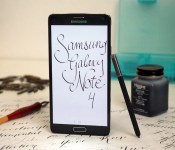
Samsung Galaxy Note 4 review: the best big-screen phone you can buy right now

What began in 2011 as a brand-new phone category has flourished into one of the most popular in the world. Smartphones with big screens (phablets, to some) are now ubiquitous, but it all started with an odd device called the Samsung Galaxy Note. At 5.3 inches, it was a behemoth for its day — and yet, it sold like hotcakes thanks to its unique S Pen stylus, which provided users with extra functionality, and a copious amount of screen space.
Four iterations later, the Note series has continued to grow, mature and dominate the genre. Not only does the latest version, the Galaxy Note 4, come with the snazziest spec sheet on the market, but it also ushers in a fantastic new direction in Samsung’s design. It sure sounds like an improvement over last year’s model, and it is. Now that Apple’s ready to tackle the Note with a large-screen phone of its own, however, is Samsung’s baby still the best in its class?
Hardware
In my review of the Galaxy Alpha, I declared it was the most beautiful Samsung phone I’d ever seen. Thanks to the company’s love of consistency, the Note 4 uses the same overall design and is just as aesthetically appealing as its smaller sibling. Its predecessor, last year’s Note 3, was a big step in the right direction, featuring a bigger screen and fashionable leather-like back. But it wasn’t enough. The ribbed chrome sides, the pointless stitches and the larger-than-life connector port at the bottom made it look cheaper than it needed to be. The Note 4 resolves those problems with aluminum sides, chamfered edges and smooth curves, and has a much more elegant appearance as a result.
Only the sides and edges of the Note 4 are aluminum, while the remainder of the phone is built with polycarbonate. And that’s OK. Samsung’s been opposed to using metal of any kind in its phones for years, and building a device with aluminum on the sides and plastic on the back is a solid compromise that makes it plenty durable. After all, most all-metal phones don’t come with removable backs, and that’s one of Samsung’s biggest strengths; for as long as I can remember, the company has allowed users to swap batteries and add external storage via microSD slots underneath the back cover. Now you can have the best of both worlds.

Fortunately, Samsung pulled off this new design without adding much bulk. It’s 2.3mm taller, 0.6mm narrower and 0.2mm thicker than the Note 3 and, at 176 grams, it’s also 8g heavier. Slightly noticeable when the two devices are compared side by side, perhaps, but otherwise a wash when it comes to the in-hand experience; I probably wouldn’t be able to pick out which one was which if I were blindfolded.
The Note 4 isn’t the most comfortable large-screened phone to hold with one hand, but it comes in second place. That title rests with the LG G3, a 5.5-inch device with an arched back and thin sides that help it rest naturally in my hand — it doesn’t feel as large as it really is. That said, the new Note has an even bigger screen and I can still hold the device without hand fatigue (in which my hand gets tired after holding the phone for a while) or accidentally dropping it. I can’t say the same about the Note’s new competitor, the 5.5-inch iPhone 6 Plus; with a large bezel, rounded sides and a slippery aluminum build, it’s tougher to hang onto with one hand than the Note. The only drawback to holding Samsung’s new device is the edges, which feel a tad sharper when I wrap my fingers around them.

Of course, it’s still big. Not everyone will like the fit and feel, simply because it is indeed a large handset. There’s not much Samsung can do to remedy that, although it manages to trim down the Note’s width with each new iteration. But for what it is, the product is reasonably sized.
On the front, there’s an LED indicator on the top left, proximity sensors next to the earpiece in the top center and a 3.7-megapixel selfie cam placed in the top right. You’ll also get a home button doubling as a fingerprint sensor, which is very easy to press because it’s slightly raised above the glass; this is flanked by two capacitive keys (recent apps and back).
Just like the sides they’re affixed to, the volume and power buttons (on the left and right sides, respectively) are also fashioned out of aluminum, and match up with the industrial design very well — plastic buttons would’ve looked awfully out of place. The 3.5mm headphone jack and IR sensor (for remote control functionality) are on the top, and a micro-USB port sits in the middle of the bottom side, while the S Pen holster rests closer to the corner. Curiously, the micro-USB connector is 2.0, which is technically a step down from the 3.0 socket found on the Note 3. While this means your data transfers won’t be as fast via cable, it also looks a lot cleaner; the port on the Note 3 was bigger, unsightly, took up too much space and, let’s face it, was never used to its full potential. It feels odd to say, but this is one time I’m happy to see Samsung go back to an older protocol. Unfortunately, the fact that the port is open, rather than sealed shut like it is on the Galaxy S5, shows that the Note 4 is not waterproof.

When I first saw the Note 4 in September, I took a quick glance at the bottom and immediately thought the entire back was curved. After a moment, I realized that I fell victim to a design trick: The top and bottom of the frame have curves that give the device extra sleekness, but the bed of the phone on which the back cover rests is ever-so-slightly raised above the frame and is still completely flat.
The Galaxy S5 was the first Samsung device with a built-in heart rate monitor on the back, housed below the camera module and next to the LED flash. The Note 4 does the same, but it adds extra sensors for ultraviolet rays and blood oxygen levels. There’s also a mono speaker grille in the bottom-left corner; I’m not sure why it wasn’t just built into the bottom of the phone, like it is in the similarly designed Galaxy Alpha or even last year’s Note 3, but I suppose it’s at least consistent with how it’s positioned on the GS5. Underneath the back cover are the microSD and micro-SIM slots (not nano-SIM, like many competitors are using now), along with the 3,220mAh battery.
If the design has any flaws, it’s in the space between the front glass panel and the edges. Some of the first Note 4 owners in other parts of the world report that the phone has a small gap, large enough to fit the edge of a business card. There’s certainly some truth to this: Samsung officially commented on the matter, stating that the issue doesn’t affect the functionality or quality of the device. I personally couldn’t find a big enough gap in my review unit to stick a business card in, though I managed to squeeze a thin piece of paper into one spot on the left side. Your mileage will likely vary depending on where and when you get your device, but I didn’t find it to be as huge a problem as it was made out to be.
| Samsung Galaxy Note 4 | Apple iPhone 6 Plus | |
|---|---|---|
| Pricing | $299+ on-contract, $700+ off-contract | $299+ on-contract, $750+ off-contract |
| Dimensions | 153.5 x 78.6 x 8.5 mm (6.04 x 3.09 x 0.33 in) | 158.1 x 77.8 x 7.1 mm (6.22 x 3.06 x 0.28 in) |
| Weight | 176 g (6.21 oz) | 172 g (6.07 oz) |
| Screen size | 5.7 inches | 5.5 inches |
| Screen resolution | 2,560 x 1,440 pixels (515ppi) | 1,920 x 1,080 pixels (401ppi) |
| Screen type | Super AMOLED | IPS LCD |
| Battery | 3,220mAh | 2,915mAh |
| Internal storage | 32GB | 16/64/128GB |
| External storage | MicroSD, up to 128GB | None |
| Rear camera | 16MP, OIS, f/2.2, LED flash | 8MP, OIS, PDAF, dual LED |
| Front-facing cam | 3.7MP, f/1.9 | 1.2MP |
| Video capture | 2160p (30fps), 1080p (60fps) | 1080p (60fps) |
| NFC | Yes | Yes (with Apple Pay only) |
| Bluetooth | v4.1+LE | v4.0+LE |
| SoC | Qualcomm Snapdragon 805/Samsung Exynos 5433 | Apple Cyclone A8 |
| RAM | 3GB | 1GB |
| WiFi | dual-band 802.11a/b/g/n/ac | dual-band 802.11a/b/g/n/ac |
| Operating system | Android 4.4.4, TouchWiz UI | iOS 8.0.2 |
Display

Samsung dabbled with a Quad HD display on a Korean version of the Galaxy S5, and now it’s ready to bring larger panels with the same resolution into full production on the Note 4. This means you’ll get to enjoy a resolution of 2,560 x 1,440 on a 5.7-inch Super AMOLED screen, equaling 515 ppi in pixel density. Obviously, it’s a much higher number than the Note’s 386 ppi, 1080p display. It’s hard to say no to more pixels, especially on such a large device, but you’re not missing out on a vastly improved viewing experience if you don’t get the new phone — the old Note’s screen was quite lovely already, after all. The Note 4 panel is subtly better, with slightly crisper text and sharper image quality, but again, you’re not going to notice a drastic improvement over the last version unless you’re looking at them side by side (which, let’s face it, rarely happens).
Of course, increases in display resolution mean more pixels to power up, so Quad HD screens aren’t exactly energy efficient. The good news is, as you’ll see later, that Samsung has found a way to compensate for that issue without having to use a significantly bigger battery. So, go ahead and enjoy the fantastic viewing angles, high outdoor visibility and extra details, all while shrugging at Samsung’s use of color saturation (you can’t say the company isn’t consistent) without feeling like it’s going to shut off any second.
Speaking of high outdoor visibility, if you’re outside and having trouble seeing the screen, switch the phone to auto brightness; doing so allows the phone to push out as much as 750 nits, which is a lot brighter than any other phone I’ve used (and a far cry from the max brightness when you change it manually on the Note 4). This setting also discolors the screen somewhat while it’s on, making it look similar to a picture that’s overexposed; you’ll see all of the details, but images and graphics won’t look quite right. Small price to pay when you can actually use the phone in direct sunlight.
S Pen experience

What’s a Note without an active stylus? The brand is synonymous with its S Pen in the same way peanut butter goes with jelly. It’s arguably what helps the Note 4 stand out from its numerous competitors; very few companies have adopted the use of a stylus of any sort, let alone an active one that responds to changes in pressure, doubles as a desktop-like cursor and comes with an action button that offers additional features. To Samsung, it’s not just about the extra real estate — it’s what you do with it that matters, and the S Pen gives the flagship a solid boost in productivity that’s tough to duplicate anywhere else.
Just like every other S Pen, the version included here is molded slightly differently than its counterparts, but it’s about the same length and width as last year’s pen and retains its elliptical shape. This model has ridges that provide a better grip for your hand, and the button is flush with the rest of the pen, making it just as difficult to press as ever. I often had to turn the pen around because it’s almost impossible to tell which side is which when I’m not looking. It’s easy to take out of its built-in holster on the bottom of the Note, thanks to a large gap at the base of the pen, where I can place my fingernail and simply pull down.
The new pen is roughly twice as sensitive to pressure as the last one, capable of registering over 2,000 levels of sensitivity instead of 1,000. This, along with some haptic feedback on the screen and friction on the tip of the pen, is supposed to create a more realistic “pen on paper” feel; aside from the extra pressure sensitivity, however, the experience wasn’t any closer to an actual pen or pencil than the Note 3 was.
Pull out the pen and a radial Air Command menu pops up with four options. The first is Action Memo, which is like a Post-it note app that lets you write to-do lists, notes to self or anything else that’s short and sweet — and you can either save it to S Note (Samsung’s primary notepad app) or pin it to your home screen as a resizable widget. Up next is Smart Select, which lets you clip a part of the screen and add it to a small gallery-style widget that floats above the top of all your running apps; neat concept, but I couldn’t find much practical use for it. After that is Image Clip, which also gives you the ability to take snippets of whatever you want and store it for scrapbooking. Finally, there’s Screen Write, which is carried over from the last Note; it takes a screenshot and then lets you doodle on it immediately afterward.

The new S Pen is also capable of letting you select multiple lines of text by pressing down the action button and dragging the pen over the section you want to use. A menu pops up, giving you the option to copy the text, share it or even look up definitions in the dictionary. Copy and paste is an obvious use case, but I also found it handy when I accidentally took 20 burst photos and wanted a fast way to batch delete them; these are but two scenarios. This seems like one of those features that should’ve been there from the beginning, but oddly has been left out until now; regardless, it’s a welcome addition that will make the process of sharing and selecting stuff faster and easier.
You’ll also still enjoy the ability to preview content by hovering the pen over pictures, videos, emails, calendar appointments and more; this has always been one of my favorite S Pen features since it debuted a couple years ago. However, Samsung’s added actions to these preview screens, so you can now choose to share or edit that content directly from those thumbnails instead of having to back out and go through extra menus.
With the added pressure sensitivity comes new capabilities. Samsung has included a calligraphy pen in the S Note collection, which is designed to let you draw fancy letters and numbers with a flourish. Since my wife has been learning the craft over the past year, I decided to have her put it to the test. Can this digital pen work as well as her traditional pen-and-ink setup? In short: No. She grew increasingly frustrated because it didn’t properly mimic the behavior of the old-school ink and paper; doing the same brush strokes at the same angles and with the same amount of pressure produced entirely different results. Lines were light where they should’ve been heavy, and vice versa. She said that it works fine if you’re just messing around, but no professional would want to use it on a regular basis — and certainly not as a replacement to real-life calligraphy.
Finally, another clever new S Pen feature is found in the S Note app. A photo icon in the toolbar takes you to a camera viewfinder. Take whatever picture you want and S Note can convert it to a digital (and editable) version of itself. If you see a sign with a phone number on it, you can take a picture of it, convert it through S Note and then copy it.
One-handed use

One of the most common complaints about large-screened phones is that they’re nearly impossible to use one-handed. I can relate: Most devices this size are frustrating when you’re trying to dig them out of your pocket and handle even the most mundane tasks when one of your hands isn’t available. The final purchase decision often comes down to what you treasure most: Would you rather have ample screen space and battery life, or feel comfortable? The user’s experience varies depending on hand size and personal preference — it won’t be a problem for those of you blessed with large digits — but there are a few things phone makers can tweak on the hardware and firmware to give you a better one-handed experience without feeling like you’re going to drop the device.
Samsung’s had several years to perfect the one-handed experience on the Note, and it shows in the Note 4. It is, by far, the best large-screened phone to use with one hand — yes, better than the iPhone 6 Plus. I’ve already examined why this is the case from a hardware point of view, but Samsung’s software features are more comprehensive and mature than Apple’s nascent Reachability option.
The Note 4 retains the same one-handed functionality from earlier models, which includes smaller dialpads and keyboards that align to the right or left side of the device, as well as a gesture that lets you swipe in and out from the edge and shrinks the entire screen to a more manageable size. These have always been handy, but not features I’ve used on a regular basis. With the latest Note, however, Samsung throws in some new gestures and panels that are more practical.
First is a small menu that you can affix to either side of the screen. The menu, which stays hidden until you swipe inward from the edge, mimics the capacitive keys found on the bottom of the Note — the home, back and recent apps buttons, in addition to a settings key. This allows you to easily navigate through the phone without trying to stretch your thumb or loosen your grip in order to reach those buttons. You can also adjust the opacity of this menu so it doesn’t get in the way of anything displayed on the phone; and as soon as you’re done using the menu, it’ll get tucked back into the side, with only a thin tab indicating that something is even there. I found myself using this a lot more than I had originally expected.
You can also shrink most native apps by dragging your finger from the top-left or top-right corner toward the center of the screen. This converts the program into a pop-up app, which can be resized, moved around the screen, placed on top of other pop-up apps, transferred into Multi Window or minimized to floating, circular icons that resemble Facebook’s Chat Heads. If there’s a limit to the number of windows you can have open at one time, I couldn’t find it. My favorite use for this feature was the camera viewfinder, which I shrunk down and used during my tests while also checking my Gmail and Calendar at the same time. Multitasking!
Software

If you like what you’ve seen so far, here’s another piece of good news: Samsung has trimmed down its in-your-face software experience. On the surface, it still looks like the freshly painted version of TouchWiz (with Android 4.4 KitKat running underneath) that first arrived on the Galaxy S5, but the company is continuing to clean up the UI and streamline its features; you’re no longer going to find 500 pointless new options here. My Magazine, the Flipboard-esque eyesore that once occupied a full page on the home screen, is nowhere to be found on the Note 4. (In its place is Flipboard Briefing, which similarly displays social media and internet feeds, but this time you can actually disable it.) Several unnecessary smart features, like smart pause, smart rotation and smart scroll, are gone. Reading mode has also disappeared.
Don’t get the wrong idea: There are plenty of new features, some of which I’ve highlighted in earlier sections. But at least the additions that Samsung threw in this go-round are more useful, don’t appear to slow down the phone and don’t have me sprinting to the settings menu in an epic quest to get rid of them.
Multi Window, one of my favorite Samsung features, is slightly improved. The camera viewfinder can now be opened into this mode, which is helpful if you’re prone to falling into manholes or walking into street signs while texting. Also, when you go into the recent apps menu, certain apps come with a new dual-pane icon that opens the program directly into Multi Window mode. You can also transfer files from one window to another, and tapping on links in apps (Twitter, Facebook, Maps and so on) will open that link below in a second window, rather than closing one app and opening another.
S Health now comes with more support. The Note 4 features sensors capable of detecting ultraviolet levels, blood oxygen saturation and heart rate (though when it comes to serious medical matters, I suggest sticking with dedicated external monitors rather than relying on Samsung), and you can connect plenty of wearables and other accessories to this hub as well.
Camera

There’s more to the Note 4’s camera than just a simple bump in resolution from 13MP to 16MP — a lot more. The new shooter also comes with optical image stabilization, which is a first in any Samsung Galaxy smartphone (except the Zoom series). As I’ll discuss shortly, this makes a difference in the performance of the camera.
The rear camera isn’t the only one that got a quality boost — flip it around and you’ll see a much better “selfie camera” as well. As painful as the term sounds, every phone maker is pushing hard to capitalize on the selfie trend. Samsung’s in it to win it too, with a 3.7MP camera that offers a generous f/1.9 aperture (compared to f/2.45 on the Note 3 and f/2.4 on the GS5) for better low-light performance. Those vain glamour shots of yourself need to be taken just as often at night as during the day, right? It’s still a little blurry — in comparison, the 6 Plus’ nighttime selfies are sharper, but much noisier — but it’s a vast improvement over the other Samsung flagships because you can actually see your face.
One of the most intense areas of competition in the smartphone selfie sphere is how much you can actually fit in the shot — the wide angle. On the Note 4, Samsung came up with a clever way to get more stuff in the field of view: a selfie panorama (selfierama?). In portrait, you can start in the center and then tilt to the left and right in whichever order you choose. The three images then stitch together to form one big picture taken at a 120-degree angle. It’s not perfect, as it’s pretty easy to see the stitching, but it’s an interesting idea that simply needs to be improved upon.
In case 3.7MP isn’t enough for your face (really, who wants to zoom into their face even more than that?), set the camera to rear-selfie mode and the heart rate monitor acts as a shutter key that vibrates to let you know it’s detected your face, and the intensity and frequency of those vibrations increases as the two-second timer counts down. Presto, now you can see every single precious pore.
Turning focus to the 16MP camera on the back: It comes with an aperture of f/2.2, which is the same as the Galaxy S5 and perfectly average for smartphones in 2014. It comes with a handful of modes, like selective focus, panorama, dual camera and Shot & more, with a few more (animated, surround, sports, sequence and food) available for download. If manual settings are your thing, you can choose from ISO, white balance, HDR, exposure and metering modes.
Daylight images taken on most Samsung flagships are quite good. They’re generally in focus, have decent color saturation and are very well-detailed. That’s not only true on the Note 4, but it also exceeds any expectations that I had: It focuses accurately and quickly, despite its lack of phase-detection autofocus; is closer to the actual colors than its predecessors; and comes with better white balance. HDR shots do a fantastic job of highlighting shadows without going overboard by looking too cartoonish. And the new Note got much more detailed digital zooms without sacrificing noise or light.
But low-light performance is what impressed me the most about the Note 4. While ISOCELL helped improve the GS5 over the Note 3, it still wasn’t very good. Optical image stabilization has made a tremendous difference here; objects that barely show up at all on other Samsung cameras can be easily seen on the Note 4. In fairness, the images still don’t look as natural here as they do on the iPhone 6 Plus, but this is by far the best nighttime imaging performance I’ve seen on a Samsung phone. Even during the day, I managed to get crisp, in-focus shots when lightly shaking the device; scenic photos I took during a bumpy hayride came out as if no movement had even occurred.
(For a look at some full-resolution Note 4 shots, head here.)
Performance and battery life

Raw power is not an area where any Note smartphone has struggled, and indeed, the latest model represents the series well. Armed with a brand-new Snapdragon 805 chipset, which packs four 2.7GHz Krait 450 cores and a 600MHz Adreno 420 GPU, as well as 3GB of RAM under the hood, the Note 4 is one of the most powerful devices on the market — and will likely keep that status for months to come.
Technically, the Note 4 comes in two flavors; the Snapdragon 805 featured in my review unit (an AT&T-branded device, by the way) and an Exynos 5433 chipset comprised of four 1.9GHz Cortex-A57 cores and four 1.3GHz Cortex-A53 cores. I have no way to determine which is the better of the two, but it’s almost impossible to dislike the speed and performance at which the S805 operates. Certainly, it was more than sufficient for my needs.
Excepting a small delay when pressing the recent apps button, I haven’t been able to spot any lagging or slowing down from the device. And with the extensive amount of productivity and multitasking Samsung throws at the thing, I was truly impressed. Apps and games load quickly; frame skips and other bugs are few and far between; animations are smooth; and it handles multiple pop-up windows, Multi Window and other minimized apps with grace. This is a pleasant find for me, because latency and bugs have been commonplace in Samsung flagship phones for years.
| Samsung Galaxy Note 4 | Samsung Galaxy Note 3 | Samsung Galaxy S5 | iPhone 6 Plus | |
|---|---|---|---|---|
| Quadrant 2.0 | 24,425 | 22,828 | 24,714 | N/A |
| Vellamo 3.0 | 1,808 | 1,994 | 1,656 | N/A |
| 3DMark IS Unlimited | 20,692 | 18,933 | 17,954 | 17,902 |
| SunSpider 1.0 (ms) | 793 | 840 | 820 | 388 |
| GFXBench 3.0 Manhattan Offscreen (fps) | 18.8 | 10.1 | 11.5 | 18.2 |
| CF-Bench | 43,234 | 38,020 | 33,351 | N/A |
| SunSpider: Lower scores are better. | ||||
The Note 4 didn’t win every benchmark test when compared to other signature Samsung devices and the iPhone 6 Plus — it won about half of them — but it still had a very strong showing in the ones it lost. In addition to the tests listed above, I also ran Geekbench and Basemark X; the Note 4 dominated the latter and kept up in the former. In a nutshell, the numbers essentially confirm something I already knew: This phone is fast and powerful.
There’s a 3,220mAh removable battery inside the Note 4, which is a very marginal improvement over the 3,200mAh cell inside the Note 3. Although the battery life was fantastic in last year’s model, I came into the review concerned that a higher-resolution display and faster chipset would actually cause a decrease in the phone’s longevity. Fortunately, it exceeded my expectations. After heavy use throughout the day, I typically went to bed with around 20 percent left over. This is assuring for power users who need a full day of battery life without compromises, but it’s also nice to know that moderate to low use will provide even better results — you should be able to stretch it and get around a day and a half to two days. In our endless video-loop test, the battery managed to keep going for just over 13 hours, a significant improvement over the Note 3. In a worst-case scenario: If you find yourself rapidly losing juice, the Note 4 added Ultra Power Saving Mode, which cuts off all but the most essential tasks.
Finally, the fingerprint sensor seems to be much more reliable on the Note 4 than it was on the GS5. It takes fewer attempts to unlock the device, and I can even use it at angles without any fuss. That last part is critical when it comes to one-handed use, especially on a device as large as the Note; if I can’t swipe my thumb across the home button at an angle, I have to use a second hand to steady the phone as I try swiping straight down from top to bottom.
The competition

The Note 4 will be available globally and the price varies by market, but the cheapest you can get in the US is $299 on-contract or $700 off-contract (each carrier offers it for different prices). Samsung’s biggest competition is obvious: Apple’s finally brought a large-screened smartphone of its own to market, the iPhone 6 Plus. It starts at $299 on-contract ($750 off) with 16GB internal storage and no external memory card slot, and you can add $100 to the cost to bump it up to 64GB or another $100 for 128GB. Much of the decision will come down to personal preference — Android versus iOS, straight sides versus rounded, Multi Window versus Reachability.
Aside from the 6 Plus, virtually every large-screened phone (or phablet, as the kids call them these days) is automatic competition for the Note 4, and there are a lot of options. LG, HTC, Huawei, ZTE, Oppo, Microsoft Devices, ASUS, Acer and (soon) Motorola all have handsets that are 5.5 inches or larger. The Note series has managed to stay unique thanks to its S Pen functionality, but that’s only tempting if you actually care to use a stylus in the first place.
Wrap-up

The Galaxy Note 4 is the best large phone on the market. It’s a device you’ll be proud to whip out in public, thanks to its elegant design, robust build, beautiful screen, impressive battery life and solid camera. It also excels from a productivity standpoint, offering seamless multitasking and stylus functionality that’s as smooth as I’ve ever seen on a smartphone. And despite its large size, Samsung has nailed the one-handed experience better than the competition. There’s certainly a benefit to drawing from years of experience in this category: What began as an oddity three years ago has now evolved into a powerful tool at the top of its class.
Filed under: Cellphones, Wireless, Mobile, Samsung, Google

Tesla’s battery-swap stations will finally arrive in December

Tesla has just told SlashGear that its much-hyped battery stations will finally arrive in California by December. Elon Musk and crew first flaunted the system to a large crowd over a year ago, showing how the Model S’s battery can be changed in half the time it takes to gas up a regular car. Since then, Tesla has missed several of its own deadlines to install the fully automatic, robotic systems. Musk said his company has been “preoccupied with a few other issues,” which no doubt include gearing up its battery-producing Gigafactory in Nevada and installing a network of supercharger stations.
Tesla may have decided to redouble its battery station efforts for economic reasons, too. As pointed out by Bloomberg, California stripped Tesla of some of its zero-emission vehicle (ZEV) credits earlier this year after revising its rapid refueling rules. The new standard requires that cars be fueled to a 285 mile range in 15 minutes, meaning the Model S — which can receive a 160-mile supercharge in about 30 minutes — no longer qualifies. Meanwhile, hydrogen-fueled cars continue to receive the maximum ZEV credits, since they can easily be refueled in that time. Prior to the decision, Tesla had been selling the excess ZEV credits to other automakers, which is one of the reasons it turned a profit for the first time last year.

Once the EV maker opens the battery stations it will re-qualify for the credits, but there’s one caveat: Tesla must prove the system is sufficiently used. Which begs the question: how popular will the stations be? That remains to be seen, as users will need to pay $60-80 for a battery swap and are required to either retrieve their old packs on the return trip or pay a hefty upgrade fee. That means customers used to “free,” or who can’t deal with the logistics may just stick with superchargers. (Though we imagine folks with the resources to own a $71,000 Model S won’t worry too much about it.)
However, Tesla has been turning a profit lately with or without the ZEV credits. And politics and logistics aside, by the end of the year Model S owners in the San Francisco to Los Angeles corridor should have another re-fueling option. For a reminder about how it works, check the video from last year’s demo below.
Filed under: Transportation
Source: SlashGear

Ireland will eliminate Apple’s sweet tax deal within four years

Apple and other tech giants had better not lean too heavily on Ireland’s super-favorable tax environment; at least one big perk is going away. Finance minister Michael Noonan has detailed a new budget that, among other things, will phase out the “double Irish” system that let companies operating in Ireland (including Apple) move their revenue to an Ireland-registered offshore tax haven. As of 2015, companies incorporated in the country will have four years to make sure that they’re also tax resident — that is, they’ll pay the same as any other corporation operating on the Emerald Isle.
Not that foreign firms will necessarily be dying to leave. Noonan is keeping Ireland’s lower-than-average 12.5 percent corporate tax, and there will be big tax breaks for companies that conduct research and development on its soil. In essence, the minister is trying to strike a very careful balance. He wants to appease European Union investigators who say that Apple and its peers are flouting the law, but he also doesn’t want to raise taxes so much that these companies bolt toward other nations that offer considerably better deals. However well this strategy works, it’s safe to say that the move won’t have American companies repatriating their cash any time soon.
[Image credit: Anthony Sigalas, Flickr]
Filed under: Misc, Apple, Google, Facebook
Via: The Guardian
Source: Department of Finance
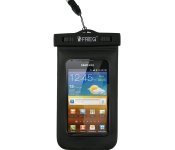
Accessory of the Day: Universal waterproof carrying case $9.99

Whether you’re traveling to the beach, skiing, snowboarding, or swimming, nobody wants to get their phone wet. This universal waterproof case is clear on both sides and protects your device while maintaining full touch-screen abilities. With thousands of 5-star reviews, Prime eligibility, and a universal fit, this is a bargain for just $9.99.
 |
The post Accessory of the Day: Universal waterproof carrying case $9.99 appeared first on AndroidGuys.
 AIVAnet