


A new MHL adapter charges your phone while sending 4K video to a TV

Back in March, we took a look at the MHL 3.0 tech that wrangles 4K video from a micro-USB jack while keeping the device charged. Well, now there’s a handy adapter for linking those compatible gadgets with any TV that packs HDMI ports for viewing sessions. If you’re in need of a refresher, the MHL 3.0 standard sorts 4K video output from a micro-USB port while also keeping said smartphone (like Sony’s Xperia Z3, for example) or slate charged with up to 10W of power. The adapter also takes care of 7.1 Dolby TrueHD and DTS-HD 7.1 surround sound to match the visuals. If you happen to be wielding a MHL-compatible device, JCE’s handy accessory is set to arrive before the month’s end with a $30 price tag.
Filed under: Peripherals
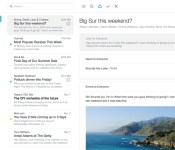
Email App ‘Mailbox’ for Mac Enters Open Beta, Available to All Users [Mac Blog]
Development on email management app Mailbox for Mac began earlier this year, with the app entering a limited public beta test back in August. As of today, the app has entered an open beta testing phase, making it available to all users.
Mailbox for Mac is similar in design to Mailbox for iOS, offering a simple, clean interface that aims to help users reach “inbox zero.” It includes all of the features of the iOS version, like easy controls to archive and delete emails, snooze functionality, and lists for organizational purposes.
The app also offers swipe gestures and several hotkeys to control specific email management tasks.

First introduced as an iOS app in 2013, Mailbox proved to be very popular, requiring a reservation system restricting access to a limited number of users for several weeks. Shortly after its release, Mailbox was acquired by file-sharing and storage service Dropbox, and the iOS version has seen several major updates since then.
Along with offering an open beta of the Mailbox app for Mac, Dropbox has also updated the Mailbox app for iOS to version 2.3.1, adding support for the iPhone 6 and the 6 Plus along with customizable swipes and push notification fixes.
The Mailbox for Mac beta can be downloaded for free from the Mailbox website. Mailbox for iOS can be downloaded from the App Store for free. [Direct Link]
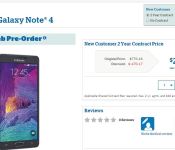
Samsung Galaxy Note 4 headed to US Cellular Oct. 17th, pre-orders start today
US Cellular has announced the availability of the Samsung Galaxy Note 4 today. Marking the launch date as October 17th with pre-orders beginning today. US Cellular has the device listed at $770.16 full price and $299.99 with a new two-year contract. If you qualify for the installment plan option it would $0 down and $32.09 per month.

The device will bring to your hands a 5.7-inch 2560×1440 Super AMOLED display, 2.7GHz quad-core processor, 3GB of RAM, 32GB internal storage + SD card slot, 16MP camera on the rear and a 3.7MP camera on the front. The device is powered by a 3,220 mAh battery that is rated for 420 hours standby and 37 hours talk time. Don’t forget the new S- Pen and fast charge ability that can get you 50% charge in 30 minutes.
As I mentioned above, you can head to the US Cellular page to get a pre-order placed today. However, if you want the device ASAP, you may as well wait the 4 days and just swing into a store.
Via Android and Me
//<![CDATA[
ord = window.ord || Math.floor(Math.random()*1E16);
document.write('‘);
//]]>
The post Samsung Galaxy Note 4 headed to US Cellular Oct. 17th, pre-orders start today appeared first on AndroidSPIN.

TunnelBear Review: A simple VPN that just works

With more and more companies and organizations attempting to steal/read/snoop on people’s data, security is something that more and more people are searching for. Phone companies are becoming more aware of this and are doing their best to keep user data safe. The next version of Android is said to feature data encryption out of the box and some companies have released phones with the sole purpose of keeping all data secure. But what can people that do not have an encrypted phone or the next version of Android do to help keep their information private. The app Tunnelbear is promising its users a secure online experience without the fear of important data being collected by sites they visit.
Tunnelbear creates a Virtual Private Network (VPN) that changes the users IP address to make it seem like they are located in different cities or even countries. It keeps your data secured from websites and online trackers that may attempt to collect information like your location and other personal data. There are other VPN apps out there, but Tunnelbear VPN is the easiest that I have ever used. The app is free to download and it gives you 500MB of data to use with Tunnelbear every month; however, for $2.99 a month or $29.99 a year, you get unlimited data and unlimited protection. You can also get an extra 1GB by tweeting about the app.
After downloading the app, you sign up for an account and begin your safe online browsing. You are taken to a map of the world and there is a bear at your current location. A simple on/off toggle at the top turns the service on or off. Once the service is on, you have to agree that you trust the application and the VPN is created. At the bottom, you can select which country you want to appear to be in, and your bear tunnels across the map and pops up in whatever country you selected. This is extremely useful if your country blocks certain websites. I am located in Louisiana, and after turning on the service my IP address changed to make it appear like I was browsing from New York City. Changing my desired country to France, I checked again and my IP showed me in Paris. This app is incredibly simple to use and fun to watch.
One thing that I did notice was a drop in data speeds. When on Wifi, I saw download speeds drop from 10+ Mbps to an average of 7Mbps with TunnelBear on. Upload speeds, however, stayed relatively even. On AT&T LTE, download speeds got even worse. I went from getting 20-30 Mbps to 2-3 Mbps with the service on. Upload speeds again stayed relatively similar between the two. While the speeds are still usable, it seems like TunnelBear can drastically reduce download speeds. When changing my country to France, I actually got better speeds on WiFi. Unfortunately, I lost the ability to use cellular data which makes sense since it appeared I was out of the country. It seems like data speeds are hit and miss, but I was surprised how much the download speed dropped.


TunnelBear is a minimalistic and simple approach to VPNs. For consumers who do not want to fiddle with settings and just want privacy when browning online, this is a fantasic solution. It is obviously targeted towards the normal consumer because it lacks basically any tweaking or customization options. If you have more experience with VPNs and want to do more tweaking, then you will want to look somewhere else. If you are just looking for a way to browse the internet more securely, TunnelBear is a wonderful app because it is simple and just works.
 |
The post TunnelBear Review: A simple VPN that just works appeared first on AndroidGuys.
 AIVAnet