



IRL: August’s renovation-free smart lock is convenient, if unnecessary

I rent a one bedroom apartment in New York City, which means if I want to make my home “smart” my options are pretty limited. A Nest Thermostat is out of the question. Truth is I don’t even have a dumb thermostat in my apartment; there’s a middle man standing between me and my heat. A smart lock would also normally be a no go, since that would mean replacing the whole lock and getting new keys. (Plus I’m sure my landlord wouldn’t want to foot the bill.) But August, as co-founder Jason Johnson is fond of saying, isn’t really a smart lock. It’s more like a robot that attaches to your existing lock. And since it only replaces the thumb latch on the inside of your deadbolt, it actually allowed me to give my roughly 90 year-old (and showing it) apartment a 21st century update.

Let’s start at the beginning: installation was relatively painless. If you want to know why August was delayed for so long, it’s because the company had to make sure it would work with as many makes and models of deadbolts as possible. Inside the box are some illustrated instructions, three different base plates for various brands of locks and even a piece of blue painters tape to secure your lock from the outside while you attach August. If you’ve ever installed a door knob before, this shouldn’t take you too long. It took less than 15 minutes from the moment I first touched the door with my screwdriver to completion.
I was really excited to ditch the keys and start unlocking my door with my phone. But there is a relatively tough adjustment period. For one, simply breaking the habit of reaching for your keys as you approach the door is hard. I had to force myself to put them away and pull out my phone over the first several days. And honestly, I wanted to go back to analog entry pretty quickly. See, while keys are certainly an imperfect security solution, they’re definitely faster than the Bluetooth LE August relies on. That means you have to be within 30 feet of the lock before the iOS or Android app even starts to pair with it. And despite all of the company’s hard work, the connection time is wildly inconsistent. It takes anywhere from one second to over 10 for the app to recognize the lock and get to a place where you can open it. And, if you’re on the opposite side of a heavy wooden door covered in what I assume is 80-plus years worth of lead paint, things are only going to get worse. Future updates could improve the connection time, but there are limits imposed by relying on Bluetooth.
Perhaps the biggest stumbling block, however, was retraining myself to forget about locking the door knob. Almost every home in America has two locks on the front door: a knob and a deadbolt. And almost every American locks both of those when they leave the house. Trouble is, August can only unlock your deadbolt. So, if you lock the knob, you’ll still need your keys. It was about two weeks before I fully broke myself of that habit (and more than once I had to take a trip to my parent’s house to borrow their spare key). While all gadgets and new technologies have a learning curve, breaking the addiction to your house keys turns out to be particularly difficult.

Once I got past that initial adjustment phase though, things started to get better. I got in the habit of firing up the app as I walked up to my house, rather than fumbling for my phone after I was already standing at the door. In all honestly it wasn’t all that different from fishing my keys out of the bottom of my bag or jacket. Then I discovered Everlock, which is basically just a timer that automatically locks your door. It sounds stupidly simple, but it’s one less thing to worry about when you’re rushing about in the morning. You just pull the door closed behind you, and 30 seconds later it’s securely locked without you having to fight with an app or a crowded keychain. And once the kinks are worked out of auto-unlock, the app will be something I rarely have to worry about. It will sense when I’m approaching my home and automatically unlock my door without any action from me. That’ll be especially useful when I’m lugging 20 bags of groceries up my steps in a single shot.
One of the biggest selling points of the August is the ability to control who goes in and out of your home and when. Now, I don’t have cleaning service come to my home or a dog walker, so those reoccurring scheduled “keys” aren’t of much use to me. In fact, the app made me realize how few people other than myself and my wife need access to my apartment. But, it did come in handy when I was going to be out of town for two days. A friend had to come by to feed my pets and walk my dog, but we couldn’t get our schedules synced up and I never got to drop off a key. But I was able to issue her a temporary electronic pass to my apartment while I was away.
Of course, no discussion of the August smart lock would be complete without talking about the hardware. It’s like no other lock you’ve ever seen before.The particular model I have is a bright metallic red with a diamond pattern etched into the outer ring. Manually turning the lock requires far less force than any deadbolt I’ve ever used before and the action is smooth as Kenny G’s “jazz.” It is a little bit bulky, but after the first few times you use it you barely notice its significant size.
Is August for everybody? At $250, probably not. But it’s an incredibly simple way to add some 21st century smarts to your home without doing any permanent renovations.
Filed under: Household

Verizon’s announcing its new Droid on October 28th

It’s been leaked to hell and back lately, but no matter – Verizon’s finally ready to pull back the curtain on its latest Droid smartphone at an event in New York on October 28. That device is the Droid Turbo, a seemingly super-charged version of this year’s Moto X that reportedly wraps an even speedier Snapdragon 805 chipset into a more traditional (some would say more heinous looking) Droid body. No need to lament its looks too much, though: while it keeps the same 5.2-inch screen as the X, Motorola stuck a 21-megapixel rear camera into the Turbo’s slimmish chassis, and rumor has it that there’s a staggeringly capacious 3,900mAh battery lurking in there to boot. If you’ve thumbed through our Moto X review, you’ll know that those two issues were the only things keeping Moto’s newest flagship from smartphone greatness, so forgive us for getting just a little excited to see the Turbo in person. After all, latest year’s Droid lineup were just slight variations on the original Moto X theme — this time Motorola seems to have dramatically upgraded the X formula.
Filed under: Mobile

Google releases animated ads showing off the Nexus 6 and Nexus 9

If you happened to watch last night’s Walking Dead episode online, you might have noticed a few new ads from Google. Yup, they quietly released these because they like having fun with us.
There are three 30 second ads in all with the first one revealing the Nexus 6 with Android L navigation buttons and a new ringtone, while the second one shows the Nexus 9. You will also notice the “Be Together, Not The Same” theme here implying that the Nexus 6 is very big and might not be for everyone. The third ad continues this theme, but doesn’t reveal any of the devices.
These ads (see below) were uploaded to YouTube by Android Authority, but if you saw them live, they were clickable. They took you to a page that isn’t live at the moment.
We could very well see one or both of these devices officially announced tomorrow. Are you guys excited yet?
Click here to view the embedded video.
Click here to view the embedded video.
Click here to view the embedded video.
source: Android Authority
Come comment on this article: Google releases animated ads showing off the Nexus 6 and Nexus 9
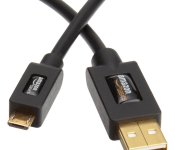
Accessory of the Day: 6ft MicroUSB cable $5.49

Always a good thing to have on hand, this MicroUSB cable from AmazonBasics has thousands of 5-star reviews. This is a perfect combo with a wall or car charger or to just keep on hand for file transferring. Supporting 480Mbps transfer speed, these cables are a wonderful deal at only $5.49 (Prime eligible).
 |
The post Accessory of the Day: 6ft MicroUSB cable $5.49 appeared first on AndroidGuys.
Verizon Droid (Turbo) expected on October 28

Verizon has set up a countdown on its Droid Does website which should result in the arrival of the Droid Turbo. Slated to expire at noon on October 28, the website reveals little about the actual device itself. That’s quite alright, however, as much of what we need to know has already been leaked.
Built by Motorola, the Droid Turbo figures to offer users a 5.2-inch ultra high resolution display, 3GB RAM, a 21-megapixel rear camera, and other top-tier stuff. Battery level is said to be approaching 4000mAh and we’re expecting a pretty stripped down Android experience. And, keeping with its namesake, the Turbo is reported to feature the Turbo Charger in the box; super quick charging ensures you’re never low on juice.
In the meanwhile, feel free to register on the Verizon website for more details, or as they call it, “activation notification”.
|
The post Verizon Droid (Turbo) expected on October 28 appeared first on AndroidGuys.
Autodesk Launches AutoCAD and AutoCAD LT for Mac 2015 [Mac Blog]
Autodesk today announced the launch of the latest versions of its popular AutoCAD computer-aided design software packages for Mac, adding a number of new features that put the release nearly equal to its Windows counterpart for the first time.

MacRumors spoke with Autodesk product manager Micah Dickerson about the new version, with Dickerson noting an emphasis on cross-platform compatibility for mixed Windows and Mac environments and highlighting a “big four” set of features added in the 2015 version based on customer feedback:
– Dynamic Blocks: Mac users now have the ability to create and edit Dynamic Blocks with a new streamlined yet powerful tool. With Dynamic Blocks, users can build a single block that can be used repeatedly (such as for windows or doors) and simply adjusted in size or shape dynamically rather than creating a static block for each feature.
– Layer States: Addressing one of the major barriers to cross-platform usage between Windows and Mac versions of AutoCAD, Mac users can now save layer information such as color, linetype and frozen/locked/off status.
– Quick Select: This feature allows users to easily select objects based on queries, including multiple selection criteria. The feature also includes a new preview function to allow the user to see what objects match the criteria before committing.
– Data Links: Users wishing to associate Excel spreadsheets with their drawings can now do so through Data Links. Changes to the spreadsheet will automatically the corresponding table in AutoCAD, making it easy to keep track of scheduling and costs on various projects.
Dickerson points out that, based on testing so far, AutoCAD for Mac 2015 appears to be the most stable and fastest version so far, while adding a number of new features and taking care of several bugs and other issues.
AutoCAD for Mac 2015 launches today, and is available not only in the usual perpetual license program, but also Autodesk’s subscription plans designed to lower the barrier to entry for those looking to take their first steps into the company’s CAD software.
Standard pricing remains the same for 2015, with AutoCAD coming in at $4195 and the more basic AutoCAD LT priced at $1200, with cheaper upgrade options also available for current users. The subscription plan will see AutoCAD priced at $210 per month or $1680 per year, while AutoCAD LT will be priced at $45 per month or $360 per year.

Google’s latest ads show off the fresh new face of Android

If you happened to be watching The Walking Dead last night like everybody else, you may have noticed some clever new Android ads. One showed several Droid-looking characters checking their devices, with the smallest pulling out a cartoonishly-huge Android L smartphone. The others flaunted Android Wear and a tablet, while the “Be Together, Not the Same” tagline pointed viewers to a (currently dead) link. Naturally, that’s led to speculation — many think the device shown is the rumored Nexus 6 or X. That’s a stretch, but we do know that Google has a surprisingly great new ad campaign hyping Android L on multiple devices, along with that mysterious link. With that, we do expect to see new stuff soon — very soon.
Filed under: Cellphones, Tablets, Wearables, Mobile, Google
Via: Android Police
Source: Cristian Colocho (Google+)

Anki Drive will now work with (some of) your Android devices, too

Ever watched your iOS-device toting friends playing modern-day Scalextric slot cars and wondering when it’d be your turn? Anki has announced that Anki Drive is now available to use on your Android device, that is, if you’re rocking a Galaxy S4, S5, Note 3, 4 or 10.1 (2014 Edition). Those not hoisted to Samsung’s mast aren’t excluded totally, as Nexus 5 owners are also able to join in on the fun. In its defense, the company points out that the slow adoption of Bluetooth LE, tech necessary for Drive to work, has hampered progress bringing the game to Google’s party. There’s also no cross-platform racing just yet, but is something the company has pledged to work on in the future. Still, if you’re yet to give it a go, Anki cut the price down to $150 / £150 last month, so maybe this is the moment you’ve been waiting for.
Filed under: Cellphones, Samsung, Google

Vodafone’s £125 Smart Tab 4G is its first LTE tablet

When Vodafone announced its first own-brand 4G smartphones back in July, we figured it would only be a matter of time until we saw an similarly-equipped tablet emerge. Today, the carrier confirmed our suspicions by unveiling the 8-inch Smart Tab 4G, a slightly modernised version of the 3G-only Smart Tab 4 we saw go on sale back in June. So what’s different? For starters, the Smart Tab 4G sports an HD display and has swapped MediaTek’s 1.2 GHz quad-core processor for a Qualcomm Snapdragon 410. It also features a 5-megapixel camera, up from the 2-megapixel shooter found on its predecessor. Everything else remains the same, right down to its size, weight, OS (Android 4.4 KitKat) and 4060 mAh battery.
With its 4G connectivity, you’d expect the Smart Tab 4G to command a higher price. Not so. For a 1GB 4G plan, you’re looking at £17 per month with a £29 upfront payment, which actually matches the price of its 3G counterpart. However, If you want to use it on one of Vodafone’s new 4G pay-as-you-go tariffs, you can get it for just £125 all-in — significantly undercutting EE’s Eagle tablet at £209.99 and even edging out Tesco’s £129 WiFi-only Hudl2.
Filed under: Tablets, Wireless
Via: Vodafone Blog
Source: Smart Tab 4G

Get satellite images from Google in every new Chrome tab

Taking a virtual tour through Google Earth and Street View is great and all, but sometimes you just quickly need to see a beautiful photo of the planet to make your day. That’s where this new Earth View plug-in for Chrome comes in. Earth View shows you satellite images from Google Maps every time you open a new tab on Chrome, from mountain and forest landscapes to aerial views of the ocean and cities in the US. And if you want to explore more of the location on screen (say, the city of Aznalcóllar, Spain pictured above), just click the globe at the bottom right corner to see more satellite images. The downside is that it wipes out the old items living in each new tab, such as your recently visited pages and quick tabs. But if you don’t mind and would rather see pictures of our planet, you can download the plug-in right now from the Chrome Web Store.
Source: Google Maps (Google+), Earth View
 AIVAnet