


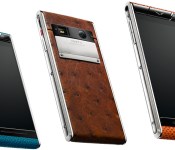
Vertu Aster is a luxury smartphone with ‘mid-tier’ price, top-tier specs

Since the launch of the Signature Touch, Vertu CEO Max Pogliani promised that “technology will be more a merging factor and not a differentiation point” for his phones. That’s literally the case with the new mid-tier Aster launched today: This titanium Android device is every bit identical to its flagship sibling device internally, just wrapped within a more contemporary and unisex design. We’re looking at a 4.7-inch 1080p display, a 5.1-inch 117 carat sapphire screen, a 2.3GHz quad-core Snapdragon 801 chipset, a 13-megapixel Hasselblad-certified main camera with twin LED flash, a 2.1-megapixel front-facing imager, 64GB of internal storage, a 2,275mAh battery, front stereo speakers, NFC, Qi wireless charging and great LTE compatibility (though no love for China, for some reason). With the specs out of the way, let’s look at why this swanky phone starts from $6,900 or £4,200.
While the Aster is technically the successor of the Constellation, the former avoided the path of screen enlargement (from the Ti’s 3.7-inch screen to the Constellation’s 4.3-inch) while managing to bring back the iconic V-pillow. By keeping the same 4.7-inch screen size on both the Signature Touch and the Aster, Vertu could risk losing appeal to a wider audience, especially in China where phablets are the norm. But Pogliani opted for a more sensible strategy.
“Vertu is not here to follow general mass market mobile trends.”
“Vertu is not here to follow general mass market mobile trends; our technology is leading edge but it doesn’t have to be bleeding edge. The same goes for the physical design of Vertu products. The nature of our customers and of our products mean that we have to develop what is right for them, not follow generic broader industry design themes that may be more fleeting than those of the luxury market.
“Many of our customers desire and appreciate compact size Vertu products that comfortably fit the inside the pocket of a well-tailored suit or in an expensive clutch bag.”
The CEO added that this also has nothing to do with the cost of sapphire, and he even said it’s possible that his company might offer larger screen sizes in the future.
Much like the other Vertu handsets, the Aster is offered with a range of skins and colors. The base price gets you calf leather in black, pink or blue, while £5,600/$9,100 gets you shiny snake skin in black or orange (the latter is this author’s favorite), and you can max out at £5,900/$9,700 — a “little” below the Signature Touch’s £6,750/$10,300 base price — for ostrich skin in brown or purple. This is pretty much why the Aster comes in at 11.2mm thick, which is just a tad more than the Signature Touch’s.

Going back to the point about differentiation, the Aster is more affordable because it comes with a shorter “Classic Concierge” subscription — just six months instead of a year and no dedicated agent. This may tempt those who doubt they will make full use of Vertu’s signature service; and they can always renew their subscription afterwards. There’s also the Vertu Certainty package that offers six months of iPass WiFi hotspots around the world, 12 months of Silent Circle communication encryption and 12 months of Kaspersky mobile security subscription. Vertu Life, a curation service that offers exclusive access to events and venues, will continue to last for 18 months — a figure based on usage statistics within Vertu’s global customer base, according to Pogliani.
“Concierge and services continues to be of significant importance to Vertu and they are a key part of our brand DNA,” the exec added. “We are continually developing this aspect of our business and new partnerships with the likes of Bentley indicate the level of our vision and ambition.”
On top of that, Vertu is also entering the e-commerce space. The English company will be gradually rolling out its Vertu Digital service between now and early next year, by which point folks around the world will be able to directly order personalized devices online, though they can also collect their new phones at a boutique — we think the latter is more fun, if there’s one nearby. But of course, this alone still won’t win the majority of us over — we’re waiting for that more affordable Vertu device that Pogliani is working on.
Filed under: Cellphones, Mobile
Source: Vertu
.CPlase_panel display:none;

Verizon’s new FiOS deal will let you watch Comedy Central away from home

Verizon is about to make it much easier to catch The Daily Show when you can’t reach your TV on time. As part of a renewed carriage deal, Big Red will let you watch all of Viacom’s live channels (including Comedy Central, MTV and Nickelodeon) through the FiOS Mobile app when you’re away from home. You’ll also have access to all of Viacom’s authenticated TV Everywhere services, so you’ll get to stream on-demand shows through a wide array of apps and devices. There’s more on the way, too. Verizon says the renewal will let it offer a mysterious bundle of “marquee content” nationwide to its wireless customers — even if they don’t have FiOS — and it expects to roll out “innovative new TV packages” that better match viewers’ tastes. We doubt the channel bundle will disappear entirely any time soon but we’d welcome more choices and, hopefully, lower prices.
[Image credit: AP Photo/Carolyn Kaster]
Filed under: Cellphones, Home Entertainment, Tablets, HD, Mobile, Verizon
Source: Verizon
.CPlase_panel display:none;

Engadget Daily: Windows 10 preview, the deal with vape modding and more!

Wondering what all the e-cig hullabaloo is about? Today, we take an in-depth look at the birth of vaporized nicotine and its growing, mod-addicted community. That’s not all we have on deck though — read on for our news highlights from the last 24 hours.
Filed under: Misc
.CPlase_panel display:none;
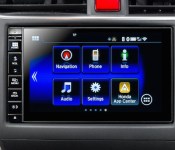
Next year’s Hondas will have Tegra and Android inside

Curious as to just which Honda models you’d see Android pop up in first? If you had money on the 2015 Civic, Civic Tourer and CRV it’s time to collect your prize from the pool. Google’s mobile OS will appear as standard equipment in those vehicles with a little help from Nvidia, naturally, and as the GPU giant tells it, Honda Connect will be the first infotainment system to run embedded Android on a Tegra chipset. Nvidia says that Connect will sport a 7-inch customizable touch-screen display that acts a lot like what you’d expect from a smartphone or a slate. Naturally that means there are swipe, pinch and zoom gestures along with an app store for the Ice Cream Sandwich-based system. How this will all play with Android Auto, though, remains to be seen.
Filed under: Transportation, Mobile, Google, NVIDIA
Source: Nvidia Blog
.CPlase_panel display:none;

Apple Creates Tool to Check Activation Lock Status on iOS Devices
Apple has released a new Activation Lock Status tool (via iDownloadBlog) that will make it easier for people buying a used iPhone, iPad, or iPod touch to avoid getting a device that is locked to another user.
Accessible via iCloud.com, the Activation Lock Status Checker allows users to enter a Device IMEI or Serial number to check whether a device has Activation Lock turned on.

Activation Lock was introduced alongside iOS 7 and is designed to prevent iPhones and iPads from being stolen. When Find My iPhone is enabled, it effectively locks an iOS device to a user’s Apple ID account, and even when wiped, the device will require the original Apple ID and password.
Activation Lock has cut down on iPhone-related thefts in major cities, but it has also affected users who purchase an iOS device used. If Activation Lock is enabled, a used iOS device will be entirely useless until unlocked by the original owner.
If an iOS device does have Activation Lock enabled, Apple’s tool will give users a clear warning that an Apple ID and password will be required before another user can activate the device. It also provides instructions on how to remove Activation Lock from a used device, which requires contacting the previous owner.

Anyone who is purchasing or selling a used iOS device should find Apple’s new tool very useful, as it can be used before a transaction takes place to ensure the iOS device will be usable by the new owner.
.CPlase_panel display:none;

iOS 8 Translator Keyboard Introduces Easy Access Language Translation Capabilities [iOS Blog]
With iOS 8 bringing support for system wide third-party keyboards for the first time, developers have been coming up with creative ways to introduce new functionality to the keyboard, beyond simply making it quicker to type.
Translator Keyboard is a new third-party keyboard designed to allow users to quickly translate their text from one language to another, without the need for a separate translation app.
Translator Keyboard is able to provide a much simpler experience than the copy-paste workflow that many translation apps have had to settle for in the past. As well as making translation quicker and more convenient, Translator Keyboard is the perfect tool for bite-size translation, such as iMessaging colleagues abroad, participating in online chat or discussions in another language, or skypeing with those from another country.
To use Translator Keyboard, users simply need to select the language they plan to type in and a second language to translate to. A small bar above the keyboard displays what’s being typed as it as entered, and when a sentence is complete, hitting the return button will submit it to be translated.

Translation from one language to another takes just a few seconds and the translated text is inserted directly into the text field. In Messages, for example, a user could type a sentence like “Hello, how are you?” in English, translate it to Spanish using the keyboard, and the person receiving the message would see only “Hola, ¿cómo estás?”
The app allows users to translate to 44 different languages and translate from 30 different languages, and switching between languages is done with a simple swipe on the keyboard.
Translator Keyboard is built using the Microsoft Translate API, and for that reason, it requires users to enable “Allow Full Access” because typed text is submitted for online translation. A privacy section within the app states that all text submitted for translation will be kept private and will not be stored or shared.
The app has built-in autocorrection that allows users to tap on a word that has been miscorrected to pull up a list of other possible word suggestions, which can be useful when attempting to type a word that needs a special character. More often, though, autocorrect makes it difficult to type in a language that is not English as every other word has to be fixed, slowing typing considerably. Disabling autocorrect is not currently possible, but according to the developer, the option will be added in a future update.

Along with autocorrect issues, there are a few minor problems with the keyboard, such as its inability to allow users to backspace or delete content in the main text field (deleting something that’s been entered requires switching to another keyboard), but it provides a useful way to conduct a conversation in two different languages via an app like Messages or make quick translations in an app like Notes.
Translator Keyboard can be downloaded from the App Store for $1.99. [Direct Link]
.CPlase_panel display:none;

Engadget Live hits Los Angeles this Friday!

As we told you last time, there’s lots going on in Los Angeles on Friday nights, but we still think our event trumps anything else you could possibly have planned. Our final Engadget Live event of the year kicks off at 7PM this Friday (October 3rd) at the Belasco Theatre.
Engadget Live is all about bringing together gadget lovers and tech brands. You (the gadget lover) will get to put your hands on some of the latest technology your friends haven’t seen. Try out vaporized spirits from Vapshot, experience Jaunt’s world of Cinematic VR, try out Huawei’s powerful smartphones and much more that you can preview in the gallery below.
So if you’re in the Southland this Friday night, get your free tickets and we’ll see you at the Belasco (not to be confused with the Velazco theatre, that’s in New Jersey). Then we’ll gear up for Engadget Expand, heading to New York on November 7-8!
Filed under: Announcements
.CPlase_panel display:none;
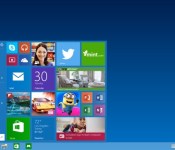
Rumor calls out Windows 95 as the reason Microsoft skipped version 9

Still confused about why the new version of Windows is 10, instead of 9? Beyond the loosely defined numbering schemes that are all too common in tech (how many iPhones did it take to get to 6?), a note posted to Reddit could provide an answer. Reddit user cranbourne claims to be a Microsoft developer, and cites rumors that early testing with the name “Windows 9″ ran into problems with code used as a shortcut to detect when apps are running on Windows 95 or Windows 98. The problem, is that it was never written to actually check for the extra character. Whatever the real reason is, Microsoft isn’t saying, and it gave Gizmodo a vague non-answer about the new name so your conspiracy theory is as good as ours (we think they were avoiding a Tolkien nine rings of power reference, and we have evidence to prove it.)
Microsoft dev here, the internal rumours are that early testing revealed just how many third party products that had code of the form:
if(version.StartsWith(“Windows 9″))
/* 95 and 98 */ else {
and that this was the pragmatic solution to avoid that.
LOL at the “real” reason MSFT went straight to Windows 10! This code is all over the place: https://t.co/mHqYMPDocw) pic.twitter.com/t6UI8XVHCd
– Christer Kaitila (@McFunkypants) October 1, 2014
The news that Windows 10 may have been named that way because of .StartsWith(“Windows 9″) checks reminds me of http://t.co/CVArfBVbZj
– Jeff Atwood (@codinghorror) October 1, 2014
I bet the real reason it’s called Windows 10 is because some enterprise app written 20 years ago checks for “Windows 9x”. #imaginethemeeting
– ଅନିଲ (@anildash) September 30, 2014
It sounds bizarre, and other versions of Windows have had different names publicly and internally to avoid such issues (Windows 7 aka Windows 6.1). Still, it carries weight for a couple of reasons and developers we asked found the reasoning plausible. Programmer Jeff Atwood points out a similar issue that hit Windows 2000 and certain Pentium processors back in the day, while indie dev Christer Kaitila exposed exactly how much of the potentially offending code is out there with a simple search. If you have a better idea, let us know in the comments below.
Filed under: Desktops, Microsoft
Source: Reddit
.CPlase_panel display:none;

Elon Musk teases Tesla ‘D’ unveiling on October 9th

Did you think that Tesla was done with surprises this year after name-dropping the Model 3? Far from it. The company’s Elon Musk has just teased the unveiling of what looks like another vehicle, the “D,” on October 9th. There will also be “something else” in store, he says. Just what either of those entail is still a mystery, although Musk has previously hinted that the third generation of Teslas would involve both the long-expected “budget” sedan and an SUV smaller than the Model X. There’s a real possibility that you’ll hear about one or both of those EVs in a week’s time.
About time to unveil the D and something else pic.twitter.com/qp23yi59i6
– Elon Musk (@elonmusk) October 2, 2014
Filed under: Transportation
Source: Elon Musk (Twitter)
.CPlase_panel display:none;
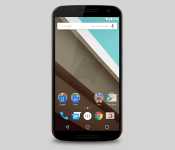
Motorola Nexus 6 spotted in the wild

We recently published a gallery of photos for the upcoming Motorola Nexus 6; however, all of these were renders because there has not been a quality photo of the actual device itself. That is, until today. The team over at Android Police has received some photos from an anonymous tipster that claim to show someone using the Nexus 6 out in public.


There is a view from both the left and right side of the device. These pictures give us a good idea of how large this 5.9″ behemoth will be, and it does not appear to be that large. For such a large phone, the user seems to be handling it relatively easily with just one hand. Since there is nothing to compare the phone to, this does not mean that the Nexus 6 will be small as the user could just have very large hands. However, it does give us hope that Motorola has been able to squeeze a 5.9″ display into a reasonable form factor. Although the majority of the phone is obscured by a hand or the case, we can still compare some features to what we have seen in leaks. The headphone jack appears in the middle of the phone and the navigation buttons appear smaller which both line up with the earlier photos and renders. The power and volume buttons are also located at the middle of the phone which shows just how large this phone will be. The front-facing speakers are also visible in both photos. While there is no way to verify the device, all signs say that you are looking at the next Nexus 6 from Motorola. Hopefully we will see the entire phone sometime within the next month or so.
What do you think of these new pictures of the Nexus 6? Tell us in the comments!
Via: Android Police
Deals, Discounts, Freebies, and More! Click here to save today!
The post Motorola Nexus 6 spotted in the wild appeared first on AndroidGuys.
.CPlase_panel display:none;
 AIVAnet