


EFF: Security software distributed by cops is actually spyware in disguise

Various schools, libraries and ordinary American families might have been using a “security” software called ComputerCOP for years. After all, they probably got their copy from cops, attorney’s offices or other branches of law enforcement, which tout it as a way to protect children online. Unfortunately, ComputerCOP isn’t the digital protector children need — according to tests conducted by the Electronic Frontier Foundation, it’s actually a key-logging spyware that uploads unencrypted data to the software’s servers. In other words, it uploads bank and email log-ins, social security numbers, among other sensitive data that can be easily intercepted and read by identity thieves, credit card hackers or even child predators.
The EFF writes:
As official as it looks, ComputerCOP is actually just spyware, generally bought in bulk from a New York company that appears to do nothing but market this software to local government agencies… Law enforcement agencies have purchased a poor product, slapped their trusted emblems on it, and passed it on to everyday people.
According to the foundation, law enforcement agencies typically buy between 1,000 and 5,000 copies of ComputerCOP for a few dollars per piece — and yes, they use taxpayer dollars for the purchase. Within the past two years for instance, several Attorney’s Offices, including San Diego’s, bought 5,000 pieces for 25 grand. The foundation reckons there might be over a million copies out there, but admits it’s possible that very few people have actually installed it, as its testers found it quite difficult to use. If you do know anyone who uses it religiously, though, make sure to send them EFF’s full report, which details what ComputerCOP truly is and what it can do.
[Image credit: Getty Images/Vetta]
Filed under: Misc
Via: BoingBoing
Source: EFF
.CPlase_panel display:none;
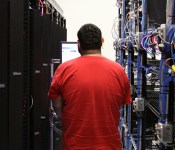
Don’t Skimp on Your Data Center
Businesses with significant IT use has to be able to stay in operation at all times, come what may. The one place where one can’t cut corners is the data center. Data centers are a second source of power, a place where a company stores its data offsite. Just like some people may have plenty of their own belongings and wines at home, while storing some of them at a storage center; businesses today need to have access to their own data while storing it with a colocator or data center.
A good colocator or data center should be one with the ability to keep operating even when there are power outages, disasters or other reliability challenges. One reason to not skimp on a data center is that the quality ones doubly secure customer data by having back-up generators that kick in when the regular service ceases. It may cost them more to have such generators, and they will pass this cost on to their customers.
Weather or other phenomenon that may cause an electrical black out or brown out are not just a remote possibility. They really happen, causing a company that skimps on their data center budget allocation to regret it.

Uptime
It’s important to select a data center that has maintenance and risk management plans. Top-tier companies will have such plans, and be able to show them to you or detail how they work. It’s important that they also can articulate what they can do if an earthquake or something occurs. If there has already been a disaster in the area where the center is located, seek to know what type of service interruption they experienced, if any.
If they can’t demonstrate or detail how they handled such matters or plan to handle such matters in the future, keep looking. Don’t cut corners by contracting with a data center that hasn’t thought out and planned for contingencies.
Smoke Detection/Fire Suppression
In the event of a fire or smoke incident, a data center needs to have maximally working smoke detectors that alert to any smoke incident; along with fire suppression equipment that can put out any fire without damaging data equipment. You also want to know that they are sufficiently insured against loss. Failing to check into these matters could backfire. Seek to know and see what they have in place. Smoke detectors and other equipment should be visible. If you take a tour with a company that you are considering, and you don’t see such equipment, keep it moving. By all means, take the tour. Don’t take anyone’s word for anything.
Sufficient Power
Your data will be compromised if the data center gets too heated. HVAC cooling capacity is mandatory in such environments. Your data is an invaluable asset, so make sure the data center you select can protect it well through temperature control. This amounts to high-power density, and it must be top-notch.
Their Contract Caveats
Make certain that you understand the contract language. In particular, you need to ensure that they have provisions for penalizing themselves if they fail to meet their contractual promises. For example, what will they do in the event of a security breach?
Your data center should be so on top of things that they have this type of language in their contracts. After all, they are asking you to trust them to perform as promised.
Staffing
If there are hours during the 24 hour block of time when the data center has no one on staff, you can almost predict that this is when problems will arise. You need to pay up, and contract with a center that has staff there 24/7, because that’s how long your data assets are in their care.
Certifications
You want a data center with SAS-70 certification from a CPA. This certificate verifies that they have adequate control over technology and related data. You may have to pay more for it, but you want a data center with infrastructure and software that is SAS-70 compliant.
Conclusion
They say you get what you pay for. If you have a company worth its merits, you want it to have everything in place to protect and safeguard your data. Paying a rate that’s commensurate with what you really need will be an almost failsafe plan. Look at it this way, your assets mean a lot to you, so pay as if they carry this significant weight.
.CPlase_panel display:none;

The ‘Angry Birds’ movie has its cast

We’ve never quite understood the point of hiring Danny McBride to be in a G-rated movie, since he can’t do the sort of foul-mouthed improvisation that he does best. That hasn’t deterred Rovio and Sony Pictures from asking him and other comedians for filling out the cast list for Angry Birds: The Movie. The flick will star SNL-alum Jason Sudeikis as Red, a bird with a “temper problem,” Josh Gad as Chuck and the aforementioned McBride as Bomb. Other cast members include SNL-alum Bill Hader as the Pigs, SNL-alum Maya Rudolph as Matilda and, er, current SNL player Kate McKinnon. The film’s secret weapon, of course, is to hire Game of Thrones and Destiny star Peter Dinklage as the Mighty Eagle. Although if the movie is anything like the game, we guess we’ll have to pay a couple more bucks in order to see the Mighty Eagle get us past a particularly difficult scene.
Filed under: Home Entertainment, Sony
Via: IGN
Source: Rovio
.CPlase_panel display:none;

Accessory of the Day: Replacement/extra battery for Samsung Galaxy S4 $13.99

Whether yours is on the fritz or you just like to keep a spare tucked in your weekend bag, buying a low-quality battery can damage your phone or much worse. This Anker 2600mAh Li-ion battery has undergone rigorous quality control testing and is comprised of Grade A cells to ensure peak performance. Its built in IC-chip prevents overcharging, a major problem with inferior batteries. Good for almost all Samsung Galaxy S4 models, except the Galaxy S4 Active, this little guy can be scooped up for just $13.99 (Prime eligible). With the 5-star reviews, you won’t regret juicing up with this deal.
Deals, Discounts, Freebies, and More! Click here to save today!
The post Accessory of the Day: Replacement/extra battery for Samsung Galaxy S4 $13.99 appeared first on AndroidGuys.
.CPlase_panel display:none;

Samsung to Begin Work on Apple’s 14-nm A9 Chips Before End of 2014
Samsung semiconductor head Kim Ki-nam today announced that the company will begin work on 14-nanometer processors for partners such as Apple, Qualcomm, and AMD before the end of 2014, reports ZDNet (via 9to5Mac).

The comments indicate that Samsung will produce Apple’s next-generation A9 chip to be used in next year’s line of iPhones and iPads. Currently, the iPhone 6 and 6 Plus use the 20-nanometer A8 processor. It is also likely that the forthcoming iPad Air 2 and second-generation Retina iPad mini will utilize Apple’s A8 chip.
The report also states that Samsung is producing around 30% of the total volume of Apple’s A8 chip, while TSMC is handling 70% of the production load. Teardowns of the iPhone 6 and 6 Plus revealed A8 chips that were manufactured by TSMC, although it is possible that a select number of shipped devices contain chips produced by Samsung.
Last year, it was reported that Apple signed a contract with Samsung to handle 30% to 40% of total A9 chip production, while TSMC would be getting the rest of the production load. A report from August stated that TSMC was ahead of schedule with its new 16-nanometer process, which was said to be for Apple’s A9 chip. However, these latest comments from Ki-nam may indicate that Korean company has already won the bid to produce the A9 with its upcoming 14-nanometer process over TSMC’s proposal.
.CPlase_panel display:none;
Download and install Google Play Services 6.1.11 with Google Fit [APK Download]

The latest version of Google Play Services has been released, bringing it to version 6.1.11, and although it includes features users probably won’t notice directly, it has some pretty nice under-the-hood enhancements.
There are a few small UI tweaks, along with the usual performance enhancements, but most notable is the inclusion of an updated preview for Google Fit to allow developers to test their fitness apps on “any Android device”.
The update also includes some enhancements to the Drive Android API, and Google says further changes are coming soon.
You can download the new Google Play Services 6.1.11 APK below.
APK Download
Why Download?
If you’re the type of person who likes to stay on the cutting edge of software then you’ll want to get your hands on the file. And, given software updates can take days or weeks to fully roll out, this ensures you’re moving up in the line.
What’s the Risk?
We’ll only share files or links to files that we feel can be trusted. Google does a great job of signing apps, checking them for malware, and protecting users. If you’re not sure whether you want to download the app at this time, simply wait for your update to arrive. No harm, no foul.
Deals, Discounts, Freebies, and More! Click here to save today!
The post Download and install Google Play Services 6.1.11 with Google Fit [APK Download] appeared first on AndroidGuys.
.CPlase_panel display:none;

LG is bringing webOS to smartwatches

We can’t think of anything that’s had more comebacks than webOS, except for maybe The Eagles. Palm, HP and LG have all tried to turn the promising software into a rival for iOS and Android, but so far you’ll only find webOS in the Korean company’s line of smart TVs. Still, LG appears to be planning to extend the reach of the little operating system that could by baking it into a future line of smartwatches. The Verge has found an LG-sponsored website, since pulled, that promises a development kit for a webOS smartwatch is coming. Given that the company was quick to make the page disappear (although we’ve got some more images after the break), and that local rival Samsung keeps Tizen around as a bargaining tool with Google, it’s certainly plausible that we’ll see a webOS smartwatch in the future. The only question is if, after all this time, anyone will consider buying one.


Via: The Verge
Source: LG (Google Cache), (2)
.CPlase_panel display:none;

Dropbox for Android can now move your cloud files to an SD card

If you’re a longtime Dropbox user on Android, you’ve probably bemoaned the lack of SD card support. What good is having gobs of cloud storage if you can’t use all the free space you have on your own phone? At long last, though, Dropbox has released an Android update that lets you export files directly to external storage. It’s a simple addition, but it’s potentially a big deal — you no longer have to worry about downloading that multi-gigabyte video so long as you have a card with enough room. The upgrade is already available in Google Play, so go and grab it if you’re eager to fill up your device.
Filed under: Cellphones, Storage, Internet, Mobile
Source: Dropbox Blog, Google Play
.CPlase_panel display:none;

Bring thermal vision to your phone with this camera add-on

For the most part, smartphone peripherals can make your mobile devices even more powerful than they already are. A new add-on, dubbed Seek Thermal, aims to do just that by bringing extra imaging features to your handset. The tiny gadget can be attached to an iPhone or Android smartphone (via Lightning port and microUSB, respectively) and, thanks to a companion app, turn that otherwise common device into one with a thermal camera. Seek Thermal notes it wants to help users across different scenarios, such as being aware of what’s around them at night time or, why not, look at clogged pipes throughout the household, just to mention a couple. If you’re interested, be ready to pay a premium — both the iPhone and Android models are priced at $199 a piece. While you think about it, check out the demo past the break, courtesy of Android Police.
Filed under: Cellphones, Misc, Peripherals, Mobile
Source: Seek Thermal
.CPlase_panel display:none;
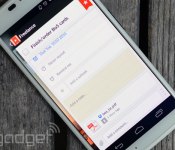
Wunderlist now lets you attach Dropbox files to tasks

Wunderlist has long been a popular choice for folks looking to wrangle both individual and collaborative to-do lists. With today’s update though, the productivity app gets a major boost from Dropbox. When creating a new task, you can attach files from that cloud-based repository, and they’re accessible right from the to-do list. From an item’s detail menu, simply clicking the paperclip or Dropbox icon allows you to hunt for the file(s) you’ll need, added as links for easy grabbing later. Update a document that’s attached to a task? No worries. It’ll automatically sync, ensuring that the latest version is available when needed. As TechCrunch notes, this is Wunderlist’s first third-party integration and it’s one that’ll save some time searching for and opening up files. TC also reports that Evernote and calendar syncing could be next up. If you’re anxious to give it a try, the new version is available now on iOS, Android and on the web.
Filed under: Software
Via: TechCrunch
Source: Wunderlist
.CPlase_panel display:none;
 AIVAnet