


Meet the iPhone 6 Plus and its 5.5-inch, 1080p Retina Display HD
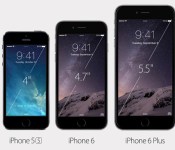

Well folks, the time for wild-eyed rumors and clandestine reports is finally over – Apple CEO Tim Cook just officially revealed the hefty new iPhone 6 Plus and its 5.5-inch screen in Cupertino alongside a long-rumored (and handier) 4.7-inch model. This thing won’t seem all that foreign if you frequent the geekier corners of the web, but it’s a sure sign that Apple wants to give all those other pocket-stretching phablets out there a run for their metaphorical money. The company’s live press event still chugging along (with a sketchy stream, no less), but here’s what we know so far.
There’s no two ways about it: the star of the show here is the spacious 5.5-inch 1080p Retina Display HD riding up front – to hear Apple’s Phil Schiller tell it, it’s SRGB-accurate, has an ultrathin backlight, photo-aligned IPS liquid crystals, an improved polarizer, and ion-strengthened glass. More importantly (and at long last!), the screen runs at 1080p.
You won’t notice any dramatic design differences between this model and its little brother – it’s still dramatically thinner than the iPhones that came before it (the Plus comes in at 7.1mm thick, and the angular edges of the 5s have given way to a smoother, rounder look in line with the company’s most recent batch of iPads. Remember all those leaks? They absolutely nailed it, and the end result looks, well, really comfortable to latch onto. Also new is Apple’s snappy new 64-bit A8 chipset – Schiller says it’s 50 percent more energy efficient (not to mention a hair smaller) than the the A7 that graced earlier models, and about 25 percent more powerful to boot.
Apple’s iOS 8 got the grand unveiling treatment back at WWDC, but (to no one’s surprise) it packs a few extra features to help it feel more at home on bigger screens. Perhaps the biggest is the inclusion of a two-paned landscape mode which makes the whole thing feel a little more like a tiny iPad than an upscaled iPhone. If you give the TouchID button (yeah, you’re not escaping those sensors), you’ll also invoke a one-handed mode that moves everything down to the lower half of the display for easy access — great if you’ve got some short thumbs.
This is a developing story, please refresh for updates.
Filed under: Mobile
.CPlase_panel display:none;

