


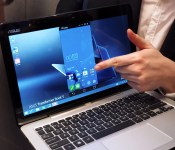
Up close with ASUS’ quirky Windows laptop / Android phone hybrid

Computex hasn’t even officially started, and we’re already blown away by ASUS’ rather eccentric Transformer Book V from this morning. The name doesn’t tell the whole story; it’s actually a Windows 8.1 hybrid laptop that lets you dock a Android phone on its back — a bit like the PadFone concept except the tablet has its own brain. That’s right, you can use both the 12.5-inch tablet and the 5-inch LTE phone simultaneously with their own brains. When docked, you’re shown the phone’s live Android phone interface within Windows (as pictured above), but you can also toggle the full Android tablet interface. It’s easily the most versatile product we’ve seen of late, but is it practical?
First of all, we should note that the Transformer Book V is apparently still about six months away from market, which may explain why ASUS only had one prototype available for hands-on. The design wasn’t even final; it’s supposed to look very much like the ZenFone 5. Understandably, the early software didn’t perform that well at the time: I couldn’t swipe between Android home screens in the windowed mobile interface, for instance. That said, I could launch Android apps just fine in the window, and it didn’t take long for the Android mobile interface to pop up in Windows after docking. It’s like Motorola’s Webtop implementation but much more powerful. On a similarly positive note, switching between the Android tablet interface and Windows was just a matter of pressing one button on the keyboard.
Since the docked phone is recognized as an external device in Windows here, you’ll still have to handle file transfer the usual way via Windows Explorer, rather than through a more seamless experience with some sort of drag and drop action over the Android interface (at least not for now, anyway). On the bright side, you can transfer files and charge the docked phone without a cable nor having the phone lie around the laptop. Another plus is with tethering enabled, you also have yourself an LTE-enabled Windows or Android laptop.
For a tablet of such size, 800g is a pretty nice weight, and this means you’re still under 1kg in total when you dock the 140g phone. There was no mention on the weight of the keyboard dock, but I found the full package to be of acceptable weight — my guess is somewhere just around 1.6kg. This is based on the fact that the slightly larger 13.3-inch Transformer Book T300 has an 800g keyboard dock with a built-in battery, so the Transformer Book V’s battery-less dock should be slightly lighter.
Due to the prototype nature of the device we played with, we’ll save our hardware comments for a mass production unit. The only complaint we have so far is that the tablet’s 1,366 x 768 display is an eyesore for those who are used to much sharper screens; though if — and it’s a big “if” — this product does take off, there’s a good chance that the displays will be upgraded.
Regardless, we think ASUS is at least headed in the right direction: the tablet dock is no longer dependant on the phone; and in fact, it’s a full-fledged Windows PC on its own but with the versatility of having Android run in Windows or run natively. But as with many products, this concept’s success will ultimately depend on the pricing. We also hope this Windows/Android hardware combo doesn’t mean ASUS has given up on the idea of a Windows Phone-powered PadFone.
Hands-on photos by Zach Honig.
Filed under: Cellphones, Laptops, Tablets, Mobile, ASUS

Kickstarter project lets you print eerie 3D x-rays for $99

If your average 3D-printed paperweight isn’t morbidly realistic enough, then here’s an interesting alternative. It’s an object that consists of thin layers of plexiglass, each of which has been printed with regular ink before being stacked in a vacuum chamber and drenched in machine oil. It’s a relatively simple process, with no actual 3D manufacture or etching involved, but it offers an unusual degree of control over color and transparency. This makes the technique perfect for biological specimens, and especially ones that benefit from some x-ray detail. A Kickstarter project is currently offering its own choice of “Looking Glass” curiosity for sale (an elephant inside a boa constrictor’s belly, inspired by The Little Prince) starting at $39, or you can get your own 3D object file turned into a personalized trinket for $99, with delivery expected in November if the funding target is met. And yes, you can opt for a 3D x-ray of one of your body parts — in fact, somebody already has — but it probably helps if you choose a part with bones in it.
Source: Looking Glass (Kickstarter)

Sony teasing upcoming smartphone on Twitter, likely Z2 Ultra

Sony Xperia Z Ultra was announced a year ago, a 6.3″ behemoth from Sony’s workshop. That phone was (and still is) huge, you need to use it in order to realize how huge that device is. And now it seems Sony is going to bring us the Z Ultra’s refresh.
Sony released a following statement on Twitter alongside an image above: “Shh… do you want to know a secret? Stay tuned for the next big thing this season.” If you ask us this is obviously a teaser for the upcoming Xperia Z Ultra 2 (just look at that picture), or whatever they intend to call this thing. Z Ultra had rather high-end specs at the time of the announcement, so we don’t doubt its successor will too.
We’ll let you know as soon as we get some more information regarding this. Do you own a Z Ultra? Would you buy its successor?
SOURCE: Sony Xperia (Twitter)
The post Sony teasing upcoming smartphone on Twitter, likely Z2 Ultra appeared first on AndroidGuys.
iOS 8 to Include Battery Usage Per App and Much More
During today’s Worldwide Developers Conference keynote, Tim Cook and other Apple executives gave us a fast-paced, broad-ranging look at some of the features we can expect with iOS 8, including improvements to Messages, keyboard enhancements in the form of QuickType and access to third-party keyboards, HealthKit, Extensibility, and more.
Along with the features that were demoed on stage, an iOS 8 graphic displayed some additional functions that went largely under the radar, many of which look quite interesting. For example, iOS 8 will apparently display battery usage by app, a handy feature that will let users monitor the battery drain of specific apps, shutting down those that are drawing too much power.
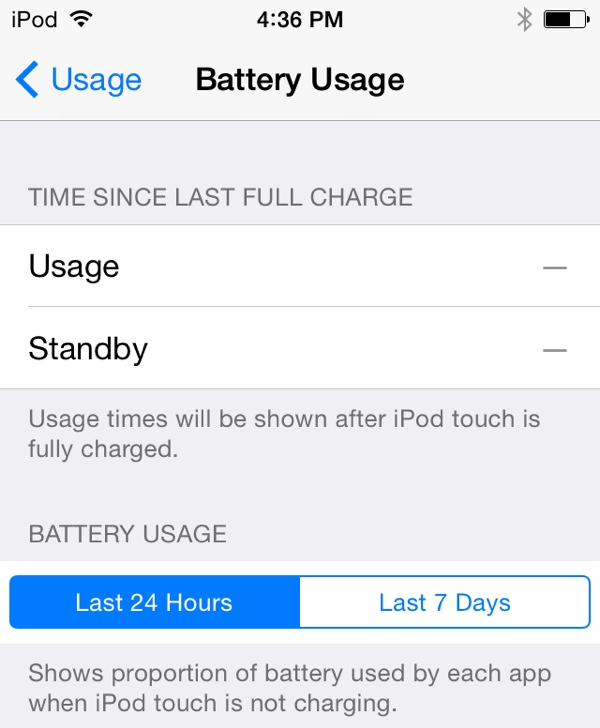 Image courtesy of Evan Coleman
iPads will gain the ability to take Panoramic photos like the iPhone, while the Camera will gain an instant burst mode, a timer mode, and separate controls for focus and exposure. iBooks will support an auto night mode and the ability to organize books by series, while notifications will include travel time.
A mysterious Tips app, which was first depicted in an early screenshot of iOS 8, is also mentioned, though it is unclear what this app will do. It is possible Tips will provide iOS users with information on lesser known iOS features, serving as a tutorial app for those who want to learn the ins and outs of their devices.
 Click to make larger
An “In Case of Emergency” card will be added to iOS 8, displaying contact information and possibly health-related information as well. Users will be able to use Siri to purchase iTunes content, Notes gains a new rich text editing feature, and RSS feeds are displayed within Shared Links in Safari.
Other mentioned features offering unknown functions include Place cards in other apps and Speak Screen.
Finally, there are also several accessibility improvements coming, including an Alex voice, Braille keyboard, improved zoom, and multi-device support for MFi hearing aids. Guided Access, which limits an iPad or iPhone to opening a single app, will gain time limits, a countdown timer, and Touch ID integration.
These are of course, only a small selection of the hundreds of new features and minor functions that will likely be added to iOS 8 as it is in development. iOS 8 is available to developers immediately, while the public will get access to the new mobile operating system later this year.
(Thanks to Phil for the image!)
Xcode 6 Allows Developers to Test Larger iPhone and iPad Screen Sizes
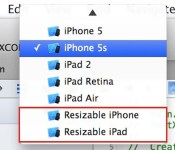
With the release of Xcode 6 today after Worldwide Developer Conference, developers have found an option within Xcode to size apps for devices referred to as “Resizable iPhone” and “Resizable iPad”, as pointed out by Mac4Ever [Google Translate]. The option is next to other Apple devices, including iPad Air, iPhone 5s, and iPad Retina.
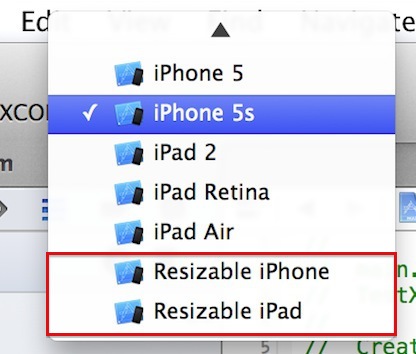
The options are likely to enable developers to start developing apps that fit on the rumored larger 4.7 and 5.5 inch screens of the iPhone 6 and, perhaps, the rumored 12-inch iPad Pro. Another photo of the Xcode simulator shows the difference between an app visually optimized for an older iPhone in what appears to be the resolution for one of the two iPhone 6 models.
It’s not yet known what the exact resolutions are for the 4.7 and 5.5 inch iPhone 6 models or even the rumored 12-inch iPad Pro, but the “resizable” functionality would allow developers to explore building versions of their apps for larger screens that are currently available.

OS X Yosemite Public Beta Limited to First Million Registered Users [Mac Blog]
Earlier today as Apple was unveiling OS X Yosemite for the first time at the Worldwide Developers Conference, software chief Craig Federighi announced that there would be a public open beta for the new operating system ahead of its launch this fall. Now, users on our forums have discovered an AppleSeed sign up page for the program, with Apple noting that the program is open to the first one million users who register.

How can I participate?
To join the OS X Beta Program, just sign up using your Apple ID. When the beta software is ready, you’ll receive a redemption code that will allow you to download and install OS X Yosemite Beta from the Mac App Store. Then go ahead and start using it. When you come across an issue that needs addressing, report it directly to Apple with the built-in Feedback Assistant application.
Users will also need to be running OS X Mavericks, and Apple recommends that the OS X Yosemite beta be installed on a secondary Mac in the event of possible bugs and errors.
OS X Yosemite includes a brand new user interface design alongside major new features focusing on seamless integration between Mac and iOS devices. The new operating system also includes a new cloud storage solution called iCloud Drive, as well as the ability to make phone calls and texts through an iPhone.
A Look at ‘Health’ and ‘HealthKit’, Apple’s New Health Initiative
Ahead of WWDC, perhaps one of the most hyped features for iOS 8 was “Healthbook,” which was said to serve as a Passbook-style app that aggregated a variety of health-related information in a colorful card array.
While Apple did indeed announce a new health initiative and accompanying app, “Healthbook” turned out to be off the mark. The app is called simply “Health,” and appears to differ a bit from how it was described in early rumors. According to Apple, Health is designed to be an “easy-to-read” dashboard of health and fitness data, which can pull in information from several different sources. “It might just be the beginning of a health revolution,” reads Apple’s iOS 8 Health page.

Heart rate, calories burned, blood sugar, cholesterol — your health and fitness apps are great at collecting all that data. The new Health app puts that data in one place, accessible with a tap, giving you a clear and current overview of your health.
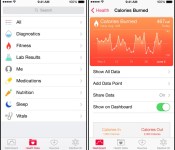
The Health app keeps track of several different health metrics measured by various devices, including heart rate, calories, cholesterol, and more. It also features an “emergency card” that includes all of a user’s important health information, including blood type and allergies, which can be displayed directly on the lock screen of an iOS device.

As can be seen in screenshots of the app, it aggregates information into a selection of categories such as Diagnostics, Fitness, Lab Results, Medications, Nutrition, Sleep, and Vitals. Many of these categories can also be displayed on a dashboard chart, giving users an at-a-glance view of their overall health.
Accompanying Health is the HealthKit tool for developers, which can be incorporated into both new and existing health and fitness apps to allow them to access the health data stored within the Health app. Users are able to choose exactly what’s shared and can, potentially, chose to share data from a blood pressure app with a doctor. Apps can also be authorized to share information with each other. A nutrition app might share how many calories are consumed with a fitness app.
According to Dr. John H. Noseworthy, CEO of the Mayo Clinic, Apple’s HealthKit has the potential to “revolutionize how the health industry interacts with people.” The Mayo Clinic is already working with Apple and HealthKit, creating an app that allows patients to monitor their blood pressure, sending alerts to doctors automatically.
Despite all of the focus on Apple’s health related initiative before WWDC, the company spent very little time going over the Health app. It is likely we’ll see an additional focus on health in the coming months as it is likely to also integrate with Apple’s much-rumored wearable device, the iWatch. Health and HealthKit, both part of iOS 8, are available to developers today with a public release expected in the fall.
AT&T to Bring the Galaxy Tab 4 10.1 and Note Pro 12.2 June 6th
A new round of Samsung tablets is headed to AT&T in just 4 days time. AT&T has announced that they will launch the new Samsung Galaxy Tab 4 (10.1 version) and the Note Pro 12.2 on June 6th for willing and able buyers.
The Galaxy Tab 4 sports a 1.2GHz quad-core processor, 16GB of storage with a SD card slot that is stated to support a 64GB card. It runs Android 4.4.2 and will be powered by a 6,800 mAh battery that has a rating of 9 hours usage time. That is about all AT&T tells us. As for other specs that should be inside, there should be a 3MP rear camera, 1.3 MP front camera and offer 1.5GBs RAM. The 10.1 inch screen is stated at a resolution of 1280 x 800 with a 149 pixel density. AT&T plans to let the Tab 4 go at $479.99 full price, $379.99 on contract or for $24 a month with the AT&T next program for 24 months. AT&T has a landing page for the Tab 4, but it doesn’t seem to work.
 Next up they have also announced the Galaxy Note Pro 12.2. This is the power house of the bunch with a 2.3 GHz quad-core processor, 32GB on board storage with SD slot for another 64GB, 8MP rear camera with 4x zoom, Android 4.4.2 and is powered by a 9,500 mAh battery rated for just over 10 hours of use. Of course it also comes with the S-Pen and all the airview hover features of the Note line. Additional specs should put the screen at a 2560 x 1600 resolution with a 247 pixel density. A 2MP front shooter and 3GB of RAM. Price wise, you will be looking at $89.99 at full price, $799.99 on a two year contract or spend just $48 a month for 24 months to pay it off. The Note Pro landing page is set up here.
We are just piecing some of that together from the specs Samsung has listed for the devices. Unfortunately AT&T didn’t offer up a really detailed spec rundown yet. If you take a look at the video for the Tab 4 10.1 you can see they are focusing more on the software and not the hardware.
In addition to the devices, AT&T is also going to take another $50 off the purchase price if you also pick up a Galaxy S5 or Galaxy S5 Active at the same time. I wonder if they will honor the $50 off on a Galaxy Gear too when you get the S5?
Source: AT&T
//<![CDATA[
ord = window.ord || Math.floor(Math.random()*1E16);
document.write('’);
//]]>

HP announces Android 4.3 powered 14-inch Slatebook

HP is known in the world of technology for their laptops and desktop computers, and if you are one of the people who are looking forward to a laptop with Android, then HP have something for you. HP officially announced the HP Slatebook – a notebook in a yellow and black color with a 14-inch display. Last year in July, HP released the Slatebook x2 but the new Slatebook comes with a lot of new specs and features.
 it comes with a 14-inch FHD (1080p), quad-core NVIDIA Tegra 4 under the hood. It will feature Android 4.3 Jelly Bean with slight customization made by HP – it will run HP’s apps as well as the Google Play app store, as well as the NVIDIA TegraZone for games. It has a 16mm ultra-slim design and weighs in at a tiny 3.71lbs. It has a battery life of up to 9 hours, which is good enough for a tablet.
It will be available starting August 6th, and it will cost $399. Are you planning to grab it? Let us know in the comment box below.
Source: HP
The post HP announces Android 4.3 powered 14-inch Slatebook appeared first on AndroidGuys.

Poll: What is the best flagship smartphone of 2014?

We’re nearly halfway into the year and we’ve got a lot of great smartphones out there. Right now we are surrounded by flagships like the Samsung Galaxy S5, HTC One M8, and the Sony Xperia Z2. Looking ahead we have the soon-to-be-released LG G3 joining the fray. Suffice it so say, all of them are amazing smartphones and each would be welcome in our hands. But, just for fun, let’s find out which one of them is the best of the bunch?
Internally, we each have our preferences and favorites, but we want to hear what our readers think. In the poll below we want you to pick the best of the big four releases so far. Which do you prefer? Is it the build quality of an HTC One M8? The sexy stylings of the Sony Xperia Z2? Maybe you’re a die-hard Samsung loyalist. Let’s hear your thoughts on which is deserving of the name “best flagship smartphone of 2014“!
Ready, set, vote!
Once you pick your favorite, head to the comments to back up your vote. Let us know what it is that made you choose that particular model!
The post Poll: What is the best flagship smartphone of 2014? appeared first on AndroidGuys.
 AIVAnet