


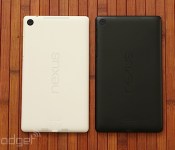
This is the white Nexus 7 (hands-on)

The Nexus 7 has been out in a black hue since this summer, so it was only a matter of time before Google launched it in white. And this many not come as any sort of shock, but the white version of the ASUS-made Nexus 7 doesn’t pack any unexpected surprises — unless, of course, you were hoping the device would be white on the front and the back (although white is barely visible along the edges when you’re looking at the front). We had the opportunity to play with the KitKat-packing slate today, and your overall user experience will be exactly the same regardless of your color preference. The outside is essentially alike as well, although there are two exceptions: this one has the FCC info printed on the back, which by the way has a glossier feel than the soft-touch plastic on the black Nexus 7. In fact, we were immediately reminded of the feel of the white Nexus 5. If the new hue is for you, they’re already shipping from the Play Store in the US for $270: your only option is a 32GB WiFi-only model. Check out the gallery below for plenty more images.
Google Play to see new games categories in February 2014
Google expects to further expand the number of Google Play categories for games in 2014, according to a new post on the Android Developers Blog. Expected to take effect in February, we should be on the lookout for Simulation, Role Playing, Educational, and perhaps others. Developers can now use the Google Play Developer Console to pick from one of these a new categories for their games; the game will not change until the new categories go live in February 2014.
The post Google Play to see new games categories in February 2014 appeared first on AndroidGuys.
Gmail Android app updated with vacation response, printing, and more
The official Gmail client picks up new features, however some are specific to Android 4.4 or later
The official Gmail app for Android is getting an update today which adds new moderate and handy features. Chief among the details is the ability to set vacation auto-responses, something previously only offered in the full web experience.
In addition to attaching photos or videos to emails, users can now toss in any file type, including .ZIP and .PDF. Those of you running Android 4.4 KitKat or later can also print hard copies of your emails directly from with the Gmail app.
Last, but not least, users may notice “enhanced performance of the app on low memory devices”, which come courtesy of Google’s Project Svelte.
The post Gmail Android app updated with vacation response, printing, and more appeared first on AndroidGuys.

Android Device Manager application now available in Play Store
Back in August, Google officially unveiled the Android Device Manager, a service Android fans were looking forward to from a long time. The service could help users to locate their lost Android device for example inside your house under the sofa. It can help them to see the last known location of their stolen device, also allowing them to wipe the data, keeping your data secure. Now Android Device Manager is available in the Play Store as an Android application.
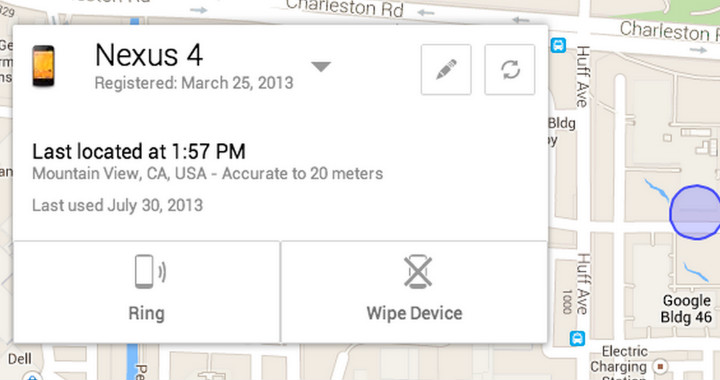 It is available for free, of course. And if you are not using the service, we highly recommend you to do so. You have to turn on the Google location service, also go to Google Settings > Android Device Manager, and select Remotely locate this device and Allow remote lock and factory reset.
You can download the application below, and don’t forget to share your thoughts with us in the comment box below.
The post Android Device Manager application now available in Play Store appeared first on AndroidGuys.
Nexus 7 16GB Going for $195 Today at Best Buy

Best buy has a one day only deal for the second generation Nexus 7 today, and you can pick yourself up one, or for a family member, for the low price of $195. That is a $35 price cut, which you can actually put towards a Chromecast if you haven’t gotten yourself one of those yet. With Christmas around the corner, could be a nice gift to get your future tech enthusiast, or just get it for yourself and call it a day. Head over to Best Buy by clicking the link below. Let us know if you did.

[Download] Gmail Updates to 4.7 Bringing KitKat Printing Support and Zip Downloading

Gmail is seeing a nice little update today, and some of you have probably already received your update through the Play Store. Some key features have been added to version 4.7, such as KitKat printing support, vacation responder, and…wait for it…zip downloading!
KitKat printing support allows you to utilize the cloud access, just incase you need to print out those important emails quickly from your device. The vacation responder is nice for those that get a slew of emails, so you will be able to set the time and dates for it to respond with an I’m out of the office email.
Finally we have zip downloading support that many have been waiting for since forever. No more messages stating you can’t open or save the attachment due to its format. Happy day indeed, and if you haven’t gotten the update through the Play Store yet, then click the download link below and grab the apk. Let us know how you like it.

Elder Scrolls Online Coming to Mac in April of 2014 [Mac Blog]
Bethesda and Zenimax today announced that it plans to release The Elder Scrolls Online MMO on Friday, April 4, 2014 on both the Mac and the PC, with a console release coming later in June.

The Elder Scrolls Online, initially announced in mid–2012, is part of the Elder Scrolls franchise, which has included open world role-playing games like Daggerfall, Morrowind, Oblivion, and Skyrim.
Like other games in the series, The Elder Scrolls Online is set on the continent of Tamriel and will feature a storyline that is indirectly connected with the storylines from previous games, set 1,000 years before the events of Skyrim. Along with a release date, a new trailer for the game is also available.
According to Game Director Matt Firor, major systems development has been completed and the development team is focused on polishing content, improving combat, and fixing bugs.
Game development is coming along very well. We completed major systems development, and are focusing on making this the Elder Scrolls game you expect: polishing the hundreds and hundreds of hours of content, making combat even more fun and responsive, fixing quest issues, and much, much more. In fact, we plan on spending the next few months before launch reacting to the latest feedback from internal and external testers and gameplay data we have collected.
The Elder Scrolls Online has been in beta testing for the last year, and the company plans to expand beta testing opportunities ahead of the game’s April release.
     |

Google Launches Chrome Apps for Mac
Google today announced that it is bringing Chrome Apps to the Mac, following a beta period that began in May. First introduced in September for Windows and Chromebook users, Chrome Apps are designed to function like native Mac apps, working offline, updating automatically, and syncing on any computer where a user is signed into Chrome.

Chrome Apps work offline, update automatically and sync to any computer where you’re signed into Chrome, so you can pick up where you left off. Your Chrome Apps on Mac behave and feel just like native software. For example, you can find your Chrome Apps in the Applications folder on the Dock. Search for apps by name in the Spotlight search—just like any other Mac program that you already use.
Chrome Apps, which are separate from Chrome browser apps, are downloaded into the applications folder and work like any other Mac app. The apps have access to local storage for offline support, differentiating them from standard Chrome apps, and are able to easily sync content between multiple computers.
Chrome Apps for the Mac also work with Google’s Chrome App Launcher, which will be automatically installed when any Chrome App is downloaded. The Chrome App Launcher aggregates all Chrome Apps into one convenient expandable grid on the Mac’s dock.
Google has several different fully functional Chrome Apps available for download from its Chrome Web Store, including offerings like video editing app WeVideo Next and project management app Smartsheet.
| |

iPod and Nest Creator Tony Fadell May Have Purchased (RED) EarPods and Mac Pro for $1.4 Million
Earlier this year, Apple design chief Jony Ive and designer Marc Newson created a number of one-of-a-kind items to be sold at a Sotheby’s charity auction to benefit Product (RED). Two items in particular were Apple related, a pair of solid gold Apple EarPods and a new Mac Pro with a special red finish.
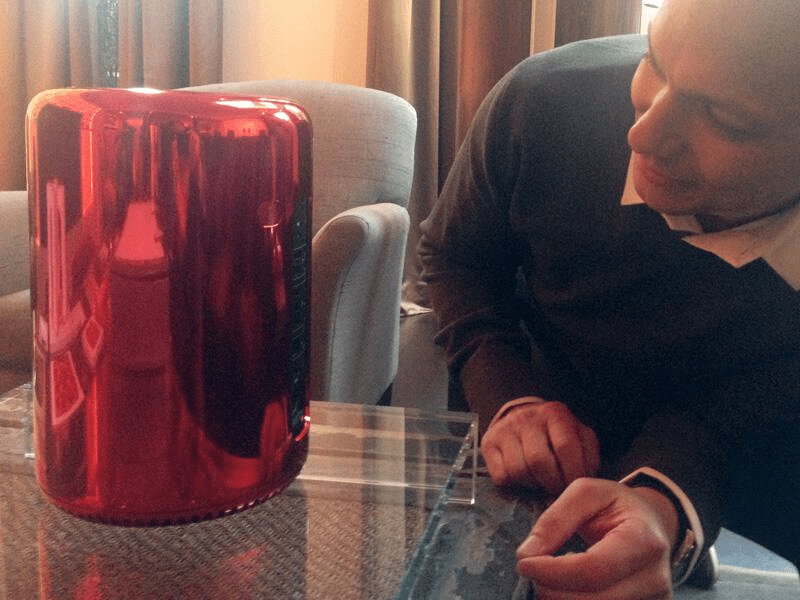
According to a pair of tweets by photographer Kevin Abosch, Tony Fadell — one of the creators of the iPod and the founder of Nest, the company behind the Nest Thermostat and Protect smoke detector — may have purchased both the Mac Pro and the EarPods at the auction.
The Mac Pro sold for $977,000 while the solid gold EarPods sold for $461,000. Other items sold at the auction included a Steinway & Sons grand piano that sold for $1,925,000 and a magnum of Dom Perignon 1966 with a custom red label that sold for $93,750.
My friend @tfadell stopped by with 1 of a kind solid rose gold earbuds. Very cool! Thank you!!!!!!!!!!
– 5:45 AM Pacific, December 11, 2013
Both 1 of a kind… @tfadell with the (RED) Mac Pro and he’s already trying to hack it!!
The red Mac Pro is one of the few out in the wild at the moment, as Apple has not yet started selling the device to the public. First shipments of the new Mac are expected later this month.
We have reached out to both Kevin Abosch and Tony Fadell for confirmation of the purchase and will update if we hear back.
| |

JetBlue fills a plane with reporters for the ultimate Fly-Fi satellite internet test

JetBlue’s been quoting some pretty ambitious figures for its new ViaSat-powered in-flight WiFi, and during our test flight last month, the Ka-band satellite service seemed to be up to the task. The promise? 12 Mbps internet at every seat on the plane; enough to stream HD video, download new apps and conduct your online business just as quickly as you would on the ground. That performance pledge generally assumes that only a handful of passengers will be watching Netflix films and YouTube clips — however, that condition went right out the boarding door when the airline filled a few dozen A320 seats with journalists eager to push the service to its limits on today’s official launch flight. It was a charter plane to nowhere — a 90-minute journey from New York’s JFK airport to New York’s JFK airport — but for this group of passengers, it was the ultimate adventure.
Gate-to-gate WiFi is coming soon — perhaps even before the end of the year — but on the flight today, Fly-Fi came online above 10,000 feet. After a few minutes of inconsistency, the service screamed for the rest of our time in the air. I uploaded Instagram photos and videos and responded to tweets using my iPhone 5s, which was connected to JetBlue’s free service, while my laptop was hooked up to the $9-per-hour Fly-Fi Plus. Both offerings performed just fine for basic surfing, but the paid version also excelled when it came to video streaming. I loaded 720p YouTube videos in only a few seconds, with minimal buffering, as you can see in the hands-on video below. Generally, the connection was much faster on the plane than it was in the JFK terminal, but it did seem to stutter a bit compared to the super-fast Verizon FiOS I’m used to at home.
With a latency of nearly one second, websites didn’t load as quickly as they would on the ground. That speed bump comes courtesy of the 22,000 miles between ViaSat-1 and our plane, but after a few minutes of surfing with Fly-Fi, I didn’t mind the delay. As I experienced with the pervious flight, the service far exceeded competing ground-to-air services from Gogo and the satellite-based Panasonic WiFi on United’s fleet. But there’s good news on that front: LiveTV, the JetBlue subsidiary tasked with installing the Fly-Fi on the airline’s A320s, has already begun rolling out an equivalent service on select United 737s. UA is expected to launch its own ViaSat-connected internet within the next few months. Still, JetBlue’s been tapped as ViaSat’s launch partner, so if you want to try out the most powerful in-flight internet on the planet, that’s your best bet today. Other North American airlines may soon follow suit, however — this is the beginning of the end for frustratingly slow in-flight WiFi.
Filed under: Transportation, Wireless
 AIVAnet