


Android 4.4.2 Binaries and Factory Images Get Posted by Google

Google has been on top of things lately, with releasing Android 4.4.1 to the Nexus family last week, then releasing Android 4.4.2 this week. They have also been updating their apps, and announced two additions to the Google Play Edition family. No one is complaining that is for sure, and today, they just posted the Android 4.4.2 binaries and factory images for anyone that wants them.
Google actually didn’t post the binaries or factory images for Android 4.4.1, probably because they knew they were going to release Android 4.4.2 to the public a week later. I know a lot of you might not even consider downloading any of these files, but this does help developers get new ROMs out quickly, and if you do end up flashing your device into certain oblivion, you can flash the factory image to get it back to stock. So if you feel like you need to download the files, head over to the Google page provided below.
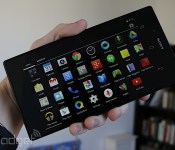
Sony Z Ultra Google Play edition hands-on

Sony’s gargantuan phone, the 6.4-inch Xperia Z Ultra, is finally getting some quality time in the United States, but not exactly the same way we had envisioned at first. For $650, you can now grab a Google Play edition of the device (in the US, anyway), which is compatible with AT&T’s and T-Mobile’s LTE and HSPA+ networks. Essentially, this means that the unlocked phone features a stock version of Android 4.4, is free of Sony’s software tweaks and carrier bloatware and it’ll (in theory) get updated to the latest and greatest version of Android sooner than most other devices.
Since the Z Ultra (no Xperia branding this time) doesn’t come with Sony’s user experience, this means that it’s missing some features you normally find on flagship Xperia devices, such as the Bravia Engine. You’ll get a stock camera UI, rather than Sony’s proprietary interface, which means you won’t have access to as many manual settings as you’d probably prefer; that said, at least it comes with a standard HDR setting, so its software algorithms may be a little different from Sony’s, and may affect the final image somewhat. Also gone is the native Android gallery that we’ve grown to love or hate over the years, and in its place is the new Google+ Photos app that was introduced in Android 4.4 KitKat and featured on Nexus devices.
Aside from these differences, there isn’t much else to the experience; the look, feel and dimensions of the device are all the same, so if you thought the original Z Ultra was too big (and too expensive) for your tastes, there’s nothing about this new edition that will change your mind. Still, this is the best option for anyone who wants an official stock Android experience on such a large handset (without venturing into loading ROMs, at least), so perhaps a handful of you may be looking at the Z Ultra in a completely new way now. Either way, we’ve got some pictures below for your viewing pleasure.
Filed under: Cellphones, Tablets, Wireless, Mobile, Sony, Google
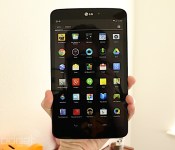
LG G Pad 8.3 Google Play edition hands-on

If you’ve been eyeing the LG G Pad 8.3, your decision just became more difficult. Yesterday Google announced — and began shipping — a Google Play edition of the tablet for $350 in the US, which makes it the very first slate to receive the stock Android treatment. What does this mean, exactly? Google Play editions come with Android 4.4 KitKat without any manufacturer or carrier customizations, so it looks precisely the way Google intends it. This can be good or bad, because there are a couple tradeoffs you need to consider: The good news is that these types of devices typically get upgrades to the newest version of Android far earlier than the vast majority of smartphones and tablets, but you also need to give up a few features that were unique to their skinned counterparts.
In the case of the G Pad 8.3, this means you won’t be able to enjoy the Knock On (aka, “double-knock”) feature, nor will you have Slide Aside or access to a litany of LG’s Q-branded functions like QPair, QRemote or QSlide. None of these missing services are crucial to the functionality of the G Pad, although we must admit that we’ve grown rather fond of Knock On. The camera interface is also quite different, but the only thing that might frustrate you is the lack of manual settings; if you only rely on automatic mode to make the photo magic for you, this likely won’t be an issue of concern. Just like we saw on the Z Ultra Google Play edition, the G Pad also doesn’t come with the native Android gallery app, as it appears that the Google+ Photos app has taken its place as the default. You’ll also have the stock camera UI to deal with, rather than LG’s, so you won’t be able to make many manual adjustments. Of course, this probably isn’t a huge concern for a lot of tablet users who may only use their camera for basic needs.
Aside from software changes, you’re not going to see anything different on the outside. The dimensions are all the same as the original model, as are the actual hardware components. It’s only available in black (the back strip is fitted with brushed metal, with black plastic ends), but it’s offered for the same price as the model we reviewed last month. We’ve got a bunch of images for you to behold below.

Twitter and Comcast expand their tweet-based TV viewing to nine more providers

Comcast and Twitter made it easy to watch TV online when they launched their SeeIt social platform, but the service has only been truly useful for Comcast customers watching NBCUniversal shows. It’s about to become much more relevant, though, as Comcast has reached deals with nine new channel and TV service providers. ABC, A&E Networks, AMC, Cablevision, Charter, Crown Media Family Networks, Discovery, Fox and Time Warner Cable should all support SeeIt’s “watch now” links in tweets as soon as the first quarter of 2014. You also won’t need to sign up for Comcast service to get the full experience — the new SeeIt deal will let Cablevision, Charter and TWC TV subscribers both tune their set-top boxes and record programming without ever grabbing the TV remote. There will still be gaps in SeeIt’s coverage in the wake of these agreements, but don’t be surprised if it’s ubiquitous in the near future.
Filed under: Home Entertainment, Internet, HD
Via: The Verge
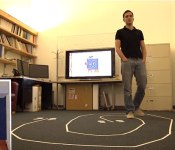
MIT’s 3D motion tracking tech can see you through walls, no camera needed

Even if you hide behind a wall, M.I.T’s 3D motion tracking tech can still see you. It can even tell if you’ve “fallen and can’t get up.” Sure the tech sounds invasive, but the team’s WiTrack (as it’s been dubbed) device is actually less intrusive than Microsoft’s Kinect — there’s no camera watching your every move. Nor is there any wearable tech involved. Instead, the setup relies solely on a wireless network and your body’s ability to bounce back those radio waves.
These relatively weak signals, said to be about 1,000x less powerful than that of a smartphone and 100x less than a typical WiFi network, are transmitted throughout a home environment where they’ll then reflect off of surrounding objects and be read by three transceivers to determine your location. Obviously, this poses a significant problem those of us with furniture, as we can’t all abide by a German minimalist aesthetic. To counter this signal noise, WiTrack makes use of an algorithm to sift through the clutter and mark your location at up to 97 percent accuracy for falls or “10 to 13cm in the x and y dimension, and 21cm in the z dimension” for general movement. So as a tracker, it’s pretty darn precise.
Despite its massive promise as a cornerstone of our futuristic, smart homes, WiTrack’s nowhere near commercial production. It is, after all, still a research project, but the tech’s usefulness as an aide for the elderly is all too obvious. Beyond that,the M.I.T. team envisions their 3D tracking system being put to use for video games (think: playing out Call of Duty IRL). What’s more, WiTrack’s also capable of helping you to control home appliances remotely, much like that Google Glass mod we saw the other day, as the system’s able to roughly track individual body parts. So, say you point in the general direction of a lamp, even if it’s through a wall, the system can detect that and power the target device on or off. Need some visual proof? Then check out the team’s demo video just after the break.
Filed under: Science
Google Santa Tracker app updated for 2013
Google’s official Santa Tracker application for Android has been updated for 2013, bringing about some new goodies. As expected, the app supports Chromecast; find out where the jolly, fat guy is from your handset or connected television. Also included in the refreshed app are three new games. You know, some fun stuff to while you wait for Mr. Kringle to come down the chimney…or through the front door. We don’t care how he gets here just so long as he does.
The post Google Santa Tracker app updated for 2013 appeared first on AndroidGuys.
Announcing our ’12 Days of Giveaways’ promotion! [#12DaysAndroid]
We’re giving away thousands of dollars worth of Android and smartphone-related goodies in December!
We’ve got a giant bag of Android-related and smartphone-related goodies that we’re looking to dump on you guys and gals. It doesn’t matter to us whether you’ve been bad or good, we just wanna hook you up with some fun stuff!
Starting tomorrow, December 12 and running through the next few weeks, we’ll be giving away bundles of prizes on an almost daily basis.
Smartphones, gaming consoles, accessories and more!
Our collection includes all sorts of wonderful stuff such as power backups, Bluetooth headphones, gaming controllers, and Google Play credits. Oh, and we’re hooking folks up with devices like the Nexus 5, NVIDIA Shield, Moto G, and Samsung Galaxy Victory.
So much great stuff from so many great companies! We’re talking thousands of dollars worth of stuff!
How to Enter
Unless otherwise noted, we’ll be using the hashtag of “#12daysAndroid” to keep track of your social media interactions. Our team will keep an eye on your conversations, shares, and more as the promotion rolls out through December.
Each day we will unveil our prize packs with a quick description of each item. On some days we may elect to give out two bundles; we’re cool like that! You’ll have instructions on what to do to enter yourself into that day’s drawing(s). In a nutshell, we’ll ask you to share the link to the prize page (with the hashtag) and leave a comment on that day’s post. We’ll also keep a running tally of winners over at the dedicated promotional page.
It’s quite simple, really, and we cannot wait to get this stuff into your hands!
Just be ready to share #12daysAndroid on your favorite social media streams
The post Announcing our ’12 Days of Giveaways’ promotion! [#12DaysAndroid] appeared first on AndroidGuys.
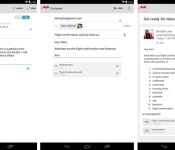
Gmail for Android gets a vacation responder, printing and universal attachment support

Many workers are about to leave on holiday trips, and Google is more than willing to help them avoid the office with an updated Gmail app for Android. The new release includes a vacation responder that will let fellow employees know that you’re off the clock. If you’re running Android 4.4 KitKat, you can also print email to avoid checking your phone during family gatherings. And if you simply must deal with that company report right away, you’ll be glad to know that Gmail now supports file attachments of all types. The new app is gradually rolling out as of this writing, so don’t be disappointed if you have to wait a little while for an upgrade.
Filed under: Cellphones, Mobile, Google
Via: Gmail (Google+)
Source: Google Play

Valve’s SteamOS will be available for individuals and OEMs on December 13th

In a blog post announcing the shipment of beta versions of the Steam Machine and Controller, Valve revealed that its SteamOS will be available December 13th. This availability coincides with the aforementioned prototype hardware heading out to a select 300 testers. As a quick refresher, this is the software that will allow streaming both games and media from machines in the living room and computers around your flat — the so-called “Steambox” operating system. Unless you’re an experienced Linux hacker, though, Valve recommends that you hold off until later next year to give it a shot. It appears that an in-home streaming beta is on the way shortly, too.
Source: Steam Community
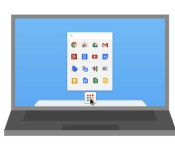
Chrome Apps get Mac compatibility

Way back in September, Google unveiled the first round of desktop-based Chrome Apps, promising Mac and Linux functionality down the road. The company’s delivered on the former today, with apps that sync when you’re signed into Chrome, while offering native software functionality, like popping up in Spotlight search and living in your dock, if you’re so inclined. To celebrate, Google’s also offering up a Chrome App Launcher for OS X that’ll show up in your dock when you download a new app. Need more convincing? The company’s got a few suggestions in the source link below.
Filed under: Apple
Source: Chrome Blog
 AIVAnet