


Google+ for Android update brings search and notification improvements, holiday cheer

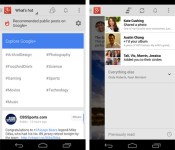
Following last month’s update to enhance locations and photos, the folks in Mountain View are rolling out version 4.2.4 of Google+ for Android today. Added features this time around include the ability to search everything from the same box and content browsing by category from the What’s Hot stream. Notifications get a tweak as well, allowing users to control who’s able to buzz them immediately by adjusting “Who can notify me” in the settings menu. Finally, to show you’re in the proper seasonal spirit, shaking your device now adds animated snow to an open photo via Auto Awesome. A second shake will save the image for posterity. The updated software is making its way to Google Play “gradually,” so check back later if it’s not snowing… er, showing up just yet.
Filed under: Software, Mobile, Google
Source: Vic Gundotra (Google+), Google Play

Borderlands 2 mobile app turns QR codes into absurd in-game armaments

Borderlands 2 is attempting the Herculean task of exciting people about QR codes. With its new LootTheWorld mobile app, Gearbox Software (Borderlands, Brothers in Arms and, er, Aliens: Colonial Marine) is turning any barcode or QR square into in-game gear like acid-burst armor or a flame-spewing sniper rifle with a 12x-zoom scope.
Whether you bought the game last year or just downloaded it for free from the PlayStation Store, this app could be one of the more useful mobile companions on your phone. Perhaps best of all, it’s free and available right now from iTunes and Google Play. We’ve reached out to Gearbox for info on how the loot is determined and will update this post if we hear back. You should hurry along though, Mercenary Day is almost upon us.
Introducing LootTheWorld, a free app for iOS and Android that enables you to hunt Borderlands 2 loot in real life: http://t.co/Ogo45IeYWr
– Gearbox Software (@GearboxSoftware) December 12, 2013
Filed under: Gaming, HD, Mobile
Via: Gearbox Community, Gearbox Software (Twitter)
Source: Google Play, iTunes

The Engadget Podcast is live at 3:30PM ET!

It’s cold out there. Why not warm up under the glowing studio lights of the Engadget Podcast? It sure beats warming your hands next to a trash can fire. This week, Brian will be joined by Terrence and Sarah, who will be making her studio podcast debut along with the usual gang of tech mascot stuffed animals.
iPhone 5s Top-Selling Smartphone at All U.S. Carriers, iPhone 5c Takes Third
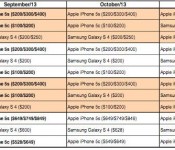
The iPhone was the top-selling smartphone at AT&T, Verizon, Sprint and T-Mobile for September, October and November of this year, according to Canaccord Genuity analyst T. Michael Walkley (via AppleInsider). We previously covered Walkley’s September numbers.
The iPhone 5s, which came out in the second half of September, has proved extremely popular with customers and has only recently gotten close to a supply/demand balance.

Before the iPhone 5s and 5c’s release, Apple, Samsung, HTC, Nokia, Sony, and Motorola all had handsets enjoying top-three sales at at least one of America’s big four carriers. Apple’s September announcement pushed all but Samsung out of the picture and relegated the South Korean conglomerate’s Galaxy S4 to the runner-up position across the board.
Apple has maintained a significant edge outside of the U.S. as well, even before the long-anticipated launch of the company’s devices on China Mobile, the world’s largest wireless carrier. The iPhone 5s was “by far the top selling smartphone…at most channels where the smartphone launched globally,” Walkley notes.
Samsung’s Galaxy S 4, the iPhone’s chief competitor, now holds second place across all carriers with the iPhone 5c coming in third. Closer to the launch of the 5c and 5s, the 5c held second place at AT&T and Sprint.
Last year, the numbers were similar, although with different phone models. NPD claimed the iPhone 5 was the best-selling model of Q4 2012, followed by the Samsung Galaxy S III, and then the iPhone 4s and iPhone 4 models.
     |

U.S. Carriers and FCC Come to Agreement Over Consumer Unlocking of Mobile Devices
 The five major U.S. carriers have come to an agreement with the FCC over a set of voluntary industry principles to make it easier for wireless customers to unlock their devices and switch from carrier to carrier if they wish. The CTIA — the industry trade group representing AT&T, Sprint, T-Mobile, U.S. Cellular and Verizon in the matter — says it will recommend the principles be added to the group’s “Consumer Code for Wireless Service” and the carriers will commit to implement them within 12 months.
The terms agreed to include [PDF]:
– Disclosure: Each carrier will post on its website its clear, concise, and readily accessible policy on postpaid and prepaid mobile wireless device unlocking.
– Postpaid Unlocking Policy: Carriers, upon request, will unlock mobile wireless devices or provide the necessary information to unlock their devices for their customers and former customers in good standing and individual owners of eligible devices after the fulfillment of the applicable postpaid service contract, device financing plan or payment of an applicable early termination fee.
– Prepaid Unlocking Policy: Carriers, upon request, will unlock prepaid mobile wireless devices no later than one year after initial activation, consistent with reasonable time, payment or usage requirements.
– Notice: Carriers that lock devices will clearly notify customers that their devices are eligible for unlocking at the time when their devices are eligible for unlocking or automatically unlock devices remotely when devices are eligible for unlocking, without additional fee. Carriers reserve the right to charge non-customers/non-former customers a reasonable fee for unlocking requests. Notice to prepaid customers may occur at point of sale, at the time of eligibility, or through a clear and concise statement of the policy on the carrier’s website.
– Response Time: Within two business days after receiving a request, carriers will unlock eligible mobile wireless devices or initiate a request to the OEM to unlock the eligible device, or provide an explanation of why the device does not qualify for unlocking, or why the carrier reasonably needs additional time to process the request.
– Deployed Personnel Unlocking Policy: Carriers will unlock mobile wireless devices for deployed military personnel who are customers in good standing upon provision of deployment papers.
Carriers reserve the right to decline an unlock request if they have a reasonable basis to believe the request is fraudulent or the device is stolen.
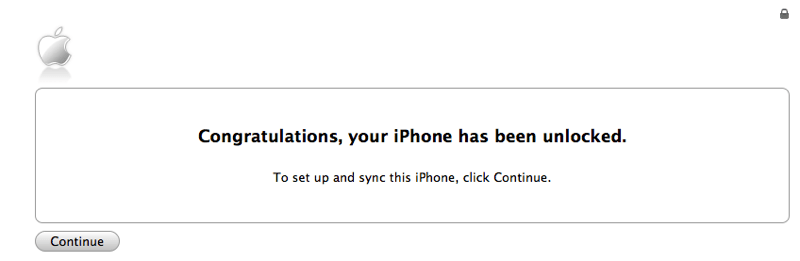
In a statement issued after the agreement was announced, the CTIA noted that “unlocking devices may not necessarily mean full interoperability since devices that work on one provider’s network may not be technologically compatible with another wireless provider’s network” and that unlocking a device may enable some functionality but not necessarily all.
Early this year, the Library of Congress ruled that it was illegal for certain mobile phone owners to unlock their phones unless specifically authorized by their carrier. This past September, the Obama administration filed a petition with the FCC, asking that carriers be required to unlock mobile devices. This voluntary agreement between the FCC and carriers would appear to forestall the need for legal action by either Congress or the FCC.
| |
Google announces winners of the first annual ‘Players’ Choice Awards’
For the past few weeks, users on Google Play have been able to vote for their favorite apps and games of 2013. Dubbed the rightful name of ‘Players’ Choice Awards’, the list boasts just that. These are some great apps and games that you’ve most likely heard before, and some you may not have.
Here are the winners of each respective category:
- I Can’t Quit You – Most Addictive Game: Knights & Dragons
- Old School, Still Cool – Best Franchise Game: Bejeweled Blitz
- Lights, Camera, Games – Best Game Based on a Movie: The Hobbit: Kingdoms
- Quietly Brilliant – Best App for Enhancing the Everyday: Duolingo: Learn Languages Free
- At Your Service – Best App for Booking and Buying: Flixster
- I ❤ Google – Best Google App: Youtube
Along with the notable apps and games in the chosen categories, there was an option for users to write-in their other favorites that may not have made the list. Here are the write-ins for 2013.
- Write-In Game: Ingress
- Write-In Game: Samurai Siege
- Write-In App: Newshog: Google News & Weather
- Write-In App: Swiftkey Keyboard
If you’d like to see the full list, you can do so, here. Do you have any apps or games which you think should have been included? Feel free to let us know in the comments!
The post Google announces winners of the first annual ‘Players’ Choice Awards’ appeared first on AndroidGuys.

Google+ app for Android turns any photo into snowglobe
A new update rolling out to Google+ for Android today lets users turn their photos into a virtual snowglobe.
We’ve included a fun holiday gift in the new version of Google+ for Android launching today. Shake your device while viewing one of your photos, and watch the snow fall. Shake it again to save your new snowy photo and share it with family and friends.
This cool feature follows closely behind the other recent Autoawesome effect that adds snow and twinkles to your winter photos. Great stuff as always, Google!
But wait, there’s more
There are a number of additional details tucked inside the new Google+ experience. Check it out!
- Search across more stuff, from a single box. Now you can search for posts, people, photos and communities — all from one place. So the next time you’re looking for something specific, just tap ‘Search’ and type what you want.
- Control who can buzz your phone, without missing notifications from others.If you only want certain people to be able to buzz your phone (like family), simply adjust your “Who can notify me” settings. Notifications from others will now appear in “Everything else,” so you can read them whenever it’s convenient.
- Explore content by category. Now when you visit the What’s Hot stream, you’ll be able to “go deeper” on a number of different categories — from Music and Science to Sports and Photography.
Look for the updated Google+ app to show up in your notification bar starting as soon as today.
The post Google+ app for Android turns any photo into snowglobe appeared first on AndroidGuys.
How to get out of your wireless contract without paying a termination fee
With the holidays coming up, more and more people are looking at getting new phones, and possibly even switching carriers. The trick with this, of course, is the fact that many people are tied down to a lengthy service contract with their providers. In other words, because they are under contract, their providers can – and do – charge an extraordinary amount of money for an early termination fee, often referred to as an “ETF”.
Gift giving isn’t the only reason to try to go with another carrier; some people want to get a new phone without paying full price, while others are tired of spotty coverage, or even just done dealing with hassles caused by their provider. Whatever the reason, this article hopes to assist those who need out of their wireless contract, without the pain of having to pay a huge fee.
Below is a full layout of a strategy that has gotten me out of not one, but two service contracts over the years when I was tired of dealing with bad service.
Please note that this is not a guaranteed strategy and that your results may vary. You could end up with a better plan or discounted device, or simply be told to fly a kite.
Let your carrier know about service issues
This is the crucial first step. When you make up your mind that you’re ready to change carriers, the first thing you want to do is start having their customer service log each and every issue. Did you drop a call? Is your data really slow, or not working in a particular area? As soon as you can, call into their customer service department and simply let them know you had an issue. You can make this a painless call by simply stating what you tried to do to remedy it (restarting the phone, airplane mode on / off, etc), and that you would simply like it logged in your account notes that you’re having trouble.
Inform your carrier of constant trouble areas
If you’re in a large urban area and you constantly have one spot, no matter how small, of no service, make the phone call to your provider and tell them. Of course, be reasonable – if you’re having trouble making a call from a 500-foot-below-the-earth mine shaft, you shouldn’t make that call. Anything else, however, is fair game. Again, just make the call and have them log it in your account. Bonus points on this if the trouble area is your home, your work, or somewhere you’re moving to.
Inform your provider of bad / unhelpful customer support calls
If you call in and are given a runaround, make sure you call back and talk to a supervisor. Have them log the even into your notes, and tell them why it was a bad call. Got hung up on? Log it. Got an useless answer to your problem? Log it.
Make sure your payments are fully up-to-date
This is pretty obvious – if you’re in bad financial standing with your provider, they don’t have to help you with anything. You have a contract with your provider – they provide you with service, and you pay them for it. If you’re not holding up your end of that contract, they have every right to charge you for cancelling. This will be a critical part of the puzzle later.
Make the cancellation call
Now, it’s time to go in for the kill, so to speak. In case you didn’t notice, everything previous to this phone call was all about making your complaints known to your provider. You want a detailed log on your account before you make the call to get out of your contract, and have it as detailed as possible. This is crucial. Also, you want to make your own note of every time you call in – you need to be sure that they show as many calls as you do, as some people will not even make a note in your account when you call. This is another point against them when the time comes. When you make the call to cancel your service, you want to make sure you do it up to a week before you want to change carriers, as the issues will likely need to be reviewed by managers, lead techs, etc. Don’t expect to make a single call and get an agreement to have your contract voided – the issue almost always has to be escalated. Once you reach someone on this call, you want to make your intentions as clear as possible. Make sure that you let them know the following:
- You should have a long list of service complaints on your account
- You have already tried to have the situation remedied
- You are only interested in cancelling your account
You will likely be escalated right away. Once you’re on the phone with a manager or lead, this is how you should word things (or at least some varying degree of the following):
I have a contract with (Provider name). I pay you to provide cellular service, and you provide me with said service. I have held up my end of this contract by paying my bills; however, (provider name) has not held up their end. This means that the contract is not being held up on (provider name)’s end, and I want this contract cancelled, with no fee.
These are the magic words, and they’re the ones you should keep going back to, no matter how the provider tries to spin things. Remember how the first step is making sure your account is up-to-date? That is so that you can say that you’ve held up your end of the contract with confidence. If you’re not, well – you’re pretty much out of luck. They don’t have to do anything if you’re also not holding up your end of the agreement.
At this point, they will likely need to review the account, which usually takes 24-48 hours, but could take up to a week. If you get calls back asking questions, be sure to focus on your issues, and the fact that you are legally able to get out of the binding contract due to the lack of service being provided to you. This strategy has gotten me personally out of two contract without an ETF, the most recent one being just this last week. You have a legal right to back out of a contract with no financial repercussions, as long as you can prove that the other party is not holding up their end of the deal.
Feedback and questions
Got any questions or comments on this? Be sure to comment below, and let us know your thoughts. Have you successfully left a contract from a wireless provider? What sort of “trick” or method did employ?
The post How to get out of your wireless contract without paying a termination fee appeared first on AndroidGuys.

Instagram Updated With ‘Instagram Direct’ Private Photo and Video Sharing [iOS Blog]
Instagram for iOS has been updated to version 5.0, adding the company’s Instagram Direct feature that was announced this morning. Instagram Direct is designed to allow users to send photo and video messages to private groups.
The update brings a new icon to the top right corner of the home feed, which includes an inbox listing photos and videos that have been sent to each user. Photos can be privately sent by selecting a new option to send a “Direct” photo to one or more people. Direct photos include read receipts, along with support for commenting and likes.
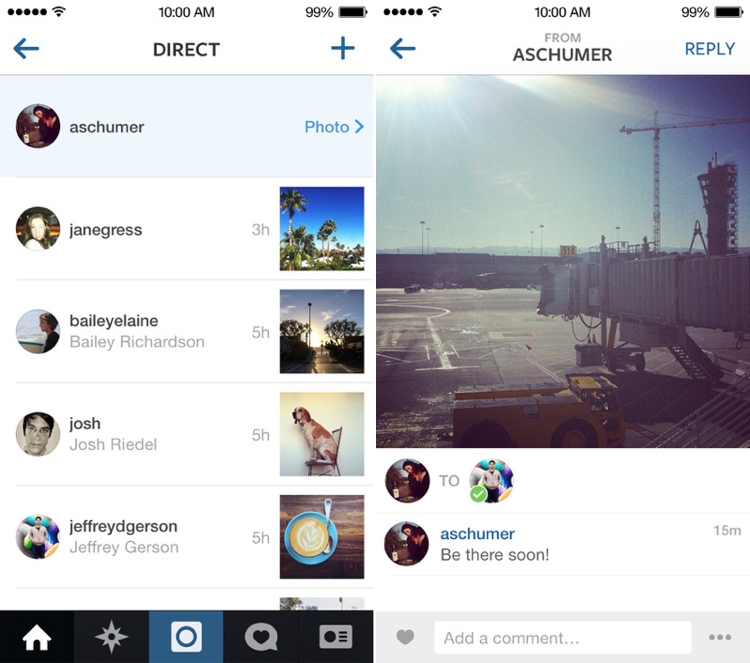
While photos and videos sent from followed users will appear automatically in an inbox, other Direct images from non-followed users will appear as a request that can be accepted or denied.
Along with direct photos, Instagram 5.0 also includes bug fixes and performance enhancements.
Introducing Instagram Direct!
We’re excited to introduce Instagram Direct, a new way to send photo and video messages to your friends.
Now you’ll see a new icon in the top right corner of your home feed. Tap it to see photos and videos that people have sent directly to you.
To send your own photos or videos, choose Direct instead of Followers once you’ve edited your post. When you’re done editing, just choose the people you want to share with.
Today’s update also includes bug fixes and performance improvements
Instagram can be downloaded from the App Store for free. [Direct Link]
| |

Foxconn and Apple Make Strides Towards Improving Work Hours, But Still Violate Chinese Limits
The Fair Labor Association has published a final status report on the working conditions at Apple supplier Foxconn, finding that Foxconn successfully reduced working hours to comply with the Fair Labor Association’s standard 60 hour work week, but failed to meet the Chinese legal limit of 49 hours per week and at times, exceeded the legal limit of 36 hours of overtime per month.
Today’s report follows an initial audit that took place in February of 2012 and a later agreement in March where Foxconn agreed to examine worker pay and implement stricter control over working hours while also improving working conditions.

Over the course of 2013, the Fair Labor Association visited three Foxconn facilities in Longhua, Guanlan, and Chengdu, with Foxconn providing full cooperation and unrestricted access to both facilities and workers during the verification process. Along with improving working hours, Foxconn also made moves to install additional exits and bathroom facilities.
FLA assessors verified that workers at the Longhua and Chengdu facilities worked no more than 60 hours every week between March and October; the same was true in the Guanlan facility with the exception of seven weeks during this period when working hours exceeded 60 hours. The assessment found that between March and October 2013, on average more than half of the workforce had worked beyond the Chinese legal limit of 36 overtime hours per month in all three facilities.
FLA assessors found that no interns had been engaged at any of the three facilities since the January 2013 verification visits and that the internship programs had been concluded at all three facilities. Assessors also verified that construction of additional exits and toilets was underway at the three facilities, with completion slated for the end of the year.
The Fair Labor Association expects Foxconn to continue to monitor its employee working hours to ensure compliance with the 60 hour work week while also making progress towards reaching a 49 hour work week. While the FLA will no longer be monitoring Foxconn, Apple is required to continue monitoring labor compliance, reporting back to the FLA each year.
Apple tracks working hours for its supply chain employees and also maintains a Supplier Responsibility section on its website, publishing yearly reports. The company has pledged to prevent excessive work hours, unethical hiring policies, and the hiring of underage workers at the factories that supply Apple with parts.
Throughout the year, various Apple suppliers have been continually accused of poor working conditions. In July, Pegatron was accused of having poor living conditions, and unethically holding worker pay. Pegatron was further accused of labor violations earlier this week, following the death of a fifteen-year-old factory worker in October.
Along with working with the Fair Labor Association to ensure safe working practices at factories, Apple also formed an academic advisory board for its Supplier Responsibility program in July, tasked with studying Apple policies and conducting research on labor standards in Apple’s supply chain.
Apple takes violations to its policies seriously, and in January, the company dropped Pingzhou Electronics as a supplier after it was found to be hiring multiple underage workers.
| |
 AIVAnet