


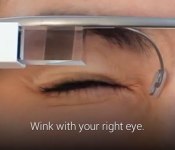
Google Glass XE 12 update lets you wink to capture photos, adds new Hangouts and YouTube glassware

MyGlass for iOS isn’t the only big news to come out of Google’s Glass camp today. Turns out, the company’s issuing a major update, dubbed XE 12, for the intelligent eyewear that not only makes the complete Glass-to-iOS bridge possible, but also bundles in a few other bells, whistles and, yes, winks.
Let’s start there, shall we? Before today, the only way to take a photo with a wink was by way of a third-party app. But now, Google’s baked that functionality directly into the Explorer Edition of Glass, making those sly creepster shots even easier. Glassware’s also getting a major boost with the addition of Hangouts, for those of you that want to send SMS, chats or even video calls from your head, and YouTube for simple Glass video uploads. Apart from that significant feature boost, the Glassware for Google Play Music now offers explorers the ability to navigate by playlists or, if they’re All Access subscribers, radio stations.
XE 12 brings some much needed security along with it, too, giving Explorers the option to set a screen lock that turns on when you take Glass off or deactivate it. And because shooting off messages with the obnoxious “Sent Through Glass” was a little too… obnoxious, Google’s cut that outgoing signature from SMS, though it’ll still be present on all outgoing emails. Know what else is getting the axe? Guest Mode. According to Google, the feature was just too much of a strain for its devs to maintain, so if you want to impress with Glass, just hand’em over freely or take Google’s advice and create a demo account.
And finally, because Google likes to be cute, you can now ask Glass for helpful caloric counts or even “How far to Brooklyn?” (the answer: No Sleep Til Brooklyn) — because everyone, even Google, loves the Beastie Boys.
Filed under: Wearables, Software, Mobile, Google
Source: Google

Samsung Hires Apple Retail Store Designer in Retail Push
Samsung has hired Tim Gudgel, a senior Apple Retail Store designer and five-year veteran of the company, reports The Information. Gudgel, who has worked for Apple since March of 2008 according to his LinkedIn page, previously worked for Novartis, and as an architect at Gehry Partners. Earlier this year, Samsung hired another former Apple Retail executive who had previously been hired away by Microsoft for its retail efforts.
Earlier this year, Samsung and Best Buy announced that the electronics maker would open 1,400 store-within-a-store concepts at Best Buy locations across the country. Apple has a number of similar dedicated “Apple Shops” inside Best Buy locations.
The Information suggests that the hire is part of a continued retail push by Samsung. The New York Times looked at the efforts of technology companies like Samsung, Microsoft and Google as they attempt to build up their own retail efforts.

Forget the floating Google showrooms. When it comes to retail, Samsung Electronics is contemplating a bigger plunge.
The South Korean company’s U.S. telecom unit recently hired a senior Apple store designer, Tim Gudgel, as it ponders a deeper investment in U.S. retail, according to two people close to the company. Mr. Gudgel specializes in store design and planning.
Gudgel is mentioned in a patent application as one of the inventors of the glass design of the Upper West Side Apple Store in New York City.
For comparison, Apple has more than 400 retail stores worldwide, with more than 250 located inside the United States. Microsoft currently operates 81 stores, including 31 temporary locations, though the company has not found significant success with its retail efforts.
Samsung’s hardware products are significantly more popular than the Windows-based devices that Microsoft sells at its stores, and the company could see more foot traffic and sales as a result. Currently, the vast majority of Samsung’s U.S. smartphone sales occur at the thousands of cellular carrier stores across the U.S.
     |

Mailbox Adds Support for Yahoo, iCloud and More [iOS Blog]
 Mailbox was today updated to version 1.7, adding support for additional email services like Yahoo, iCloud, me.com, and mac.com. Previously, the Mailbox app only supported Gmail.
Today we’re thrilled to announce we’ve added Mailbox support for Yahoo, iCloud, me.com, and mac.com email accounts. This is a big step for us — we get more requests for Yahoo and iCloud support than for any other feature.
Mailbox remains 100% free, and adding a Yahoo or iCloud email account is just as easy as adding a Gmail account.
Email management app Mailbox was originally introduced in February of 2013 by Orchestra, the developers behind the Orchestra to-do app. Mailbox debuted with novel features like simple touch gestures for email organization and “Snooze” functionality, allowing users to put emails out of sight until a later date.
Mailbox was later purchased by Dropbox in March, and additional functionality like iPad support and Cloud Search was added.
Mailbox is a universal app that can be downloaded from the App Store for free. [Direct Link]
| |

Magtron brings POGO charging cables/cases to Galaxy S4
When I first saw the email I had dumbfounded look on my face and my brain didn’t want to register what I was reading. Then I saw the video, which you will also see in a minute, and it clicked.
So here is the skinny that you need to know. Magtron has released what is called the Magnector POGO cables and cases. See where my confusion came from. POGO is means you don’t have to “plug” in your device, rather you just set it on a dock or stand that has the POGO connectors available. This readily available on Nexus devices and some other model devices out there. It is nice and can ultimately save your charging port from failing on you. There is the limitation of it having to be in a dock, not to mention the limited availability of devices that sport it. Magtron is changing that with the Magnector series.
 The Magnector series is a line of cases that you can slide your Android device into, currently the Galaxy S4, and then you are free to use the POGO charging cable that is magnetically attracted to the bottom right side of the case. Viola, that is it. You are up and charging and you didn’t even have to fumble with flipping the usb cable over or searching for the hole. Take a watch of the video, it will make more sense.
“For the past 10 years, our core value has been providing customers with new and exciting products that maximize their experience with cell phones and tablets,” said David Byun, President of AccessoryGeeks.com. “The magnetic attachment concept that allows high-speed charging and data sync capabilities is a paradigm shift that benefits everyone. We are proud to offer the line of Magnector products as the exclusive North American partner.”
Pretty sweet really. They also have a Magnector cable for the Nexus 10 if you are interested. I know the video showed the Galaxy SIII and the Nexus 7 first and second gen tablets as well, but I am not seeing them up on the site to purchase just yet. You can get one ordered for your Galaxy S4 and your Nexus 10 though. Head over to Accessory Geeks to take a look.
Samsung to introduce 4 tablets in early 2014, report says
Samsung is rumored to release 4 new tablets… just in Q1!
When you release as many devices as Samsung in any given year, there are bound to be a slew of rumors that seem like they never stop. According to SAMMOBILE, Samsung could debut at least 4 different tablets at the beginning of 2014.
A lot of the time, a big percentage of devices released by Samsung never make it to the United States, so it might not seem like its raining tablets like we’d hope. However, it should come to no surprise that we are getting our fare share of variety from the tech giant. It is rumored that the Galaxy Tab 3 Lite could be introduced, making it the cheapest Samsung tablet yet. Another rumored variant is a 12.2-inch Galaxy Note, and a 13.3-inch tablet as well.
All of these rumors would be great to see, especially because Q1 isn’t that far away!
Source: SAMMOBILE
The post Samsung to introduce 4 tablets in early 2014, report says appeared first on AndroidGuys.

Thoughts on the new Twitter UI
Last week, Twitter updated its official Android app with more functionality and UI problems than we’ve ever seen.
It’s no secret that the official Twitter app for Android has been… neglected. Not in the sense that it doesn’t receive notable updates, because it does. However, the way the app looks and feels is its biggest downfall. Compared to some 3rd party Twitter clients, there should be no reason to use the official app. But Twitter has something else up its sleeve…
Why is this a big deal?
With Twitter’s API limits introduced in late 2012, it’s getting harder and harder for 3rd part developers to keep their apps in the Play Store. If you haven’t heard, if a new Twitter app enters the Play Store, it only has 100,000 tokens available. If an app already has more than 100,000 users, they get to double their tokens, then get shut down.
Since the most recent update, I have never seen so many disappointed users. You would think that if they’re putting a cap on users to 3rd party apps, they would focus a little more on the app that they are (essentially) forcing people to use. We’ll talk more about that later.

The UI isn’t the main problem. Though it’s bright and a little bulky, it’s usable. You should begin to see the differences when it starts holding you back from doing things more quickly, and more efficiently.
Functionality
When I use Twitter, I read my feed, tweet, and find new people to follow. While you may use it for something more intensive, I usually stick to just that. The features of it that I use the least are Discover and Activity. Actually, I haven’t met anyone who uses them frequently, at all. The reason why I bring this up, is because perhaps the easiest way to navigate somewhere in an app, is by sliding tab to tab, from left to right. But, in the official Twitter app, they did this:

These tabs are accessed by swiping from left to right. In my opinion, these should not be placed here. The most used features are only accessed by tapping on them on the top of the screen.

While using this logic, shouldn’t they be switched around? Yes. They need to be. Take a look at some other apps that are doing it correctly, including Falcon Pro, Plume, and Tweedle:
Falcon Pro

(If you’re planning on downloading Falcon Pro, you can’t from the Play Store. This app is the first that has been removed due to Twitters limits. You can, however, download it from its official website, found in the above link.)
Plume

Tweedle

Widgets
The benefit to having an application on Android is the ability to use widgets. Especially with Twitter, most of the time you don’t even need to open the app if you have one on your home screen. Try not to laugh when you look at the comparison between the official and 3rd party widgets.

As you can see, the official Twitter widget resembles the UI from something that came out of the Gingerbread days, while the Plume widget blends in with just about anything that it sits next to. Why have they been neglecting this feature so much? No idea. But, here’s to hoping they update it sometime soon.
Final thoughts…
Not many official social network apps have a smorgasbord of customization options, but that isn’t the point. Don’t make a bad app/widget in the first place, and people won’t be resorting to other options. Also, if you’re going to have rules banning other apps from getting more users, you better be sure that yours is on-point. I think that’s the main thing that bugs me. Odds are, writing about this won’t change API limits or get Twitter to change their minds about anything. All we can really do is make suggestions, rate it on the Play Store, and hope for the best.
How do you feel about all of this? Are you using a different Twitter app? If so, we’d love to hear your thoughts in the comments!
The post Thoughts on the new Twitter UI appeared first on AndroidGuys.

Microsoft will have a new CEO ‘in the early part of 2014’

With roughly nine months to go until Microsoft’s unforgettably demonstrative CEO Steve Ballmer steps down, the hunt is on for his replacement. Will it be incoming Nokia CEO Stephen Elop? Maybe Ford’s Alan Mullaly? No one outside of Microsoft’s board of directors knows for sure, but it apparently won’t be too long before we find out. “I expect we’ll complete our work in the early part of 2014,” board chair John W. Thompson wrote on Microsoft’s blog.
Thompson said he and his colleagues have whittled down the list from “over 100 possible candidates” to “a group of about 20 individuals” (presumably including the aforementioned exec duo). He sadly didn’t offer much insight into the discussions, which we can only guess involved both a very large dart board and (at least) a few bottles of carbonated mineral water.
Filed under: Microsoft
Source: Microsoft

GeForce Experience update brings Twitch game streaming

NVIDIA’s GeForce Experience may not be tremendously popular with PC gamers, but it’s about to get more traction now that its Twitch streaming is finally available in beta. An updated app lets any player with a Kepler-based GeForce card both livestream their sessions and record clips through ShadowPlay. If you’re worried about missing special moments, there’s a PlayStation 4-like Shadow Mode to automatically capture the last 20 minutes of game time; performance shouldn’t be an issue, since dedicated hardware handles all the video encoding. NVIDIA can’t promise that everything will be smooth in the beta, but it’s already planning to add both a desktop capture mode and new microphone controls. Head to the source links if you’re eager to share your virtual escapades with the world.
Filed under: Gaming, Software, NVIDIA
Via: Tech Digest
Source: NVIDIA (1), (2)

On The Gadget Table: the products that defined 2013

The snow is falling, the trees are all lit up and servers everywhere are beginning to groan under the strain of last-minute shopping sprees. It’s beginning to look a lot like Gadget Table time. To celebrate the season — and put one last ribbon on the year that was — we’re bringing back an old Engadget Show favorite. We’ve dusted off the table and filled it full of some of the best and most memorable gadgets of 2013. Tablets, smartphones, video game consoles, tablets, wearables and even the occasional dongle — all are fair game. Join Brian and Dana after the break, as they take you through the year in gadgets.
On The Gadget Table:
Google Chromecast: At $35, the Chromecast is the gadget deal of the year. This little dongle and its ever-growing arsenal of compatible streaming services can turn your old HDMI-enabled set into a smart TV you control with your mobile device.
Moto X: Motorola has a knack for focusing on elements other smartphone manufacturers largely ignore. Recent models have brought ruggedness and battery life to the forefront, as other companies have raced toward ever enlarging displays. The Moto X is all about customization, thanks to Moto Maker — and thanks to a new US factory, the Google-owned phone maker can proudly display the words “assembled in the USA.”
Google Glass: If the Gadget Table is any indication, 2013 was a banner year for hardware from a company largely known for its software offerings. Google Glass wasn’t the most popular or best-received product of 2013, but in a year that saw an explosion in the popularity of wearables, the headset seemingly gave us a small glimpse into the future. Google’s still got a ways to go as far as convincing the public, but Glass’ limited exposure has managed to capture the public’s imagination.
iPad Air: 2013 likely won’t go down as one of the more innovative years in Apple’s history, but the company did prove that it can still wow us with some super-sleek hardware. The latest iPad is as thin and light as its name implies, while still packing in great battery life and snappy performance, thanks to the A7 chip. The real star of the show, however, is iOS 7, a completely revamped version of Apple’s mobile OS.
PlayStation 4: It’s still far, far too early to crown a winner in the console wars, of course, but Sony’s certainly got a bit of a head start, thanks in no small part to its $400 price point (coming in at $100 cheaper than the new Xbox). That price tag will get you a fast, powerful machine with a lovingly revamped gamepad. As for games, however, well, we’ll have to wait for 2014…
Filed under: Cellphones, Gaming, Home Entertainment, Tablets, Wearables, Sony

Former Microsoft Office exec Kurt DelBene will rebuild HealthCare.gov

Leading Microsoft is arguably the toughest (and most up-for-grabs) job in tech right now, but salvaging a catastrophic government website launch is a close runner-up. The White House has tapped Kurt DelBene, the outgoing Microsoft Office President, to head up a revamp of its notoriously glitch-ridden HealthCare.gov. US Secretary of Health and Human Services Kathleen Sebelius announced the appointment today, and Microsoft commented on the move via its official blog. DelBene, who spent 20 years at his former employer, stepped down as part of an internal reorganization early this year. He certainly won’t have a gap in his resume; his final day at Microsoft was yesterday, December 16th.
Filed under: Internet, Microsoft
Via: ZDNet
Source: The Official Microsoft Blog
 AIVAnet