



Software Allows Hackers to Activate MacBook Webcams Without Green Warning Light
A recently resolved criminal case shows how a high schooler was able to hack a classmate’s laptop in order to take nude photographs with he computer camera without her knowledge, before attempting to use the images to extort her.
Though Apple’s FaceTime camera is designed to always illuminate the adjacent green light at the top of the screen, software has been written to separate the camera and light hardware, allowing both illegal — and legal, the FBI has used similar software in criminal investigations — ways.

While controlling a camera remotely has long been a source of concern to privacy advocates, conventional wisdom said there was at least no way to deactivate the warning light. New evidence indicates otherwise.
Marcus Thomas, former assistant director of the FBI’s Operational Technology Division in Quantico, said in a recent story in The Washington Post that the FBI has been able to covertly activate a computer’s camera — without triggering the light that lets users know it is recording — for several years.
A pair of students at Johns Hopkins examined Apple’s webcam indicator [PDF] and discovered both how to disable the LED indicator, and a way to modify OS X’s kernel keep nefarious users from taking control of the LED. The vulnerability they described does not work on Macs built after 2008, but it is likely that similar hacks exist for newer machines.
In the older vulnerability described in the Johns Hopkins study, the software bypasses a hardware interlock that the camera uses in an attempt to ensure the indicator light illuminates whenever the camera is active. It is not known precisely which software package the defendant in the case used to compromise his classmate’s computer, but the Hopkins study is the first public confirmation that Apple’s camera system can be compromised.
The easiest way for users to protect themselves — aside from standard security protocols like not downloading strange applications, or allowing untrusted people access to the computer — is to put a small piece of tape across the camera.
     |

Sci-Fi Adventure Game, Gemini Rue, Comes To Android Via A Humble Bundle
 I’m a huge fan of adventure games; the Monkey Islands and The Walking Deads of the games world have me in fits of joy when I play them, but I have to say that there is a definite lack of so-called ‘point-and-click’ adventure games on the mobile platform. Fortunately, now there is one more addition to this small number of games: the game is called Gemini Rue, and it is a handcrafted gem coming to us via Wadjet Games.
 The PC version of Gemini Rue has been hailed on several occasions for having a gripping storyline featuring its two protagonists, Azriel and Delta-Six, and its Android port appears to be no different. But the other star of the show is the game’s impressive art style which features 60+ hand-drawn backgrounds. Check out the trailer to Gemini Rue to get a better idea of what the game looks like:
Gemini Rue is currently available on the Play Store for $4.99 on its own, however, it is currently also available as part of the Humble Bundle for PC and Android 8. If you pay above the average (which is currently $4.13) you will get Gemini Rue as well as 5 other great indie games.
Stay tuned for our review of Gemini Rue. Who’s going to pick up Gemini Rue and check it out? Let us know if you do.
Game: Gemini Rue
Price: $4.99
Press Release
Dystopian Adventure Game Gemini Rue Comes to Android, Mac, and LinuxNew versions of Wadjet Eye Games’ award-winning indie adventure are now available in latest Humble BundleNEW YORK – December 17, 2013 – Wadjet Eye Games, an independent developer and publisher of retro-styled adventure games, is today expanding onto the Android, Mac, and Linux platforms with Gemini Rue, the company’s best-selling game to date. The new versions released this morning as part of Humble Bundle: PC and Android 8: https://www.humblebundle.com/Developed by UCLA Design | Media Arts graduate Joshua Nuernberger, IGF winner Gemini Rue is an old school adventure game that combines point-and-click gameplay with gritty, low-res graphics and a gripping neo-noir narrative. Alternating between ex-assassin Azriel Odin and hospital inmate Delta-Six in a bleak future dominated by the corrupt Boryokudan crime syndicate, players must uncover the secrets both protagonists are guarding and uncover their unlikely bond.Gemini Rue was widely praised when it originally released for PC, earning an IGF Student Showcase award, IGN’s Editor’s Choice award, Adventure Game of the Year from GameSpy and PC Gamer, and an 85% average review score on GameRankings.com. More recently, the iPhone / iPad version was praised as “a must-buy addition to your App collection” by Slide to Play, “an excellent port of an excellent adventure” by AppSpy, and “easily one of the best modern point-and-click adventures around” by PocketGamer, who also honored Gemini Rue with a Gold Award and selected it as Game of the Week.The new Android version can be purchased outside of the Humble Bundle for $4.99 from Google Play (https://play.google.com/store/apps/details?id=com.wadjeteye.geminirue.google) and is coming soon to the Amazon Appstore. Currently exclusive to Humble Bundle: PC and Android 8, the Mac and Linux versions will later go on sale from Wadjet Eye’s website and other online stores.Learn more about Gemini Rue at the game’s official website: http://www.geminirue.comAbout Wadjet Eye GamesFounded in 2006, Wadjet Eye Games has developed a reputation for producing award winning and critically acclaimed adventure games. Committed to creating unique character-driven game experiences around recognizable brands, in 2010 Wadjet Eye expanded to support and publish games by other independent developers. The company’s portfolio includes The Shivah and the Blackwell series, both of which have garnered Game Developers Choice nominations, Puzzle Bots, which was selected for the Penny Arcade Expo’s PAX 10 showcase, IGF Student Showcase winner Gemini Rue, and the critically acclaimed Resonance. The company is run by husband and wife team Dave and Janet Gilbert out of their home in Brooklyn. For more information, visit http://www.wadjeteyegames.com.About Joshua NuernbergerJoshua Nuernberger is a game designer, illustrator, and storyteller. His first commercial release, Gemini Rue, won multiple Game of the Year awards and was showcased at IndieCade @ E3, the Indie Games Arcade, and the Independent Game Festival. He holds a B.A. in Design | Media Arts from UCLA with a minor in film. His personal website is www.thejburger.com.About Humble BundleHumble Bundle organizes pay-what-you-want plus charity promotions for awesome digital content and puts the power directly in the hands of the consumers. Consumers pay what they want, and decide how to allocate their money between the developers, charity, and a humble tip. Thanks to the generous contributions of bundle buyers, Humble Bundle has raised more than $29 million for charity to date.

More FREE music in the Play Store; NIN, 2Pac, Kanye and More
Google is always rotating out the list of free music for you guys to pick up in the Play Store and add to your Google Music account. The December “Free Playlist” (which is apparently going to rotate every week) has made its way out and has a pretty good set of 10 tracks from a variety of artist you may know and love. Tracks like Dear Mama by 2Pac, Hurt by NIN, Drop it like it’s Hot by Snoop and Give it Away by the Red hot Chili Peppers. All of which we are sure Grandma would love to have streaming to your Chromecast over the holiday. She wouldn’t mind after a little eggnog right?
 Anywho, all 10 tracks are available in the Play Store for you to grab and add to your ever growing music collection. So get to hitting that FREE button.

AMC’s Yeah! interactive streaming movie service comes to iPad tomorrow

AMC Networks launched its Yeah! streaming service at SXSW 2013, and this week’s debut marks the first major update since the platform’s introduction back in March. Yeah! will be coming to iPad tomorrow, with a free application making its way to the App Store. The unique service pairs exclusive content, such as filmmaker and star interviews, flick facts and additional info, with full-length feature films. You’ll find Wes Craven interviews packaged with A Nightmare on Elm Street and Scream, Kevin Smith chatting about Clerks and Michael Madsen filling you in on his experience filming Reservoir Dogs. Yeah! films start at $5 for a 48-hour rental, including the full lot of additional features.
Filed under: Home Entertainment, Tablets, Software

Touchless music game lets you create jittery drum and bass with your face

If there’s was one ubiquitous item at NYU’s ITP Winter Show, it was the Kinect. Countless projects were built around the Microsoft-made sensor. Max Ma’s Touchless, which he built with a ton of help from Tony Lim, originally featured one, but the version that made it to the floor went with an OEM equivalent instead. But the effect is the same: a set of cameras and sensors track various parts of your face, turning your muscle twitches and eyebrow raises into raw data. While Max says this data can be used for a host of different applications, such as unlocking your door with series of blinks and winks, he focused on bringing joy to people’s lives through music creation. The sensor tracks between 16 and 64 points (under ideal conditions) on your face, and uses your movements to trigger and manipulate samples. Truth is, it’s hard not to smile while making ridiculous faces, though, I was a little disappointed to find out that the tracker did not play well with my winter beard.
The main method of interacting is by tilting your head, opening your mouth and raising your eyebrows, but Max added some depth by turning a Leap Motion sensor into a controller for a software synthesizer. So samples and beats are all above the neck, but you can wave your hands through the air to play a lovely lead melody. Really, the whole thing is pretty self-explanatory and quite fun, as you can see in the video after the break.
Filed under: Misc

Study proves that you can secretly hijack an older Mac’s webcam

If you believe common wisdom, it shouldn’t be possible to take over most webcams without alerting users. The indicator LED is supposed to be hack-proof, after all. However, a pair of Johns Hopkins researchers have recently published a research paper showing that it’s possible to control the camera while keeping the indicator dark. Their proof-of-concept app, iSeeYou, reprograms a controller chip on pre-2009 Macs to separate the camera and LED functions; users can flick the light on and off like a switch. Apple is aware of the issue with its own systems, but it hasn’t said whether or not there will be a fix. It’s also unclear how many newer Macs or other PCs are at risk. Regardless of the exact threat, the study isn’t very reassuring in an era of widespread surveillance — if a pair of academics can stealthily record your activity, it’s likely that professional spies can do the same.
Filed under: Desktops, Laptops, Apple
Via: The Washington Post
Source: JScholarship
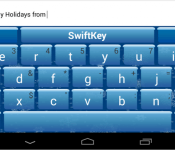
Happy Holidays from SwiftKey includes a new “Ice” keyboard Theme
SwiftKey has put an update out today for their keyboard replacement app. It adds in the traditional bug fixes, improvements and language pack management. It also adds in a new installer with automatic language downloads. All good stuff, but they also put a nice little keyboard theme in as well.
 Like it? Is a snowy, icy cold blue with snow capped keys and snowflakes. Not a huge deal, but a nice treat for those that change up their devices and want a more traditional icy look to all aspects of their device for the holidays.
The update is live, but might not be available for everyone just yet. For those of you that don’t have this keyboard replacement, feel free to pick it up. SwiftKey has placed it on sale today as well. Bringing it down from $3.99 to $1.99. So go ahead and treat yourself.

BBM to be Preinstalled on Some LG Devices
When the Blackberry Messenger app first got leaked out, pulled, and then officially released it was met with excitement and disappointment. While many couldn’t believe it was coming to Android, it took off like a bolt of lightning. Current numbers in the Play Store put it in the 10 to 50 million download bracket. The launch didn’t go all that smooth and had plenty of bumps, but it is alive and obviously flourishing.
 Blackberry claims there are around 80 million active users sporting the software with 20 million of them being Android users. It makes sense that they would want to attempt to take it to the next level and find a partner to have the app pre-installed on a device out of the box. A press release that has hit the Blackberry press site has announced just that today. LG will pre-install BBM to the LG G Lite.
“BBM is widely used throughout the Middle East, Africa and Indonesia where smartphone users tend to engage heavily in social networking,” said Kevin Shin, Vice President of Marketing for Asia, the Middle East and CIS countries of LG Electronics Mobile Communications Company. “The LG G Pro Lite offers an optimized BBM experience with its large, high quality display and embedded Stylus Pen.”
“People across the globe are using BBM to connect with each other and the enthusiasm has been phenomenal,” said Andrew Bocking, Executive Vice President for BBM at BlackBerry. “We’re extremely pleased that LG Electronics will help bring their customers a more seamless experience with BBM by preloading the app, starting with the G Pro Lite in key markets.”
As you see, there is no mention of the U.S. in their. While BBM will be pre-installed in some LG devices, it looks like it will mostly be for devices in the Middle East, Africa and Indonesia. It is good for Blackberry, even if it might seem a little odd to some of us Android users.
Via Blackberry

12 Days of Giveaways: Win a SwannEye HD Plug & Play (DAY 5)
Today marks the fifth day of our 12 Days of Giveaways promotion which sees us giving out all sorts of wonderful Android-related stuff. We’ve already given away hundreds of dollars worth of stuff and we’re only getting warmed up! The next few days will see us offering up an NVIDIA Shield, Nexus 5, Samsung Galaxy Victory, and Moto G! Hold on tight, it’s gonna be fun!
Prize #1 SwannEye HD Plug and Play

How would you like to be able to remotely watch the front door of your home or office? Maybe you’ve got some friends coming over and want to know when they’ve arrived. Maybe you have a problem with kids knocking over your garbage cans. Whatever the case is or what your needs are, you can keep an eye on things from your Android smartphone or tablet.
- Shoots real time 720p video or still images to your smartphone or tablet
- SwannEye app for viewing on PC, Mac, tablets & Smartphones including iPhone, iPad & Android devices
- Perfect for low light scenarios, thanks to 12 infrared LEDs
- Built-in microphone captures audio
- Easy 3 step set-up using a QR code & your Smartphone or tablet with no manual networking configuration required
- Mount the camera on any flat surface, upside down, on the ceiling, or on a wall
Learn more about Swann or follow them on Facebook and Twitter.
Prize #2 Bundled Goodies


The second prize we’re hooking you up with is a Whitelabel SoundDew BT Speaker and a pair of iHome Earbuds with Mic. The former is a highly portable and waterproof Bluetooth speaker that delivers up to 10 hours of playback; the latter are a pair of earbuds with a microphone to take calls on your Android!
Learn more about Whitelabel!
Learn more about iHome or follow them on Facebook and Twitter!
Prize #3 Android Collectible (SERIES 04)

The third prize tossing out to a random winner is an unopened Series 04 Android collectible figure from Dead Zebra and Andrew Bell. As to what’s inside the box remains a mystery, but here are the potential candidates!
Learn more about Andrew Bell or follow him on Twitter!
Daily Prizes
Oh… don’t forget we’re also giving out Google Play credits over the remainder of the month. On some days we’ll randomly pick someone to win $10, others will be $25 and higher!
How to Enter
We’re going to keep this short and simple. To enter today’s contest all you need to do is leave a comment below! We’ll let this run for 24 hours and then randomly select the winner(s).
Win Google Play Credits!
To enter to win one of the Google Play credits all you need to do is share the following on your social media platform of choice: “I want to win Google Play Credits, AndroidGuys! http://goo.gl/dGQhG6 #12DaysAndroid”
Yes, you can share over Facebook, Instagram, Twitter, and Google+. Yes, you can enter as often as you like.
Finer details
This post will be updated with the name(s) and we’ll reach out via the comments as well. Also, be sure to keep an eye on the 12 Days of Giveaways page where we’ll keep a running tally of prizes and winners.
Note that we’ll give each winner a 24 hour window to respond. Should the winner not reply in time, we’ll re-draw and announce a new name. Be sure to check back!
Here’s the rub: We’re limiting this contest to U.S. residents only. Yes, we know it sucks – we hate doing it. Also, you can only win one prize per household. If you happen to win a Google Play Credit as well, then so be it!
The post 12 Days of Giveaways: Win a SwannEye HD Plug & Play (DAY 5) appeared first on AndroidGuys.

This Chromium experiment takes the URL out of the address bar, because why not?

Chromium, Google’s open-source Chrome project, isn’t for the average Joe (or Jane); it’s for open-source fanatics. So today’s two Chromium experiments, announced by Product Evangelist François Beaufort, should give that subset of users something curious and something useful to play with, in that order.
First up is a Chrome OS experiment that mixes up the traditional URL-in-omnibox setup by removing the host URL altogether and placing it within the toolbar, just off to the right side (as pictured above). You can still click on that “origin chip” to display the full URL, as well as permissions data, if you’d like, but the the omnibox will remain empty for — we’re not sure — a cleaner search experience, perhaps? Again, the reasoning behind this odd switch up is unclear, but knowing Google, it likely has to do with reducing clutter in the user interface as much as possible.
The other, much more sensible experiment involves a bit of code that allows you to make any site of your choosing (presumably a favorite) into a Chrome App. The option, once enabled, will appear under Tools in Chrome’s dropdown menu. All it requires is one click and you’re done. And no, you wouldn’t be wrong for thinking of this as a new way to bookmark sites… it is and it’s simple to do.
Just hit up the source below to get cracking on this Chrome customization and that other, weird one if you’re so inclined.
Filed under: Internet, Software, Google
Source: Francois Beaufort (G+), (2)
 AIVAnet