



T-Mobile prepaid offering free data… but only to access Facebook

Look, we understand: you absolutely have to know what Jimmy ate for lunch. And that Marissa is, “Ugh, just so sick of this week already.” And Jason’s only a “maybe” to the office holiday party? Who does that guy even think he is?
Sorry, sorry — we nearly forgot to tell you that T-Mobile’s prepaid brand, GoSmart Mobile, has joined forces with Facebook to offer unfettered access to The Social Network[TM]. Even if you don’t pay for data, GoSmart Mobile will still allow Facebook and Facebook Messenger access. You’ll never miss another link to “28 signs you’ve lived in New York City too long” again!
Whether the Facebook access will be speedy is another question altogether; it’s not actually clear which network users will access it through, and GoSmart is a prepaid service aimed at bringing down mobile costs over offering blazing fast speeds. Either way, free is free, right?
Filed under: Handhelds, Internet, Software, Mobile, T-Mobile
Source: T-Mobile

Avegant tests Glyph wearable display prototype, on track for CES debut

We weren’t expecting to see the final Glyph prototype materialize until just before CES, but Avegant is ready to show off the latest consumer design in the flesh, presented above (and again after the break) for your viewing pleasure. The high-res retinal display projects an image directly into your eyes, enabling a much sharper picture than what you’d experience by looking at a traditional panel. According to Avegant reps, this alpha prototype currently undergoing testing has smaller optics and improved adjustments compared to the demo unit we tried out in October, and it’s far more attractive, to boot. The company plans to launch a Kickstarter campaign on January 22nd, with a beta version of Glyph shipping to pre-order customers for $499 by the end of 2014.


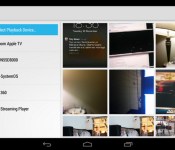
AllCast for Android leaves beta, streams media to your Apple TV, Roku or Xbox (video)

Worried that you won’t get to watch your favorite videos while visiting family this holiday? Don’t be: after a brief beta phase, ClockworkMod’s Koushik Dutta has released a completed version of AllCast for Android. The polished app lets you stream both local and cloud-based media to relatively common living room media hubs, including Apple TV, Roku players, the Xbox 360 and the Xbox One. Many Panasonic- and Samsung-made smart TVs will also handle content, and numerous DLNA-capable devices should make the cut. Chromecast support will likely have to wait until Google opens up its ecosystem in the new year. We can’t promise that your relatives will share your taste in movies, but it won’t hurt to grab AllCast from Google Play.
Filed under: Cellphones, Home Entertainment, Tablets, Software, HD, Mobile
Source: Google Play
Amazon shaves $30 off Kindle Fire HDX and Kindle Fire HDX 8.9
Hurry, you can still get this in time to slide it under the tree!
Amazon, coming through in the clutch, has discounted its Kindle Fire HDX and Kindle Fire HDX 8.9 on the eve of Christmas Eve. Today only, and while supplies last, you can pick up either tablet for $30 less than the normal price. What’s more, you can also enjoy free one-day shipping on those that are in stock!
For a limited time, save $30 on Kindle Fire HDX or Kindle Fire HDX 8.9” tablets when you enter promotional code SANTAHDX at checkout. Plus, enjoy free one-day shipping on in-stock Kindle e-readers and Kindle Fire tablets until 9 PM PST December 23–get it by December 24
This puts the tablet lines prices as follows. Keep in mind that these do have the “special offers” which means sponsored screensavers and special offers on the lock screen. If you want the ad-free version, just ad $15 to these costs.
- Kindle Fire HDX (Wi-Fi, 7-inch, 16GB) – $229
- Kindle Fire HDX (Wi-Fi, 7-inch, 32GB) – $269
- Kindle Fire HDX (Wi-Fi, 7-inch, 64GB) – $309
For those who desire 4G LTE data connectivity, you’ll need to add $100 for either AT&T or Verizon’s model. Same deal applies for the “sponsored” versions.
The larger Kindle Fire HDX 8.9 prices are so:
- Kindle Fire HDX 8.9 (Wi-Fi, 8.9-inch, 16GB) – $379
- Kindle Fire HDX 8.9 (Wi-Fi, 8.9-inch, 32GB) – $429
- Kindle Fire HDX 8.9 (Wi-Fi, 8.9-inch, 64GB) – $479
- Kindle Fire HDX 8.9 (AT&T 4G LTE, 8.9-inch, 16GB) – $479
- Kindle Fire HDX 8.9 (AT&T 4G LTE, 8.9-inch, 32GB) – $529
- Kindle Fire HDX 8.9 (Wi-Fi 4G LTE, 8.9-inch, 64GB) – $579
- Kindle Fire HDX 8.9 (Verizon 4G LTE, 8.9-inch, 16GB) – $479
- Kindle Fire HDX 8.9 (Verizon 4G LTE, 8.9-inch, 32GB) – $529
The post Amazon shaves $30 off Kindle Fire HDX and Kindle Fire HDX 8.9 appeared first on AndroidGuys.
Apple Mac Pro review (2013): small, fast and in a league of its own

It would be an understatement to say that Apple’s Mac Pro workstation was getting a little long in the tooth. As of summer 2012, it was missing Apple’s own Thunderbolt ports, not to mention 802.11n WiFi. Finally, though, Apple released an updated version, and it addresses a little more than just the wireless card and I/O options. Redesigned from the ground up, it’s now much smaller and lighter, with a space-age cylindrical shape, an overhauled cooling system that’s half as loud and a spec sheet that includes standard dual GPUs, PCIe SSDs, 802.11ac WiFi, up to 64GB of RAM and the latest Intel Xeon processors, once again going up to 12 cores. In short, these are specs that bring the Mac Pro into the modern age — and make it ready to handle the coming onslaught of 4K content.
If you’re a professional photographer, videographer, audio engineer, animator or what-have-you, you might actually be considering spending $2,999 on one of these — maybe as much as $9,599, if you have the means. Or maybe you’re just like my colleagues here at Engadget, who don’t need one, and won’t ever buy one, but covet it just the same. Either way, you’ll want to read on to see how this thing actually performs (though you probably already have an idea).
Hardware

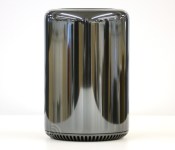
If the Mac Pro really does look like a trash can, as everyone says, it’s much nicer than any rubbish bin I’ve ever owned. Starting with the shape, which seems to have earned it so much ridicule, the Mac Pro is basically a squat little cylinder, with a large circular opening up top where the heat creeps out. Between that and the glossy gunmetal “Space Gray” finish, it does indeed look like some sort of futuristic wastepaper basket.
Then, of course, you turn the thing around and notice the Apple logo, power button and a cutout in the anodized-aluminum exposure, making it easy to access the various ports. Not exactly a garbage can, that. All told, the Mac Pro is a compact little thing, standing 9.9 inches tall and measuring 6.6 inches in diameter. For whatever reason– the photography on Apple’s site, perhaps — it feels smaller and shorter than I imagined it. To give you some perspective, the Pro stands around half as tall as a 27-inch monitor, like Apple’s own Cinema Display, and has roughly the same footprint as an office phone. So if you have room for a landline, you almost certainly have room for the Mac Pro. And if you have enough room for a landline, you can probably get away with using the Mac Pro in other small spaces, like a music stage or the corner of a film set.

Speaking of the sort, the machine is light enough, at 11 pounds, that you could conceivably take it with you to your next shoot. Left uncovered, you’ll want to handle it gingerly, of course, but if you keep the original box with the foam inserts, you should have no problem carrying it in the crook of your arm. In fact, that might not be such a bad idea: The glossy aluminum finish is also quite the fingerprint magnet, much more so than any other Apple products we’ve seen. If you do carry this around by hand, be prepared to wipe off some smudges now and again.
Swinging back to the ports for a moment, these include headphone and mic jacks, four USB 3.0 sockets, six Thunderbolt 2 connections, dual Gigabit Ethernet ports and an HDMI 1.4 port. As a nice, even more futuristic touch, the power button glows white briefly when you turn on the machine, as do a few other accent lights around the ports. The LEDs even fade as you shut down the computer, and flick on again one by one as it’s booting up. Additionally, you’ll find a locking switch that keeps the removable aluminum enclosure in place (you can’t actually power on the machine unless the cover is on). One thing you won’t find here: a memory card slot. This makes sense, in a way, given that pros aren’t big on SD cards, and there are simply too many other formats to accommodate on one small chassis. To build in, say, a CF slot, but not one for XQD would have been rather arbitrary indeed.
Internals

Six paragraphs so far and I’ve only described the removable case. Slip it off and you get to the heart of the machine, a tall, three-sided board Apple is calling the “thermal core.” Two of the sides are taken up by the GPUs — dual graphics cards are standard here — whereas the CPU occupies the third. I’ll get to performance and configuration options in a moment, but for now, suffice to say you can configure this thing with two AMD FirePro D700 GPUs and 12GB of video memory, amounting to up to seven teraflops of computing power (the last Mac Pro maxed out at 2.7 teraflops). Meanwhile, there are two RAM banks (with two slots each), located on either side of the CPU board. Combined, these can accommodate up to 64GB of DDR3 memory, with bandwidth of up to 60 gigabytes per second.
With the exception of the processor, everything is user-replaceable — the RAM, the GPUs and the solid-state storage. (I still wouldn’t recommend that the average person replace the GPU himself, but then again, the Mac Pro isn’t exactly for the average consumer in the first place.)

Speaking of thermal performance — this is the thermal core, after all — Apple designed a cooling system whereby air is sucked in at the base of the machine, and gets pushed out of that large hole in the top. Rather than use multiple fans, Apple went with just one, tweaking the size, shape, speed and spacing of the blades. In the end, the company’s engineering team settled on backward-curved impeller blades, which spin at fewer revolutions per minute than on the last-gen Mac Pro.
The idea, of course, is for the blades to effectively cool the system, but also to make less noise in the process. According to Apple, the new Pro reaches 15 decibels while under load, versus 30dB on the last edition. And when the machine is idle, it simmers down to just 12dB — very similar to the lower-powered Mac mini. As I’ll discuss later in the review, the machine is indeed as quiet as advertised, though that may or may not come at the expense of some warm operating temperatures.
Performance
| Mac Pro (2013, 3.7GHz Intel Xeon E5-1620, dual 2GB AMD FirePro D300) | iMac (2013, 27-inch, 3.4GHz Core i5, 8GB RAM, 2GB NVIDIA GTX 775M) | iMac (2012, 27-inch, 3.4GHz Core i7, 8GB RAM, 2GB NVIDIA GTX 680MX) | iMac (2012, 21.5-inch, 3.1GHz Core i7, 16GB RAM, 512MB NVIDIA GeForce GT 650M) | |
|---|---|---|---|---|
| Geekbench (multi-core) | 12,650 (32-bit) / 14,207 (64-bit) | 10,920 (32-bit) / 11,867 (64-bit) | 13,045 (32-bit) | 12,577 (32-bit) |
| Xbench | 601.98 | 539.73 | 560.44 | 531.91 |
Though the unit we have here is very nearly an entry-level configuration (quad-core Intel Xeon E5-1620 processor, 16GB of RAM, 256GB SSD, dual 2GB AMD FirePro D300 GPUs), I also had the chance to test out a more tricked-out version. That was an $8,099 model with an eight-core CPU, 64GB of RAM, a 1TB SSD and two FirePro D700 GPUs — the best graphics Apple is offering. With the newest version of Final Cut Pro X, which has been specifically optimized to take advantage of the Mac Pro’s dual GPUs, I saw the machine play back 16 picture-in-picture 4K streams simultaneously.
Editing is a seamless affair too — you can apply a filter to a video and see it go into effect immediately. Zero rendering time here. Ditto for previews: You can instantly see how an effect will look without having to wait for the machine to catch up. Last example: Retiming a four-and-a-half-minute clip to just a few seconds was also instantaneous — I could immediately play back a much shorter version of that same footage. I’m no videographer, as you all know, but if I were, it would be nice not to have to wait while I had a director or client looking over my shoulder, asking me to make changes. (Because in my fantasy life as a videographer, I’m always on location.)
Fortunately, you don’t need an $8,100 configuration to enjoy that kind of performance. Even on the more modestly specced machine, I was able to preview and apply effects and transitions with zero waiting time. As on the higher-end model, I could play back multiple 4K streams at once. Additionally, I was able to add effects to clips while playing back my project, and could immediately jump to that clip to see the effect in action. At one point, I went a little overboard and added 15 filters and the footage still ran flawlessly. (N.B.: There’s an option in settings that causes playback to stop as soon as a frame drops, but that never happened during my testing. Not once.) Truth be told, I probably could have applied even more than 15 effects, but by that time, I had conceded defeat, and was starting to feel bored with my little game.
Other stats: Importing a 9.23GB folder of .MOV files from the desktop took less than two seconds — I had barely pressed the start button on my stopwatch and the import was already over. When it came time to export, exporting that 9.23GB project from ProRes 422 to H.264 took five minutes and 16 seconds. As a side note, when I timed the export, I made sure I wasn’t doing anything else in Final Cut Pro, since the program is designed to slow background processes if there’s something going on in the foreground. That said, I found that I could play other 4K clips while exporting a project, though at one point I hit a clip that included a 4K picture-in-picture overlay, which caused a brief slowdown.

I won’t dwell too much on benchmark scores here, for the simple reason that most tests have not yet been optimized to take advantage of dual GPUs. As you can see in the above table, for instance, the numbers are on par with a recent iMac, even though the real-world performance here is far superior, especially in apps like Final Cut Pro X, which have been designed to leverage both graphics cards. Meanwhile, our test system ran the Cinebench R15 Open GL test at 74 frames per second — that, too, is a good showing, but still not as fast as you’d expect of a dual-GPU machine.
It’s a similar story with gaming: I ran Batman: Arkham City (the Game of the Year Edition), but suspect it was using just one of the GPUs. With resolution set to 2,560 x 1,440, details on high and anti-aliasing at its highest setting (8x), the Mac Pro managed an average of 56 frames per second, with frame rates running the gamut from 28 to 83 fps. It wasn’t until I dropped the anti-aliasing and detail levels to medium that I saw rates climb to 60 frames per second, with a peak of 88 fps. Even then, that was only a modest improvement. In the Mac Pro’s defense, though, gameplay is smooth, especially if you disable V Sync, which caps frame rates. The performance just isn’t quite as robust as you’d expect on a machine this powerful.
Without belaboring the point, this brings me to one of my few concerns about the Mac Pro, which is that right now, at least, most programs won’t fully harness its graphics capabilities. One of the reasons I spent so much time in Final Cut Pro is that it’s one of the few programs designed specifically to run well on a new Mac Pro. It reminds me a bit of how Retina display MacBook Pros were initially short on compatible software. If that analogy holds true, we should see more apps retooled to play nice with the Mac Pro’s dual-GPU setup. Just be prepared for some slim pickings if you buy one this week.
| Read speeds | Write speeds | |
|---|---|---|
| 1GB | 912.5 MB/s | 764.7 MB/s |
| 2GB | 919.3 MB/s | 753.3 MB/s |
| 3GB | 910.0 MB/s | 758.3 MB/s |
| 4GB | 933.0 MB/s | 761.2 MB/s |
| 5GB | 918.3 MB/s | 768.3 MB/s |
As for tasks that aren’t GPU-intensive, start-up consistently took around 46 seconds — a moot point if you’re one of those people who never shuts down before leaving the office. (If you do shut down regularly, you might find the boot-up sequence slightly tedious, though you’ll of course make up for it in rendering time.) Copying a nearly 10GB file from the downloads folder to the desktop was basically instantaneous. Most apps launched with virtually zero wait time. Even Final Cut Pro, a fairly heavy-duty program, was up and running in under three seconds.
Right now, at least, most programs won’t fully harness the Mac Pro’s graphics capabilities.
Throughout, the Mac Pro gets a bit warm, but it’s rarely hot, and it’s always quiet. For lack of a better word, you’d have to provoke the machine to really be bothered by the heat: The warmest area is at the top of the chassis, and even then, you’d have to be sticking your hand near the vents to feel it. Otherwise, the chassis does get a tad warm — and can take a while to cool down — but it’s much cooler than the air blowing out of the top. Avoid sticking your fist into the opening at the top and you’ll be fine. As for noise, I tried hard to get the fans spinning, but they stayed quiet. Actually, if you put your ear up to the opening at the top, you will hear a faint purring, but again, you’d have to be the sort of wise guy willing to put your ear next to the hottest part of the machine (not recommended).
It’s no surprise that with a high-performing machine like this, Apple went with SSDs built on the PCI Express standard. (In fact, all of its new machines, laptop and desktop alike, use PCIe.) In this case, though, the speeds are rated for 1.2GB per second, versus 800 MB/s on, say, the MacBook Air or the entry-level Retina display MacBook Pro. So, whereas the disk speeds are good on Apple’s other machines, they’re positively screaming here. As you can see in the above table, our read speeds averaged 918.6 MB/s across different stress loads, with write speeds coming out to 761.2 MB/s. To put that in perspective, the newest iMac managed 667.88 MB/s on the read test, and just 318.14 MB/s when it came to write speeds. Big difference, wouldn’t you say?
In addition to the SSD, the Thunderbolt 2 ports bring some serious speed of their own. Thanks to their bandwidth of 20 Gbps, you can daisy-chain up to six peripherals per port, or 36 for the whole machine. Or, you can connect up to three 4K monitors. I wish I could’ve tested that last bit, but alas, our reviews budget doesn’t stretch far enough to include three of those bad boys. One would be sweet enough.
Configuration options

And here we arrive at what’s actually one of the more important sections of this review: the part where we tell you all the ways you can trick out your new beast of a workstation. On Apple’s site, you’ll see two ready-made models, both of which are scheduled to ship in February. The base version goes for $2,999 with a quad-core 3.7GHz Intel Xeon E5 processor, dual AMD FirePro D300 GPUs with 2GB of VRAM each, 12GB of memory and a 256GB PCIe SSD. In other words, it’s basically the same unit I tested, except ours had 16 gigs of RAM instead of 12. Otherwise, same specs.
The other model listed on Apple’s site is a six-core unit with dual FirePro D500 GPUs. As a higher-end machine, this has 3GB of video memory per GPU, not two. Additionally, it comes with 16GB of RAM and a 256GB SSD, just like the base model.
But don’t be fooled by the simplicity of Apple’s purchasing page. Click “select” for either and you’ll be opening up a wide array of customization options. And really, that’s what you’re most curious about, right? Let’s unpack all the choices here. For starters, if you’re configuring the lower-end quad-core model, you can step up to a six-core CPU ($500), an eight-core one ($2,000) or a 12-core chip ($3,500). From there, you can upgrade to 16GB ($100), 32GB ($500) or 64GB ($1,300) of RAM. As for storage, there are larger 512GB and 1TB SSDs available for $300 and $800, respectively. Finally, there’s graphics. In addition to the base option, which includes two 2GB FirePro D300 GPUs, you can opt for two 3GB D500s ($400) or two 6GB D700s ($1,000).
Obviously, the upgrade prices are different if you start with the higher-end model. Regardless, the Mac Pro always comes with dual GPUs, as I said, along with other amenities like 802.11ac WiFi and Bluetooth 4.0, neither of which was included on the last-gen Mac Pro.
If you still have room in your budget, Apple is also selling a $3,595, 32-inch 4K Sharp monitor on its site, in case you don’t already have a screen for viewing and playing back ultra-high-res media. Apple is also selling the keyboard and mouse separately, as it has in the past. Already, we’ve seen some commentary on the internet criticizing Apple for being stingy, but keep in mind that many of the folks buying this might well be businesses that already have keyboards and mice lying around, so they might not actually be missing these accessories as much as you think they are.
Wrap-up

I debated even putting the word “expensive” in the cons list of that review card you seen down there. It’s hard to say if the Mac Pro is pricey, per se, given that there’s nothing else quite like it. There are plenty of Windows-based workstations, certainly, but none are quite this small or quite this portable (many aren’t quite this quiet, either). And if you’re a creative professional already hooked into Mac-only apps like Final Cut Pro, this is really your only choice: The new Mac Pro is a serious improvement over the old model in every way, and is likely worth the upgrade. So, while $2,999 (let alone $10,000) is indeed a big investment, it’s well worth it for people who live and die by their workstation, and for whom (rendering) time is money.
Zach Honig and Todd Thoenig contributed to this review.
Apple Reportedly Launching Larger iPad in October 2014, Larger iPhone in May 2014
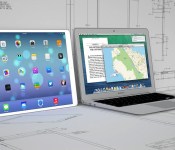
Following a report last month stating that Apple supplier Quanta Computer had landed the contract to mass-produce a larger-sized iPad for late 2014, Digitimes is reporting that the 12.9-inch tablet will be released in October 2014 and will target North America’s educational market. Apple is also said to be examining the possibility of replacing the 11-inch MacBook Air with the larger iPad.
 12.9-inch iPad (left) with 13-inch MacBook Air (right)
Apple’s large-size tablet will be manufactured by Quanta Computer, and was originally expected to adopt either 12.9- or 13.3-inch panels, with recent rumors indicating that 12.9-inch has a better chance to be picked, the sources noted.
The report also states that Apple is planning to release a larger size iPhone in May 2014, using a 20nm processor manufactured by Taiwan Semiconductor Manufacturing Company (TSMC). Reports of a next-generation iPhone featuring a larger screen have surfaced occasionally throughout the past year, while the claim of an A8 processor made by TSMC is follows a report in June stating that the company had struck a three-year deal with Apple to produce A-series chips starting in 2014.
However, a May 2014 release date for the next iPhone would be somewhat of a surprising move by Apple, considering that the most recent reports have stated that the larger-screened iPhone will debut in late 2014. A release then would be in line with the October 2011 launch of the iPhone 4s, the September 2012 launch of the iPhone 5, and the September 2013 launch of the iPhone 5s and 5c.
A report last month from The Korea Times indicated that production of a 12.9-inch Retina Display to be used in a next-generation iPad was already underway at an Apple supplier in Korea, with a target date of early 2014. The larger tablet is also said to carry an improved display nearing ultra high-definition (UHD) quality, which would be significantly bigger and contain more pixels than Apple’s current 9.7-inch iPad Air.
     |

Berlin Apple Retail Store Reportedly Smashed by Car, Display Merchandise Stolen [Mac Blog]
An Apple Retail Store located in Kurfürstendamm, Berlin was the site of a smash-and-grab robbery earlier this morning, reports Bild.de [Google Translate]. At 4:15 AM, thieves reportedly crashed an Opel Corsa supermini automobile into the store and proceeded to steal display iPhones, iPads, and computers before fleeing in two Audis.

The report also notes that there have been seven such robberies in Berlin as of late, including a heist at the Alexa shopping mall located in Alexanderplatz, Berlin where theives made off with over 100,000 euros worth of goods.
With Apple gadgets fetching a high price on the secondary market, thefts of individual devices in muggings are common. However, organized robberies on Apple Retail Stores are usually uncommon.

The smash-and-grab robbery on the Kurfürstendamm Apple Store is also similar to the robbery that took place at Apple’s Promenade Temecula retail store in Temecula, California last year, where robbers also used a car to obliterate the entire front glass and security grating of the store before making off with merchandise. It is likely that the Kurfürstendamm store will close for cleanup and repair for a short while before opening to the public again.
| |
CyanogenMod downloaded 10 million times as it begins to go legit

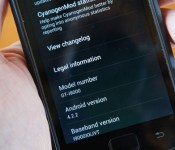
Though CyanogenMod has gotten plenty of ink lately for its Oppo N1 hookup and Google Play approval, it’s still first and foremost a modding outfit. In fact it just marked 10 million downloads of its custom Android ROMs, according to its latest stats. That marks a lot of folks wanting to un-skin some models, or give others like Samsung’s Galaxy S (shown above) new life. That model, along with the Galaxy SII and SIII were the most popular devices to mod, a reflection of their popularity and perhaps users’ disdain for TouchWiz. It helps that you can now skip difficult command-line installs, thanks to OTA updates and new desktop and mobile apps. Now if you’ll excuse us, we’re going to install CyanogenMod’s Android 4.2.2 ROM on our Galaxy S — a device officially unsupported since the Gingerbread era.
Filed under: Software
Via: Phone Arena
Source: CyanogenMod

Geeksphone’s OS-agnostic Revolution smartphone to use Intel chips

We’re not yet done with 2013 and already handset manufacturers are tempting us with the products that we’ll see in 2014. Geeksphone, the outfit behind the Peak+ and Keon, has released the spec list for the third of its Firefox OS devices. The two notable things about the Geeksphone Revolution, of course, is that the hardware will feature Intel’s Atom Z2560 processor, clocked at 1.6GHz, and that running Firefox OS is no longer mandatory. Instead, users will have the option to choose between the Mozilla-backed software and an as-yet unknown build of Android. Otherwise, it’s a reasonably standard offering, with a 4.7-inch IPS qHD display, 2,000mAh battery and an 8-megapixel camera. It’ll land in Q1 next year, and we’re sure that Mozilla will be watching to see just how many people decide Firefox OS is preferable to Android.
Filed under: Cellphones, Mobile, Google
Via: PhoneArena
Source: Geeksphone

ASUS teases new dual-boot hybrid device with its CES teaser (video)

Just before a big tech show, ASUS likes to wheel out a baffling teaser to get us all in the mood. Normally, the clips involve panning over some brushed metal, promising that the new gear will transform your life. But every now and again, ASUS decides it’s time to travel to a world heritage site for a spot of vandalism. The latest victim is the Statue of Liberty, which throws a peace “V” to the crowd before pulling apart the tabula ansata in the hope of getting a Transformer Book Trio of its very own.
What’s new this time round is that this system somehow supports dual OS in both laptop mode and tablet mode, as indicated by the blue (Windows) and green (Android) flash; whereas the current Trio only does dual boot in laptop mode. On the other hand, the keyboard base appears to remain fully functional as a Windows machine (and may still require a separate monitor). Come CES, we shall take a closer look at this second-gen Trio.
 AIVAnet