



Google Glass collision detection could one day save you from yourself

Once upon a not so distant time, a woman took a long walk off a short pier while checking her Facebook page. True story. Then there was the time the San Diego police department ticketed a woman for driving while under the influence of Glass. Clearly, we’ve fallen victim to our technological dependence, not just literally, but also legally and it requires a solution. It’s unsurprising then that Google had the foresight to come up with a way to save us from ourselves, at least where its Glass eyewear is concerned.
A recently surfaced patent application, dated October 2011, references a “collision-avoidance action” that could help reduce Glass-related mishaps. The technique detailed in the filing doesn’t set off any alarms or alerts for Glass users, but it will “[de-emphasize] at least one of the displayed virtual objects” in the HUD to keep you from smashing into glass or walls or telephone polls or other people. You get the point. It does this by gathering data from Glass’ sensors and calculating the distance between you, the oblivious party, and potential obstacles in your way. Go ahead and laugh at the absurdity of this all now, but in five year’s time when we’re all rockin’ Glass-like eyewear, you’ll be thankful for the heads-up (pun intended).
[Original Image credit: RuthMarie/Flickr]
Filed under: Wearables, Google
Source: USPTO
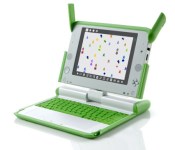
Switched On: What’s become of the $100 laptop
Each week Ross Rubin contributes Switched On, a column about consumer technology. This week marks the ninth anniversary of the column.

Back in 2006, at the height of interest in the One Laptop Per Child-fueled $100 computer, I embarked on a quest to find such a device on the market — with a catch. Since there were no such computers readily available in retail channels, the search was conducted via eBay for used, but still-capable PCs that cost less than $100. (It was a lot easier to find one that ran Windows than Mac OS.)
The past seven years have seen a lot of changes in the broader personal computing market. The Hisense Sero 7 LT, which arrived at Walmart earlier this year, exemplifies the kind of product that can now be considered the “$100 laptop” for the American mass market. Since then, others have followed. What it delivers, though, varies widely from what we thought such a device might look like.
It’s not a laptop
The Hisense Sero 7 LT is a consumer tablet, a category that didn’t really exist back in 2006. Of course, the main drawback of this, when compared to the 2006 idea of a $100 laptop, is the lack of a physical keyboard (and maybe some screen protection). That said, the form factor shift has brought some advantages. While the LT isn’t thin compared to other tablets, it’s still thinner, lighter and smaller than most notebooks and its touchscreen is also easier to learn than a mouse or trackpad. And as modern tablets and smartphones have made the case, you don’t need the keyboard much of the time anyway.
It doesn’t run Windows (or Mac OS)
And it doesn’t have Intel inside. Of course, the original XO laptop (which was actually sold to individuals for much more than $100) didn’t run those operating systems, either. As the initial XO drama unfolded, there was a war of words and products between OLPC and Intel, which offered the rival Classmate laptop. Neither company really won, but ARM-based alternatives have seen explosive growth in smartphones and tablets over the past few years, and with them, we’ve seen a shift to operating systems built on them.
One requirement for the 2006 experiment was to find a laptop that could run the latest version of Windows or Mac OS. But the Sero 7 LT runs a contemporary version of Android and supports Google Play, granting it access to about a million apps. Sidestepping the question of what a PC is, these apps cover traditional “PC” tasks such as web browsing, document creation, e-mail, messaging and even video chat with its front-facing camera, as well as a host of more recently popular smartphone-driven app categories including streaming media, social networking and casual games.
Many of these apps aren’t as deep as those one would find on a Windows PC or Mac, but consider that consumers use PCs dramatically differently than they did seven years ago; that more app categories are becoming progressively (storage) or inherently (social networking) cloud-based, anyway. And high volumes and new software revenue models make many of them available for free or for a dollar or two.

It (now) costs less than $99
The Sero 7 LT entered the market at $99, but, as HP did soon after entering the market with its 7-inch slate, Hisense cut the price not long after launch. (In this case, to $79.) In fact, Nextbook now offers an 8-inch tablet for $99. It would be great if one could spend the extra cash on a cheap Bluetooth keyboard, but, unlike the Sero 7 Pro, which is the Sero 7 LT’s $149 Tegra 3-equipped sibling, the cheaper Hisense tablet doesn’t include the short-range wireless standard. Still, one can attach a wired keyboard to its micro-USB connector (adapter included), bringing it even closer to the functionality, if not integration, of a laptop.
It connects to a TV
Unlike some early, inexpensive computers, such as the Commodore 64, the Sero 7 LT doesn’t need an external display. However, if you have a modern TV, you can output a range of entertainment via its HDMI port. Sero 7 LT users could also spend a bit more and connect to their TVs wirelessly via Chromecast.
Its customers seem to like it
“How good can a $99 tablet be?” one may ask. The Sero 7 LT can’t hold a candle to tablets such as the new Nexus 7 or iPad mini; it even compares pretty poorly to the more expensive (by $60) Sero 7 Pro. In addition to the lack of Bluetooth, it only has 4GB of on-board flash memory (although one can augment this with a microSD card) and has a battery life that is about half that of leading tablets.
But checking out the reviews for the Sero 7 LT at Walmart.com — some of which were made when the device was priced at $99 — reveals a generally positive reception. Most rated it at five stars. A few reviewers called it “excellent” for the price, while another called it the best and cheapest of the three tablets she’s owned. The majority of reviewers said they would recommend it to a friend or family member.
It’s not alone
In addition to a host of brands that are even less recognizable to US consumers, Walmart.com also carries the recent Nextbook 7-inch Android tablet at $60 and the 8-inch model at $99. And the floor’s the limit on eBay. A bit further up the pricing chain, the XO brand has returned with the XO tablet from Vivitar, coming in at about $120 and including a host of educational content in English and Spanish from the OLPC project. (Yes, the latest effort from the non-profit that advocated the $100 laptop is neither less than $100 nor a laptop.)
Of course, Black Friday saw even deeper promotional pricing on tablets, including a deep, but ephemeral discount on the Dell Venue 8 Pro. The sub-$100 sector may well expand significantly in 2014, but 2013 will go down as the year that connected computing for a wide range of tasks became a more viable mainstream option for less than $100.
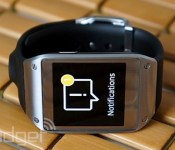
Samsung Galaxy Gear notification update reaches the US three weeks late

Remember how Samsung promised American Galaxy Gear owners an update that significantly improves third-party notification support? That update is at last rolling out — three weeks behind schedule. Early stateside adopters can now read the basic content of Facebook Messenger conversations, Gmail messages, Hangouts messages and Twitter mentions from their smartwatches. The upgrade should also improve battery life, connection quality and S Voice search performance. While we’d prefer to receive upgrades in a more timely fashion, it’s good to know that the Galaxy Gear is now much more useful to US wearers.
Filed under: Cellphones, Wearables, Mobile, Samsung
Source: Android Central
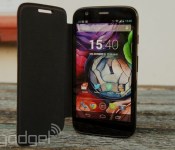
Moto G gets KitKat, improved camera features in the US

Given that Motorola’s budget-friendly Moto G launched just last month, you would have figured the mid-range smartphone would have packed some KitKat. Sadly, it did not, but Mountain View’s hardware arm began rolling out Android 4.4.2 to select owners today. If you purchased your Moto G from Amazon or on Motorola.com in the US, it’s time to snag that update. Devices sold through carriers and in other regions will get some love “soon.” The company’s also offering up the same camera update that hit Moto X devices last week, enabling tap to focus and expose, locked exposure for panoramas and support for additional languages. Those camera enhancements will also be making their way to Droid Mini, Maxx and Ultra.
Filed under: Cellphones, Google
Source: Motorola

BlackBerry bringing Channels and Voice Chat to BBM for Android and iOS next year

Remember how excited you were for BBM to hit Android and iOS and then BlackBerry continued to fake us all out with imminent releases? Thankfully, that’s now all in the past and BBM is a reality for those of us not on BB10 devices, but still its feature set leaves something to be desired. The good news is that BlackBerry intends to flesh out BBM in 2014, though not just for the app.
So what’s up ahead? Arguably, the most significant changes are coming to Android and iOS users in the form of BBM Voice and BBM Channels. Think of BBM Voice as you would Skype or Google Hangouts — it’s essentially a way for you to chat with your contacts without touching your allotment of minutes. And Channels, if you’ll remember from our preview this past summer, is basically BlackBerry’s spin on the social network. Both are already available for current BBM users running BB10, so this addition really just brings the rest of BBM’s outsider base up to speed.
BlackBerry’s also looking to make sharing with BBM a less cumbersome process in the new year. Though the company hasn’t elaborated fully on just how it intends to make photo and voice note sharing that much speedier, it seems as if the process will soon require less fussy UI interactions. Users will even be able to divulge their whereabouts with BBM, albeit on a temporary basis and make use of over 100 new emoticons. All of this is coming “in the next couple of months,” so if you need something to sate your curiosity now, check out the video after the break.
Filed under: Cellphones, Software, Mobile, Blackberry
Source: BlackBerry blog
 AIVAnet