



Stephen Hawking’s first official app teaches the basics of the universe

Stephen Hawking has gone to great lengths to promote science through books and videos, but he has been conspicuously absent in the software world — until now, that is. The astrophysicist has just teamed up with Random House on Snapshots of the Universe, his first official app. The $5 iPad title teaches the fundamentals of space through mini games: players learn about G-force with Einstein, put planets into orbit and come to grips with the theory of relativity. Particularly curious users can go deeper with both video explanations from Hawking as well as old-fashioned text. Snapshots is no substitute for reading A Brief History of Time, but it may inspire young scientists to learn more.
Filed under: Tablets, Science, Mobile
Source: App Store

YouTube opens live streaming for all verified channels, even yours

What’s that, your YouTube channel has fewer than 100 subscribers, but you feel it’s a travesty that you can’t share your video opus as it happens? Well, start popping bottles: Google has begun rolling out live streaming capabilities to all of its verified users that are in good standing (hopefully that includes you!). Since releasing the feature more widely less than a year ago, the video giant has now given the option to all, putting even the lowliest accounts on equal footing with the site’s heavy hitters. Don’t start planning a live broadcast of your next quilting bee just yet, though: While the update starts today, YouTube said it’ll be a few weeks before everyone gets access.
Via: The Next Web
Source: YouTube Creators blog
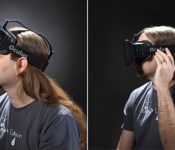
Oculus Rift makers get $75 million from investors to finish consumer model

Short of attending an industry event or ordering your own dev kit, it’s a bit tricky to get your hands on an Oculus Rift VR headset. Soon, that could change: the company just secured $75 million in funding to bring the product to market. The influx of cash comes from Andreessen Horowitz, a venture capital firm known for funding companies like Jawbone, Facebook Twitter and Skype. As part of the deal, the group’s co-founder, Mark Andreessen, will join the Oculus VR board of directors. “We believe Oculus will not only alter the gaming landscape, but will redefine fundamental human experiences in areas like film, education, architecture and design,” Andreessen said in the company’s official statement. ‘We’re incredibly excited to help them change the world.
The influx of cash will help Oculus VR finish building the consumer version of its Rift VR headset, which promises to bring immersive experiences to Windows, Mac, Linux and Android devices. The company didn’t go as far as announcing a release window for the headset just yet, but CEO Brendan Iribe seems optimistic. “This additional infusion of capital, as well as the leadership and experience of Marc Andreessen, will help us take the final steps toward our ultimate goal: making virtual reality something consumers everywhere can enjoy.” Details are scarce for now, but we’re told more details should be available tomorrow.
Source: Venture Beat
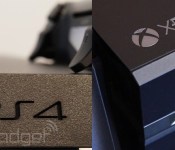
PlayStation 4 on top in November next-gen console sales according to NPD

Confirming what we already suspected, sales tracking firm NPD reports that the PlayStation 4 outsold the Xbox One in North America during November. As of latest numbers, the Playstation 4 is in 2.1 million homes compared to the Xbox One’s 2 million — a great start for both consoles and a paltry sales difference. Sony released a statement from SCEA head Jack Tretton, which said, “Demand continues to overwhelm supply, but we’re working hard to get PS4 units into the hands of customers throughout the holiday season.” The full statement is just beyond the break.
Xbox One, meanwhile, was apparently November’s “fastest selling console,” with around 101K sold each day of availability (November 22nd through November 30th). Since the PS4 was available starting on November 15th, and the Xbox One went on sale starting November 22nd, the Xbox One caught up in sales so quickly because of higher demand. Or as NPD puts it, “When looking at sales on an average per-week basis, Xbox One led PS4.” Last month’s Xbox One launch was also Microsoft’s most successful console launch on record, which Microsoft’s assuredly enjoying.
SCEA CEO and president Jack Tretton:
“PlayStation 4 sales in North America and worldwide have been incredibly strong since launch, culminating in PS4 being recognized as the largest console launch in history. In North America alone, more than one million PS4 units were sold in only 24 hours and we’re pleased NPD has reported that PS4 was the top selling next gen platform for both hardware and software in November. We are humbled by the passion and excitement demonstrated by gamers for PS4. Demand continues to overwhelm supply, but we’re working hard to get PS4 units into the hands of customers throughout the holiday season.”
PMD’s Nimble UX platform gives computers super accurate touchless gesture controls

Most of us are familiar with touchless gesture controls, thanks to the efforts of Leap Motion, SoftKinetic, PrimeSense and others. PMD, however, is a name you may not be familiar with, despite the fact that the German firm has been building some of the most accurate and robust depth sensing technology in the world for around a decade. The reason for its low profile? PMD’s technology has been used almost exclusively in industrial and automotive settings… until now.
The company began exploring consumer products back in 2009, and we saw its first consumer reference design sensor, the CamBoard Pico, last year at CES. Now, the company’s back with its sensor camera and a new gesture control platform for both Mac and PC, called Nimble UX. Nimble has three parts — the first, as mentioned, is a depth-sensing camera. Next is the Nimble PMD SDK that gives developers access to the depth information gathered by the sensor and tools to help them build gesture-based applications. Finally, there’s the Nimble dashboard, which is a plug-and-play bit of software that implements touchless gesture controls for Windows 8. We got to see Nimble UX for ourselves and chat with the folks from PMD to see what sets their technology apart from the competition, so join us after the break to learn more.
So, you’ve seen Elon Musk designing rocket parts with the Leap, and you’ve seen the gaming and hacking powers of Kinect firsthand, too, so what makes PMD’s gesture camera technology so special? Well, first off, each of the pixels on the sensor capture depth information by measuring the brightness of the reflected light, as opposed to other solutions that extrapolate and estimate depth information. Those same pixels are also able to subtract ambient light on an individual basis, which enables the sensor to work outdoors or in almost any lighting conditions. Furthermore, each individual pixel also knows when it’s not providing the highest quality depth measurements — and because the Nimble UX provides a depth map to developers, those devs can set differing thresholds of quality for when they choose to use a given pixel’s data. Additionally, PMD’s sensor solution is fully integrated on a single chip, as opposed to multi-chip designs from elsewhere, which means it’s smaller and more efficient in operation.
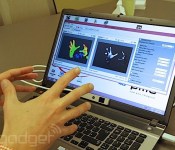
We got to see a demo the Nimble SDK using a CamBoard Pico S connected to a Windows laptop that basically amounted to a digital replication of our hands onscreen. The movements were tracked with aplomb, and we noticed no occlusion problems as we rotated our hands around each other. It wasn’t perfect, but the team at PMD is still working on the SDK middleware to get all the kinks sorted before it’s released in January. The result of PMD’s work currently is, in effect, close to our experience with Leap Motion — it can detect very fine movements, but with the occasional hiccup and slight stutter every now and again.
When used in conjunction with Windows 8 via the Nimble Dashboard, the technology shined. Because the sensor is mounted at the base of your laptop’s display, it can see very slight movements above the keyboard and the code allows it to differentiate between regular keystrokes and touchpad inputs with high accuracy — meaning you don’t have to wave your hands around high above the machine. Instead, you can keep your wrists resting upon the keyboard deck as they normally would when typing, and simply point at the screen to use Nimble to navigate your way around Windows. During our brief demo, the platform worked surprisingly well. So well, in fact, we’d say it’s the first implementation of touchless controls we could see catching on with users, simply because it’s an intuitive way to interact with Windows 8, and it prevents the arm fatigue that usually comes part and parcel with using gesture interfaces.
For now, PMD’s plan is to build the most stable and dev-friendly platform it can to best enable the Nimble UX to improve the way that we interact with our computers. Sound good? Developer kits will be available beginning next month, and you can sign up to get one at the source link.
Filed under: Desktops, Laptops, Peripherals
Source: PMD

Bing broadens Snapshot to include TED Talks, famous speeches and more straight from the results page

How do you improve adoption of a search engine? You make it so users never have to leave the results page, or so Microsoft’s latest Bing enhancements would suggest. With the bevy of new features Bing’s introduced today, users with an academic or historical bent can now get pretty much all the info they need directly from Snapshot, its preview window for queries. Searches for prominent people will now surface links to any famous speeches or TED Talks they’ve given, with content playing either from within that pane or just one-click away. Bing will also present users with online course listings for Universities, Wikipedia-sourced summaries for historic events and scientific theories, as well pertinent Animalia info (so you can figure out if that’s a husky or a wolf you’ve just adopted). In all, it seems like these search enhancements are geared towards the academic set. So, it’s good news if you’re the lazy collegiate type — now you don’t even have to open separate tabs.
Filed under: Internet, Software, Microsoft
Source: Bing Search Blog

Twitter changes how ‘block’ works, makes it more of a mute button

From your garden variety troll to far worse kinds of harassment, we’ve all run into people on the internet that we’d rather not deal with. On Twitter, choosing to block someone used to mean they couldn’t see your feed while they were logged in. Now, a support page explains that it just means you won’t see their tweets or interactions with you, unless you go to their page or they come up in a search. The only way block actually blocks someone, and forces them to unfollow your account, is if your tweets are set to private.
Many users are voicing disagreement with the change, citing the fact that harassers can easily monitor their target’s accounts, or RT their tweets and encourage others to join in. As it stands, the harassed now have to choose between participating in public conversations or controlling who can follow and retweet them (temporarily switching to private and blocking someone can be used to cause a force-unfollow in a pinch).
There are several different interests at play here, and Twitter’s ability to both let its users participate in a public forum and maintain their privacy against harassers puts it in a difficult position — not to mention try to generate profits as a publicly traded company. Those critical of the change have already claimed the change exists to stop users from blocking advertisers, but Twitter reps tell TechCrunch the change occurred to prevent retaliation scenarios. The way the feature works now, the person who has been blocked no longer sees any message or notification.
Another issue results from the way certain public safety organizations like police departments use Twitter, and that if they block someone for trolling, that individual could miss important information. That exact situation recently popped up for the Albuquerque police department’s feed, and the new policy would fix that. One alternative suggested is that Twitter should offer separate mute and force unfollow options — let us know in the comments if you can think of a better solution.
Filed under: Internet
Source: Twitter

Sonic the Hedgehog 2 for iOS Remastered and Rereleased [iOS Blog]
 Sega has released an updated and remastered version of Sonic the Hedgehog 2 for iOS, adding iPad and iPhone 5 support, in addition to a new Boss Attack Mode and a new online 2-player mode. The update is free for current owners of the game.
The game is a faithful recreation of the classic Sega Genesis title, but adds a secret zone called the Hidden Palace that was removed from the original game. The game was made by the same team that released the Sonic CD iOS-port previously. Our sister-site TouchArcade has more:
Just a quick heads-up to let you know that the Sonic The Hedgehog 2 [$2.99] remastered update, which we gave you some first impressions of yesterday, is now available as a free update to the original game in the App Store. In addition to improved visuals, widescreen and Universal iPad support, and a 60fps frame rate, this remastered Sonic 2 also includes brand new additions like a Boss Attack Mode, an online 2-player mode, Knuckles as a playable character right from the start, and the first ever official inclusion of the long-lost Hidden Palace Zone which was scrapped from the original Sega Genesis version of the game just days before release back in 1992.
Sonic the Hedgehog 2 is available for $2.99 from the App Store for iPhone and iPad. [Direct Link]
     |
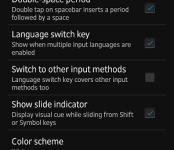
Blue & White color schemes added to Google Keyboard [Download]
Today is sure a blizzard of Google app updates now isn’t it. We have seen Google+, Maps and QuickOffice hitting today along with Newsstand, Hangouts and Keep yesterday. Now we get a notification of an update to the Google Keyboard app. While not a milestone update, it still has a function beyond the usual bug fixes and stability improvements that they all get.

 Todays update brings the Google Keyboard upto v2.0.19133 and adds in just a hint of change. You now have the option to change the color scheme between white or blue. We are hoping that this small change is part of the grander plan to bring in more color options soon. Otherwise all they have done is appease the ones that hated the color change after the last update.
As always, you can download the apk (and all the rest that are out) and install it at your leisure, or head to the Play Store and see if it is waiting for you.

Only on Android: 6 Exclusive Features
For residents of upstate New York, you need a phone that you can take and use wherever you travel, whether you’re heading to the Finger Lakes for a vacation, traveling to the Big Apple on business, or spending the weekend in Philadelphia. When considering your next phone purchase, consider the following exclusive features only found on Android phones.

Replaceable Keyboards
When it comes to typing on your phone, it’s nice to have options. For example, with Android phones, you can choose from other keyboard layouts to get a keyboard that works best for you. One of the most common options is the Swype keyboard, which allows you to swipe over the letters to make a word without having to type each letter individually. This makes typing out text messages and email messages infinitely faster. Other options include Perfect Keyboard, SwiftKey, Thumb Keyboard and Kii Keyboard.
Near Field Communication (NFC)
A big part of the Android ecosystem is the use of NFC, or near field communication. This is a short-range wireless technology that makes it possible for two devices to interact through electromagnetic radio waves. With NFC, you can share things easily from one phone to another, such as pictures or documents. Not only that but you can buy NFC tags and program them to do simple tasks. LifeHacker details how this works if you want to learn more.
Dual User Profiles
With Android phones, you can create multiple user accounts. This allows you, as the owner, to restrict access when you give your phone to others to use. This is especially helpful for parents who want to let their children use their phones from time to time to play games, read books or watch video. This ensures they aren’t able to access adult apps or R-rated videos.
Customizable Features
With Android, there are tons of ways to customize the look and feel of your phone. With custom launchers, you can choose how you want the icons to appear on your screen so that your Android looks completely different than the Android user sitting next to you. You can also find custom icon packs that change the look and feel of your phone and how the icons look on your screen.
If you want to see what the weather will be like every time you open your phone, add a weather widget to your home screen. Many widgets are available including calendars, flashlights, Facebook, Twitter and stocks.
Access to Files
One of the major selling points of Android phones is easy access to the file systems. Where other phones might require you to connect the phone to your computer to see files (and may restrict access to certain file types), with Android you can open up the files and get to everything stored in the memory. Build your own structure with the files by adding folders and subfolders in a way that makes the most sense to you.
Remotely Access and Control Your PC
Though this is not technically an exclusive feature, having the ability to remotely access your personal computer is a great feature that should be mentioned. This is easily done with the Android app TeamViewer, which is free. For it to work well, you’ll need a fast and reliable connection. Buffalo residents have the option of connecting to FiOS, a great option because it provides speeds of up to 500 Mbps, over 16 times faster than the typical cable Internet connection.
This is just the tip of the iceberg when it comes to exclusive features to the Android phone. Features like these really make you wonder why everyone doesn’t own an Android.
 AIVAnet