


Samsung promises ‘differentiated’ smartphones based on its camera expertise

Samsung has instigated a small corporate reshuffle that could potentially have big implications for its future smartphones. The company has shunted its digital imaging unit sideways so that it sits under the giant umbrella of the mobile division, in the hope of combining “technical know-how” in these two areas and ultimately “differentiating” its smartphones with better camera technology. At the same time, Samsung expects expertise to flow in the opposite direction, allowing its engineers to create cameras with better wireless connectivity. It’s a move that makes plenty of sense given the recent spate of Galaxy-branded hybridized products, such as the slightly awkward Galaxy S 4 Zoom and hugely over-priced Galaxy NX mirrorless shooter. It also suggests that Samsung has paid attention to what Nokia has achieved by re-thinking mobile camera technology for its PureView phones, instead of using standard off-the-shelf parts.
Filed under: Cellphones, Cameras, Mobile, Samsung
Source: Yonhap News, ET News
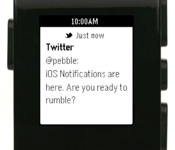
Pebble Smart Watch Adds ‘Do Not Disturb’ Option, Enhanced Notification Control [iOS Blog]
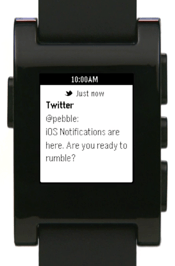 Pebble today released an update for its smart watch that enables various features, including a “Do Not Disturb” function that blocks notifications for a specified period of time, and the ability to create multiple alarms.
Also included is improved control over notifications which allow the user to specify which types of messages are displayed, and enhanced iOS connectivity performance along with various bug fixes.
What’s New
Do Not Disturb. Block notifications for a set period of time (from Pebble: Settings » Notifications » Do Not Disturb).Alarms app update. Create multiple Alarms, toggle Alarms on/off, and edit existing Alarms.
New “Snooze Alarm.” Customizable via the Pebble Alarms app.Improved Notification Control. Specify what notifications are displayed (Notifications On, Phone Calls Only, or Notifications Off). Notification settings are now accessible more quickly through a dedicated menu (Settings » Notifications).
Improved iOS performance. Notifications are now sent more quickly from your iOS device to Pebble. After exiting Airplane Mode, Pebble will now search for connectable iOS devices immediately, instead of waiting one minute.
The device was also updated earlier this month with full support for iOS 7 notifications along with the addition of a developer SDK and APIs for Javascript, the accelerometer, data logging and persistent storage.
Originally, the Pebble raised more than $10 million on Kickstarter, potentially proving the viability of the smart watch as a product. Apple is also said to be working on its own iWatch and recently invested hundreds of millions of dollars in a new Arizona factory to make sapphire glass, perhaps for such a product.
The Pebble smart watch is available for $150 from getpebble.com and at Best Buy and AT&T retail stores. 
     |
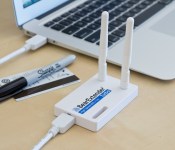
BearExtender Turbo starts shipping today for $80, brings 802.11ac WiFi to older Macs

Yes, it took a little longer than we originally expected. But, starting today, BearExtender is finally making its 802.11ac WiFi adapter available to Apple laptop and desktop owners who are missing out on the novel wireless standard. Much like the company’s BearExtender 1200, the Turbo is also designed to add 802.11ac functionality to older Mac computers. However, the BearExtender Turbo differentiates itself by supporting USB 3.0 and dual-band connectivity (2.4 and 5GHz), which is said to allow it to handle up to 867Mbps throughput speeds on the 5Ghz band. Naturally, BearExtender notes that this will depend on your internet service provider and the router being used — for example, it recommends this year’s AirPort Extreme or Time Capsule to achieve maximum performance. At $80, BearExtender’s Turbo has potential to be a decent solution, one that could, perhaps, hold you over until you finally decide to upgrade to a new, 802.11ac-equipped machine.
Filed under: Desktops, Misc, Laptops, Wireless, Networking, Apple
Source: BearExtender

DirecTV pondering online video service that deliberately won’t compete with Netflix

Satellite provider DirecTV may already have embraced online broadcasts, but reports suggest it’s looking to double-down on streaming to lure back a younger generation of cord cutters. The WSJ reports that the company is exploring the idea of launching a “price-sensitive” paid video service that won’t look to compete with Netflix or similar services, but would instead bundle programmes to cater for specific customers, like Hispanic audiences or children. DirecTV appeared ready to dive deeper into streaming when it was linked with a $1 billion-plus bid for video site Hulu, but CEO Mike White has indicated that his company has already begun navigating the choppy waters of online programme licensing in an attempt to kickstart its own service. While he isn’t sharing his online vision for now, White says he will disclose more information in the next 12 months — so don’t dismantle that satellite dish just yet.
[Image credit: Brian Cantoni, Flickr]
Filed under: Home Entertainment, HD
Source: Wall Street Journal

NSA overhaul could see an end to PRISM-style surveillance

Edward Snowden might have missed out on becoming Person of the Year, but that’s not to say he’s not been a big influence on America’s government this year. According to deep-throated persons familiar with the matter, the presidential task force is proposing a huge overhaul to the NSA in the wake of the PRISM scandal. Proposed changes include giving bulk collection duties to phone companies or an independent third party, imposing tighter standards before NSA staffers can access your personal data and appointing a civilian head, rather than recruiting from the military. The report is due in full on Sunday, but there’s no word on when the White House will make the proposals public — unless, you know, someone else feels compelled to “do a Snowden.”
Source: Wall Street Journal

ARM buys graphics company Geomerics to improve gaming on its mobile chips

ARM has just purchased a gaming graphics technology outfit called Geomerics — a name which may not ring a bell unless you’re a particularly inquisitive gamer. Geomerics’ so-called global illumination engine, Enlighten, has been used to create real-time, photo-realistic lighting for triple-A games like Battlefield 4 and Need for Speed: The Run. ARM hasn’t specified exactly how the tech will be used, but did say that “it’ll help bring the next generation of graphics experiences to mobile platforms.” That could mean it’ll improve gaming realism on its in-house Mali GPUs, or even help it fine-tune the chips themselves for better gaming performance. Regardless, ARM has also said that it’ll let Geomerics run independently and continue to service existing customers like EA, which gave the deal a hearty seal of approval.
Jolicloud 2 gets Feedly integration and a simpler interface for all your cloud services

It’s been a long time coming, but Jolicloud has finally released version 2 of its cloud-services aggregator today. To the uninitiated, Jolicloud is essentially a one-stop shop for all your web activity, be it Instagram photos, Facebook likes or Dropbox files. Jolicloud 2 retains much of the same functionality as its predecessor, but has been upgraded to play nicer with Chrome with a new structure that separates out content from online storage. “Home” is for the former, and it’s where you can keep track of the latest updates from your social networks along with a library of all the items you’ve faved or liked across the internet. The new version of Jolicloud also now has Feedly integration, which is good news for news junkies out there. As for online storage, that’s now under “Drive” and it’s where you can manage files from sites like Dropbox, Google Drive, SugarSync and more. You can even play media files, edit text and share folders right from the Jolicloud interface. So if you live your life in the cloud and want a single space to access them all, you might want to take a look at Jolicloud’s latest.
Filed under: Internet
Source: Jolicloud

Amazon tipped to launch online wholesale store called Pantry in 2014

While Amazon has no shortage of rivals, it’s now reportedly gearing up to take on big players in the warehouse store business, like Costco. According to USA Today’s anonymous sources, Amazon is prepping the launch of an online service called Pantry that’ll initially carry around 2,000 common grocery items to be sold at low cost. As long as you’re an Amazon Prime member, you’ll be able to fill a box up with Pantry goods that the retailer will ship for a nominal fee, assuming you’re within the weight limit. Amazon hasn’t commented on the report, so while there’s no firm word on when you can start shopping in your bathrobe for month-long supplies of canned goods, sources say it’ll be sometime in 2014.
[Image credit: Mike Seyfang/Flickr]
Source: USA Today
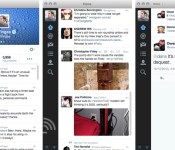
Twitter 3.0 for Mac brings in-line photo previews and detailed tweets

Twitter brought in-line media previews to its mobile apps a few weeks ago; today, it’s the Mac’s turn. The new Twitter 3.0 app for Mac now shows a quick glimpse of photos from supported services, so you’ll know right away whether pictures are worth clicking. A few older features are also making their long-expected debuts, including more detailed tweets (complete with conversations) and full profiles. The new additions aren’t likely to give Tweetbot users any regrets, but OS X fans who prefer Twitter’s official software will definitely want to swing by the Mac App Store for an upgrade.
Filed under: Internet, Software
Via: Twitter Blog, 9to5 Mac
Source: Mac App Store
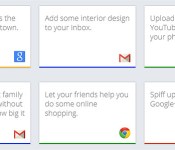
Google launches Tips to help you get more out of Gmail and its other services

Though we’re sure Google tries to keep its products like Now and Docs as easy to use as possible, who has the time to learn every single feature? That’s likely why Google just launched Tips, a site that uses its info card trope to help you dive more deeply into all 13 of its consumer products. For instance, if you choose Google+, one card suggests you can “make your still photos not so still,” and reveals step-by-step instructions when you flip it along with each device it supports. You can even submit your own idea for a tip, though to do that and other functions, you’ll need a Google account. It’s only available on desktop browsers for now, but if you want to give it a spin and see all the supported products, hit the source.
Source: Google Tips
 AIVAnet