



U.S. Carriers and FCC Come to Agreement Over Consumer Unlocking of Mobile Devices
 The five major U.S. carriers have come to an agreement with the FCC over a set of voluntary industry principles to make it easier for wireless customers to unlock their devices and switch from carrier to carrier if they wish. The CTIA — the industry trade group representing AT&T, Sprint, T-Mobile, U.S. Cellular and Verizon in the matter — says it will recommend the principles be added to the group’s “Consumer Code for Wireless Service” and the carriers will commit to implement them within 12 months.
The terms agreed to include [PDF]:
– Disclosure: Each carrier will post on its website its clear, concise, and readily accessible policy on postpaid and prepaid mobile wireless device unlocking.
– Postpaid Unlocking Policy: Carriers, upon request, will unlock mobile wireless devices or provide the necessary information to unlock their devices for their customers and former customers in good standing and individual owners of eligible devices after the fulfillment of the applicable postpaid service contract, device financing plan or payment of an applicable early termination fee.
– Prepaid Unlocking Policy: Carriers, upon request, will unlock prepaid mobile wireless devices no later than one year after initial activation, consistent with reasonable time, payment or usage requirements.
– Notice: Carriers that lock devices will clearly notify customers that their devices are eligible for unlocking at the time when their devices are eligible for unlocking or automatically unlock devices remotely when devices are eligible for unlocking, without additional fee. Carriers reserve the right to charge non-customers/non-former customers a reasonable fee for unlocking requests. Notice to prepaid customers may occur at point of sale, at the time of eligibility, or through a clear and concise statement of the policy on the carrier’s website.
– Response Time: Within two business days after receiving a request, carriers will unlock eligible mobile wireless devices or initiate a request to the OEM to unlock the eligible device, or provide an explanation of why the device does not qualify for unlocking, or why the carrier reasonably needs additional time to process the request.
– Deployed Personnel Unlocking Policy: Carriers will unlock mobile wireless devices for deployed military personnel who are customers in good standing upon provision of deployment papers.
Carriers reserve the right to decline an unlock request if they have a reasonable basis to believe the request is fraudulent or the device is stolen.
In a statement issued after the agreement was announced, the CTIA noted that “unlocking devices may not necessarily mean full interoperability since devices that work on one provider’s network may not be technologically compatible with another wireless provider’s network” and that unlocking a device may enable some functionality but not necessarily all.
Early this year, the Library of Congress ruled that it was illegal for certain mobile phone owners to unlock their phones unless specifically authorized by their carrier. This past September, the Obama administration filed a petition with the FCC, asking that carriers be required to unlock mobile devices. This voluntary agreement between the FCC and carriers would appear to forestall the need for legal action by either Congress or the FCC.
     |
Google announces winners of the first annual ‘Players’ Choice Awards’
For the past few weeks, users on Google Play have been able to vote for their favorite apps and games of 2013. Dubbed the rightful name of ‘Players’ Choice Awards’, the list boasts just that. These are some great apps and games that you’ve most likely heard before, and some you may not have.
Here are the winners of each respective category:
- I Can’t Quit You – Most Addictive Game: Knights & Dragons
- Old School, Still Cool – Best Franchise Game: Bejeweled Blitz
- Lights, Camera, Games – Best Game Based on a Movie: The Hobbit: Kingdoms
- Quietly Brilliant – Best App for Enhancing the Everyday: Duolingo: Learn Languages Free
- At Your Service – Best App for Booking and Buying: Flixster
- I ❤ Google – Best Google App: Youtube
Along with the notable apps and games in the chosen categories, there was an option for users to write-in their other favorites that may not have made the list. Here are the write-ins for 2013.
- Write-In Game: Ingress
- Write-In Game: Samurai Siege
- Write-In App: Newshog: Google News & Weather
- Write-In App: Swiftkey Keyboard
If you’d like to see the full list, you can do so, here. Do you have any apps or games which you think should have been included? Feel free to let us know in the comments!
The post Google announces winners of the first annual ‘Players’ Choice Awards’ appeared first on AndroidGuys.

Google+ app for Android turns any photo into snowglobe
A new update rolling out to Google+ for Android today lets users turn their photos into a virtual snowglobe.
We’ve included a fun holiday gift in the new version of Google+ for Android launching today. Shake your device while viewing one of your photos, and watch the snow fall. Shake it again to save your new snowy photo and share it with family and friends.
This cool feature follows closely behind the other recent Autoawesome effect that adds snow and twinkles to your winter photos. Great stuff as always, Google!
But wait, there’s more
There are a number of additional details tucked inside the new Google+ experience. Check it out!
- Search across more stuff, from a single box. Now you can search for posts, people, photos and communities — all from one place. So the next time you’re looking for something specific, just tap ‘Search’ and type what you want.
- Control who can buzz your phone, without missing notifications from others.If you only want certain people to be able to buzz your phone (like family), simply adjust your “Who can notify me” settings. Notifications from others will now appear in “Everything else,” so you can read them whenever it’s convenient.
- Explore content by category. Now when you visit the What’s Hot stream, you’ll be able to “go deeper” on a number of different categories — from Music and Science to Sports and Photography.
Look for the updated Google+ app to show up in your notification bar starting as soon as today.
The post Google+ app for Android turns any photo into snowglobe appeared first on AndroidGuys.
How to get out of your wireless contract without paying a termination fee
With the holidays coming up, more and more people are looking at getting new phones, and possibly even switching carriers. The trick with this, of course, is the fact that many people are tied down to a lengthy service contract with their providers. In other words, because they are under contract, their providers can – and do – charge an extraordinary amount of money for an early termination fee, often referred to as an “ETF”.
Gift giving isn’t the only reason to try to go with another carrier; some people want to get a new phone without paying full price, while others are tired of spotty coverage, or even just done dealing with hassles caused by their provider. Whatever the reason, this article hopes to assist those who need out of their wireless contract, without the pain of having to pay a huge fee.
Below is a full layout of a strategy that has gotten me out of not one, but two service contracts over the years when I was tired of dealing with bad service.
Please note that this is not a guaranteed strategy and that your results may vary. You could end up with a better plan or discounted device, or simply be told to fly a kite.
Let your carrier know about service issues
This is the crucial first step. When you make up your mind that you’re ready to change carriers, the first thing you want to do is start having their customer service log each and every issue. Did you drop a call? Is your data really slow, or not working in a particular area? As soon as you can, call into their customer service department and simply let them know you had an issue. You can make this a painless call by simply stating what you tried to do to remedy it (restarting the phone, airplane mode on / off, etc), and that you would simply like it logged in your account notes that you’re having trouble.
Inform your carrier of constant trouble areas
If you’re in a large urban area and you constantly have one spot, no matter how small, of no service, make the phone call to your provider and tell them. Of course, be reasonable – if you’re having trouble making a call from a 500-foot-below-the-earth mine shaft, you shouldn’t make that call. Anything else, however, is fair game. Again, just make the call and have them log it in your account. Bonus points on this if the trouble area is your home, your work, or somewhere you’re moving to.
Inform your provider of bad / unhelpful customer support calls
If you call in and are given a runaround, make sure you call back and talk to a supervisor. Have them log the even into your notes, and tell them why it was a bad call. Got hung up on? Log it. Got an useless answer to your problem? Log it.
Make sure your payments are fully up-to-date
This is pretty obvious – if you’re in bad financial standing with your provider, they don’t have to help you with anything. You have a contract with your provider – they provide you with service, and you pay them for it. If you’re not holding up your end of that contract, they have every right to charge you for cancelling. This will be a critical part of the puzzle later.
Make the cancellation call
Now, it’s time to go in for the kill, so to speak. In case you didn’t notice, everything previous to this phone call was all about making your complaints known to your provider. You want a detailed log on your account before you make the call to get out of your contract, and have it as detailed as possible. This is crucial. Also, you want to make your own note of every time you call in – you need to be sure that they show as many calls as you do, as some people will not even make a note in your account when you call. This is another point against them when the time comes. When you make the call to cancel your service, you want to make sure you do it up to a week before you want to change carriers, as the issues will likely need to be reviewed by managers, lead techs, etc. Don’t expect to make a single call and get an agreement to have your contract voided – the issue almost always has to be escalated. Once you reach someone on this call, you want to make your intentions as clear as possible. Make sure that you let them know the following:
- You should have a long list of service complaints on your account
- You have already tried to have the situation remedied
- You are only interested in cancelling your account
You will likely be escalated right away. Once you’re on the phone with a manager or lead, this is how you should word things (or at least some varying degree of the following):
I have a contract with (Provider name). I pay you to provide cellular service, and you provide me with said service. I have held up my end of this contract by paying my bills; however, (provider name) has not held up their end. This means that the contract is not being held up on (provider name)’s end, and I want this contract cancelled, with no fee.
These are the magic words, and they’re the ones you should keep going back to, no matter how the provider tries to spin things. Remember how the first step is making sure your account is up-to-date? That is so that you can say that you’ve held up your end of the contract with confidence. If you’re not, well – you’re pretty much out of luck. They don’t have to do anything if you’re also not holding up your end of the agreement.
At this point, they will likely need to review the account, which usually takes 24-48 hours, but could take up to a week. If you get calls back asking questions, be sure to focus on your issues, and the fact that you are legally able to get out of the binding contract due to the lack of service being provided to you. This strategy has gotten me personally out of two contract without an ETF, the most recent one being just this last week. You have a legal right to back out of a contract with no financial repercussions, as long as you can prove that the other party is not holding up their end of the deal.
Feedback and questions
Got any questions or comments on this? Be sure to comment below, and let us know your thoughts. Have you successfully left a contract from a wireless provider? What sort of “trick” or method did employ?
The post How to get out of your wireless contract without paying a termination fee appeared first on AndroidGuys.
Instagram Updated With ‘Instagram Direct’ Private Photo and Video Sharing [iOS Blog]
Instagram for iOS has been updated to version 5.0, adding the company’s Instagram Direct feature that was announced this morning. Instagram Direct is designed to allow users to send photo and video messages to private groups.
The update brings a new icon to the top right corner of the home feed, which includes an inbox listing photos and videos that have been sent to each user. Photos can be privately sent by selecting a new option to send a “Direct” photo to one or more people. Direct photos include read receipts, along with support for commenting and likes.
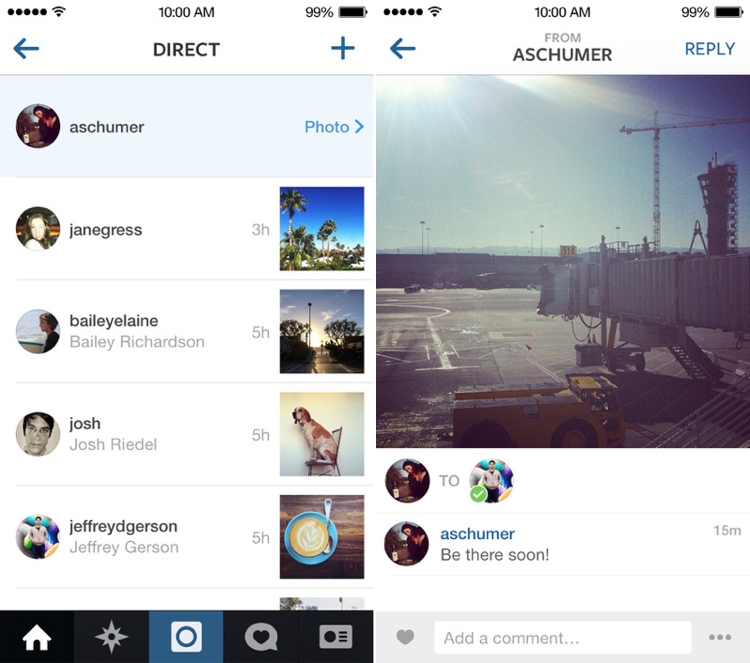
While photos and videos sent from followed users will appear automatically in an inbox, other Direct images from non-followed users will appear as a request that can be accepted or denied.
Along with direct photos, Instagram 5.0 also includes bug fixes and performance enhancements.
Introducing Instagram Direct!
We’re excited to introduce Instagram Direct, a new way to send photo and video messages to your friends.
Now you’ll see a new icon in the top right corner of your home feed. Tap it to see photos and videos that people have sent directly to you.
To send your own photos or videos, choose Direct instead of Followers once you’ve edited your post. When you’re done editing, just choose the people you want to share with.
Today’s update also includes bug fixes and performance improvements
Instagram can be downloaded from the App Store for free. [Direct Link]
| |

Foxconn and Apple Make Strides Towards Improving Work Hours, But Still Violate Chinese Limits
The Fair Labor Association has published a final status report on the working conditions at Apple supplier Foxconn, finding that Foxconn successfully reduced working hours to comply with the Fair Labor Association’s standard 60 hour work week, but failed to meet the Chinese legal limit of 49 hours per week and at times, exceeded the legal limit of 36 hours of overtime per month.
Today’s report follows an initial audit that took place in February of 2012 and a later agreement in March where Foxconn agreed to examine worker pay and implement stricter control over working hours while also improving working conditions.

Over the course of 2013, the Fair Labor Association visited three Foxconn facilities in Longhua, Guanlan, and Chengdu, with Foxconn providing full cooperation and unrestricted access to both facilities and workers during the verification process. Along with improving working hours, Foxconn also made moves to install additional exits and bathroom facilities.
FLA assessors verified that workers at the Longhua and Chengdu facilities worked no more than 60 hours every week between March and October; the same was true in the Guanlan facility with the exception of seven weeks during this period when working hours exceeded 60 hours. The assessment found that between March and October 2013, on average more than half of the workforce had worked beyond the Chinese legal limit of 36 overtime hours per month in all three facilities.
FLA assessors found that no interns had been engaged at any of the three facilities since the January 2013 verification visits and that the internship programs had been concluded at all three facilities. Assessors also verified that construction of additional exits and toilets was underway at the three facilities, with completion slated for the end of the year.
The Fair Labor Association expects Foxconn to continue to monitor its employee working hours to ensure compliance with the 60 hour work week while also making progress towards reaching a 49 hour work week. While the FLA will no longer be monitoring Foxconn, Apple is required to continue monitoring labor compliance, reporting back to the FLA each year.
Apple tracks working hours for its supply chain employees and also maintains a Supplier Responsibility section on its website, publishing yearly reports. The company has pledged to prevent excessive work hours, unethical hiring policies, and the hiring of underage workers at the factories that supply Apple with parts.
Throughout the year, various Apple suppliers have been continually accused of poor working conditions. In July, Pegatron was accused of having poor living conditions, and unethically holding worker pay. Pegatron was further accused of labor violations earlier this week, following the death of a fifteen-year-old factory worker in October.
Along with working with the Fair Labor Association to ensure safe working practices at factories, Apple also formed an academic advisory board for its Supplier Responsibility program in July, tasked with studying Apple policies and conducting research on labor standards in Apple’s supply chain.
Apple takes violations to its policies seriously, and in January, the company dropped Pingzhou Electronics as a supplier after it was found to be hiring multiple underage workers.
| |
Jawbone Up24 review: wireless syncing makes this Jawbone’s best fitness tracker yet

Late last year, Jawbone faced a herculean task: regaining consumers’ trust after widespread reports of brickage on the original Up fitness tracker. The outfit was able to right many of the wrongs that plagued the first edition, but there was still room for improvement. You still had to plug the Up into a smartphone to sync your collected data; sleep tracking left a lot to be desired; and the iOS app needed more usable functionality beyond tallying steps and monitoring dietary habits. However, the 2012 model did offer more than seven days of battery life and, you know, kept working even after a week of use.
This time around, the company has finally opted to go wireless. Thanks to a Bluetooth Low Energy radio, the new Up24 can sync wirelessly and only needs to be plugged in when it’s time to recharge. The convenience of wireless comes at a cost, however. The 2013 version got a $20 price increase to $150. So is the ability to sync wirelessly worth the extra coin? Are the software improvements impressive enough to make folks trust Jawbone above rival companies? I spent a few weeks tracking my every move to determine just that.
Hardware

You’re not alone if you confuse the Up24 with either of the previous Up bands. The new offering comes in two colors (black and orange) and sports the same rubber-coated exterior as before. Upon closer inspection, the unit now features a swirly textured pattern around its outer shell — a change from the zigzag design on the 2012 model. The lone physical button, used for toggling between Sleep Mode, Power Nap and other functions, now has a slightly different texture as well. Opposite the button is the removable nickel-plated cap that hides the 3.5mm plug for charging. Recharging still happens over USB, with the help of an adapter. In some places, the new unit may be a hair thinner, but there are otherwise no significant changes to report there.
The simplicity of the Yves Béhar-designed original remains, and that’s a good thing. Jawbone decided not to add a display à la the Fitbit Force; instead it’s relying on its companion software to serve up your fitness stats (more on that in a moment). There are still two LEDs, though, and they’re still situated around back by the band’s button, indicating when the unit is awake (that’s the sun icon) or snoozing (that’d be the moon).
One change you’ll notice pretty quickly on the Up24 is the reduced battery life.
As with the previous models, you can use the physical button to activate a number of modes. Pressing once still shows whether you’re in active or Sleep Mode; just press and hold to toggle between the two. When the band is awake (for lack of a better term), you can turn on the stopwatch by pressing once and then pressing and holding until the sun icon flashes and the band vibrates. Similarly, pressing the button followed by pressing and holding until the indicator flashes and Up24 vibrates in Sleep Mode triggers Power Nap.
Last year’s model also brought improved flexibility and water resistance, and indeed, those features are still in play. I was sure to get the unit good and wet each time I washed my hands or did the dishes. Several weeks later, I still haven’t had any issues. The Up24 is also just as flexible as the previous model. From time to time, though, the band would snag when I put on a jacket, sliding it about halfway down my arm, at which point I had to adjust it.
One change you’ll notice pretty quickly on the Up24 is the reduced battery life. The ability to wirelessly sync your data means the runtime now hovers around seven days. That’s the figure Jawbone has claimed, and so my experience was right in line with what the company is advertising. Of course, the band itself will remind you when it’s low on juice using both vibrations and a push notification to your iPhone so you can plug it in for the requisite 90-minute recharge. I say iPhone because while there is an Android version of the Up application, the Up24 is only iOS compatible at this time.
Software

The Up24 arrives with version 3.0 of the Up app, which brings a smattering of new features and improvements. Otherwise, it largely looks like the software we familiarized ourselves with last year. First, there are notifications that get pushed to your iPhone when you’re about to reach your goal. You might also receive alerts updating you on your progress. For example, after waking up in the morning and switching Sleep Mode off, I got a message letting me know how much shut-eye I got. These updates all arrive automatically without the need to plug in the device if you’re using the Up24. There’s also a sleep-recovery tool that allows you to manually enter your estimated hours should you forget to enter Sleep Mode before dozing off. Owners of the previous Up bands can enjoy all of these improvements — everything aside from push notifications, that is.
Still, the app’s main function is gathering your activity and sharing it among your “Team” of friends. Whether this provides adequate motivation or ongoing humiliation depends entirely on how active you are. As a way of keeping morale up, Jawbone’s added two new progress features. “Today I Will” allows you to take things one day at time by setting goals like drinking eight glasses of water or packing in seven hours of sleep. Then there are Milestones. These are longer-term achievements like walking a million steps or hitting a certain goal two weeks in a row. In addition, you can still use the Trends view to keep tabs on your activity over the past few days, weeks and months. Meanwhile, the Recent Activities and Lifeline views organize your data into handy visual lists and graphs.
Like the previous build of the app, version 3.0 can still be used in tandem with a number of other applications if you’re into the Internet of Things as a way of life. During the course of this review, I tied my account to RunKeeper, MyFitnessPal and If This Then That (IFTTT). As you might expect, integration with IFTTT opens up a whole new world of possibilities. Have a set of Philips Hue lights? You can program those to come on when you take the Up24 out of Sleep Mode or after you’ve been asleep for eight hours. The band can also trigger events with SmartThings and Belkin’s WeMo power outlets (like turning on a coffee pot). And now those apps can all be activated wirelessly at the touch of a button, making the Up24 a part of your automated setup as well.
Food Tracking is back with a built-in barcode scanner. As ever, too, you can add images of your own choosing. Unfortunately, the food catalog isn’t the most comprehensive and you’ll have to manually add any items that aren’t on the list. Once you log your food (Frosted Flakes, for example), it shows up in your activity feed for all of your friends to see. For both of those reasons, I found it easier and much less incriminating to log my meals via MyFitnessPal, a competing food tracker. Chances are, if you’re already using MyFitnessPal to monitor your diet, you’ve already added items you consume regularly, and you’re used to a much more robust database. Ditto if you’re on Weight Watchers.
Sleep tracking and alarms

Sleep tracking on the original Up was pretty hit or miss. If you were hoping that the situation would be remedied with the Up24, that’s unfortunately not the case… for the most part, anyway. If you’re a so-called active sleeper like I am, go ahead and prepare yourself for sleep reports in the morning that are split into multiple segments. A couple of nights a week, my sleep pattern showed that I slept for three hours and then four hours or some such, even though I never actually woke up. This nocturnal tracking system still distinguishes between deep and light sleep, so perhaps my thrashing around was mistaken for a 2 AM trip to the restroom. Who knows?
With the Up24, you can now set Smart Alarms via the app, thanks to that newfangled wireless connection. Each time I set one, it went off as promised within that 30-minute light-sleep window, using vibrations to ensure I didn’t wake up my wife as well. Power Nap, meanwhile, will activate the same vibrating alarm after you’ve snagged about 26 minutes of shut-eye. The Idle Alarm is also back to remind you to get up from your desk after a certain amount of time (these intervals are customizable). Finally, as mentioned a few times already, all three of these can be programmed via the app without the need to ever plug in the band.
The competition

As far as we’re concerned, the Up24′s inclusion of Bluetooth connectivity makes it a no-brainer over the previous Up — even if it is $20 more expensive. For $50 less, the Fitbit Flex offers wireless syncing, a sleek design and an LED display allowing you to keep an eye on your stats, but its sleep tracker doesn’t work reliably. The outfit also offers the $130 Force with similar features and a slightly larger OLED panel and especially long battery life: 11 days, according to our tests. Unfortunately, the software experience for Fitbit’s devices is cumbersome to use, and also lacking in certain areas. Then again, food tracking — the area where Fitbit is particularly weak — is not a strong suit for Jawbone either.
Then there’s Nike’s $150 FuelBand SE. Though it has a similarly sleek design as its predecessor, and also works the same way, it houses a larger battery that only needs charging once a week. It also brings improved social networking integration, if you find that helpful for keeping your workouts on track. Still, we found the new software features like Sessions to be rather hit or miss. Oh, and there’s still no Android app, with no sign of one arriving anytime soon.
Wrap-up

After some quality time with the Up24, I can definitely say that this is Jawbone’s best activity tracker yet. Sure, the software still needs some polish, and the sleep-tracking feature can still be imprecise, but we’re excited about the possibility for even more integration with third-party apps. It is worth noting that the Up24 is also the company’s most expensive fitness device to date and sits just on the upper end of what we’d be willing to pay for such a device. And don’t forget that last year’s Up is still available for $130. Even so, we’d recommend shelling out the extra 20 bucks for the convenience of Bluetooth connectivity. Because let’s face it: Taking the unit off to sync every day means you might not be using it at all a few months down the road.
Filed under: Wearables

Cablevision: Case against Aereo could destroy cloud computing (and our cloud DVR)

Cable operator Cablevision agrees with its competitors that streaming startup Aereo is illegal, but warns that the legal approach taken by the other cable and broadcasting giants could render services like Apple’s iCloud, Amazon’s Cloud Player — and, of course, Cablevision’s own remote DVR service — illegal. In a white paper released today, Cablevision expanded on earlier arguments it made against both Aereo and the rest of the indusry, saying that the approach taken against Aereo “would imperil consumers’ rights to use innovative technologies, such as popular digital locker services like the Apple iCloud, Amazon Cloud Player and Google Play Music.”
Cablevision, like the rest of the industry, considers Aereo illegal, saying the service “violates the copyright laws because it retransmits broadcast content without a license.” However, Cablevision calls its competitors’ claims that Aereo’s service creates illegal “public peformances” of broadcasts a “radical” interpretation of the law, which, if upheld by the courts, could “attack the legal underpinning of all cloud-based services, everything from the Apple iCloud to Cablevision’s own remote storage DVR service. In short, the broadcasters are asking the Court to throw the baby out with the bathwater – a move that could cripple cloud-based innovation in the U.S.”
At the core of the argument is the 2008 case in which the courts rejected the argument that Cablevision’s remote DVR service was engaged in illegally rebroadcasting programming. The case against Aereo, according to Cablevision, not only goes against that decision, but also threatens cloud-storage services like Amazon Cloud Player, since those services, like Aereo, create “public” performances by allowing consumers to play back cloud-stored versions of music they own.
Cablevision previously sided with the rest of the industry against Aereo, and argued that its cloud-based services, unlike Aereo’s, were legal. It switched tactics, adopting its current champion-of-emerging-technology approach after the rest of the industry decided to take the case to the Supreme Court. Of course, as of now, all arguments against Aereo are moot, since the courts have so far rejected industry claims, and the Supreme Court has yet to decide whether it will take the case.
Source: Cablevision (PDF)

Latest Gmail tweak lets images display in your email automatically

There are bad people out there in the world; bad people that look for backdoors in email image attachments to load up with malware. Google knows this and Google wants you to know it has your back. So with the company’s latest Gmail update, it’s re-routing images served from external servers to its own “secure proxy servers” for automatic display in your email. The benefit of which means you won’t have to click to accept image downloads anymore — they’ll just be there as soon as you open your email. If you’re a privacy nut (and why shouldn’t you be?), you can still set Gmail to ask before downloading images. And if you’ve previously set that as default in settings, the good news is that preference will still remain default. This Gmail update’s initially targeted for roll out to the desktop, but Google plans to implement the image server change across mobile sometime next year.
Source: Official Gmail Blog

Microsoft uses eye tracking to argue that Google distorts search results

Google has already made a few concessions to please European antitrust regulators worried about fair placements in web search results. However, Microsoft doesn’t feel those sacrifices are good enough — and it claims to have scientific proof that more changes are necessary. One of the company’s astroturfing outfits, Initiative for a Competitive Online Marketplace, has commissioned an eye-tracking study which suggests that Google’s lower-profile sponsored links and map results still draw too much visual attention. “Organic” search results and alternative services get just a fraction of the eyeballs, the Initiative argues. While the data may be of some use to officials, we’d advise taking it with a giant grain of salt — company-backed studies are rarely objective sources of information.
Filed under: Internet, Microsoft, Google
Via: GigaOM
Source: ICOMP

