


Google Launches Chrome Apps for Mac
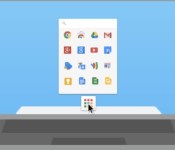
Google today announced that it is bringing Chrome Apps to the Mac, following a beta period that began in May. First introduced in September for Windows and Chromebook users, Chrome Apps are designed to function like native Mac apps, working offline, updating automatically, and syncing on any computer where a user is signed into Chrome.

Chrome Apps work offline, update automatically and sync to any computer where you’re signed into Chrome, so you can pick up where you left off. Your Chrome Apps on Mac behave and feel just like native software. For example, you can find your Chrome Apps in the Applications folder on the Dock. Search for apps by name in the Spotlight search—just like any other Mac program that you already use.
Chrome Apps, which are separate from Chrome browser apps, are downloaded into the applications folder and work like any other Mac app. The apps have access to local storage for offline support, differentiating them from standard Chrome apps, and are able to easily sync content between multiple computers.
Chrome Apps for the Mac also work with Google’s Chrome App Launcher, which will be automatically installed when any Chrome App is downloaded. The Chrome App Launcher aggregates all Chrome Apps into one convenient expandable grid on the Mac’s dock.
Google has several different fully functional Chrome Apps available for download from its Chrome Web Store, including offerings like video editing app WeVideo Next and project management app Smartsheet.
     |
 AIVAnet