


Updated Vine for Windows Phone lets you save clips as drafts

Although Vine launched on Windows Phone with many core features intact, it didn’t come with a draft mode — if you switched tasks, your hard work (six seconds of it, anyway) went out the window. That won’t be an issue with the latest version of the app, though. You can now save the video you’ve recorded to finish it later; interruptions and time lapse videos won’t be major headaches from now on. The Windows Phone client still doesn’t have the post-shoot editing of its Android and iOS siblings, but it’s clear that the feature gap is narrowing quickly.
Filed under: Cellphones, Software, Mobile
Via: Phone Arena
Source: Windows Phone Store

Twitter’s story coming to a TV near you, thanks to ‘Hunger Games’ producer

In a world where history changes 140 characters at a time, what’s the above message if not the recipe for a bonafide Television hit? According to The Hollywood Reporter, Hunger Games producer Allison Shearmur is teaming up with Lionsgate Television to get all The Social Network with the best-seller Hatching Twitter: A True Story of Money, Power, Friendship and Betrayal. The details are pretty scant beyond that for now, though the term “power grab” is used at least once in the writeup, which always makes for compelling TV. Lionsgate’s recent production credits include the Netflix series Orange is the New Black. Perhaps we’ll be seeing the world’s first big budget Vine-based TV show, six-second power grabs at a time?
Filed under: Home Entertainment, Software, HD
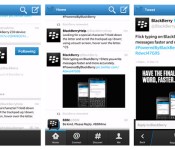
Twitter for BlackBerry 10 scores BBM integration and timeline photo previews

It’s no secret that Twitter for BB10 still needs a lot of polishing, and the latest attempt to make it shine brings BBM integration and other new features. Now, you can automatically update your status on the platform’s famous messaging service simply by tweeting through the refreshed app. The latest version also brings thumbnail previews that show attached images right on your timeline. Other than that, it comes with a built-in reply box and a fresh option to report spam or abuse that show up when you tap on a tweet. Unfortunately, if you read the app’s reviews on BlackBerry World, you’ll see a lot of users complaining that their apps have stopped working after they downloaded the update. So, no matter how sweet these changes are, it might be wise to proceed with caution or just wait until the developers issue a fix.
Filed under: Mobile
Via: Inside BlackBerry
Source: BlackBerry World

You can now tweet O2 for account information thanks to #Tweetserve

Here’s an interesting, if somewhat unusual, approach to helping customers: European mobile service provider O2 is rolling out a “Tweetserve” program to provide assistance to users on Twitter. Once you’ve followed @O2 and tweeted “#TweetServe” at the company, you’ll be followed back and receive a direct message with a verification code. Send that PIN to O2 via SMS, and you’re now able to DM the company with nine preset hashtags, including #charges, #minutes and #offers as well as #android, #windows or #ios (for info on software updates).
The #charges and #minutes commands, which show your current bill and remaining minutes, respectively, look to be the most helpful. If you have a more complicated query about your account — such as a billing dispute — we imagine Tweetserve isn’t going to replace a phone call to customer service. The program appears to be available to users in the UK for the time being; click the source link for more info.
Filed under: Cellphones, Networking, Mobile
Source: O2

Thoughts on the new Twitter UI
Last week, Twitter updated its official Android app with more functionality and UI problems than we’ve ever seen.
It’s no secret that the official Twitter app for Android has been… neglected. Not in the sense that it doesn’t receive notable updates, because it does. However, the way the app looks and feels is its biggest downfall. Compared to some 3rd party Twitter clients, there should be no reason to use the official app. But Twitter has something else up its sleeve…
Why is this a big deal?
With Twitter’s API limits introduced in late 2012, it’s getting harder and harder for 3rd part developers to keep their apps in the Play Store. If you haven’t heard, if a new Twitter app enters the Play Store, it only has 100,000 tokens available. If an app already has more than 100,000 users, they get to double their tokens, then get shut down.
Since the most recent update, I have never seen so many disappointed users. You would think that if they’re putting a cap on users to 3rd party apps, they would focus a little more on the app that they are (essentially) forcing people to use. We’ll talk more about that later.

The UI isn’t the main problem. Though it’s bright and a little bulky, it’s usable. You should begin to see the differences when it starts holding you back from doing things more quickly, and more efficiently.
Functionality
When I use Twitter, I read my feed, tweet, and find new people to follow. While you may use it for something more intensive, I usually stick to just that. The features of it that I use the least are Discover and Activity. Actually, I haven’t met anyone who uses them frequently, at all. The reason why I bring this up, is because perhaps the easiest way to navigate somewhere in an app, is by sliding tab to tab, from left to right. But, in the official Twitter app, they did this:

These tabs are accessed by swiping from left to right. In my opinion, these should not be placed here. The most used features are only accessed by tapping on them on the top of the screen.

While using this logic, shouldn’t they be switched around? Yes. They need to be. Take a look at some other apps that are doing it correctly, including Falcon Pro, Plume, and Tweedle:
Falcon Pro

(If you’re planning on downloading Falcon Pro, you can’t from the Play Store. This app is the first that has been removed due to Twitters limits. You can, however, download it from its official website, found in the above link.)
Plume

Tweedle

Widgets
The benefit to having an application on Android is the ability to use widgets. Especially with Twitter, most of the time you don’t even need to open the app if you have one on your home screen. Try not to laugh when you look at the comparison between the official and 3rd party widgets.

As you can see, the official Twitter widget resembles the UI from something that came out of the Gingerbread days, while the Plume widget blends in with just about anything that it sits next to. Why have they been neglecting this feature so much? No idea. But, here’s to hoping they update it sometime soon.
Final thoughts…
Not many official social network apps have a smorgasbord of customization options, but that isn’t the point. Don’t make a bad app/widget in the first place, and people won’t be resorting to other options. Also, if you’re going to have rules banning other apps from getting more users, you better be sure that yours is on-point. I think that’s the main thing that bugs me. Odds are, writing about this won’t change API limits or get Twitter to change their minds about anything. All we can really do is make suggestions, rate it on the Play Store, and hope for the best.
How do you feel about all of this? Are you using a different Twitter app? If so, we’d love to hear your thoughts in the comments!
The post Thoughts on the new Twitter UI appeared first on AndroidGuys.
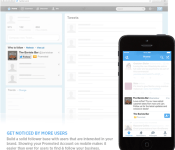
Twitter’s promoted accounts might start showing up within your timeline

By now, you’re most likely used to seeing promoted tweets (that’s fancy for “sponsored ads”) appear in your highly curated Twitter timeline. But promoted accounts? That’s the stuff best left banished to the wilds of the Discover tab or worse yet, Twitter’s desktop interface. Of course, that does advertisers no good and Twitter, in its march towards monetization, needs to get more eyeballs in front of those potential ad dollars. The big fix for that then, is to move sponsors’ promoted accounts out of the ghetto and into timelines to leverage the hefty three-quarters of its base that check in via mobile. Twitter’s labeling the change as still being in beta, but it’s available now for advertisers to test drive across the company’s global reach. What? You thought your timeline was sacred? Not when access to it is free, silly.
Via: AllThingsD
Source: Twitter Advertising Blog
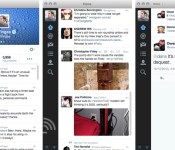
Twitter 3.0 for Mac brings in-line photo previews and detailed tweets

Twitter brought in-line media previews to its mobile apps a few weeks ago; today, it’s the Mac’s turn. The new Twitter 3.0 app for Mac now shows a quick glimpse of photos from supported services, so you’ll know right away whether pictures are worth clicking. A few older features are also making their long-expected debuts, including more detailed tweets (complete with conversations) and full profiles. The new additions aren’t likely to give Tweetbot users any regrets, but OS X fans who prefer Twitter’s official software will definitely want to swing by the Mac App Store for an upgrade.
Filed under: Internet, Software
Via: Twitter Blog, 9to5 Mac
Source: Mac App Store
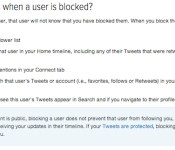
Twitter changes how ‘block’ works, makes it more of a mute button

From your garden variety troll to far worse kinds of harassment, we’ve all run into people on the internet that we’d rather not deal with. On Twitter, choosing to block someone used to mean they couldn’t see your feed while they were logged in. Now, a support page explains that it just means you won’t see their tweets or interactions with you, unless you go to their page or they come up in a search. The only way block actually blocks someone, and forces them to unfollow your account, is if your tweets are set to private.
Many users are voicing disagreement with the change, citing the fact that harassers can easily monitor their target’s accounts, or RT their tweets and encourage others to join in. As it stands, the harassed now have to choose between participating in public conversations or controlling who can follow and retweet them (temporarily switching to private and blocking someone can be used to cause a force-unfollow in a pinch).
There are several different interests at play here, and Twitter’s ability to both let its users participate in a public forum and maintain their privacy against harassers puts it in a difficult position — not to mention try to generate profits as a publicly traded company. Those critical of the change have already claimed the change exists to stop users from blocking advertisers, but Twitter reps tell TechCrunch the change occurred to prevent retaliation scenarios. The way the feature works now, the person who has been blocked no longer sees any message or notification.
Another issue results from the way certain public safety organizations like police departments use Twitter, and that if they block someone for trolling, that individual could miss important information. That exact situation recently popped up for the Albuquerque police department’s feed, and the new policy would fix that. One alternative suggested is that Twitter should offer separate mute and force unfollow options — let us know in the comments if you can think of a better solution.
Filed under: Internet
Source: Twitter

Twitter looks back at 2013, 140 characters at a time

500 million tweets a day and 230 million users: Twitter’s job of neatly summarizing the year is probably getting tougher each time. For 2013, the social network’s displayed what happened and when in month-by-month summaries of both the major events and hashtags of the moment. It also has specialized synopses for sports, news, entertainment and showcase. The latter is curated highlights from Twitter’s selected publishing partners, so it’s pretty classy fare. If you already can’t remember what’s gone down since January, hit up the source, or watch Twitter’s summary after the break, which pulls together Royal babies, typhoons, red pandas and well, the launch of its own six-second video sharing service, into a single-minute highlight reel.
Filed under: Internet
Source: Twitter

Twitter and Comcast expand their tweet-based TV viewing to nine more providers

Comcast and Twitter made it easy to watch TV online when they launched their SeeIt social platform, but the service has only been truly useful for Comcast customers watching NBCUniversal shows. It’s about to become much more relevant, though, as Comcast has reached deals with nine new channel and TV service providers. ABC, A&E Networks, AMC, Cablevision, Charter, Crown Media Family Networks, Discovery, Fox and Time Warner Cable should all support SeeIt’s “watch now” links in tweets as soon as the first quarter of 2014. You also won’t need to sign up for Comcast service to get the full experience — the new SeeIt deal will let Cablevision, Charter and TWC TV subscribers both tune their set-top boxes and record programming without ever grabbing the TV remote. There will still be gaps in SeeIt’s coverage in the wake of these agreements, but don’t be surprised if it’s ubiquitous in the near future.
Filed under: Home Entertainment, Internet, HD
Via: The Verge
 AIVAnet