



iWork updates let you share password-protected files through iCloud

Many fans of cloud services are used to sharing secure files with their friends, but that surprisingly hasn’t been an option for iWork users — at least, until today. Apple has updated both iWork for iCloud and all its Keynote apps to let productivity mavens share password-protected documents through iCloud links. Appropriately, iCloud now offers a list view that helps you find shared documents. Whether or not you’re the sharing kind, we’d suggest at least grabbing the Keynote update; both iOS and Mac users get better presenter display options, new transitions and more sophisticated charts. You’ll find all the iWork upgrades at the source links.
Filed under: Internet, Software, Apple
Via: GigaOM
Source: Mac App Store, iWork for iCloud, App Store

Korg Gadget packs 15 synthesizers and drum machines into an iPad app

Fancy feeding your music production hobby with a slate rather than a collection of pricey gadgets? If so, Korg has added to its iPad-based offerings with the Gadget app. The software for Apple tablets bakes in 15 different sythesizers and drum machines (called Gadgets) that can be combined any way you’d like to construct those beats. Ranging from the Kiev digital synth to the Chicago tube bass machine, the app’s instrument arsenal (which can be previewed here) covers quite the sonic spectrum with drum and synth sounds a plenty. Keeping the orientation vertical, the UI is divided into two sections that allow for dual control at all times. This is aimed at making both track and instrument adjustments quick and easy. If you’re concerned about your lack of musical skill, there’s a scale function helps you avoid hitting a wrong note whilst getting your feet wet.
Already splurged for the latest iPad? Korg says you’ll be able to run more than 20 of the instruments at the same time, thanks to its beefed up chipset. Once those audio files have been tinkered with enough, options for sharing to Facebook, SoundCloud and Twitter or beaming them to Dropbox for safe keeping are all built in. There’s also access to GadgetCloud for showing off projects with fellow users of the software — complete with its own ranking system. The app is a bit pricey at $38.99, but if you commit before February 23rd, you can snag a $10 discount at that second source link below.

Filed under: Software

Adobe redesigns Photoshop Express for Android, makes it compatible with KitKat

On mobile devices, Photoshop Express is one of Adobe’s most crowd-pleasing applications. Now, to make things better for Android users, the software maker has released a completely revamped version of its handy app. Aside from being friendly with the latest flavor of Android, KitKat, the Photoshop Express app’s been tweaked to access/process images from an SD card in much faster fashion. Adobe states that the goal of this update was to bring the most popular features front and center, including things like Looks, Corrections, cropping, red eye reduction and a bunch of other useful tools. There’s also the debut on Android of Adobe’s new engine for rendering photos (which the company says is great for handling large files), as well as integration with its own photo service, Revel. And hey, above all, it still won’t cost you a dime to download it to your device.
Source: Google Play, Photoshop Blog

Kernel code for the T-Mobile Xperia Z1s released by Sony
The kernel source code for a device is a great thing for developers and those that like to tinker with their device. More and more manufacturers are starting to get on the proverbial bandwagon and have been doing a fairly great job at keeping the kernel codes for their devices out and available. Many have even been right on point to have them available right after an update goes out or when a new device is physically available for purchase. Sony has done just that. Just yesterday the Xperia Z1s became available for customers at physical T-Mobile stores. At the same time, Sony released the kernel code for that very device.
 Wahoo! Right? Well, sort of. While the kernel code is key to development and tweaking of your device, it won’t do much good if the bootloader doesn’t get unlocked. That is and still is an issue with the original Xperia Z from T-Mobile. It didn’t gain a large enough following for the devs to spend a lot of free time cracking it open. Which is sad because it really is a great device. Same thing applies to the Xperia Z1s as T-Mobile has requested the bootloader be locked. Not really surprising though. Hopefully the Z1s gains enough of a following that this little issue gets side skirted.
Go get your download on if you would like to though. You can pick up the 347MB file over at Developer.SonyMobile.
Source: Sony Mobile Via Android Police
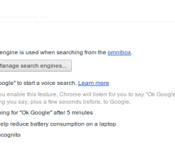
Google’s voice search could soon be baked into Chrome, no extension required

Back in November, the folks in Mountain View trotted out the beta version of a Chrome extension that brought “OK Google”-enabled voice search to the desktop, no clicks required. That’s all fine and dandy, but what if it said control was a standard option on the desktop, capable of being toggled on or off with a click? Well, the Chromium folks are working on just that, with options for the browser to stop listening after five minutes and working incognito. Items like this that pop up in Chromium have a tendency to turn into standard Chrome features at some point. There’s no telling when we’ll be able to use spoken word as a standard search tool, but there’s always the beta add-on for sorting hands-free queries in the meantime.
Filed under: Internet, Software, Google
Source: Francois Beaufort (Google+)

Huawei pays off Apple and Microsoft-led consortium in Android patent spat

While Google does all it can to avoid the Android patent headache brought on by the “Rockstar” patent group, another of the consortium’s targets has decided it wants out. FOSSPatents reports that Huawei, one of seven Android OEMs sued alongside the search giant, filed a joint motion with Rockstar and its subsidiary to dismiss claims that it infringed on numerous networking and UI patents. The move suggests that the Chinese company chose the less costly option of settling instead of embarking on an expensive legal battle. Bear in mind that the Rockstar consortium counts Apple, Microsoft, BlackBerry, Sony and Ericsson as members, which closed the purchase of thousands of patents previously owned by Nortel for $4.5 billion. With a deal seemingly worked out, Huawei is free to use Rockstar’s patents without fear of future reprisals, leaving Samsung, LG, ASUS, HTC, Pantech, ZTE and Google firmly in Rockstar’s crosshairs. Huawei’s settlement prove decisive, however, as it demonstrates the group’s patent claims have merit, which could motivate the remaining phone makers to broker their own deals.
Filed under: Cellphones, Software, Mobile, Microsoft, Google
Source: FOSSPatents

Tizen release hits another snag according to Samsung Official
 Tizen has been receiving a reasonable amount of attention lately thanks to several leaks that have given us a very nice look at how its developing. While it is technically being developed as an open-source project under the Linux Foundation, it’s commonly seen as Samsung‘s baby to bring to the smartphone market, one which has had several false starts in recent memory. The latest false start was reportedly confirmed by an anonymous official from Samsung’s Media Solution Center who let loose that Samsung had planned to release Tizen handsets in Korea and Russia in the first half of this year, but that has unfortunately been put on hold.
This is the latest delay that also saw Japan’s NTT DoCoMo can the Tizen launch that was scheduled in March due to lack of demand. Seeing how saturated the smartphone market is getting, particularly the Android market, it’s doubtful that there will be a ‘right’ time to launch Tizen. All the same, Tizen is reportedly going to be shown at MWC 2014 next month so it will be good to see what kind of progress has been made since we saw it last.
Do you think Tizen is going to come out this year? What are your thoughts on how it’s going to perform in today’s smartphone industry? Let us know in the comments.
Source: Tizen Indonesia via Mashable

Google Chrome can listen in on your conversations (but it probably isn’t)

Google Chrome users are no strangers to speech recognition software — heck, the internet browser has “Ok Google!” voice recognition built right into its URL navigation bar. But that recognition is triggered to “listen” only when you’ve opened a new tab or navigate to Google’s homepage, and the expectation is that the browser isn’t able to listen in otherwise. Not so, says speech recognition program developer Tal Ater, who discovered an exploit in Chrome’s speech recognition that enabled unscrupulous websites with speech recognition software to listen in when users aren’t expecting.
First, you have to give permission to a website to allow speech recognition to work. After that, however, the website may open a pop-under window with the intent of secretly continuing to listen — even if you’ve closed the tab and moved on. Google Chrome must remain running, and you have to miss seeing the pop-under, but it’s certainly an issue.
Moreover, Google knows of the problem and has yet to fix it…despite a fix existing. Ater describes reporting the issue to Google, finding out it was fixed by the company soon after, and that fix not being implemented in subsequent updates. Google confirmed that to Engadget with the following statement:
“The security of our users is a top priority, and this feature was designed with security and privacy in mind. We’ve re-investigated and this is not eligible for a reward, since a user must first enable speech recognition for each site that requests it. The feature is in compliance with the current W3C specification, and we continue to work on improvements.”
Given Google’s compliance with speech recognition standards, it sounds like Mountain View isn’t changing the way Chrome’s speech software works just yet, though we’d be surprised if some form of visual indication of recording wasn’t included in a future build. A video of Ater demonstrating the exploit is just below.
Filed under: Internet, Software, Google
Source: Tal Ater

Future Windows 8.1 update may let you pin its Store apps to the desktop’s taskbar

Microsoft started blurring the lines between the modern Windows interface and the classic desktop with Windows 8.1, and there are now signs that it’s ready to mix things up a little more. WZor has posted screenshots of a leaked Windows 8.1 update that would let users pin Windows Store apps to the desktop’s taskbar, saving them the trouble of visiting the Start screen. There aren’t any hints that these apps would run on the desktop. However, it may be easier to return to the traditional Windows environment. SuperSite for Windows‘ Paul Thurrott hears from sources that the upgrade may also add a desktop-like close button — you wouldn’t have to remember gestures or keyboard shortcuts to quit a Store app. There aren’t any clues as to when this OS update would arrive, although we wouldn’t be surprised if there’s some news by the time Microsoft’s Build developer conference kicks off in early April.
Filed under: Software, Microsoft
Source: WZor (translated)
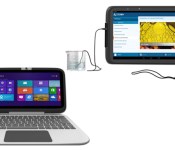
Intel’s latest education-focused tablet and Classmate PC reference designs add… more rubber?

We’re all about the sentiment in Intel’s education-focused tablet and PC reference designs, aimed at providing a template for other tablet and PC makers in the education space. That’s all fine and good. Our side that cares about electronics evolving over time is less enthused, as this year’s Intel reference designs for educational tablets and PCs are basically last year’s models.
The same Intel education software suite is incorporated, the same Android and Windows bases (respectively), and roughly the same specs sit inside each (head below for the full list for both). In fact, the biggest difference we’re seeing here is a more “ruggedized” exterior (read: more rubber edges). If it’s not broken, don’t fix it, right? That’s apparently the tactic Intel’s employing here: if it works for education, then why change it, right? Agreed, though we can’t help but wonder what else Intel could do to push the field here beyond making kid-proof devices with education software installed. Perhaps we’ll find out in 2015. An HP version of the Classmate reference goes on sale later this month, no word on tablet makers.
Intel Android tablet reference design specs:
- Android 4.2
- Dual-core Intel Atom 1.2GHz Z2520 processor (integrated graphics)
- Front/rear-facing cameras
- Avg. 12-hour battery life
Intel Classmate PC reference design specs:
- Windows 8.1/Windows 7/Linux
- Intel Celeron N2805 processor
- Touch-screen (optional)
- Rotatable camera (optional)
Filed under: Laptops, Tablets, Software, Intel
Source: Intel

