


Hands-on with Sixense’s MakeVR, a motion controlled 3D modeling suite bound for Kickstarter (video)

The last time we saw Sixense’s Stem motion controller, it was little more than a collection of prototypes. The company showed us a gaggle of plexiglass boxes containing reference hardware and a 3D printed shell representing the final product’s design. A more functional third unit (a developer kit, actually) allowed us to play with the controller’s electromagnetic tracking technology, but the overall experience was fragmented and incomplete. Now the company has finally pulled these disparate elements together, revealing the final Sixense Stem System at CES earlier this month.
We caught up with the company earlier this month to take a look at the revised controller, and found a solid, lightweight controller modeled very closely after the 3D printed mockup we saw last year. In fact, the only major difference we found was the revised button layout: we were originally told the device would utilize a modular faceplate system, but the final version wears a symmetrical button configuration reminiscent of the Razer Hydra. Sixense hadn’t met up with us merely to show us the completed Stem System, however — it was rearing to show us MakeVR, the firm’s homegrown virtual reality 3D modeling software.
The MakeVR project has actually been around about as long as the Stem, but its development hasn’t been nearly as public. Sixense sells the program as an evolution in 3D modeling interfaces, a chance to step back from the complicated, menu-laden CAD programs modelers use today and replace them with a more natural interface. By casting the modeling program in a virtual environment with 1:1 motion controls (provided by Sixense’s own Stem, naturally), MakeVR hopes to make digital modeling as easy as playing with Legos, shallowing the learning curve to make it palatable to a consumer market.
Picking up the Stem System for the first time, we saw first hand how easy it was to manipulate shapes and objects. By mirroring the position of the user’s hands, MakeVR creates a workspace that’s more like working on a shop bench than in a CAD program. Objects can be lifted, twisted and observed as if they were held in your palm, lending a tactile element to a digital experience. The program even attempts to integrate its option menus in a natural way, placing settings, import, export and data saving options on a virtual tablet. On a computer monitor, this seems a little strange, but it’s the kind of interface that shines in virtual reality. In fact, it meshes quite well with Oculus’ best practices documentation.

This much we already knew — Sixense has been quietly shopping around the modeling interface for awhile now — but the company did have a few new things to show us. The latest build of the program features a collaborative mode, a multiplayer workspace that allows up to five modelers or observers to interact in the same virtual environment. Users can pass objects between each other, work on the same model simultaneously, or simply observe, point, gesture or talk to each other as if they were in the same room. This collaborative modeling experience is designed to foster a more personal work environment, allowing partners to work together in a virtual space over the internet or through locally connected machines. Sixense’s demo setup also showed off one of the Stem System’s more convenient features: base sharing. Two PCs, each using their a pair of Stem controllers were able to use the same Stem System base unit as the reference point for tracking motion, meaning that offices using MakeVR and Stem controllers would need to invest in fewer bases than workstations.
Although MakeVR has the precision tools and ability to build high resolution models, Sixense told us that it’s geared more for consumers and hobbyist makers than the professional arena — but why would the average consumer want to fiddle around in 3D modeling software? Well, it turns out the company has an answer for that too: 3D printing. Sixense has partnered with Shapeways to allow the users to export their work to the 3D printing service from within MakeVR, providing consumers with an easy to use, streamlined suite for visualizing, creating and ordering objects of their own design. Sending objects off to the printer is easy too; MakeVR provides a trio of cubes recommending 12cm, 6cm and 3cm. Fit your object in the desired box, and you’re ready to print. As we watched our hosts create a toy fire hydrant and a coffee mug in mere minutes and send them to the printer, it was easy to visualize the utility of the integration. Can’t find the perfect gift for your Grandmother’s birthday? Just make it.

MakeVR might not be the perfect program for everybody, but the shallow learning curve and stellar 1:1 motion control integration certainly makes it appealing to anyone picking up Sixense’s Stem system. The early build we saw wasn’t quite ready for primetime, but the potential for a creative virtual reality playground is certainly there. Unfortunately, Sixense hasn’t announced the software’s price or release date, and only told Engadget to stay tuned — a Kickstarter campaign for the program is launching on February 5th.
Filed under: Gaming, Peripherals, Software
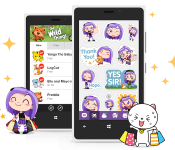
Viber improves notifications and statuses in latest Windows Phone 8 update

Popular VoIP service Viber today released a new version of its Windows Phone 8 app. This update focuses on delivering smarter notifications and giving users more customization options for their statuses. For example, the application can now play a sound when a notification comes in, and it also gives you the ability to choose whether or not you want to hide these. In addition to that, Viber has added a “Seen” feature which shows when a contact has viewed a user’s status, while “Last online” keeps you better informed on who’s online and able to chat it up. And if you’re into Viber’s custom labels, like the ones seen above, then you’ll be happy to know the Sticker Market is now available on Microsoft’s mobile platform. We’re pretty into that “YES SIR!” one ourselves.
As for Viber CEO Talmon Marco, he’s pretty thrilled and had this to say about the refreshed Windows Phone 8 application:
Bringing the Viber Sticker Market to Windows Phone 8 is a very exciting step for us and we are sure that our users on the platform will love it. This is the first time we are bringing a monetization feature to Windows Phone 8 and it’s another part of our commitment to the platform. More importantly, this release is part of our commitment to our users who want to communicate with their contacts no matter what OS they use.
Filed under: Internet, Software, Mobile
Source: Windows Phone

[Review] Jelly Bean Extreme Icon Theme by BigDX

JellyBean to the Extreme BigDX Style
I’ve been out of the scene for a little while, stopped in to see what was going on, and I was offered the chance to do a write up on a new icon set, when I heard it was by BigDX I had to jump at the chance. After downloading and installing I’m in Icon Heaven. I always love to do icon reviews because it’s great to have the opportunity to see how each developer interprets the design of the icons and how their personal touches give the icon sets a personality all their own.
This icon set is huge, at my best guess, I’d put it close to or exceeding 800 icons, that’s just incredible. What else is incredible is the time and detail that each of the 800+ icons received. I find myself just browsing through the app pages to see what icons are in the set, and while I haven’t made it all the way through, it’s still fun to look. Ok, down to business.
BigDX has put out this icon pack app but it pairs up well with his JB Extreme Theme app perfectly. So, (hint hint) pick that one up too.
The icon pack, as I said, is very well endowed. As I’ve moved through the app and saw everything I could find, I took pics along the way so I would be able to find my way out again, without getting lost anyway. This is what I found:
Multi Launcher support, ADW/EX, Apex, Nova, Action Launcher, Next, Atom, Go Launcher EX, Smart Launcher, Solo Launcher, and TSF Shell. Each launcher has similar application attributes, Apply app icons and dock elements, but others have the ability to install app drawer elements, folder widgets, contact widgets, and launcher images to name a few. The theme installs with a simple click and apply method, my 4 year old can do it, which makes installing these easy for anyone and I do mean everyone.


 Did I forget to mention, it comes with a killer wallpaper set as well as full contact info within the app? I may have, but it does, and does not disappoint.

 While in the app settings, checking out the icons, you can easily swipe from side to side to check out the different app icons that are themed, and while it may take a while, they are all there in their glory. I personally like the fact you can edit icons (depending on your launcher) and hand pick what icons you want with different apps. I picked one out of the misc section for my app drawer icon, there are some sweet unassigned ones in there ready to be put wherever you feel the need to interject some of your own personality. Many people like the icons because of what it does for their phone, the look, the feel, the fluidity of the whole theme. Me, I like it because, as with many aspects of the wonderful world of Android, I can make it to be how I see fit, what suits me the best, with this app, it is not hard to find what speaks to you…well, with all the options it may take some time, but you’ll get there.
Show BigDX some love, his work is long standing in the Android Community and it’s developers like him that help make out Android Landscape that much better. I have several of his themes and love them all, they get better with each release and even when I think that’s the top of the pyramid in quality, look, and feel…I am mistaken and the bar raises yet again with the next release. What is on the horizon for the next BigDX release? I am not sure, but I am looking forward to it.
BigDX Contact Info:
Big DX G+ Page, BigDX Twitter Page, BigDX Blog, BigDX Play Store Page
Application: Jelly Bean Extreme Launcher Theme
Developer: BigDX
Cost: $1.99
Application: Jelly Bean Extreme CM11/AOKP Theme
Developer: BigDX
Cost: $1.99

Chrome apps will soon arrive on Android and iOS devices

Last month, we discovered Google was working on a tool that would port Chrome apps to both Android and iOS. Today, the folks in Mountain View released a developer preview that does just that. Like the early rumblings suggested, it’s based on open-source Apache Cordova, which leverages the software’s native HTML, CSS and JavaScript. This means that the software will get wrapped in the stylings of a native app and can be submitted to each app store for distribution. There’s also a slew of Chrome APIs available that you’d expect to see in mobile apps, including the ability to build in payments, notifications and alarms on top of those offered by the Cordova platform. Now that the tools are in the hands of devs, we’ll have to bide our time until the finished Chrome apps begin to surface.
Filed under: Software, Mobile, Google
Via: The Verge
Source: Chromium Blog
Build anything you want with Legos, in Chrome

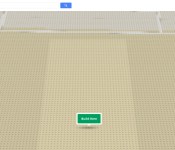
Let’s be honest: You’re never too old to play with Legos. Thanks to the latest Chrome experiment (and a little help from WebGL) you can build whatever your heart desires directly from your browser. Using Maps, you’re able to choose a location-specific plot before starting to build, brick by brick. As you might expect, creations can be viewed across Google+ circles with categories for sorting, and tutorials will help hone those plastic contractor skills. If you really wanna get hands-on, use your phone or tablet’s touchscreen for a more tactile feel. Itching to get started? You can begin construction right here.
Filed under: Internet, Software, Google
Source: Google

Wikipedia to store famous voices for posterity, starting with Stephen Fry’s

Virtually everyone in the UK (and many an Engadget reader) is familiar with Stephen Fry’s iconic voice, but will anyone remember it in, say, 50 years? He certainly hopes so, but just to be sure, Wikipedia has recorded it for posterity and pegged it to his bio page. The plan is to have a large number of well-known types do the same so that readers will know “what (those folks) sound like and how they pronounce their names.” Though there are only a handful of contributors so far (including US astronaut Charlie Duke and British peer Baron Knight of Weymouth), the effort will be soon be bulked up by some “500 to 1,000″ celebrity clips thanks to the BBC. As tat for its tit, the Beeb hopes to one day use the Wikipedia archive to power a real-time, open-source voice-recognition engine — and perhaps add some VIP pizzazz to its own collection of voices.
Filed under: Internet, Software
Via: Pocket Lint
Source: Wikipedia

An early look at iOS in the Car (video)

Apple’s iOS in the Car, which we first met last summer at WWDC, may soon make an official debut. In fact, the dash-friendly interface has been hiding right under our noses in the public version of iOS 7.0.3. Developer Steven Troughton-Smith managed to capture an early version of the interface in action by emulating a vehicle display on his desktop — he posted a video walkthrough of the pre-release software today. The current iteration appears to include a full-screen map, with simple touch controls and indicators framing the top and bottom. There’s even a software home button, which can be used to switch between apps and return to the (currently nonexistent) home screen.
Based on today’s demo, you’ll be able to enter a destination directly into the vehicle by speaking a search term, or by searching on a connected iPhone or iPad. Current functionality appears to be limited to basic location entry and map readouts, but it’s definitely a work in progress — another dev, Denis Stas, managed to get his hands on a screenshot from the iOS 7.1 beta, which offers a more iOS 7-like look and feel. We have yet to hear from vehicle manufacturers about confirmed partnerships with Apple, so there’s no word on when iOS 7 in the Car will actually hit the road, though judging by the tremendous interest in iOS integration in general, several agreements are already in the works.
Filed under: Transportation, Software, Apple
Via: MacRumors
Source: Steven Troughton-Smith, Denis Stas

BlackBerry’s latest software update turns smartphones into radios

If you own a BlackBerry Z30, Q10 or Q5, then your smartphone can suddenly do a neat little trick. The company’s latest software update enables those devices to become an FM radio, letting you stage an impromptu dance party without a data connection. Version 10.2.1 also brings a series of minor, but welcome, tweaks to the platform, including a new screen for answering calls, SMS groups, offline reading mode and picture passwords. The update is making its way to all BlackBerry 10 handsets from today, including the Porsche P’9982, for all you fancy-dans out there.
Filed under: Cellphones, Software, Mobile, Blackberry
Source: BlackBerry
Android 4.2.2 gains approval for AT&T HTC One X, slated for 1/29

Looks like everyone still sporting a stock HTC One X on AT&T’s network will finally see their update to Android 4.2.2. The update has passed through AT&T’s technical team and has been certified for delivery to their customers. The Update obviously brings a much needed update to the device in terms of Android OS version. It also brings along the Sense 5 UI overlay as well. You guys can expect to find Blinkfeed and a few other additional software enhancements. All of which can be perused at the AT&T update support page.
HTC AT&T One X customers – We have received Technical Approval for the MR with Sense 5 + OS 4.2.2. The OTA is targeted for 1/29. Thanks!
— Mo (@moversi) January 28, 2014
Don’t forget though, this WILL BE the last update that will be pushed out to the device. There could be a smaller one later on if any major bugs are discovered upon delivery, but don’t expect any more OTA updates to move you up a notch in the Android OS versions.
Via HTC Source

Starwood swapping room keys for mobile phones at two hotels

Starwood plans to roll out refreshed SPG apps that can unlock your guest room later this quarter. The new tech, which the company refers to as “keyless key” in its intro video (embedded after the break), will soon let you bypass the front desk and enter your room using an Android 4.3 or iPhone 4s (or newer) device at the Aloft Harlem and the Aloft Silicon Valley. Existing locks must be upgraded in order to communicate with the Android and iOS apps via Bluetooth, according to a WSJ report, but Starwood’s CEO says that the “investment would not be substantial.”
Starwood currently offers a Smart Check-In solution at several Aloft hotels, but the existing system requires guests to obtain (and carry) a compatible membership card. It’s also quite limited, with only nine hotels currently participating. Meanwhile, if this initial smartphone rollout is a success, your phone could be the key to all W and Aloft hotels worldwide by the end of next year.
Filed under: Wireless, Software
Source: Wall Street Journal, Starwood Hotels
 AIVAnet