StreamNation copies all your cloud media into a central hub

Joining multiple cloud services is great for maxing out your storage, but keeping on top of all them can be a chore. StreamNation‘s latest update may help you untangle all that by allowing you to copy your media from Dropbox, Flickr, Instagram, Google Drive and others into its own app. Content can be directly uploaded from those programs straight through their APIs without tying up your connection. Once copied over, you can stream or share those files with anyone who’s also signed up to the service or even lend them out. To fit all of those files in, StreamNation will give you 5GB of storage for free, or more if you’re willing to invite your contacts to join and jump through other hoops. Otherwise, you plans start at $4 a month for 100GB, and go up to $19 month for unlimited storage.
We tried the iOS and web versions of StreamNation ourselves, and found it a breeze to add local files or media from services like Google+ or Dropbox. However, since it creates a second copy of your cloud files, you may need as much space on StreamNation as all your other services combined. That likely fits well with the company’s plans to sign you up to a paid service, but may be a non-starter if you’re looking for free storage. Still, if the convenience of being able to share any file from a central location outweighs those drawbacks, you can now sign up at the source.
Filed under: Internet, Software
Source: StreamNation

Flickr co-founder’s Slack collaboration tool leaves beta, goes freemium for all

Back in August, Flickr creator Stewart Butterfield’s Tiny Speck started the digital signup sheet for Slack, its collaborative productivity software. Today, the project exits beta and goes freemium for businesses anxious to opt in. In case you’re in need of a refresher, the goal of Slack is to free the daily workflow from what Butterfield calls “email bankruptcy.” With this software, internal messages are all in one spot with access to files stored elsewhere and items like bug trackers baked in. In addition to the free Lite tier, there are also Standard and Plus options with increased functionality for $8 and $15 for each user per month, respectively. A more robust and customizable Enterprise subscription will range from $49 on up to $99 a month, but it isn’t set to arrive until 2015.
Let’s go back to that no-cost option for a minute, shall we? Here, users get access to a searchable archive of 10,000 messages, 5GB of storage, five of those external integrations and native apps for iOS, Android and Mac. New features have already been teased for later this year, with items like email integration, guest accounts and detailed analytics mentioned for the paid tiers.
Filed under: Software
Source: Slack

VSCO Cam app for iOS adds more ‘community’ features in a bid to take on Instagram

The VSCO Cam app has developed a pretty dedicated following of serious mobile photographers. Over the summer Visual Supply Co. even unveiled a minimalist publishing platform called VSCO Grid. But ties between the two were… let’s say, weak. An update for the iOS version finally rectifies the situation, by fully integrating VSCO Grid. Most notably it adds the ability to follow people and browse a feed of your friends’ most recent photos, taking the first tentative steps into social network territory. You can obviously search out friends on your own, but VSCO also serves up a collection of curated artists it thinks are worth tracking.
The update to 3.0 isn’t all about the “community” though; the camera and editor themselves have received a few nice tweaks. There’s a new Tilt & Level tool that makes sure your pics are perfectly aligned, both vertically and horizontally. The crop tool has been updated for a “smoother, more accurate experience,” and the details view for photos has added pinch-to-zoom support, for really digging into the nitty-gritty of your compositions. You can also now set the app to automatically save images to the iPhone’s Camera Roll and turn off location tagging if you’re paranoid about your privacy. For now the update is iOS only, but Visual Supply Co. promises the new features are coming to Android in the near future.
Source: Visual Supply Co., VSCO Cam (iTunes)

Brush up on American history with this elegant Ken Burns iPad app

When it comes to apps, Apple’s iOS platform offers access to an incredible amount of them. That being said, there are always some which stand out from the rest, one of these being Ken Burns’ new, beautifully designed iPad application. But there’s more behind its stunning visuals: The Ken Burns app is also, most importantly, loaded with a ton of content related to American history. Once installed, you can view scenes from different Burns’ films (like Baseball or The War), as well as select a theme that you’re most interested in — Art, Innovation, Politics, War, to mention a few. It’s available now as a free download, but be prepared to shell out $10 in order to unlock the app’s full potential on your iPad.
Filed under: Tablets, Software, Apple
Via: The Verge
Source: App Store

WatchESPN finally comes to Windows 8

Windows 8 has plenty of apps to choose from, but there’s one in particular that avid sports fans had long been waiting for: WatchESPN. The great news is The Worldwide Leader in Sports has finally brought the application to Microsoft’s operating system. Now users will be able to stream a ton of on-demand and live content from ESPN’s network lineup, right on their Windows 8 PC. Access to real-time video feeds does require a cable subscription, however, so be sure to check the description here to see if your provider supports WatchESPN.
Filed under: Home Entertainment, Internet, Software, HD, Microsoft
Source: Windows Store

Rdio for iOS delivers playlist editing and on-the-go review composition

For those using Rdio on iOS devices, today’s update adds two new functions to the software for Apple’s mobile gadgets. First, users can edit playlists from the app on an iPhone or iPod touch without having to log in on the desktop in order to do so. The curation feature allows for the usual addition, removal and rearranging of tracks while also including custom artwork, visibility and collaboration settings. Fancy typing out those music critiques while they’re fresh in your mind? Well, the latest version allows for composing on that mobile device with the ability to peruse reviews from the pros and fellow Rdio listeners. It’s time to stop procrastinating and start compiling that Yacht Rock playlist, you guys.
Filed under: Software
Source: Rdio

Abandoning Olympus: Mega Man’s creator on going indie

Keiji Inafune’s been making games for nearly 30 years. He’s the man behind one of gaming’s most iconic characters (Mega Man) and several huge franchises (Dead Rising, Onimusha). After 23 years working at Capcom, one of Japan’s largest game publishers, he suddenly quit back in 2010. “Settling down means death for a creator. As long as you are a creator, you cannot settle down,” he announced on his blog. Just six months after being appointed Capcom’s Global Head of Production (overseeing the company’s entire gaming catalog, from Resident Evil to Street Fighter), he quit.
With that, he set off on his own and created two new companies: Comcept and Intercept. When we talked with Inafune last week at DICE 2014, he spoke of his plans for Comcept in detail. “I was a publisher for 20 years, so you’d be right in thinking I brought some ideas from there into Comcept,” he said. That means, first and foremost, retaining ownership of IP. That’s a major component of going with Kickstarter for the latest Comcept game, a Mega Man-esque action game titled Mighty No. 9.
The project sailed past its target goal of $900K and took in $3.8 million. Without a publisher, of course.
For the game industry, such freedom for mid-level studios is unprecedented in recent years. Comcept’s last major project, Soul Sacrifice on the PlayStation Vita, is an original work by Comcept that is wholly owned by Sony Computer Entertainment. That isn’t meant to demonize Sony — it’s standard business for game publishing, and more than likely that Sony shared non-financial resources in the process — but to contextualize the importance of self-publishing. Inafune puts it best himself:
“At Capcom, makers didn’t have rights for the game. But now independent, we’re able to make what we want…which makes us into a publisher. It’s more to be a games maker, you become a publisher. You need to think as both a developer and a publisher.”
He even said it’s harder now for studios than it was just 10 years ago. “More than publishers giving out money, they’re looking for hits (like Call of Duty), for investing into definitive things.”
Of course, even with his years of experience and current projects, he can’t speak for the entirety of Japanese game development. He’s been asked to do as much many times in the past. Part of that is assuredly due to his outspoken nature — a rarity among Japanese game devs — and another part is due to his own speeches/rallying cries for innovation in Japanese game development. Inafune sees another factor as well: “I think it’s the press that made me into this ‘representative.’” Touché.

As Comcept grows in the coming years, Inafune’s got high but reasonable hopes: “a company that creates games where we hold onto the rights…not a games maker that’s ordered to make a type of game.” His studio and games may be labeled “indie” for now, but Inafune’s goal remains the constant it’s been his entire career: to have the freedom to make great games.

Windows Phone 8.1 leak reveals new messaging and storage settings, and more

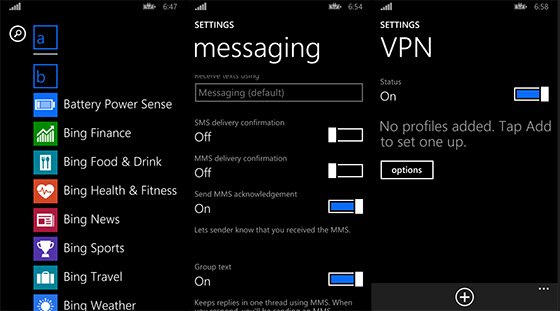
Up until now, the most we’d heard about the next rumored update to Microsoft’s Windows Phone OS centered on two features: Cortana, the company’s Siri-like digital assistant, and Action Center, its native notification center. Today, however, we have a clearer idea of where Windows Phone 8.1 could be headed thanks to a Reddit user who’s allegedly gained access to the new SDK as part of Microsoft’s developer preview program.
Despite both Cortana and Actions Center reportedly being marquee features of the new WP OS, neither are present on the leaked list of new WP 8.1 tweaks. That’s likely due to secrecy surrounding the features and Microsoft’s desire to unveil both publicly at BUILD this coming April 2nd, a date the dev mentions quite often in the thread. What this leak does give us confirmation of is how Microsoft is working to unify development between Windows RT 8.1 and Windows Phone 8.1 on the back end; something it’s calling Universal Apps. Developers using the new SDK will be able to create applications for both app storefronts using a shared JavaScript/HTML code and provided templates.
Windows Phone 8.1, which according to the provided SDK documentation has been relabeled WinPRT, also ushers in a critical change to SD card functionality that should please longtime critics of the platform. Namely, users can now install apps to SD card and not just sideload from it, thus freeing up internal storage. Bing apps are now apparently pre-baked into the OS, as are a trio of “sense” apps to monitor battery power, data and storage. SkyDrive, as previously reported, has been rebranded to OneDrive and there’s even a new Music app on deck (said to resemble Xbox Music) to replace the former Music+Video.
One of the more surprising changes Microsoft’s made to the Windows Phone platform focuses on how it handles SMS receipt and delivery. With WP 8.1, text messaging will no longer be restricted to the native SMS app. The messaging settings submenu includes the ability to specify which third-party app routes that communication by default.
Users expecting new live tile sizes will be disappointed since this update doesn’t include any options beyond the three already available in the OS. Although, there are apparently plenty of minute cosmetic overhauls packed into the 8.1 update. Among these are new default transitions for moving between apps and homescreens, a navigation bar with color settings to match backgrounds or accents, gestures to hide and reveal the onscreen navigation buttons, as well as the addition of Windows RT’s progress ring. Back button functionality now also falls in line with WinRT in that it simply sends applications into a ‘suspend’ state, as opposed to terminating them. To actually close apps out, users will have to enter into multitasking view and swipe down to end the process.
This long list certainly represents a heady mix of some overdue and even unexpected OS tweaks; tweaks that could help Microsoft catapult its struggling mobile OS to prominent market share. But it’s likely just a preview of what Microsoft has planned for WP 8.1, so don’t expect this to be the last we hear of the platform’s next iteration. We’ve still got a couple of months to go before Microsoft BUILD can reveal most, if not all of Windows Phone’s new direction, leaving ample time for like-minded devs to pull back the curtains even further.
Filed under: Cellphones, Software, Mobile, Microsoft
Via: The Verge
Source: Reddit
Xbox One’s second big update focused on multiplayer ahead of Titanfall’s March arrival

For better or worse, Microsoft is clearly aware that the Xbox One‘s party system and online multiplayer functionality is lacking. An update aimed at bringing parity between Xbox One’s party system and the Xbox 360 arrives this March — the second half of this Spring’s big XB1 update, the first of which will launch this week — and it features some fairly run-of-the-mill alterations.
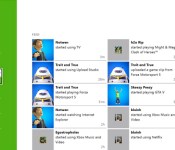
The headline feature, for instance? “Get to your friends list faster,” which simply bumps the friends list to the main homepage within the Friends app (the current version is seen above). The rest of the list is along the same lines: party chat will automatically engage when in a party, you’ll be able to chat with people in games you’re not playing, invites to party up can be sent from in-game menus, and a recent players filter is being added to the Friends app as well. Longtime multiplayer gamers will no doubt recognize all this functionality as already available on Xbox 360; we’re thankful it’s coming back, but shouldn’t this have been in the Xbox One at launch?
As previously promised, the multiplayer-focused update is set to arrive just ahead of Titanfall’s March 11th launch. Should today’s news not be too thrilling for you, it sounds like multiplayer isn’t the only aspect of next month’s update: Microsoft says it’ll “continue to share more details in the days and weeks ahead.”
Filed under: Gaming, Software, HD, Microsoft
Source: Microsoft

New Samsung Galaxy S5 TouchWiz icons get teased in invitation to Unpacked 5 Event
 Yesterday, we got a taste of what the status bar on Samsung’s TouchWiz UI will look like when Android KitKat finally comes rolling by and it’s all looking very stock Android, which is a nice surprise. We’re expecting to see that build of Android KitKat on the Samsung Galaxy S5 when it launches at Samsung’s Unpacked event at MWC 2014 in just under two weeks now, but to this day we’ve still had very little indication of what the new TouchWiz is going to look like. Well, thanks to a teaser that Samsung circulated today, we might have a better idea of what the Samsung Galaxy S5 TouchWiz icons are going to look like.
As seen in the invite above, Samsung is inviting everyone to tune into their Unpacked 5 event and the invite features presumably the 9 different focuses that they’ve employed for designing the Galaxy S5, which include: Speed, Outdoor, Curiosity, Fun, Social, Style, Privacy, Fitness and Life. I’m most intrigued by fitness as Samsung hasn’t really alluded to any fitness-centric products in their repertoire, unless the Galaxy Gear 2 is going to be a glorified fitness tracker, but I guess we’ll see what they mean about this and all the other focuses at the Unpacked event. The general appearance of the icons are also quite different from what we’re used to with Samsung, and hopefully they incorporate a lot of this in their actual UI.
What do you think about the icons? Where do you think Samsung is going with TouchWiz? Let us know what you think in the comments.
Source: Android Authority via Phones Review
 AIVAnet