



Google helps devs create cross-platform Android and iOS multiplayer games

The annual Game Developers Conference descends on San Francisco this week, and Google’s wasting no time in sharing its news. For gamers, Mountain View’s said it’ll be launching a “game gifts” service for sending in-game swag to other players, and increasing the number of game categories in the Play store to 18 in the hope you’ll stumble upon titles you might like easier. More important, however, is what devs can do with the new features of Google Play game services, a backend tool for managing leaderboards, achievements and more in Android, iOS or web games. Multiplayer support has been added for iOS games, and via an update to the Unity plug-in, cross-platform multiplayer between Android and iOS devices is now possible. These features have to be implemented by developers, of course, but next time you see that friend who’s always arguing the merits of one mobile OS over another, you might just be able to settle the discussion in-game instead.
Filed under: Cellphones, Gaming, Tablets, Software, Mobile, Google
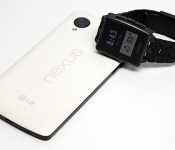
Switched On: Birth of a platform
Each week Ross Rubin contributes Switched On, a column about consumer technology.

Regardless of what one may think about the potential for smartwatches, one of the most exciting things about a new device category is that there is so much experimentation with form factors and capabilities. We’ve already seen products with different display technologies (Memory LCD, LCD and OLED) and varying screen sizes. Some have various combinations of microphones, speakers, cameras, touchscreens, WiFi or cellular radios. Their prices have ranged from less than $100 to $400 and beyond and their battery life has varied from a day to a year. And then, of course, there are many of the factors that differentiate traditional watches — size, design and materials.

The launch of the Pebble app store brings to mind the launch of the iTunes App Store for the iPhone. In both cases, a convergent device was being opened up to the imagination and creativity of a world of developers. Taking advantage of its early marketplace entrance (and perhaps some lessons learned from the Allerta inPulse), the Pebble is an extremely constrained platform. With no touchscreen, no keyboard (not even a screen-based one), few accessible controls and a tiny monochrome display, one must have realistic expectations about the sophistication of the apps, of which the watch can have only eight resident at a time. Even accessing some of the apps can be a hassle requiring multiple button presses.
On the other hand, the Pebble has access to certain advantages that the iPhone didn’t have when its app store launched. For one thing, it has the iPhone itself (and now Android phones), as an always-connected bridge to do the heavy lifting of connectivity. It also has access to a far greater wealth of internet-based services to draw on, many of which were dragged online and made more accessible because of smartphones. And finally, it is arriving in the early days of a world where, increasingly, everyday objects are connected.
The Pebble has access to certain advantages that the iPhone didn’t have when its app store launched.
The initial six categories of the Pebble app store are: Daily, Tools and Utilities, Notifications, Games, Remotes and Fitness. Immediately, one can see that this is far from a perfect topology, but a few of the categories stand out. Games always seem to be a staple of new platforms, but the two categories that best reflect the heart of the smartphone are fitness and notifications. The Pebble doesn’t have any special sensors to judge body signs apart from the standard-issue accelerometer, but a whole class of wearables has been focused on providing a reflection of activity — an input focus. Conversely, notifications — a feature of the pre-app Pebble — represent the other main smartwatch focus, the at-a-glance output focus.
Remotes is a bit of a new twist as a category. Indeed, one of the first App Store apps released by Apple for the iPhone was the Remote app for controlling Apple TV. Similarly, using the connected smartphone as a surrogate, the Pebble can reach out and provide wrist access to some of the emerging Bluetooth and WiFi-connected devices such as the Philips Hue lights, Nest thermostat and GoPro camera.

There are a few notable, popular web-based and mobile-based services. These include Yelp and Foursquare, the latter of which has made a habit of being first on a platform with a showcase app. Developers also haven’t been afraid to push the Pebble to tasks for which it may not be well-suited. One of these includes an app that allows you to “mirror” the image coming from your smartphone’s camera — at least as well as it can be mirrored on a 1.26-inch monochrome display.
Smartphone app stores have included many of the staples of the PC … but became better known for a new class of applications that were inherently focused on location and context.
As has been the case with smartphones, the Pebble store can serve to expand market awareness for services that might not cross the radar of someone just looking for a watch that can display a variety of different faces. If you weren’t aware of the Indigo or Vera home-automation platforms, you will be when you peruse the store.
Smartphone app stores have included many of the staples of the PC — web browsers, email, Office productivity — but became better known for a new class of applications that were inherently focused on location and context, tied to social networks and optimized for a new interface. In its early days, we can see evidence of that trend continuing with smartwatch apps. There is overlap with some of what one can do with a smartphone, but the emphasis has shifted to a different class of applications that is addressing the promise of what one can do with a quick bit of attention to one’s wrist.
Ross Rubin is principal analyst at Reticle Research, a technology, media and telecom advisory firm, and founder of Backerjack, which covers crowdfunded product innovation. He blogs at Techspressive.

Mozilla stops work on Firefox for Windows 8

We hope you weren’t eagerly anticipating a finished release of Firefox for Windows 8 — despite releasing a beta of the browser just last month, Mozilla has cancelled the project. There just aren’t enough testers using the new interface to justify shipping a completed version, the developer says. It’s concerned that the missing feedback could lead to a buggy release that requires too much repair work. Pre-release code will still be available, and Mozilla isn’t ruling out a change of heart in the future. For now, though, Windows 8 users will have to switch to a rival like Chrome if they want a touch-friendly alternative to Internet Explorer.
Filed under: Internet, Software
Via: The Next Web
Source: Mozilla Future Releases

Google Maps for Android now tells you about upcoming events

Google wants to make sure that dance card of yours stays full. Rather than just showing you the best way to get to a new hot spot in town, today’s Maps update for Android tells you what events are coming up there as well. Information is displayed below the venue’s address, and may include a list of upcoming bands when you’re looking at a music club, or what games are set to go down at your local ballpark. No matter what you’re into, it should make planning your next night out that much easier.
Filed under: Wireless, Software, Mobile, Google
Via: Google+
Source: Google Play

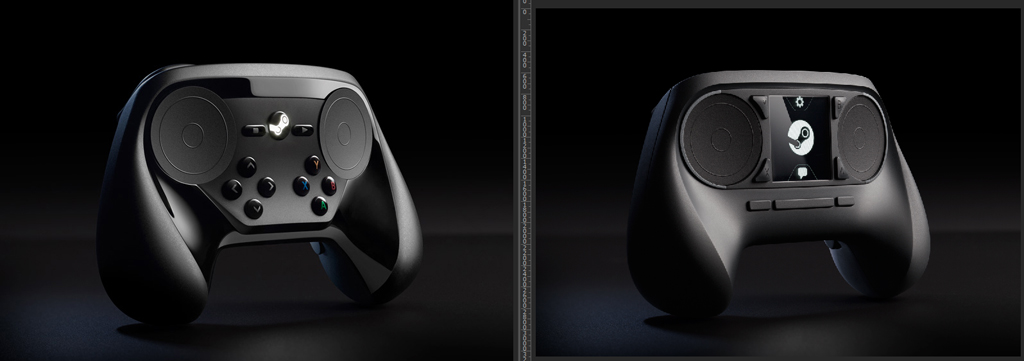
Here’s a much clearer look at Valve’s new Steam Controller

You see that image above? That’s the new Steam Controller, headed to SteamOS. Sound familiar? That’s because this is the second iteration of the Steam Controller first unveiled last year. Astute readers might be thinking, “Haven’t I seen this somewhere before?” That’s also a strong possibility, as we got a first glimpse of it back at Steam Dev Days earlier this year (albeit via shaky cellphone camera). Today, however, Valve’s deigned us worthy to see it in high-res glory. Heck, the folks at Valve even juxtaposed the new one (on the left) against the original version of the controller (seen on the right). Sad about that missing touchpad? We are too, but perhaps those fancy new buttons will help make up for it, eh? Head below for a much larger version.
 (Click to embiggen)
Filed under: Gaming, Handhelds, Peripherals, Software, HD

Xbox One’s Skype app gets first refresh: contact filtering, longer chat logs and more

Skype for Xbox One — or as we like to call it, SuperSkype Extreme — is getting its first update today. Tired of looking through offline contacts to find out if Larry’s online? This update allows for filtration by availability! Tired of Larry lying about things he said last week? This update adds longer chat logs (“up to 1,000 messages, rather than just the past seven days”)! Tired of Larry’s constant use of smiley face emoticons? This update has “hidden” (totally not hidden) Captain America: The Winter Soldier emoticons! Tired of Larry’s Skype always crashing? This update squashes a variety of launch bugs.
Really though, it sounds like you’re just tired of Larry. Maybe it’s time to finally move on.
Filed under: Gaming, Software, HD, Microsoft
Source: Skype
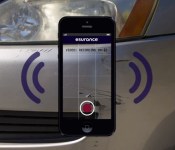
Esurance video appraisal lets a rep use your smartphone’s camera to assess damage remotely

This is one cool tool we hope to never use. Esurance’s new video appraisal feature for the insurer’s Android and iOS apps helps speed up the post-accident process significantly. Typically, you’re required to get a vehicle inspection after an accident before the insurance company can send out an estimate for repairs. With the refreshed app, however, an appraiser can use your smartphone’s camera to assess the damage while also communicating with customers and the repair shop. You’ll still need to set up an appointment (through the Esurance app), but since the agent won’t need to travel, you’ll be on your way much more quickly. Video appraisal requires a smartphone running Android 4.0+ or iOS 7, a front and rear camera with autofocus and a WiFi or LTE connection. Tablet compatibility is in the works. It’s available today in the latest version of the Esurance app.

Google Play Store update adds finer security control for app purchases

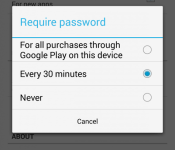
Making it smoother for you to buy up all the in-app items you need (or make it harder for your kids to do the same), Google’s latest update to the Play Store is adding a new “Require password” settings option, as well as a more eye-catching in-app purchase reminder when applicable apps are downloaded. These security changes might well be in response to a recently-filed class action lawsuit against Google Play, and the ability for children to really ring up those in-app purchases within a 30-minute window. In the company’s defense, however, the default setting requires users to input their password for every app and in-app item.
Apple recently added an in-app purchase nag warning inside its iOS 7.1 update, noting that once the password has been entered, users won’t have to reenter it for 15 minutes. Google’s store update also adds the ability to batch-install apps (ready for that upgrade), although it’s curiously dropped the batch-uninstall function. The fight against bloatware might take a little longer next time.
Filed under: Internet, Software, Mobile, Google
Via: Android Community
Google Updating the Play Store to v4.6.16, Download it Now
It is about time! Not that it has been years or anything, but 3 months between Play Store updates is a long time in tech, like years. The Play Store version is moving from 4.5.10 up to 4.6.16 and it packs in a few things of interest.
With the huge issues that Google faced thanks to unruly children on obsessive download and purchasing rampages, they update aims to offer a solution. Now you can set the “Required Password” option to prompt for ALL PURCHASES. This will let you kill off the every 30 minutes setting and force the password to pop up anytime real money is involved. Won’t help much if your kid guesses or knows your password though.

 The Settings and Help selections are finally moved from the overflow triple dot button and now reside in the side slide out tab.
In-app purchases are shown in App permissions before you install the app.
It also appears that there is a slight tweak to add buttons, names are now bold and it looks like the G+ profile in the Play Store has a Ring around the profile image.
you can sit back and kick it for the staged roll out, which can take a week or two sometimes, or you can head over to Gappsearly and pick up the APK now.
Source: Android Police
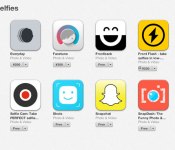
Apple adds a dedicated selfie section to its iOS App Store

A new App Store section. Not the app store section we needed, but the app store section we deserved.
Filed under: Cellphones, Software, Mobile, Apple
Via: 9to5Mac, @Viticci (Twitter)
Source: iTunes

