


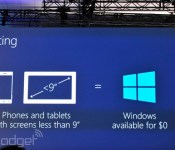
Windows will be free on phones, small tablets and the Internet of Things

It turns out that those rumors of Microsoft cutting Windows prices to spur adoption were true — and then some. The company has announced that Windows will be free for hardware makers to use on phones, tablets with screens under nine inches and Internet of Things devices. Suffice it to say that this is a huge move for a tech giant whose operating system licensing is arguably its bread and butter. Microsoft is obviously willing to take a financial hit to compete against Android, Chrome OS and other freely available platforms.
Filed under: Cellphones, Peripherals, Tablets, Software, Microsoft

Catch our Amazon video event liveblog right here!

Today’s the day when Amazon unveils…something to do with video (or so we’re told). Let’s not beat around the bush here: this is almost certainly Amazon’s long-rumored video streaming device, and may very well also be the game streaming device we’ve been hearing about (we’re guessing it’s one device that does both). Oh, and probably that Bluetooth game controller too, right? There’s gotta be some reason Amazon bought the studio that made the new Killer Instinct!
Regardless, the particulars are missing. What kind of streaming options will there be? How about onboard processing? A set-top box or a dongle (a la Chromecast)? How does this incorporate the coming army of Jeff Bezos-controlled domestic drones? Should we bring our bugout bags to the event?


Filed under: Gaming, Home Entertainment, Household, Wireless, Software, HD, Amazon
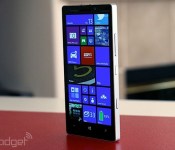
Microsoft’s opening-day Build keynote is happening now, get your liveblog here!

It’s technically called “Build Windows.” But this year, the biggest news coming out of Microsoft’s annual developer conference might not have much to do with Windows at all. Sure, we’re expecting a software update, for which we’ve already seen copious leaks. But what about Windows Phone? Is version 8.1 on the way? Maybe we’ll even hear about Cortana, Microsoft’s answer to Siri. And hey, what of Nokia? Is this acquisition gonna ever close or what? Lastly, can we see some new hardware? Might we catch a glimpse of some new phones ahead of tonight’s Nokia shindig? Your guess is as good as ours, which means you’ll want to follow our liveblog as we give you the blow-by-blow.



Microsoft unveils Cortana, its answer to Siri and Google Now

At Microsoft’s Build 2014 developer’s conference, it has just announced Cortana, a new voice search tool for Windows Phone 8.1 powered by Bing. It fully replaces the search function in Windows Phone, and you’ll be able to access it (her?) through a special Live Tile. On top of finding thing, it can make calls, send texts, take notes, give reminders and set alarms. Microsoft said it’ll work with third part apps as well, and has been working with select developers to integrate it. So far, it’s showed Hulu Plus and Facebook operating in the app, though there’s no official word about that yet.
Microsoft also said that Cortana will get smarter over time, learning based on your search requests or other actions. It’ll even function as a pseudo-secretary, making sure you’re not disturbed during quiet times but still letting people from your inner circle get through. To do that, it’ll ask questions such as whether it should track a flight it found in your email, for instance — a decidedly Google Now-type touch. Once trained, it’ll function using using casual language questions, and respond with a casual “sounds good?” when it confirms. Another trick is Hulu Plus integration that’ll let you tell Cortana to queue up a show, for instance. You can perform similar tricks with Facebook, by asking “what’s up” with somebody, and being led straight to there profile page. It seemed to work well during the demo despite a couple of hiccups, but Microsoft’s Joe Belfiore reminded us that Cortana is still in beta at the moment.
Developing…

Spotify’s quest to get it ‘just right’ through balanced design

In the heart of Stockholm a team of designers and engineers have been hard at work, mostly in secret, overhauling one of biggest names in music. (And no, we’re not talking about Icona Pop or even an ABBA reunion.) On Birger Jarlsgatan, a street that divides the neighborhoods of Ostermalm and Norrmalm in the Swedish capital, sits the home of Spotify. Not all that long ago it was the undisputed king of subscription music services. Today it is just one of many major players in the exploding marketplace with would-be usurpers, from Google to Beats, surrounding it on all sides.
Over the years it’s shoehorned in new features and accelerated its international expansion, the design stagnated. Its iTunes-like desktop client didn’t just look dated, it was cumbersome and many of its features bordered on obsolete. Its mobile apps and web player filled a need, but lacked the polish and stability many mainstream customers demanded. So for the last several months a team led by Michelle Kadir (Director of Product Development) and Andreas Holmstrom (Lead Communications Designer) have been toiling away to bring Spotify into the 2010s. That means a flatter more playful look with soft edges and large images. But the company also bucked the trend towards lighter color palettes by slathering its UI with enough black to make Tomas Skogsberg proud.
Even though it was in desperate need of a fresh coat of paint Spotify had to be careful when it came to reimagining its flagship product. It has amassed tens of millions of users. Even if only a small portion of those pay monthly subscription fees, their patronage results in ad revenue. The guiding philosophy was that of “lagom” — a Swedish word which roughly translates to “just right.” Basically, a redesign had to be a quest to find the perfect balance in the new Spotify experience. A balance between being distinctly new and modern, but not unfamiliar; feature rich, but not overwhelming; beautiful, but not over-designed.
The first and most critical step was gathering user feedback. That, of course, included the standard set of surveys and unsolicited missives from customers. But engineers and designers also watched people using the apps. Even if a user couldn’t articulate what was important to them or what was wrong with current experience, the acute eyes of Spotify’s experts could spot the problem simply by watching a person’s behaviors. Though the company was reticent to highlight its own weaknesses, it would cop to users being confused by the inconsistent UI across platforms. It also found that people preferred the darker interface elements that Spotify favored during its earlier days.
They even ran separate focus groups with users who had never used the service before, which made it easy to spot the more counter-intuitive and confusing elements of the experience. Those users were at the front of the company’s mind when it also chose its new typeface and icons. They’re clean, rounded and simple. In a word: approachable. And that accessibility extends beyond simple looks. The engineers aimed to simplify almost every task to make sure that the app was doing “the heavy lifting” not the user. Primarily that effort focuses on exposing the most commonly used functions, but it also means fully implementing search as you type for quickly surfacing results.

The return to dark roots is immediately apparent when you fire up redesigned web player. The gray panels are replaced with a stark black backdrop. Against that absolute absence of color the other elements of the UI seemingly float in empty space. And that’s the point. While others like Google are trying to flatten their interfaces as much as possible by putting white on light gray, Spotify is trying to separate the content from the rest of the UI. The dark backdrop mimics that of a movie theater — black is the color of entertainment to here the designers tell it. That choice alone sends a message about the purpose of the app. And while you’re probably not going to listen to your music in fullscreen mode it sends a certain message to the user when the rest of the UI simply fades into the background.
Movie theaters and Swedish concepts of moderation aren’t the only influences at play, however. Looking at the new Spotify apps it’s hard not to see the distinctive mark of social networking. In particular the company appears to have borrowed heavily from Google+. Albums, artists and users are all represented as cards in the primary browsing view. They’re not as heavily adorned as they are in Google’s “social backbone” but there is an obvious resemblance. Most notably when clicking through to an artist’s page, which contain round “profile” pictures against a large header image that fills out the rest of the pane. Individual user profiles are laid out very similarly. When you see a round image it sends the user a visual cue that this a person or persons, allowing them to quickly distinguish between a direct link to content like an album and a profile.
Whether or not Spotify succeeded in embodying the principle of lagom is entirely subjective. While some may find the large rounded icons and social network-influenced flourishes instantly welcoming, other may be turned off by its simplicity. But the intended goal is obvious. By blending the old with the new and putting its focus on content Spotify is trying to bring balance and uniformity to what has until now seemed scatter-shot.
Filed under: Home Entertainment, Internet, Software, Mobile
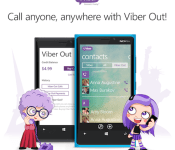
Viber’s Windows Phone 8 app now allows you to call any number you want

How does Viber celebrate being acquired for a ton of money? By bringing one of its most popular features, Viber Out, to Windows Phone 8 — that’s how. In second thought, we’re probably way off. Still, the Skype rival has indeed updated its WP8 application, celebration or not, allowing users to now make calls to any phone number thanks to Viber Out. This new version also lets you send video messages and multiple photos at a time, while added Bluetooth support should make it easier for you to enjoy some hands-free action. As usual, you can grab the update from the Windows Phone Store — and feel free to share your Viber 4.1 impressions with us in the comments below.
Filed under: Cellphones, Internet, Software, Mobile, Microsoft
Source: Windows Phone Store

Samsung’s Smart Home service ready to control new wave of TVs and appliances

Samsung has just taken a big step in its home automation plans by launching its Smart Home service in the US and Korea. That means you can now download an Android app that, in conjunction with Samsung’s cloud service, will give you control over certain (crazy expensive) Samsung smart appliances. In the US, those include Samsung’s T9000 Smart French Door refrigerator, the WF457 smart front loading washing machine, all 2014 Smart TVs and, later in the year, the Smart Bulb, Gear Fit and Smart Ovens. On top of an app for any Android 4.0 or later device, a Tizen app will soon arrive to Samsung’s Galaxy Gear 2 smartwatch, as well. Once all that’s installed and connected, you’ll be able to fully control a wash cycle, check the temperature of the fridge or even say “good night” to the TV remote to shut down all connected devices. Samsung has promised that all of this is encrypted and secure, so let’s hope that’s the case — all this is just the beginning of its “grand plan” to enhance your home.
Filed under: Household, Peripherals, Software, Samsung
Source: Samsung

NASA’s game collaboration lets you steer asteroids without leaving home

Kerbal Space Program is the closest you’ll get to running a space agency. The game lets you build and launch everything from orbital stations to interplanetary explorers, all in the name of collecting scientific data. It’s only fitting, then, that the studio behind the title has teamed up with NASA to release its Asteroid Redirect Mission add-on. The patch gives you both equipment based on the Space Launch System as well as enough giant rocks to let you either mimic potential real-world missions or live out your Armageddon dreams. The KSP upgrade isn’t a completely faithful simulation by any means, but it’s realistic enough that it could help you appreciate the challenges of steering asteroids. If you’d like to see the software in action, you can check out the second video at about the 57-minute mark.
Filed under: Gaming, Science, Software
Source: Kerbal Space Program

Spotify’s new design is cleaner, darker and puts the focus on content

If you’re using Spotify on the web, desktop or iOS you should notice a pretty massive change starting today. (The new look should be coming to Android “near future.”) The company is launching its most dramatic overhaul since its launch in 2008. Most noticeably, it’s flat and dark. Like Swedish death metal dark. The gray and white elements it experimented with over the last couple of years have been banished and it has returned to its roots with a UI that is primarily black and slightly lighter black. Sure, there are still green highlights and the new rounded (dare we say finger-friendly) icons are a lighter shade of gray, but the overall effect is one where the most important element — the content — jumps off the background.
Of course, if Spotify simply painted everything black that wouldn’t be big news. The redesign touches on almost every element of the experience. The edges are softer, there’s a heavy use of blurring on background images (especially in the mobile app) and there’s a new typeface, Proxima Nova, that’s clean and heavily rounded. Despite the starkness of the UI elements, these touches make the app feel warm and inviting. The new look also borrows flourishes from social networks. Artist and user pages now feature a round profile image against a large cover photo and content is now presented as image-heavy cards when browsing. Those round profile photos also give you a quick visual cue to let you know a card is for a person or artist, rather than a song or album. In general you’ll notice a lot more images throughout the interface, and big ones at that.
The overall look is not that unlike a dark cousin of Google+, at least in the browser. The desktop client uses many visual elements as the redesigned web player, but still retains some of the more traditional media manager elements. The mobile app employs a heavy does of transparency and slides around individual UI elements to keep them out of the way and maximize screen real estate. It also makes the shift to a tabbed interface that more inline with modern design trends.
The changes are not purely cosmetic either. The company has finally fully implemented search as you type across all platforms, and it’s blazingly fast. This will also be the first time that many users will get to enjoy collections — a feature that has been rolling out painfully slowly. Rather than being forced to save albums as playlists, users will simply be able to add them to their library for quick and easy access.
For more about Spotify’s effort to breathe new life into its streaming music service, read our additional coverage here.
Filed under: Home Entertainment, Internet, Software, HD, Mobile

iWork upgrade lets you share read-only documents

Apple isn’t letting the launch of Office for iPad go completely unanswered. It’s pushing out a slew of iWork updates that might not keep Microsoft awake at night, but should fill in a few conspicuous feature gaps. You can now share read-only documents, for one thing — you no longer have to worry that others will mess with a Pages report. You can also open iWork documents from iCloud webmail, and there’s a host of cross-app improvements that include a new editor tab and the option of modifying imported charts. All the upgrades are available on iCloud, iOS and the Mac, so you can check out the many, many tweaks for yourself.
Filed under: Cellphones, Tablets, Internet, Software, Apple
Via: 9to5 Mac
Source: iWork for iCloud, App Store

