


Chrome Remote Desktop App Released by Google Today
Just moments ago we alerted everyone that Google has released the stock Android camera to the Play Store. That alone is pretty exciting news especially since it also included a number of UI enhancements and additional features. Apparently that isn’t all Google pushed out today though. While cruising through the Google Inc developer page we noticed another app that we haven’t seen before, Chrome Remote Desktop.
 Like the name would suggest, it is an app that allows you to remote into your PC through your phone or tablet. This is nothing new as there are a number of companies that offer this ability like PhoneMyPC or TeamViewer.
In order to give Google’s Chrome Remote Desktop app a run, you will need to install the Chrome Remote Desktop to your Chrome browser through the Chrome Web Store. Once installed, open it up and walk through the simple setup including a 6 digit pin code.
 From there, install the app on your tablet and/or phones and open it up. You then see a list of PC’s you can access, all dependent on which ones you have the web store app installed on of course.

 I played around with it a little bit and it seems to work just fine. It even pulled both monitors displays to my Xperia Z. You can pinch to zoom in and out to help you navigate around and see things a little more clearly. It does’t appear to support streaming sound and watching a YouTube video on my phone from my PC has a little lag. It is a start though.
On a side note, once the app is installed, it appears a s Remote Desktop in your app list, so go to ‘R’ to find the app. Hit the link below to go grab it for you Android device and give it a whirl.

//<![CDATA[
ord = window.ord || Math.floor(Math.random()*1E16);
document.write('’);
//]]>
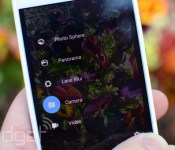
Google’s new camera app brings Photo Sphere and Lens Blur to Android devices

While Google has continued to toss new features into the camera app shipped on its Nexus devices, many Android phones replace it something else. But just as we revealed a few weeks ago, now it’s available in the Play Store, ready to run on any phone or tablet using Android 4.4 KitKat. Beyond bits like Photo Sphere that we’ve seen before, Google is filling in the blanks on its new “Lens Blur” option. Meant to emphasize the subject while blurring the background for an impressive depth of field effect, it uses algorithms to simulate the large camera lens and aperture your phone / tablet doesn’t actually have. Google’s Research Blog has details on how its done, including a Lytro-like ability to change which object is in focus after you take the shot.

Tired of tilt-shift effects after years of Instagramming, no matter how much math is at work? There’s more to the new camera app than that, it has all the other features we’d heard about too, like a “100% viewfinder” that makes sure you can see everything that will be in the picture on your screen before the shot is taken with no “dropped pixels” and a larger capture button. Panorama shots are better now too, with higher resolution, and Google’s 360-degree Photo Spheres can be captured at up to 50 megapixels.
Filed under: Cellphones, Tablets, Software, Mobile, Google
Source: Android (G+), Google Research Blog, Google Play
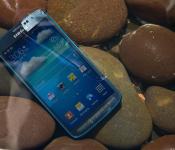
Android 4.4 OTA Rolling Out to AT&T Samsung Galaxy S4 Active
 The more rugged version of the Samsung Galaxy S4, the Galaxy S4 Active, that found its way to AT&T’s network is getting an OTA update today moving it from Android 4.3 Jelly Bean to Android 4.4 KitKat. According to the release information on AT&T‘s blog there are a number of things you will you find other than just a new OS version. Take a quick read.
- Improved user interface with Android 4.4 KitKat: The latest version of Android includes enhancements such as re-styled status and navigation bars, a new full-screen-immersive mode, color emoji support, improved closed captioning support, stronger security and smarter power use.
- Enhanced music access: Full screen album art and media controls are available from the lock screen when listening to music.
- Camera access: The camera can also be accessed directly from the lock screen.
- Location menu: An integrated location menu enables users to easily activate GPS and share location details.
- Wireless printing: Integrated support for wireless printing available in enhanced settings.
- New sound controls: Set sound for specific Samsung applications in enhanced settings.
You will want to make sure you have over 50% charge to your device and a Wi-Fi connection available to download the 426.84mb file needed to update. If you happen to meet the above requirements then you should head into your device settings and check for the update if you haven’t seen it yet.
Source: AT&T Via: Android Police Img: CNET
//<![CDATA[
ord = window.ord || Math.floor(Math.random()*1E16);
document.write('’);
//]]>

HTC allows devs to tap into the power of the One’s Duo Camera

The HTC One (M8) brought with it a load of new camera features, including its unique Duo Camera setup on its back side. Now, the handset maker is opening up the code that powers the pair in a SDK preview for third-party devs. This means that apps can be designed specifically for the M8′s cameras with DualLens and DimensionPlus APIs baked right in. In other words, developers will get their hands on that bokeh-style refocusing and multi-angled shot selection in addition to depth maps from the pair of cameras. Of course, only time will tell how eager app makers are to latch on to HTC’s smartphone snapshooting tricks, but at least now they’ll have the necessary tools to do so.
Filed under: Cellphones, Software, Mobile
Source: HTC

Better’s mobile app lets you call a Doctor as if they were tech support

Technology problem? Easy, just hit the Mayday button (if you have one) or sign up for Google Helpouts and within a few minutes, you’ll instantly connect to an expert. Compare that with selecting a healthcare plan, or making trips to the clinic, and medicine can seem a little old-fashioned. Better is looking to change that with an iOS app that offers both a concierge to help you navigate your HMO’s bureaucracy, but also to offer instant access to the physicians at the Mayo Clinic when you’re feeling unwell. The app is launching from today, setting you back $49 a month, and while it’s currently not covered by any insurance plans, there are some incentives to help soften the blow.
Filed under: Cellphones, Software, Mobile, Apple
Via: Re/code
Source: Better (App Store), Better

Here’s the software that helps Edward Snowden avoid the NSA

Edward Snowden hasn’t escaped the NSA’s watchful eyes purely by exploiting lax security — he also uses the right software. We now know that he communicates with the media using Tails, a customized version of Linux that makes it easy to use Tor’s anonymity network and other tools that keep data private. The software loads from external drives and doesn’t store anything locally, so it’s relatively trivial for Snowden and his contacts to discuss leaks without leaving a trace.
The underlying technology isn’t completely original, and it’s not perfect; Tails’ open source code and anonymous developer base help resist pressure to include spy-friendly back doors, but there are still potential security holes. Users also have to be careful with their choices of internet services while using Tails, as the wrong ones could give the whole game away. Even with those concerns in mind, the software is a big help to Snowden, journalists and others that want to keep their conversations under wraps with a minimum of effort.
Filed under: Internet, Software
Via: Slashdot

Roku 3 update lets you search for movies and more with a smartphone

Roku baked its comprehensive search feature into its mobile apps last month, but only folks who used it with the firm’s HDMI Streaming Stick have been able to enjoy life without wielding a remote to hunt and peck for letters. Starting today, however, more of the outfit’s hardware is getting some love: an update is trickling out to Roku 3 devices that’ll enable the search feature with the apps. Since the company expects the software rollout to wrap up by April 22nd, it may be a while before your own box gets updated. Other Roku models are expected to snag the upgrade in the following weeks. Until then, you can use the clicker to hunt for content by actors, directors and show titles. Like an animal.
Filed under: Home Entertainment, Software, HD, Mobile
Source: Roku Blog

HotelTonight app now lets you preview room availability seven days ahead

HotelTonight’s namesake feature is also holding it back: You can only book a room beginning at 9AM on the day of check-in. If you’re planning to arrive during a major event, say, in Los Angeles during E3 or Rio during Carnival, landing without a confirmed room can add to the already stressful travel process. But the folks at HotelTonight have a good idea of whether or not you’ll be able to find a room, and the team’s now ready to share that info with you. Now, when you open up the iOS app, Look Ahead will let you preview room pricing and availability for the next seven days. The app will even give you a heads up if there’s an event in town, so you can be aware of higher than normal rates, or opt to change your plans to avoid the crowds. Look Ahead is available today in Chicago, Dallas, Las Vegas, Los Angeles, Miami, New York, San Diego, San Francisco and Washington, DC. You’ll need to have an iPhone to take advantage, but expect the feature to hit Android soon.
Filed under: Software
Source: TechCrunch, HotelChatter

MLB 14 The Show: The Joystiq Review

The term “simulation” is appropriate for MLB 14: The Show, but not just because of its beautiful presentation, a defining trait of the series that’s become a benchmark for other sports video games. Rather, MLB 14: The Show earns its simulation stripes by continuing the series’ tradition of challenging players with mechanics and statistics that mirror the real sport. While MLB’s gameplay has changed little this year, no matter what option players select for pitching, fielding and hitting (we’ll get to that later), they will fail or succeed as regularly as athletes do in the big leagues.
Yet much like the faithfully-recreated and wildly differing batting stances of hitters in the game, MLB 14: The Show truly makes its mark in the baseball sim series by being one thing: dynamic.
Click here for more
Filed under: Gaming, Software, HD, Sony
Source: Joystiq
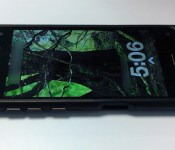
Here’s Amazon’s phone: six cameras and a 4.7-inch screen

Rumors of an Amazon-made phone are nothing new, but today the rumors enter reality more firmly: what you see above is what BGR claims is the Amazon’s first phone. “Whoa, that’s super ugly!” you might be saying. Cool it, that’s just an enclosure around the device itself preventing prying eyes (like our own) from seeing the actual design. The good news is we can still learn a few things about the device without the enclosure removed: five cameras up front (reportedly a sixth out back) and a trio of buttons along the left side handle power and volume. The screen is reportedly of the 4.7-inch variety — which lines up with previous rumors — and puts Amazon’s first phone on the same scale as Motorola’s Moto X (among others).
Before we move on, we should probably address that whole six cameras thing, huh? Well, the rear one is a standard phone camera for taking photos, and apparently one of the five on the front is also just a standard camera. The four other face cameras, though, are apparently for something especially unique: the phone’s 3D interface. All those cameras reportedly enable the phone to track the position of your head and where you’re looking, thus enabling glasses-free 3D from any angle. BGR says the four face cams are low-power infrared sensors.
So, what’s powering that effect besides cameras? 2GB of RAM and an unnamed Qualcomm Snapdragon processor, apparently. Rather than going 1080p, the handset is also said to push 720p (also similar to the Moto X).
If that’s not enough, the report also says that a less flashy, more affordable version will arrive this year as well. That’s two Amazon phones potentially leaked without Amazon acknowledging or even teasing either. Don’t expect shock on our faces when an ambiguous event invite shows up in the next few weeks.
Vote on our poll for Amazon’s Phone. First thoughts?!
Filed under: Cellphones, Cameras, Handhelds, Software, Mobile, Amazon
Source: BGR

