



Facebook’s Nearby Friends feature keeps track of your pals, but only if they want you to

If you’re of the sort that likes to plan those otherwise impromptu encounters, Facebook has just announced a optional new feature that will certainly help with that. Nearby Friends will show you if your friends are close by, so you can reach out about meeting up. This isn’t automatically turn on inside Facebook’s apps though, as you’ll have to toggle it on and your friends will have to decide to share their location for it to work. However, there’s the ability to broadcast coordinates for a certain amount of time — the hour or two that you plan to be at your favorite bar, for example. You can also see when folks that have opted-in are traveling, giving you the opportunity to send any ramen or burrito recommendations their way. As you might expect, the feature will beam push notifications to your mobile device to alert you when your best mate is nearby. This news is certainly interesting in the context of the outfit’s push for its own location services, along with recent news of Instagram testing the in-house Places for tagging photos. While there’s no official arrival date, Nearby Friends is rolling out to both Android and iOS in the weeks to come.
Filed under: Software, Mobile, Facebook
Source: Facebook

MLB at Bat App Gains Chromecast Support, for Premium Members Only of Course
Baseball is one of America’s greatest past times. Some would say their is nothing better than sitting in the stadium with a beer and dog watching your favorite team. I myself am not much of a sports person, but I know how die hard sports fans are when it comes to being able to watch the game when they can’t be at the stadium. Google has announced today that, with the help of MLBAM, Chromecast support for the MLB.com At Bat app will be officially available later today.
There is always a catch of some sort. You need to have a MLB.TV Premium subscription in order to stream those live out-of -market games to your TV with the Chromecast. Yes, this means that even if you are a MLB.TV subscriber you still need to upgrade to Premium to cast those games to your big screen. A 1 year subscription is $129.99 or you can pay monthly at $24.99. However, it offers you “every 2014 Regular Season out-of-market game LIVE or on-demand in HD” on Android, iOS and your PC/Chromebook.
 Be on the lookout for the app to update sometime today with details that support has been added. What team will you be following this year?
Source: Google Blog Via: 9to5Google
//<![CDATA[
ord = window.ord || Math.floor(Math.random()*1E16);
document.write('’);
//]]>
Flickr wants to become your new Instagram with its latest app update

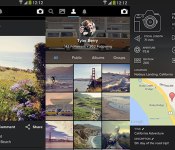
Today Yahoo is rolling our Flickr “3.0,” a completely redesigned approach to its photo-sharing apps on Android and iOS. In addition to offering improved sharing through Dropbox and Google+, Flickr on mobile now features Instagram-like filters and in-depth editing tools. We especially like the new option to view each photo’s metadata, including which camera an image was shot with, aperture setting and more.
Download the new Flickr app, and you’ll see that it looks very much like Instagram, even beyond the new filters feature. You now have the ability to comment on, like and share photos, and there’s a feed view that echoes the experience of scrolling through your friends’ latest uploads on Facebook’s ultra-popular acquisition. Finally, you can also shoot and edit 30-second video clips and add filters.
Should you drop Instagram or your other photo app of choice for Flickr, though? That depends on how willing you are to create a Yahoo account — previously you could sign into the app through Facebook or Google, but the latest update eliminates those two options. In any case, you’ll find the download links below.
Via: The Next Web
Source: Flickr (iTunes), Flickr (Google Play)

Ahead of Supreme Court trial, Aereo opens lobbying and advocacy site

The United States Department of Justice says that streaming TV service Aereo is violating copyright law. Aereo, unsurprisingly, disagrees. In five days, the US Supreme Court will hear arguments from both sides. The former has already made its case to the Supreme Court in a filing; today, Aereo fights back with its own lobbying effort: a website named “Protect My Antenna” that both makes arguments for Aereo’s position and compiles various legal documents for the public to read. “We remain steadfast in our conviction that Aereo’s cloud-based antenna and DVR technology falls squarely within the law,” Aereo CEO Chet Kanojia said in an email to users announcing the site.
It’s no secret that over-the-air broadcasters are less than thrilled with Aereo’s live TV service. Customers pay annually to receive a dedicated antenna at one of Aereo’s hubs and DVR functionality, all of which exists in the cloud and streams to users. Sounds pretty okay, right? Not if you’re a broadcast TV outlet, apparently: the channels that Aereo carries show licensed content, and the companies that broadcast said content want their licensing cut.
Of course, it doesn’t help that the broadcasters in this story are the Goliath to Aereo’s David. Aereo only operates in a handful of markets — mostly cities, where using an antenna for OTA broadcasts is often unreliable — and the company is offering a unique service. It is of course growing, but remains nowhere near the size of the media giants it re-broadcasts.
The United States Department of Justice, however, argues that, regardless of Aereo’s size, it’s violating copyright law in re-broadcasting content from the likes of NBC, CBS, ABC, Fox, and other OTA signals (read our explainer right here). Whether the US Supreme Court agrees with that assessment is another question altogether — and it’s one that’s set to be answered in the not-so-distant future. The case begins on April 22nd, in just five days.
Filed under: Internet, Software, HD
Source: Protect My Antenna

Scout GPS app keeps your gas and coffee detour to a minimum

Telenav wants its latest Scout update for iPhone to stand out from other nav apps by giving what it claims 80 percent of us want while driving: gas, coffee, or food. You can now select a spot serving one of those sans typing and be sure it’s decent thanks to a user feedback feature that even accounts for the time of day. Then, Scout will only search places on the road ahead, not behind, to efficiently re-route you — a feature surprisingly lacking in most GPS apps. Other new tweaks include a guide to the closest and cheapest parking, real-time ETA info relayed to your loved ones and the ability to report traffic conditions, even when not navigating. All of this is free, though it only works in the US and certain features, like offline and voice-guided turn-by-turn navigation, require a $24.99 in-app buy.
Source: iTunes
Spotify moves away from delivering music through peer-to-peer networks

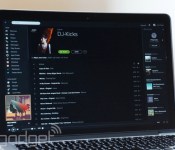
Spotify has always streamed at least some of its music over peer-to-peer listener networks, helping it deliver music quickly while saving some cash on bandwidth and servers. However, the service is now ready to leave that tradition behind. It tells TorrentFreak that it’s phasing out peer-to-peer connections, with plans for everyone to use dedicated servers in the months ahead. As the firm explains, there’s simply no need for peer links at this point — Spotify’s servers can deliver “best-in-class” performance all by themselves.
The move should reduce the amount of data you use when checking out hot tracks at home, which could help if you’re on a basic or capped internet plan. We’d also note that the transition should be relatively inexpensive for Spotify itself. Music doesn’t chew up as much bandwidth as video services like Netflix, so Spotify isn’t very likely to find itself paying extra connection costs to price-sensitive internet providers.
Filed under: Internet, Software
Source: TorrentFreak
Bloomberg: Apple wants to plug Shazam directly into iOS

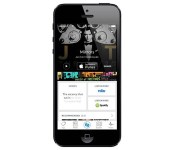
It’s easy to track down iPhone apps that name catchy tunes, but it now looks like Apple wants to spare you from having to search in the first place. Bloomberg sources claim that a future version of iOS will incorporate Shazam’s song recognition in the same way that the existing mobile platform integrates Facebook and Twitter. While built-in music detection wouldn’t be a new idea (just ask Windows Phone users), you could ask Siri to tell you what’s playing rather than hit a button. There aren’t any clues as to when the feature would reach iOS. However, Apple’s Worldwide Developer Conference begins in early June — if the rumor is accurate, there’s a good chance we’ll get the full scoop in a matter of weeks.
Filed under: Cellphones, Software, Mobile, Apple
Source: Bloomberg
Hyundai’s bringing Apple’s CarPlay to some new Sonata models

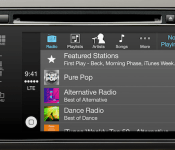
It’s becoming a trend to see more and more companies integrate their products with Apple’s CarPlay, whether it be car manufacturers or makers of in-dash systems. The latest to join the movement is Hyundai, announcing that navigation-equipped 2015 Sonata models will feature the recently unveiled in-car infotainment system from Apple. Hyundai says that adopting CarPlay was an easy decision for its engineers, since it provides an interface that’s already familiar to iPhone users and takes advantage of the new Sonata’s 8-inch touchscreen. More importantly, Hyundai’s plan to feature CarPlay makes it one of the more cost-effective brands to do so — and that’s a great thing, because not everyone can afford a Merdeces or a Ferrari.
Filed under: Transportation, Software, Apple
Source: Hyundai
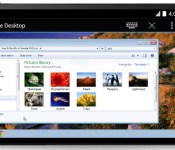
Chrome Remote Desktop for Android browses a PC or Mac from your phone

While we’d seen rumblings that it was in beta testing, Google’s Chrome Remote Desktop app for Android made its official debut today. This means that those who fancy Mountain View’s mobile OS can take a gander at files that reside on a Windows or Mac machine that’s safely docked in the office. The Remote Desktop app has been available on the desktop for quite some time, and now the same access is available through Chrome on Android smartphones and tablets. For those who prefer Apple’s devices, an iOS version of the software should be on the way soon.
Source: Google Chrome Blog, Google Play
Google Releases Stock Camera App to the Play Store, KitKat+ Only Devices
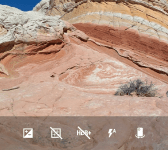
Today is not only hump day, but it also the day the Google usually updates app. Some updates are minor, others are major. Then you have something totally unexpected. Not to long ago we let you all know that Google was working on releasing the stock Android camera app to the Play Store. The launch date was never mentioned, just that it was in the works. However, there is good news regarding the stock camera app today as Google has just released it.


 The release of the app also pushes an update out with it that moves the camera app to version 2.1.037. It brings along a new interface and some new features like lens blur mode, which gives you SLR-like photos with a shallow depth of field.
Google Camera snaps quick and easy photos and videos, and has creative picture modes like Photo Sphere, Lens Blur and Panorama.
Features
• Photo Spheres for immersive 360º views
• Lens Blur mode for SLR-like photos with shallow depth of field
• Panorama mode with high resolution
• 100% viewfinder for getting the maximum resolution from the sensor (no dropped pixels)
• Updated UI that gets out of your way and is centered on an extra large capture button
• Works on phones and tablets running Android 4.4+ KitKat
You will probably notice that final bullet point in the apps description.
 If you happen to be sporting a device that sports anything below Android 4.4 you won’t be allowed to install it from the Play Store. :0( We will get our hands on the apk and give it a run on a few devices anyways and see what happens.
Until then, if you sport a Nexus or another device on Android 4.4+, feel free to hit the link below and go give it a shot.

Getting the APK now by the way, will update with the links shortly.
//<![CDATA[
ord = window.ord || Math.floor(Math.random()*1E16);
document.write('’);
//]]>
 AIVAnet