


Sony Xperia Z1 and Z Ultra owners on Bell and Rogers picking up Android 4.4.2 Today

Reports have been hitting G+, and of course trickling down to blogs, that owners of the Xperia Z1 and Xperia Z Ultra on Canadian carriers Bell and Rogers have an update waiting for them. The update to the Sony device offers up a build number of 14.3.A.0.757 and brings with it Android 4.4.2 KitKat.
The update brings in KitKat , of course, along with performance an UI optimizations, a tweaked status bar and quick settings that are more intuitive and customizable and the new Xperia Themes addition.
If you haven’t seen the prompt for the update yet then head into settings > about phone > software update. Alternatively you should be able to plug the device into your PC and launch the Sony Companion software and check as well. If you do see the update wirelessly, be sure you have a stable Wi-Fi connection, a little time to download it and over 50% battery life to get it all installed.
Img: Terry Boccarossa Confirmed via Mobile Syrup
Hopefully this means the the KitKat update for the stateside T-Mobile Xperia Z1s is close at hand too.
//<![CDATA[
ord = window.ord || Math.floor(Math.random()*1E16);
document.write('’);
//]]>

Download: Show your friends you’re smarter than them with QuizUP

Sometimes you don’t need an original idea to make a killer app, as long as you get the presentation right. Take Tinder, for example, which managed to put a whole new spin on internet dating thanks to its slick, simple mobile interface. Now, there are innumerable quiz apps out there for mobile devices, but none quite like QuizUp. Released last month on Android after launching last year on iOS, QuizUp is spreading through this editor’s friendship group like wildfire, because what are friends for if not to beat at question-and-answer games and wind them up about it later? It’s not just the online multiplayer that makes QuizUp a gem, though — it’s also super easy to use and looks great, too.
QuizUp kind of does for quizzing what Words With Friends did for Scrabble. Pitting your LOST knowledge against a confident chum while riding the bus is what makes the app so fun, and signing in with Facebook, Twitter and G+ will auto-populate the in-app buddy list with any connections that have QuizUp installed. You can battle each other in real-time, or answer your seven multiple choice questions whenever you want, letting your opponent catch up later. You score points for correct answers, obviously, but quick fingers are also key, as you get penalised the longer you take to choose. If you want to brush up on a topic, of which there are over 400 from architecture to Star Trek, chemistry to brand logos, you can challenge a random online, but the higher you level up on any given subject, the harder the questions get.

If you needed any more reasons to spend time within the app, then there’s messaging, rankings, a history of what your friends’ are up to, achievements and even forum-like discussion boards for each topic. On top of all the little extras, QuizUp also looks and behaves impressively. It’s colourful, everything works as you expect it to, and the simple UI makes for easy navigation. For a free app it’s nicely polished, although you can buy XP boosters with real money if you’re absolutely intent on levelling up quickly. We imagine, like Words With Friends, you just won’t load it up one day, and forget about it. Until then, though, it’s the type of casual but crazy addictive game that’ll have you sitting in the pub in silence, with a grunt here and a snort there revealing which of your mates knows way too much about One Direction.
Filed under: Cellphones, Gaming, Tablets, Internet, Software
Source: QuizUp, App store, Play store

What you need to know about Aereo’s battle with broadcast television

Today, the United States Supreme Court will spend one hour hearing the latest arguments in an old, important debate that affects everyone watching television in the US: who owns the airwaves?
ABC, CBS, NBC, Fox and others use the broadcast frequencies our TV antennas pick up, the government regulates those frequencies, and cable companies pay broadcasters to re-broadcast those frequencies, but the answer to who owns them remains nebulous. That is at the heart of today’s case — “American Broadcasting Companies, Inc., et al. v. Aereo, Inc.” — being decided by the highest court in the United States. And the decision stands to leave a massive impact on how Americans consume television, regardless of which side wins.
WHAT IS IT?

Aereo charges customers $8/month to rent a physical antenna in a remote location that offers local channels and cloud DVR service, which is then streamed live to smartphones, tablets, and computers. Broadcasters and the federal government say that violates copyright law; that re-broadcasting content from the airwaves via the internet is a crime.
The biggest names in broadcast television, from CBS to Disney and the federal government too, have 30 minutes to present their case: that New York City startup Aereo is stealing content and re-broadcasting it without paying a fee. Aereo has the same 30 minutes to defend itself; an attempt to uphold previous rulings in its favor from lower courts. What the Supreme Court decides doesn’t just affect Aereo customers, but the future of television as we know it.
WHY SHOULD I CARE?
The decision leveled by the Supreme Court ultimately affects much more than Aereo. Do you like cloud DVR services? How about competition in the world of broadcast TV? They’re just two potential targets for impact.

First: cloud DVR functionality — once the subject of its own hard-fought legal battle — could be deemed a “public broadcast.” Should the broadcasters group win, services that millions of people use will be suddenly illegal in the eyes of US law. At very least, those services would be up for re-evaluation in terms of legality. The US government doesn’t think so, because cloud DVR services re-broadcast already played content, while Aereo offers streaming of live content with a slight delay.
Second: if what Aereo is doing is illegal, then what hope do we have for innovation in broadcast technology? Over the last half century or so broadcasters and distributors have slowly rolled out technological advancements like HD and surround sound, a pace which looks even slower compared to changes in wireless or internet services.
Even minor tweaks to the existing formula like VCRs, DVRs and internet streaming were slowed or crippled by legal challenges that exist to keep the existing broadcast model afloat. Worse, the broadcasters themselves have been slow to adopt the new technology.

Consider that only one broadcast network (ABC) offers a live stream of its over-the-air broadcasts — and that’s only in select markets, with a pay-TV login. New innovations are being considered as a response to Aereo should it prevail, but if the startup loses, there is little incentive for the existing patchwork of studios, broadcasters and distributors to provide real change in response to customer’s demands.
WHAT’S AT STAKE?

The US public doesn’t “own” the airwaves, but broadcasters are dependent on both the US government for logistical regulation (i.e. who broadcasts on which frequencies) and the US public for ad dollars (viewers equal ad dollars, in broad terms). The signals are open to anyone with a receiver, and at least one of the stations is partially funded by taxpayer dollars (PBS).
The public doesn’t “own” the airwaves, but we do own all the mechanisms that enable companies to profit from their existence. And that’s pretty powerful stuff.
WHAT’S THE ARGUMENT?
When Congress enabled broadcasters to start collecting re-transmission fees from cable companies in 1976, a new cash stream was born. Cable companies began paying broadcasters directly for feeds of their content. That revenue stream now accounts for anywhere from 10 percent of a given broadcast company’s annual revenue to 50 percent, according to both sides of the case. Aereo argues that it can sidestep paying to re-broadcast content by using individual antennas; since it’s receiving thousands of signals, it’s attempting to skirt re-transmission laws.
Here’s what that 1976 copyright law says you can’t do with what’s transmitted over broadcast signals:
1: to perform or display it at a place open to the public or at any place where a substantial number of persons outside of a normal circle of a family and its social acquaintances is gathered; or
2: to transmit or otherwise communicate a performance or display of the work … to the public by means of any device or process, whether the members of the public are capable of receiving the performance or display receive it in the same place or in separate places at the same time or at different times.
By using individual antennas, Aereo isn’t taking one signal and re-transmitting it to thousands of customers; Aereo takes thousands of individual signals and re-transmits them to thousands of people. Broadcasters, who have spent over 30 years reaping financial rewards in re-transmission fees, say Aereo is violating copyright law in “performing” their content (the re-broadcast). One side’s arguing legal technicalities, the other’s arguing technological minutia. All for the future of broadcast television.
WANT EVEN MORE?
The SCOTUS Blog has a great piece diving into the history of broadcast legislation, and the site’s catalogued all of the case filings thus far right here. Longtime television industry executive turned investor Barry Diller, whose company invests in Aereo, wrote an interesting (though certainly biased) op-ed about the case at The Wall Street Journal. Finally, the federal government’s filing is surprisingly readable (for a legal document). We’ll also have updates as the Supreme Court makes its decision in the coming months.
Filed under: Home Entertainment, Internet, Software, HD

University wants you to capture the ‘soundscapes’ of Earth

Remember when Ridley Scott asked people to record videos to be compiled into the Life in a Day movie? Bryan Pijanowski, Purdue University’s Soundscape ecologist, wants to repeat the task today, but with audio rather than video. He’s developed the Soundscape Recorder app for iOS and Android and is asking people to suck down three minutes of ambient noise to help measure the changes to the sonic environment. Once you’ve recorded your moment, you’ll be asked to describe what you heard and how it made you feel — something that Pijanowski hopes will become an annual event every Earth Day. Just don’t follow our example and try and record the ambience of an empty room, because that’s not helping.
Filed under: Cellphones, Science, Software
Via: Wired
Source: Global Soundscapes

Google Glass now displays your iPhone’s text messages

On the heels of last week’s KitKat update, Google Glass nabbed up two more notable improvements today. First, iOS users can now have their text messages displayed on Glass, after a quick toggle of the Bluetooth settings. Here’s the catch: “due to some limitations with iOS,” you wont be able to reply to those messages directly from the headset. There’s also a new Calendar Glassware that situates an agenda to the left of the home screen. Tapping a card in that timeline will allow you edit title, time, location and even RSVP. If you’d rather just skip those festivities altogether, you can delete events or hide them from view. Both of the new features are said to be rolling out to early adopters “in the next few days,” so keep your eyes peeled.
Filed under: Wearables, Software, Mobile, Google
Source: Google Glass (G+)

Google Hangouts merges conversations and texts messages from the same sender

Since Google tacked on SMS messages to its Hangouts app, it has been tweaking the experience to keep convos on the up and up, and this week it’s making a major change. In version 2.1 of the software, text messages and Hangout conversations from the same contact are neatly merged into a single thread, allowing you to send notes via either method. In order to keep track of things, the two sources are color-coded, and you can separate them any time you’d like. There’s also a split in the contacts list for quick searching: folks you chat with on Hangouts and phone contacts that you keep to SMS. For easy access, there’s a new home screen widget and improved quality for video calls. If your Android device hasn’t alerted you to the update yet, head over to that second source link to snatch it up.
Source: Google+, Google Play

[Download] Google Hangouts 2.1 on the way with SMS improvements and a widget

Google is starting the wonderful process of pushing out a new update to one of our most used apps, Hangouts. The Google Hangouts app hasn’t been updated since February when it received v2.0.303. The update that is rolling out this week will bring it to v2.1. A whole number update usually means there will be a lot of goodies inside. A G+ post from Mike Dodd gave a quick highlight of what is new.
– Merged conversations: SMS and Hangout conversations with the same recipient are now combined into a single conversation. You can control whether you want to send a message via Hangouts or SMS with the flip of a switch, and different message types will be easy to tell apart in the conversation. Of course, you can always merge and unmerge conversations if you’d like.
– Simplified contact list: now there’s two main sections in contacts — People you Hangout With, and Phone Contacts — making it simpler to navigate, and easier to use for SMS.
– Homescreen widget: add the Hangouts widget to your homescreen for quick access to your recent conversations.
– Performance improvements: today’s update includes better quality video calls, as well as improved SMS and MMS reliability.
The home screen widget is a 3×3 that can be resized to fit your screen and offers up a list view of your conversations. Tapping on one will open up the hangouts app into that conversation. It is also scrollable.


The merged SMS and Hangouts conversations that allow you to choose how you want to communicate with the recipient is definitely a feature many were really wanting.
I also see a much clearer view of my messages compared to one my friend sends with a color change so that not all text bubbles are the same color.
We will play about a bit more with it and let you know if we catch anything else. If you are super eager to get your hands on the new update, grab the APK from GappsEarly right now.
//<![CDATA[
ord = window.ord || Math.floor(Math.random()*1E16);
document.write('’);
//]]>

NBA Game Time updates with extra special additions for select Samsung device owners
With the 2013-2014 NBA Playoffs underway sports fans will be keeping close tabs on things when mobile. Of course Google Now does a pretty good job of keeping you in the loop at all times, but there is also an ‘app for that’ as it were. The NBA Game Time app is a free app that is meant to keep you in the loop all things NBA related. Last week they pushed an update to the app that brought some special treats to Samsung Galaxy device owners.
 The new Samsung Experience section is officially live for owners of the Galaxy S5, Galaxy S4, Galaxy S3, Galaxy Note 2 and Galaxy Note 3. The new section brings you an exclusive lockscreen with live countdowns to your teams next game, live scoring updates during the game and quick access to playoff series scores all without unlocking your device. You also get some wallpapers to set of your favorite teams.
As a Galaxy owner you will also get special highlights from the playoffs like slow motion video content taken with the phantom camera, mini-movies from select games and segments from “NBA Inside Stuff”. As a famed Galaxy owner, you will get all that content before it is released to the general mobile community.
If you don’t have the app and ant to check it out feel free to hit the button below to go pick it up.

//<![CDATA[
ord = window.ord || Math.floor(Math.random()*1E16);
document.write('’);
//]]>

You can now pay for your Domino’s Pizza with Google Wallet

Domino’s has already made it pretty easy to order your favorite pizza using your smartphone, but today things are getting even simpler for US Android device owners. Today the company confirmed that it’s added Google Wallet to the list of supported payment types in its Android app, allowing you to complete an order using the same details you’d typically download apps or rent movies with. If app-based ordering wasn’t already affecting your impulse spending, dispatching a deep dish with even fewer screen presses might be a blessing or a curse.
Filed under: Internet, Software, Mobile, Google
Via: Domino’s
Source: Domino’s Pizza (Google Play)
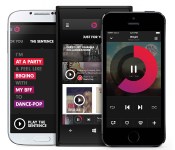
Beats Music update lets you subscribe from inside the iOS app

Odds are that you weren’t riveted by Beats Music when it first arrived, but the streaming service has just delivered a pair of big updates that may give you a good excuse to tune in. For the iOS app, the biggest improvement is visible when you’re signing up — you can now subscribe from within the software rather than heading to the web. The move makes it that much easier to keep the music flowing after your trial is over, and may just help Beats grow its fledgling customer base.
Not that Beats is neglecting its Android app by any means; you get a “brand spanking new widget” for your home screen if you’re running Google’s mobile platform. Both the Android and iOS releases also share some common improvements, including the ability to find Facebook friends who use Beats, better social network linking and thousands of new tracks in the Sentence playlist generator. There’s no guarantee that either refresh will have you rethinking that Rdio or Spotify subscription, but it’s hard to knock upgrades that make it easy to start listening.
Filed under: Cellphones, Internet, Software, Mobile
Via: Recode, Droid-Life
Source: App Store, Google Play
 AIVAnet