This Chrome add-on lets you copy and erase text inside any image on the web

What would you say if we told you that it’s possible to copy, translate, edit and even erase the text inside any image you find on the internet? Well, you can, and it’s a lot easier than you might think. All it requires is a new browser extension, called Project Naptha, made by developer Kevin Kwok. It uses a number of optical character recognition (OCR) algorithms, including libraries developed by Microsoft and Google, which quickly build a model of text regions, words and letters from nearly any image.
Once installed, you simply hover your cursor over available image text and select it. Using its built-in tools, you can do a number of things: Firstly, you can copy your selection. This is great if you’ve been emailed a scanned document or a screenshot of an error message. For instance, instead of jotting things down and manually typing it back into to Google, you can simply copy and paste the output directly into your search bar. If an image includes text you don’t understand, Naptha also supports numerous translation services, allowing you to decode a previously unintelligible language (at least to you) on the fly. However, perhaps the extension’s most impressive feature is its ability to edit and remove text. Using a technique similar to Photoshop’s “Content-Aware Fill” feature called “inpainting,” Naptha captures each of the independent colours from regions around the text and intelligently fills the space where it used to be. It’s not perfect, but it certainly beats having to open a dedicated image editor.
Kwok says he’s consistently working on expanding the project, which will include bringing it to other browsers like Mozilla Firefox. Right now, not all images allow you to edit words within them, although the developer has said he hopes to include support for vertical text in the future. Project Naptha is available now for free via the official website or Google’s Chrome Web Store.
[Image credit: Wikimedia Commons]
Filed under: Internet, Software
Source: Project Naptha, Chrome Web Store

Shocker! Nobody uses Samsung bloatware

If you used a Samsung app recently it was possibly a mis-click, according to a Strategy Analytics survey of 250-plus Galaxy S3 and S4 users. While Samsung recently trumpeted 100 million users for ChatOn, for instance, the report said US users spent a mere six seconds per month on the app, compared to, say, 151 minutes on Instagram. The rest of the suite fared little better, with users spending no more than seven minutes per month on all its apps combined. By contrast, users stayed on Facebook for 11 hours and Google’s three most popular apps for 150 minutes on average. If accurate, that would be a stinging rebuke, given that Samsung’s apps are pre-installed on most of its devices and can’t be removed easily — unless, ironically, you’re in its home country.
Filed under: Software, Samsung
Via: WSJ
Source: Strategy Analytics

Viber’s first major redesign makes it look right at home on the iPhone

Internet calling and messaging service Viber does a solid job of constantly bringing new features to its apps, regardless of the platform. Now, some seven months after iOS 7 was released, Viber is finally changing the looks of its iPhone app to match that flat, minimalist appearance of Apple’s OS. Aside from overhauling the UI, the Viber application now also lets you create a list of numbers you’d like to block and send longer video messages to people. The company’s CEO, Talmon Marco, tells us this update isn’t just about iOS 7, however. “This is the first time we are introducing a new look and feel for Viber. Our goal was to create a simple and friendly interface but at the same time establish a solid foundation for future updates,” Marco stated. In other words, don’t be surprised when you see some of these design cues make their way to other Viber apps, like those on Windows Phone 8 and Android.
Filed under: Cellphones, Internet, Software, Mobile, Apple
Source: App Store

Google offered to help Samsung with Apple patent battle costs

Confirming what a lot of us thought already, Google is more than a little interested in Apple and Samsung’s continuing court battle. New evidence revealed by Apple’s lawyers outlines emails from Google that offered to foot some of the damages (if Samsung lost), as well as cover part of the legal costs in the current trial. This would cover two of the five patents that Apple is fighting over. Google lawyer James Maccoun confirmed that it would help Samsung as part of the Mobile Application Distribution Agreement, the framework that allows Samsung to use Google-made apps on its Android devices. According to Maccoun’s taped deposition: “As I read it, Google’s essentially offering to defend Samsung to the MADA and does offer to defend some [patent] claims.”
Apple is looking to claim $2.2 billion from Samsung over five patents, while in return (you know how these things go), the Korean company is claiming a smaller $7 million for infringing two of its patents. Samsung had already stated that four of Apple’s patents are covered by Google’s Android OS, and has called in engineers to testify to that effect. The details of exactly how much cash Google will be willing to offer up haven’t been disclosed, although it’s likely hoping it won’t have to pay a thing.
Filed under: Cellphones, Software, Apple, Samsung, Google
Source: WSJ
Air Berlin’s latest iOS app can push boarding passes to your Pebble

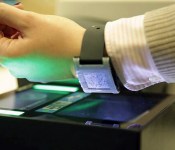
Still carrying a paper boarding pass when you travel? Air Berlin’s got a new way to go green this Earth Day. The airline’s iOS app now sports Pebble integration, letting you display boarding passes and flight information on your smartwatch. You can pull up the QR code-style pass on your wrist when it’s time to board — the agent will be able to confirm your seat and flight info as soon as you scan, eliminating the need to pull out your phone as you queue up at the gate. Air Berlin is the second airline to offer this feature — Vueling teamed up with Sony to add boarding pass functionality to the SmartWatch 2 just last month — and we can only hope US carriers will follow suit.
Filed under: Transportation, Wearables, Software
Source: Air Berlin, iTunes

Apple’s OS X beta testing is now open to the public

Apple has released public beta tests of individual Mac apps in recent years, but OS X itself has largely been off-limits unless you’ve registered as a developer. That changes now that Apple has launched the OS X Beta Seed Program. Starting with OS X 10.9.3, you can try pre-release operating system updates by signing in with a garden variety Apple ID; oddly enough, you still have to sign a developer-style agreement promising to keep some details a secret. We wouldn’t sign up solely because of the upcoming Mavericks update, but the program represents an all too rare opportunity to both preview features and provide direct feedback as an everyday user. If you’re willing to live with a few bugs, you can start with your first beta at the source link.
Source: Apple

Republic Wireless starts pushing Android 4.4.2 to 2,000 Moto X Users

We have sort of started to really love what Republic Wireless has been doing. Beyond having plans that are extremely affordable and offer a great solution to costly monthly bills and lengthy contracts. They recently released the anticipated Moto G for $149 and the ability to reactive a used device on a different account. Today we are very pleased to announce that Republic Wireless is releasing an update to the Moto X that will bring the device up to speed with its brothers, Android 4.4.2 KitKat.
The update weighs in at 349.3 MB’s and brings KitKat on boar, along with a New Phone Dialer application and Google Hangouts app update. So says the screenshot. The official release in from from RW talks about an improved Google Now Search, an update to the camera and caller ID functionality. Most of which were additions in KitKat.
The roll out for the KitKat update to the RW Moto X is starting today, however it is only being released to 2,000 randomly picked customers. It is sort of like winning the lottery for some. If you don’t see the update, today, then you didn’t win. The plan is for those 2,000 lucky installers to test it out and help identify any issues. You guys will be the lucky few that will have KitKat installed and no one else will, through April 30th. Then RW will start pushing it out in batches with an expected completion date of May 9th.
If you happened to be part of the first test batch of users, let us know what you think of the update and how things are going.
Source: Republic Wireless Img: RW Community (stnkyminkey)
//<![CDATA[
ord = window.ord || Math.floor(Math.random()*1E16);
document.write('’);
//]]>
Finally, you can customize the face on your Sony Smartwatch 2

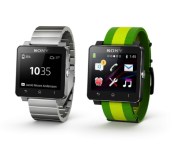
Sony has added new features to its Smartwatch 2 since its arrival last year, but there was one glaring omission. With the most recent update though, users can finally fine-tune that watch face with simple drag and drop motions. Customizable faces can sort widgets for displaying info including date, weather, calendar, battery level and more. Of course, Sony has invited third-party devs to join the party, so more options should be on the way soon. There’s also improved Gmail and Facebook functionality alongside swappable wallpapers, a calculator and notification drawer. If your devices haven’t already alerted you to the update, you can grab it via that second source link.

Filed under: Wearables, Software, Sony
Via: Android Police
Source: Sony, Google Play

1Password’s iOS and Mac apps get better sync and edit features

If you use 1Password, you might be worried about the security of your private data, what with all the talk about Heartbleed. Fortunately, the software’s developer, AgileBits, says 1Password isn’t affected by the OpenSSL exploit, but some of the sites you visit probably are. That’s why the company built a service called Watchtower, which allows you to check the vulnerability of sites you frequent. Even still, users will be happy to know that both the password manager’s Mac and iOS applications just received a whopper of an update, bringing a bevy of bug fixes, UI tweaks and notable improvements for each platform. Oh, and they’re on sale until Friday for $24.99 and $8.99 respectively.
There are quite a few enhancements to both apps, but for starters, sync is completely revamped: if you update your master password in the desktop applicaton, it will be updated on all your devices. Additionally, the new mobile app, complete with a new flat UI design, and 1Password Mini browser plugin both support login item tagging, making it much easier to find usernames and notes outside of the desktop client.
Filed under: Internet, Software
Via: 9to5Mac (iOS), 9to5Mac (Mac)
Source: AgileBits

Withings Pulse O2 monitors blood oxygen levels for climbers, asthmatics

Withings released its Pulse tracker late last summer, and now the outfit has announced it’s successor: the Pulse O2. Just like that first fitness gadget, the new model keeps tabs on heart rate, sleep and activity (steps, distance, elevation and calories), but it also keeps an eye on blood oxygen levels with a lens and light mounted on the unit’s back side. While you might not find that a useful bit of info, mountain climbers and folks who suffer from breathing problems — like asthma — need the data to monitor respiratory function. The Pulse O2 automatically syncs in the background thanks to Bluetooth Low Energy and Withings has added real-time coaching to its Health Mate app for a bit of added motivation. And as you can see in the image above, there’s a new wrist strap so you can sport the Pulse O2 like a watch, if that’s your preferred method of wear. Sound too good to pass up? Well, the wearable is on sale now for £100 ($120).

Filed under: Wearables
Source: Withings (1), (2)