


1Password for Windows now lets you manage accounts from your browser

AgileBits isn’t done sprucing up 1Password just because it released a much-needed Android upgrade; it’s also showing some love to the Windows version of its secure account manager. The just-launched 1Password 4 for Windows catches up on features in a big way, including the browser extension previously seen only on the Mac. You’re now just a shortcut away from fetching credentials or generating an extra-complex password. The revamp also brings WiFi syncing, multiple vaults and a service that warns you when hackers compromise a site.
The reworked software is free if you bought 1Password for Windows in 2013 or later. However, be prepared to pay up if you’re starting relatively fresh: a brand new license is $50 ($70 in a five-pack), while those who don’t qualify for a free update will have to shell out $25. That’s steep if you’re used to paying no more than a few bucks for mobile software. However, it might be worth the expense if you’re tired of memorizing obscure login details.
Filed under: Internet, Software
Source: Agile Blog, AgileBits

eBay Valet sells your stuff for you, for a (steep) price

eBay has offered Sell for Me, a service does most of the heavy lifting for you, for sometime. But, it hasn’t been widely used. The company seems to think its lack of success might be a combination of poor branding and inconvenience (Sell for Me is only accessible from the desktop site). So today it got a new name and a mobile app, eBay Valet, that lets iPhone users sell their stuff without lifting a finger. (Ok, not literally, since you’ll have to lift a finger to operate the app… but you get the idea.) Basically you snap a few photos of whatever it is you want to sell. A representative will give you an estimate of its worth, and if you’re still interested, the company will send you a box with a pre-paid shipping label. The eBay will take some pro-quality snaps of your goods, create a listing, send you a notification when it goes live and ship it to the winner when everything is over. Or return the item to you if it fails to sell. For its trouble eBay will take a 30 percent cut of the sale price, however. It’s not ideal if you’re actually looking to make money, but it sounds like a godsend for the lazy among us just looking to ditch some clutter.
Source: eBay Valet (iTunes), TechCrunch

4oD catch-up apps now support mobile streaming

While Channel 4′s catch-up service 4oD has been available on mobile for a number of years, viewers were always limited to streaming their favourite shows over a Wi-Fi connection. That changed at the start of the month when the broadcaster updated its iOS app to deliver streams over 3G and 4G connections. It took a couple of weeks, but it’s now equipped its Android app with the same capability. That means you can now stream full Channel 4, E4 and More4 programmes when you’re on the move and enjoy “4Shorts,” hundreds of clips, extras and trailers from your favourite shows. If you wanted to stream Countdown while on your daily commute, you can now do so on either your iOS or Android device.
Filed under: Internet, Software
Source: 4oD (App Store), (Google Play)

Warhammer 40K: Carnage Now Available in the Play Store
 Warhammer 40K: Carnage has made its way to Android today, just a month or so after its debut on iOS . The title is a side-scrolling-action-RPG game that puts you in the roll of a Space Marine who gets the pleasure of annihilating a slew of Orcs. You can play as the legendary Ultramarine and even unlock the Blood Angel.

 Game features:
PLAY AS POWERFUL SPACE MARINE CHARACTERS: Battle as a legendary Ultramarine or unlock the action as the menacing Blood Angel. Encounter aggressive bands of Orks and Bosses as you build your Space Marine up to his frighteningly awesome destructive best!
STUNNING LEVEL DESIGNS AND GREAT REPLAYABILITY: Blast through the ever changing world of Mithra. Up to 9 diabolically different ways to play each level. Challenge yourself: experience heavy gravity, corrosive atmospheres, meteor storms, exploding enemies and the much dreaded blackout levels modes.
‘EASY-DESTRUCT’ GAME CONTROLS: Easy-to-use tap controls guarantee effortless mayhem and destruction of all you survey!
500+ CLASSIC WARGEAR ITEMS: Get your hands on Boltguns, Chainswords, Grenades, Thunder Hammers, Jump Packs and more. Customize and upgrade your Space Marine in True WH40K RPG fashion to suit your style and maximize up the destruction.
FREE EXPANSION PACKS: Battle through more than 50 levels across 2 maps. 6 more maps to come.
FRANTIC FIRETEAM MISSIONS: Connect with your Google Play or Facebook friends, and recruit to complete challenging co-op ‘Fireteam’ missions. Each mission earns you rare ore and a chance to acquire Epic gear.
COMPELLING STORYLINE: Story written exclusively by award winning author Graham McNeill.
NOTES:
– IMPORTANT Minimum requirement: 768MB Ram, 1GB+ recommended
– Minimum Android OS: 4.1 or newer
– Minimum screen resolution: 800×480
– Recommended: Android device manufactured in 2013 or newer
It certainly looks like a pretty sweet title indeed. Warhammer 40K: Carnage can be picked up in the Play Store for $6.99. Just hit the link below and let us know what you think.
//<![CDATA[
ord = window.ord || Math.floor(Math.random()*1E16);
document.write('’);
//]]>
Nike+ FuelBand App Finally Makes its way to Android
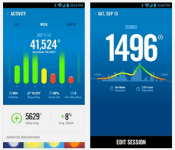
The Nike Fuelband sat as a iOS compatible only device since its original launch. That never bodes well for a wearable device, being locked to a certain OS that is. Recent rumors from April lead to lots of speculation that Nike might be doing away with the Fuelband line when they laid off a 55 of the 70 person team working on the device. It wouldn’t have been all that surprising, and it still might be true, to some degree. However, Nike doesn’t seem quite ready to give up just yet. This morning they have released the Android compatible app for the Nike Fuelband. Yes, the Android world is in shock right now.

· View your progress against your goal broken down by day, week, or month.
· Save all your information directly to your Nike+ profile online.
· Customize your device display, change the time and update your Daily Goal – straight from the app.
· Track NikeFuel and intensity for specific activities with Nike+ Sessions.
· Stay active by enabling Move Reminders in your Device Settings that encourage you to Win the Hour.
· Compete for the top slot on your Friend leaderboard.
· Stay constantly connected to your app with Bluetooth 4.0.
Nike says the app is compatible on any Android device running Android 4.3 or above and, of course, you need a Nike Fuelband SE device to use it. They put in a little extra work apparently and optimized he app for the Galaxy S3, S4, S5, Nexus 5, HTC One and Moto X. Owners of those devices will get the best experience.
For those of you that meet the criteria, hit the link and install the app. If this is what you were waiting for before you bought a Fuelband, we put the links to pick one of those up down below too.
Via Droid-Life
//<![CDATA[
ord = window.ord || Math.floor(Math.random()*1E16);
document.write('’);
//]]>

Terrain Android launcher helps you organize and find your content

Samsung’s Accelerator division has just spawned a new Android launcher that aims to help you see and find everything on your phone. Called Terrain, it resembles a stock Android home screen at first glance, but from there you can launch the three main features. The first is the Sidebar which brings up your content in familiar card form with a swipe from the left, letting you glance your top Spotify songs, Facebook news feed, Instagram pictures, Reddit threads and more. You can then tap each card for a deeper dive. The Phone Search option checks all your apps and contacts and also searches the web, Google Maps, Play or Yelp, to name a few. Finally, there’s the alphabetically organized All Apps drawer to see your programs at a glance. So how well does it work? Read on for more.
I’ve played with a lot of launchers, including Nova and Aviate, and Terrain seems quite robust for a first release. It was fairly simple to add and edit content from the sidebar, helped along by the initial launch suggestions. After a little time, I had a sidebar showing Facebook feeds, favorite contacts, a calendar, Spotify tracks, my Instagram feed and for lulz, the xkcd cartoon, all organized how I wanted. There are 60 content cards in total from categories like utilities, local (weather and traffic), social and news. Searching contacts was more convenient than using Samsung’s stock contact app and let me dial or send a text message without fussing. It was also arguably quicker to search less-used apps that weren’t on my home page, like Vivino. Finally, the app seemed just as fluid as my go-to launcher, Nova.
Though reasonably glitch-free, it was occasionally a bit slow to find feeds like technology (which include feeds from Engadget, Re/Code, CNET and the Verge). In addition, it was missing a few key social apps like Vine and requires you to download separate apps to pull feeds from Instagram and Spotify — a bit of a kludge. But it seemed stable on my last-gen Galaxy Note II with KitKat and came with enough news, social and entertainment apps to be useful right away — and the folks behind it said that more cards and content are rolling out soon. If you feel like giving it a try yourself, check Terrain’s home page or download it from Play.
Filed under: Cellphones, Software, Mobile
Source: Terrain

Clarification: Does Xbox One have 10% more horsepower without Kinect?

Here’s the short answer, right up front: no. The long, more explanatory answer is more complex of course.
Last week at E3 2014, GameTrailers host and well-known video game dude Geoff Keighley tweeted this:
After @xboxp3 interview I’ve been asking devs about impact of new Xbox sdk on perf. Bungie says it will get Destiny to 1080p/30fps on XB1.
– Geoff Keighley (@geoffkeighley) June 10, 2014
The “Xboxp3″ Twitter handle he referenced belongs to Phil Spencer, the head of Xbox at Microsoft (we interviewed him last week as well, right here), and the “new Xbox SDK” he referenced is part of the June update that the Xbox One received. In said update, developers received a new software development kit that — according to a statement Microsoft released at the time — “allows access to up to 10 per cent additional GPU performance.” So that solves it, right? Not quite.
Microsoft’s Ken Lobb, longtime Xbox team member (and namesake of GoldenEye 64 weapon, the Klobb), explains the situation more thoroughly in an interview with Eurogamer. “Lots of people ask, ‘so, you’re taking back the GPU reserve for Kinect. Well, does that mean I can’t say, ‘Xbox, record that?’ No. You can always say that,” Lobb says. In so many words, some folks worried that, with the new SDK, much of the Kinect functionality they’ve come to love accept will be taken away. Not so, says Lobb.
The SDK update does take advantage of the originally reserved CPU for Kinect, but it’s a variable system that allows Xbox Ones with and without Kinect to use the extra horsepower. “You have to count for that whether you’re using Kinect or not. But you get the full memory and the full bandwidth,” he explains.
So, does Xbox One get 10 percent more CPU performance without Kinect? No. The answer is still no. But the Xbox One did get an update in June which enabled developers — including Bungie, as we previously noted — to use more of the Xbox One’s horsepower reserves. Everyone wins! We think!
Filed under: Gaming, Software, HD, Microsoft
Source: Eurogamer

Jelly catches up with the rest of the internet by adding comments

Jelly tries to get answers to the questions that keep you awake at night. A question we’ve had since its launch, however, was why it lacked any kind of comment or thread system. Fortunately, that’s Jelly’s new feature. Once you’ve got an answer, but you’d really like to hear some more detail, you (or whoever answered) can continue the dialogue below. These replies are also public, so they could help everyone. Biz Stone’s new project just got a lot more viable — provided you can find someone to answer your question in the first place.
Filed under: Internet, Software, Mobile
Source: Jelly, iTunes, Google Play

Parallels’ new remote desktop apps let you control your PC like a phone

Remote desktop apps have an easier time working on tablets, where you have a lot of display area to work with, but they’re frequently awkward on smartphones. Wouldn’t it be nice if you could control a PC at home like it was just another phone app? Parallels is tackling that challenge head-on with smartphone-friendly versions of its Access app for both Android and the iPhone. Much like the earlier iPad release, the new titles give you a remote view of your Mac or Windows PC that’s optimized for your mobile platform of choice. You can launch programs, select text and type almost as if the computer’s software were built for a small screen. On the Android client (which also handles tablets), Parallels will even let you create shortcuts to jump directly into favorite desktop apps.
The wider support comes alongside a bundle of fairly hefty upgrades. It’s now possible to wake up your computer in some circumstances, so you won’t have to always leave it running for Access to work. You can also choose from extra screen resolutions if you need to see more of your desktop at a glance, and apps can borrow your device microphone for speech recognition or a quick voice chat. Those on iOS have the added perk of a file browser that makes it easier to track down that all-important presentation.
For some, the biggest change may be the cost of entry. Parallels has cut its personal subscription price from $80 to $20 for one year, and $35 for two years ($30 if you sign up by the end of June). That’s obviously a much better value, particularly if you only occasionally need to reach your PC. There’s also a new business tier that lets companies hook up five people for $50 per year. All the new apps are free to try for a couple of weeks, so it won’t hurt to give them a shakedown. Who knows — they might save your bacon the next time you leave your laptop at home.
Filed under: Cellphones, Tablets, Software, Mobile
Source: Parallels

Facebook Paper adds a trending section, hopes you’ll notice it

Remember Paper? That app for reading stuff from Facebook. It sure is pretty, but certainly has some issues in the functionality department. Well, last month it added some seemingly essential features that were missing from version 1.1, like event and birthday notifications. Today, to celebrate version 1.2, Facebook is adding support for hashtags, a trending posts section and photo tagging. Paper still isn’t anywhere near ready to replace the standard Facebook app but, now that you edit your profile or cover photo, you could rely on it for slightly longer. (Perhaps even tens of minutes!) There’s even autocomplete for friends names when you’re trying to tag them in post. Basically, Paper is coming into its awkward teenage phase. We can see the promise and the appeal — there’s glimmers of maturity beneath its awkward veneer. Perhaps most impressive is the fine grained controls that have been added for crafting and sharing updates. Switching between public and friends is just a tap away, even if you’ve already posted a missive to your wall. Between Home and Paper it’s easy to get a picture for how Facebook sees users interacting with its service in the future… unfortunately that future isn’t here yet.
Filed under: Software, Mobile, Facebook
Source: Facebook

