



Isis mobile payment platform to change its name to avoid association with militant group

Near the end of 2010, a group of telecommunications and commerce businesses joined forces to form a mobile payment venture called Isis. It was a solid brand name: Short, simple and easy to remember. Unfortunately, ISIS is now associated with a militant group based in the Middle East, so the wireless company believes a branding tweak makes sense. In a blog post, CEO Michael Abbott explained: “However coincidental, we have no interest in sharing a name with a group whose name has become synonymous with violence and our hearts go out to those who are suffering. As a company, we have made the decision to rebrand.” Abbott didn’t announce what the new brand would be — we imagine that he’s working on that as we speak — but mentioned that he’d have more information to share in the coming months.
Filed under: Cellphones, Software, Mobile, Verizon, AT&T, T-Mobile
Source: Isis
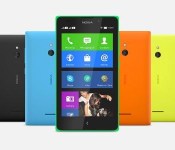
Nokia by Microsoft may have an Android-powered Lumia device on the Way
 Remember when we thought the Android-powered Nokia X was going to be Nokia‘s last hurrah before being completely consumed by Microsoft? Well, it looks like Android may still be playing a big part of Nokia’s ongoing future under its new omnipotent leader. Everybody’s favourite leaker, @evleaks, has today suggested that there will be a Android-powered Lumia device to come from the newly branded Nokia by Microsoft division.
This is probably most surprising as it was assumed that Microsoft had let Nokia continue with the Nokia X line of devices as an entry level package to help pull people towards Windows Phones, but having an Android-powered device among its most premium devices would be a revelation. It would likely be yet another forked version of Android, utilizing Nokia’s slowly growing Nokia Apps marketplace, though that does open up the possibility of being able to root and flash custom ROMs onto hardware that would otherwise be impossible to access for Android users. Just imagine a Nokia 1020 running Android…
Still, we still have to see whether this actually comes to pass, but it’s definitely something to look out for in the future. What do you think about the possibility of an Android-powered Lumia device? Would you be interested?
Source: @evleaks
//<![CDATA[
ord = window.ord || Math.floor(Math.random()*1E16);
document.write('’);
//]]>
The post Nokia by Microsoft may have an Android-powered Lumia device on the Way appeared first on AndroidSPIN.
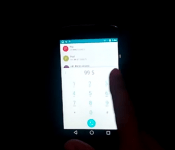
[VIDEO] Android L has been ported to the Nexus 4
 The question on many people’s lips, particular the ones who don’t own a Nexus 5 or Nexus 7, is when they will be able to try the Android L preview on their device. The question is even more pertinent for Nexus device owners who have had part of the preview uploaded to AOSP, but it may or may not be enough to go on to make complete ROMs. Still, that hasn’t stopped some geniuses out there as Android L has been ported to the Nexus 4. You can check out a video of their feat below:
As you can see, it looks to be working pretty with all the functions and apps for Android L working in this port, though there are some outstanding bugs that remain including NFC, Bluetooth, Camera and a few other niggling issues. There also appears to be an unfortunate one-off side effect of the ROM installation as the first time boot after flashing can take up to 15-20 minutes; as any flasher will know, the time taken for the first boot can seem like an eternity so make sure you stay extra patient for this one. If you’re interested in trying out the ROM, you can download it from the site below, or you can check out the original XDA forum post in the source links.
Let us know if you try out Android L on the Nexus 4, and how you find it.
Source: Galaxy Fit Update, XDA via Phone Arena
//<![CDATA[
ord = window.ord || Math.floor(Math.random()*1E16);
document.write('’);
//]]>
The post [VIDEO] Android L has been ported to the Nexus 4 appeared first on AndroidSPIN.

Is this Xperia Z3′s about screen?

About a week ago we shared alleged images of Sony Xperia Z3 and Z3 Compact smartphones. Now we have some software leaks when it comes to Sony’s future flagship phone.
Alleged about screen from Xperia Z3 has leaked (image below). Model mentioned on this screenshot is D6653 which should be the model number for Sony’s upcoming flagship device. We can also see that the device is supposedly going to sport a Snapdragon 801 chip which is in high demand lately and will run on Android 4.4.4 KitKat.

We’ll let you decide if you believe this to be true or not and if we get any more information we’ll make sure to share them. The device is expected to launch in September during IFA, so let’s wait and see what we get.
Source: XperiaBlog
Via: PhoneArena
The post Is this Xperia Z3′s about screen? appeared first on AndroidGuys.

There can’t be only one: Technology’s singular obsession

Last week, Google announced the aptly named Android One, a plan to unite the myriad budget devices running its mobile operating system. But Sundar Pichai and crew aren’t alone in banking on the singular power of one. No, Google’s One is just one of many in the industry’s recent past. It turns out, everyone wants to be the one.
[Image: Getty]
Filed under: Cellphones, Misc, Laptops, Science, Internet, Software, Sony, Microsoft, HTC, Google, Acer

Sunrise’s social calendar app reaches the Mac

Sunrise has quickly become the calendar app of choice for some people, and for good reason. Besides its straightforward interface and support for all your social networks, it’s one of the few truly multi-platform schedulers you can find — as of this May, it can run on Android, iOS and the web. It hasn’t had a native desktop app, however, and the company is rectifying that by launching Sunrise for Mac. Not surprisingly, it’s more than just the iPad app writ large. In addition to the all the advantages that come with more screen real estate, you get both a mouse-friendly interface and native OS X notifications; there’s also a complete offline mode if you need to review your itinerary on a flight without WiFi.
As before, the big deal is integration with a slew of content providers. Sunrise’s Mac client handles both the standard calendars from Facebook, Google and Microsoft as well as a raft of features from online services that rarely show up in this kind of software. You can see your Evernote reminders and Foursquare check-ins, for instance, or use LinkedIn to find out more about the attendees at your next meeting. This won’t necessarily supplant either Apple’s stock calendar app or web-based tools, and Windows users are unfortunately out of luck for now. But hey, it’s free — if you’re interested in a Mac-friendly life organizer whose usefulness extends well beyond the desktop, it won’t hurt to give Sunrise a spin.
Filed under: Internet, Software
Via: 9to5 Mac
Source: Mac App Store, Sunrise

The Gionee Elife S5.5 gets Android 4.4.2, makes the jump from Android 4.2
 The defining characteristic of the Gionee Elife S5.5 is that it is thin. Really thin. At 5.5mm, it remains the thinnest smartphone available on the market right now, and you get the sense that other manufacturers will struggle to get any thinner than the wafer-thin Elife S5.5. While not the absolute bleeding edge in mobile technology, it holds its own in the mid-range, and now has another feather in its cap as the Gionee Elife S5.5 gets Android 4.4.2. The Elife S5.5 makes the jump from Android 4.2, skipping 4.3, resulting in a rather hefty update of 865MB.
 The changes include homescreen changes, thanks to all the additions in Android KitKat, as well as UI changes which have allegedly improved the responsiveness of the devices. The full list of changes includes (as per GSM Arena):
- Android upgrade to KitKat
- New Desktop layout
- Removed the world cricket championship
- Added Du speed booster for faster operations
- Updated Amigo Paper with a brand new UI interface design
- Updated Game Zone with a new UI interface design
- Updated GioneeXender for optimized performance and further improved the linking success rate
If you have a Gionee Elife S5.5, we’d love to find out what the phone is like to own; let us know what you think in the comments below.
Source: GSM Arena via Phones Review
//<![CDATA[
ord = window.ord || Math.floor(Math.random()*1E16);
document.write('’);
//]]>
The post The Gionee Elife S5.5 gets Android 4.4.2, makes the jump from Android 4.2 appeared first on AndroidSPIN.

MiniLock browser plugin promises easy encryption with drag-and-drop security

A coder/activist is trying to walk a fine line with his encryption program called MiniLock, according to Wired. On the one hand, Nadim Kobeissi has developed a simple drag-and-drop interface for the browser plugin to make it accessible to all. But its public-key encryption backbone also needs to satisfy the vocal cryptographic community by being robust enough to handle any attack, even from experienced hackers (like the NSA). Judging by skeptical comments on Reddit, the latter aim will be daunting, particularly since his last effort (Cryptocat) wasn’t well regarded. Nevertheless, Kobeissi will introduce an experimental beta of the new program at the HOPE X hacker conference later this month in order to have it poked and prodded by that community. As for the interface, he told Wired that “it’s super simple, approachable, and it’s almost impossible to be confused by it.” If he manages to run the gauntlet at HOPE, MiniLock will eventually be released as a free browser plugin so that even your dear old gran can protect the family brownie recipe.
Filed under: Internet, Software, Alt
Source: Wired

Civilization: Beyond Earth ships October 24th with maps based on real planets

If you’re eager to play the first Civilization game set in space (not counting Alpha Centauri), you now have a date to mark on your calendar: Beyond Earth will reach Windows-based PCs on October 24th. That’s a long time to wait, although Firaxis is sweetening the pot with astronomy-themed bonus content. If you pre-order the space colonization game from certain stores, you’ll get a map pack based loosely on real, potentially inhabitable exoplanets like Kepler 186f and Rigil Khantoris (aka Rigel Kentaurus) Bb. It’s hard to say if the extra terrain will be worth plunking down cash in advance, but we suspect that you’ve already pulled the trigger if you’re a die-hard Civ fan — this is just icing on the extraterrestrial cake.
Filed under: Gaming, Science, Software
Source: Joystiq

“OK Google” on every screen still not there for you? Try this little Trick
The Moto users out there are all too familiar with the “OK Google” hotword from anywhere. Many of us are aware of it, but never had it. In a more recent update to the Google Search app, the hotword has been brought to many devices. It enables you to say “OK Google” on any screen, even the lockscreen, and do a voice search or command. However, it has been rolling out stupidly slow and many are getting impatient. So much so that we are uninstalling the app and re-installing it, clearing cache and any other trick in the book in hopes that the hotword detection settings will pop through for us. Do any of them really work, or is it all a placebo effect? I don’t think we really care so long as it shows up after an attempt. A new trick has appeared and it seems to help some gain the function, hell, it helped one of my devices even.
The trick is pretty silly really. You will want to open up the search app and type or speak, “OK Google Everywhere” and search. It will pull up articles about the new addition, including this articles source, AndroidPolice. Head into the settings > voice > “ok google” detection and you should have all the options available.

 I checked to make sure the settings hadn’t appeared before I did the little typing trick and they still weren’t available before but are now afterwards. This was done on a T-Mobile Sony Xperia Z running a stock Sony Android 4.4 firmware build from overseas. I did the same thing on the T-Mobile Xperia Z1s with stock Android 4.3 and no dice. If you go to help&feedback you can read the documentation and the availability. It does state that you need Google Search 3.5, Android 4.3+ and Audio History turned on. So the Z1s should have it, or at least be able to get it.

Maybe it worked, maybe it didn’t. Others seem to claim it appears right after the search though, and it certainly did on one of my devices, so why not give it a shot, even if just for giggles.
Source: Reddit Via Android Police
//<![CDATA[
ord = window.ord || Math.floor(Math.random()*1E16);
document.write('’);
//]]>
The post “OK Google” on every screen still not there for you? Try this little Trick appeared first on AndroidSPIN.

