


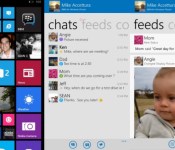
BlackBerry opens BBM for Windows Phone beta

“We’ve gotten an incredible number of requests for BBM to come to Windows Phone,” BlackBerry proclaimed in its post announcing BBM for Windows Phone beta today. Whether that means 10 or 10,000 of you have been begging for the service is unclear, but either way, it’s just about here. You’ll get the usual list of features, such as individual and group chats, contacts and feeds, albeit with a refreshed Windows Phone-esque UI. BBM Voice, Channels and Glympse location sharing won’t be available initially, however. You can sign up for access to the limited beta today, or wait for BlackBerry to open up access to everyone within the next few weeks.
Filed under: Cellphones, Software, Mobile, Blackberry
Source: BlackBerry

Google Keyboard updates to v3.1.19633 with new languages, spoken Emoji support and more [APK Download]
A new version of the Google Keyboard app has been released by Google today. The update brings the free keyboard replacement up to version 3.1.19633. With it comes a number of changes that are quite important to those some.
With the update Google has added 5 new languages to the mix. The keyboard replacement now supports Indian English, Basque, Galician, Swiss Italian, and Latin American Spanish. The voice input button has also been moved. It now resides in the top right when it can be used when it isn’t present in the app you are using. Like below, it appears for a text message, but in the Chrome Browser you can tap on it in at the top in the search box.

 Spoken Emoji’s are now becoming a thing too. Seems the groundwork is in place but only a couple of them are working at the moment. This just means that you can verbally say “Smiley Face” and the keyboard will know that you want to put in a :-). The same is true for Sad Face and Tongue Face. Android Police has also pulled out the huge string that contains the hotword triggers for 808 Emoji images. Everything from a “No Smoking symbol” to “cat face with tears of joy”.
The final little addition is the removal of the long-press delay menu item.
I am sure many of you have already moved on to the Android L keyboard, but if you havn’t we have the newest Google keyboard apk download available for you below.
Google Keyboard apk download v3.1.19633.
Or you can check the Play Store for the update.
//<![CDATA[
ord = window.ord || Math.floor(Math.random()*1E16);
document.write('’);
//]]>
The post Google Keyboard updates to v3.1.19633 with new languages, spoken Emoji support and more [APK Download] appeared first on AndroidSPIN.

The FTC is taking Amazon to court over its in-app purchase policies

Earlier this summer, the Federal Trade Commission (FTC) warned Amazon that if it didn’t adopt a more Apple-like policy about in-app purchases, it might wind up in court. Now, it has. Today the FTC announced that it’s seeking a court order requiring the online retailer to issue refunds to parents whose children ran wild with in-app purchases — unauthorized charges, the FTC says, that racks up into the millions. Much of the alleged blame is focused on Amazon’s past. According to the FTC, Amazon had almost no protection against unwanted in-app purchases in 2011, and has only implemented adequate consent framework recently. The government’s concern seems to lie squarely on customers left in the lurch: Amazon’s official policy says that all in-app purchases are non-refundable, and the exceptions to that policy are “unclear and confusing.”
In early July, Amazon told the FTC that it was disappointed with the government’s threat to file suit, claiming that it has always been quick to respond to refund requests for unwanted, child-sourced purchases. “Pursuing litigation against a company whose practices were lawful from the outset and that already meet or exceed the requirements of the Apple consent order makes no sense,” Amazon argued, “and is an unfortunate misallocation of the Commission’s resources.”
Filed under: Internet, Software, Amazon
Via: USA Today
Source: FTC

Cuphead: Bringing 1930s style to 21st century games

Every June, the game industry descends upon the Los Angeles Convention Center for its blockbuster-focused trade show: the Electronic Entertainment Expo (E3). And traditionally, just ahead of that show, the big three console makers — Microsoft, Sony and Nintendo — hold press briefings focused on the Call of Dutys, Assassin’s Creeds and Halos of the world. They’re big, blustery affairs aimed mostly at the 18-35 male demographic. And hey, that’s totally fine: We dig shooting aliens just as much as the next 18- to 35-year-old.
But this year, we didn’t come away from Sony’s or Microsoft’s presentations talking about the next triple-A title from some huge studio. With Sony, the most important game on stage was from a small group of British devs: No Man’s Sky. With Microsoft, you’re forgiven if you missed the highlight of the presentation: Cuphead, a gorgeous game from a small Canadian studio, was only briefly teased during a clip of indie titles headed to the Xbox One. So, let’s fix that!
First and foremost, you need to put your eyes on Cuphead in action. The game is gorgeous:
Sold, right? It doesn’t take much of Cuphead to see it’s a standout. Yet, despite hearing glowing praise from nearly every journalist I spoke with at E3 2014, coverage of Cuphead has been surprisingly limited. “It is a little odd,” Studio MDHR co-founder and “the guy who draws Cuphead” Chad Moldenhauer told me in a phone interview last week. “We’re kind of an unknown; maybe that’s part of the problem.” He and his brother Jared lead the development team at Studio MDHR, the folks creating Cuphead.
Though the brothers Moldenhauer have been developing games for many years while working other jobs — Chad in web design, Jared in construction — this is their studio’s first official game. Together with a programmer friend in Romania (Cosmin Chivulescu), a childhood friend handling music (Kristofer Maddigan) and an additional animator in Brooklyn (Smo), the Moldenhauer’s are attempting 1930s-style animation in a 21st-century video game. And they’re nailing it.
ANCIENT HISTORY (The early 2000s)

Chad and Jared got started in game development back when the first Xbox came out. Here’s how Chad tells it:
“We’ve dabbled in games our whole lives, but mainly just for our own fun. And back in the early 2000s, when Microsoft first announced … I can’t remember what the program name was called, but for the original Xbox they had an indie program, and we just built a PC to the exact specs that they were sending out to devs, and started trying to make a few games. Back then, we still loved the idea of a run-and-gun, so that’s what we were working on.”
If you’re rubbing your face and wondering how Chad speaks so casually about “dabbling” in game development, rest assured that you’re not alone. He told me that it’s a measure of growing up around folks who were both “hardcore into games” and into films as well. “Since probably 13 or 14, we’ve been studying and analyzing within our own groups, critiquing games and trying to break them apart and understand why certain elements work and others don’t. And that just helps as we come into game design,” he said.
It also helps being friends with a “wicked” programmer. “Like it was painting a picture,” he said. “We just jumped into it, you know?” Uh-huh. Sure.
CREATING CUPHEAD
“There haven’t been any even medium-scale projects that use this style in the last 20 years.”
Chad and Studio MDHR’s contract artist, Smo, are creating all of Cuphead‘s beautiful art. The game looks the way it does in motion specifically because of how it’s being created. Chad specifically cited famed cartoonist and inventor Max Fleischer, and Disney’s classic Silly Symphony series. Here’s “Funny Little Bunnies,” from 1934:
Beyond the artistic influence, it’s the way those cartoons were drawn that Chad’s interested in. This requires some background on the history of cartoon animation. Chad explained:
“[In the 1930s], they didn’t know how to cut corners to make similar visual styles, so a lot of the older animation is actually 24 frames per second. When you make a fast drawing, you can do it on ‘ones,’ which means you draw one frame (one image per frame). To get one second of animation, you need 24 frames. But as they got smarter, in the late ’30s and ’40s, they realized you can get away with a lot of stuff on ‘twos,’ which means you halt that drawing for two frames, and then you only need to draw 12. But, there’s still something very weird and surreal to see every frame drawn, and that’s why it seems not traced, but almost like just a very surreal motion to their animation. And because we’re dumb, we’re copying that [first] style of … more work.”
The game is, of course, a game, so it’s being developed in the (very flexible) Unity game engine. Chad and Smo aren’t animating every single frame of animation by hand, but Chad says, “It still haunts me to think of how many frames are left to finish this game.” They’re targeting a 2015 launch.
‘TURBO SUPER MEGA’
While Cuphead‘s visual influences are more vintage than old-school, the game’s roots are in 8- and 16-bit run-and-gun shooters, like Konami classic Contra. The working title for the project that eventually became Cuphead was Turbo Super Mega — an homage to the hyperbolic adjectives of mid-’90s game consoles.
Early on, the idea for Turbo Super Mega was to create a run-and-gun game, focused on boss fights, with children’s art instead of a 1930s cartoon style. “You would start in kindergarten fighting three or four different bosses that were drawn very crude, and then you would work your way to grade one, two and, when you got to grade eight, it would be semi-detailed,” Chad said.

As a joke, he and his brother replaced some of their art with stills from Disney films, added in animation and showed a few friends. “They said we should never make our game unless we use that style,” Chad said. “Then I started crying, [because] I knew I had to attempt animation.” For the next half year, Chad studied cartoonist Richard Williams’ celebrated instructional book, The Animator’s Survival Kit, which he calls “pretty much the best thing in the world.”
PLAYING CUPHEAD
Beyond the clip shown during Microsoft’s presentation — Cuphead is currently console-exclusive to Xbox One — only bits and pieces about the game are known. First, it’s focused mostly on boss battles. These grandiose, highly animated creatures help to showcase the art style, but are also a particular passion of Chad and Jared.
“Konami and a few others have made run-and-gun levels that weren’t perfect, but near perfect. So, as we kept playing with the idea of getting back to run-and-guns, we just warped it mainly toward boss fights. That’s kind of what we love. We understand that the levels still provide a bit of easy filler for the most part, where you can just see a ton of destruction, but the core to us was always fighting a boss and that was the ‘on the edge of your seat’ gameplay.”
Second, there’s a Super Mario 3D World-style world map (seen briefly in the video below). “You can walk around and explore anywhere, so you don’t have to move from line to line,” Chad said. Which is also to say: The game isn’t linear. Cuphead “isn’t going to be boss one, boss two all the way to the end of the game,” Shadow of the Colossus-style, Chad said. You can try out harder levels, speak with various characters and explore for secrets. Not quite “open world,” but not as constrained as its run-and-gun forebears.
FUTURE CUPHEAD
 The next steps for Studio MDHR are crucial. As previously stated, it’s just a small group of folks, and at least two members are investing their own savings into the project. Though Chad couldn’t go into the details of his studio’s contract with Microsoft for that console-exclusivity deal, it sounds like the agreement brings more help with press contact and event participation (think: bringing their game to E3) than anything else. “Up front is more still relying heavily on us,” Chad said, in reference to the cost of developing the game. “But we’re not as worried to dip into our savings and borrow money because there seems to be at least a decent amount of love for Cuphead right now.”
Chad and Jared are both still “semi-part-time” at their old jobs, and mostly full-time on creating Cuphead. I spoke with Chad over Skype from Brooklyn, on his first day of vacation in Saskatchewan, Canada. He was there with Jared. “We’ve kind of been talking actually while I’ve been here, and like we kinda now have to just jump in and just … there’s an opportunity here and we might as well take it.”

Climendo’s weather app compares forecasts to deliver the most accurate

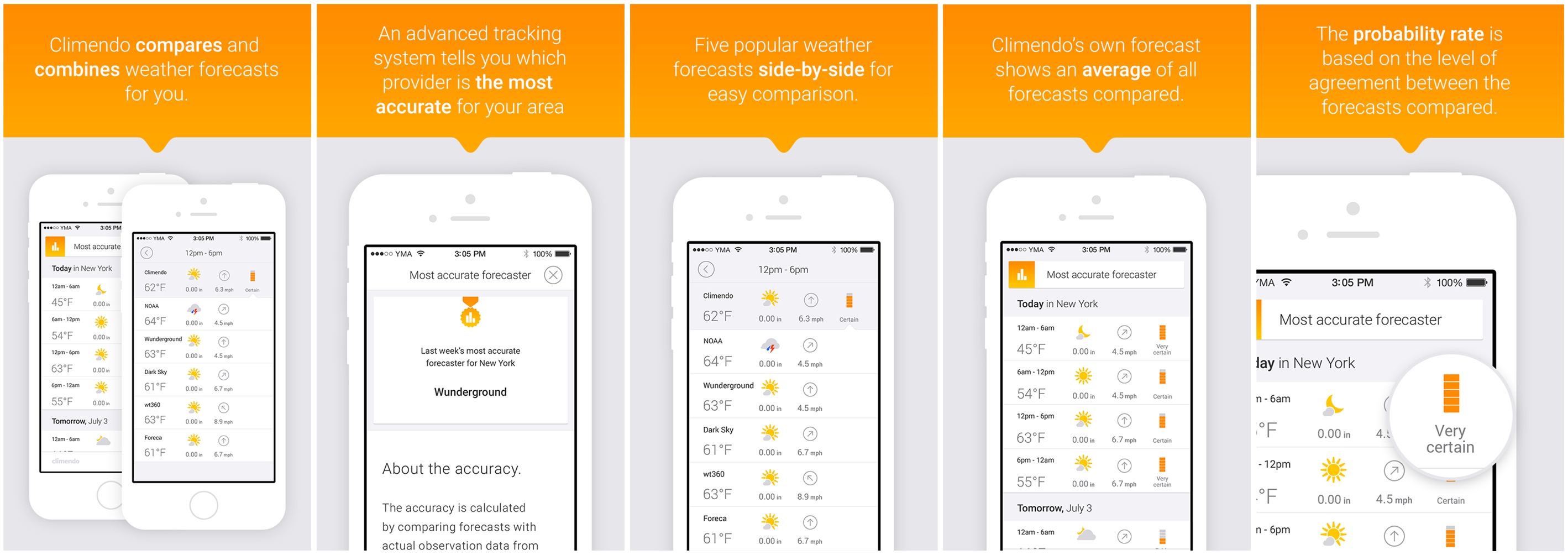
Sure, your favorite weather app might look good, but can you really tell how accurate it is? Instead of relying on just one weather source to provide you with an overview of the week’s weather, Climendo wants to do things a little differently. It compares and combines data from the most popular and/or accurate providers to give you the most precise forecast possible. On top of that, it’ll also match predictions with historic data from professional weather stations, letting you know exactly which provider you can trust.
While the app launched in Sweden last year, it’s only now making a break for global success. It’s undergone a redesign, displaying a five-day forecast with six-hourly predictions of upcoming weather, which is supplied by 12 providers located in the US and Europe. They include NOAA, Forecast.io (Dark Sky), Weather Underground, Storm and TV2.dk, with more being added all the time. Based on their predictions (drawn from 10,000 weather stations around the world), the app generates an average forecast and calculates a probability rate (fairly uncertain, certain, fairly certain etc). The more readings that are similar, the higher the chances that you’ll experience the weather it tells you to plan for.
Currently, the app displays the temperature, the current weather condition and wind speed. However, the team says more detailed statistics will come to the app, breaking the data down so that “farmers, sailors, sun bathers, surfers can dig into what they think is the most important part to keep an eye on.” While the new features and design are currently only available to iOS users, the Android and web apps will receive a similar update in the coming weeks. Climendo is $0.99/69p for a limited time and can be downloaded from the App Store or Google Play.
Filed under: Internet, Software, Mobile
Source: Climendo, (App Store), (Google Play)

Google Camera lends shutter control to Android Wear smartwatches

If you’re the type that fancies snapping selfies or group shots from a distance, a pending update to Google’s Camera app should lend a hand. The new version of the software allows Android Wear smartwatches to work as remote shutter controls. What’s more, on top of tapping the watch face to snap a picture, the wearable’s screen will display a countdown with an image preview to follow. Unfortunately, that G Watch or Gear Live won’t act as a viewfinder, so you’ll need to sort the composition beforehand. The update might not show up for you in Google Play just yet, but those eager to implement the function can grab the APK over at Droid Life.
Filed under: Wearables, Software, Mobile
Source: Droid Life, Google Camera (Google Play)
Remote Shutter and Revamped Panorama UI in Google Camera Update [APK Download]
Continuing on with Google app update Wednesday, we have one more small, but awesome, app to add to the list. The Google Camera app has been pushed up a little bit. It jumped from v2.2.024 to v2.3.017. The file size went up nearly a whole MB, which is pretty decent and means a little more than just some bug fixes. The new update offers a couple of things that are notable. If you happen to be an Android Wear owner this update will give you shutter control on your device. Not only can you snap a photo from your wrist, but you can also view the said image as well.
The other change comes to light in the panorama option. Google has enlarged the data points as well as the centering ring. It makes it quite a bit easier to spin around for those shots without needing glasses to line them up.


Per the norm, the update is rolling out in stages to all users of the app. We are about as impatient as anyone else is, so we have the apk for your downloading enjoyment. Don’t forget though, this app is only supported on Android 4.4+ devices and even some of those can’t use the app. If you can and already have it, then have at it.
Google Camera v2.3.017 apk download
Don;t forget about the Chromecast update and the Gmail update either.
//<![CDATA[
ord = window.ord || Math.floor(Math.random()*1E16);
document.write('’);
//]]>
The post Remote Shutter and Revamped Panorama UI in Google Camera Update [APK Download] appeared first on AndroidSPIN.
Get a little Android L look and feel on your Xperia device with the L Theme from Candl Design
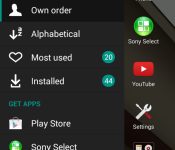
Android L is all the rage. We all want the Material Design look and feel today, not this fall. For many, this fall doesn’t mean a thing since we know carriers and OEM’s tend to be much further behind than Google. That doesn’t mean you can’t have bits and pieces of the what Android L looks like, minus the fancy little animations of course. If you happen to own an Xperia device then you are in luck. Candl Design recently released a theme specifically for us to use with the Xperia theme engine on our devices.


 The theme comes with quite a few graphical changes for your device.
– Navigation bar icons
– Launcher and Lockscreen Wallpaper
– System colors
– Xperia™ Home components (require full version to get full experience)
– Platform Components: button, checkbox, dropdown list,… (require full version)
– Up to 270 graphical assets
The basic theme is free and gives you a few changes like the softkey changes at the bottom. The images above are from the basic free version of the theme. Where as the image below are of the paid version ($0.99). You can quickly see a number of changes like how the folders look, the radio button colors/looks and the slide out in the app drawer.


 If you are on Android 4.4+ you are all set, install the theme from the Play Store and then head to Settings > Personalization > Xperia themes and check the box. However, if you are on Android 4.3 you will need root and Supermod. Links to both version are provided below.
Xperia theme: L $0.99
//<![CDATA[
ord = window.ord || Math.floor(Math.random()*1E16);
document.write('’);
//]]>
The post Get a little Android L look and feel on your Xperia device with the L Theme from Candl Design appeared first on AndroidSPIN.
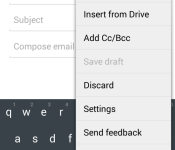
Gmail gets updated to v4.9, brings Google Drive file attachment [APK Download]
The hits just keep coming today don’t they. It is update Wednesday after all. We just handed you guys the keys to the Chromecast app for screen mirroring, now we have the update for Gmail. This update moves it to v4.9 and doesn’t do a whole heck of a lot. However, it is newer than the old one and that makes it worth installing.

 The only visually noticeable thing, as pointed out by Android Police, is a new menu item in the overflow menu when writing an email that lets you add a file from Drive. Not huge, but something. We have also seen comments floating around that the update solved some sync issues some users were having. Not sure how true that is or not. If you don’t see the update in the Play Store just yet you can just hit the link below and go grab the apk.
Via Android Police
//<![CDATA[
ord = window.ord || Math.floor(Math.random()*1E16);
document.write('’);
//]]>
The post Gmail gets updated to v4.9, brings Google Drive file attachment [APK Download] appeared first on AndroidSPIN.
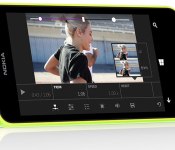
Microsoft’s Video Tuner outfits Windows Phone 8.1 with easy clip editing

Windows Phone 8.1 users have been rather strapped when it comes to video editing apps straight from HQ, but now Microsoft is looking to lend a hand. With Video Tuner, Redmond serves up a new app that wrangles smartphone clips with the ability to apply filters, add music (non-DRM protected MP3s, natch) and apply a range of corrective adjustments — including speed tweaks. As you might expect, once the finished product is ready, footage can be broadcast directly to various social channels, with the exception of Vine. The software can save videos in the proper format for Twitter’s video stream, but there’s no direct sharing at this time. Video Tuner supports MP4 files and allows editing of video captured from the same device on which it is installed. You’ll need a Lumia handset running Windows Phone 8.1 to nab up the new offering, but it’s already available free of charge from Microsoft’s app repository for those who qualify.
Filed under: Software, Mobile, Microsoft, Nokia
Source: Windows Phone Store

