


Wi-Fi Calling is finding its way to the Sprint HTC One M8 with Android 4.4.3 Update
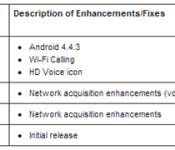
Sprint is working on pushing out a OTA to those of you that are rocking a HTC One M8 that moves the device to Android 4.4.3. The update will bring Wi-Fi calling and a HD Voice Icon to the flagship device. Their description of the changes is limited to just those three mentioned above. We assume there are a number of little tweaks and bug fixes as well.
 Interestingly enough though, it would seem that after a number of sites reported on the update appearing in the Sprint support pages, listed as version 2.16.651.4, Sprint has since removed it. We hope that there wasn’t some sort of major issue sprouting up on devices that already received it. If you see it, let us know. Maybe it was a snafu and it was supposed to be Android 4.4.4. We can hope, right?
Source: Sprint, 9to5Google
Img: AndroidPolice
//<![CDATA[
ord = window.ord || Math.floor(Math.random()*1E16);
document.write('’);
//]]>
The post Wi-Fi Calling is finding its way to the Sprint HTC One M8 with Android 4.4.3 Update appeared first on AndroidSPIN.

ESPN dusts off its Fantasy Football app ahead of draft day

Football season will be here in a matter of weeks, so to help fantasy football enthusiasts keep tabs on their rosters, ESPN has updated its suite of apps dedicated to the task. In addition to a fresh coat of paint for the UI, you’ll be able to create a team or league from within, getting alerts for scoring, injuries and more all season long. If you’re unsure of your pal’s contact info, invites can be sent to those social media acquaintances worthy of a clipboard. While software for Apple’s mobile operating system was already equipped with both live and mock draft abilities, the Android faithful can now do the same. New versions of both the Android and iOS applications are now available for download via their respective app libraries, so you can get started with the pregame strategery.
Via: Android Police
Source: Google Play, iTunes

Nokia’s exclusive take on Windows Phone 8.1 is rolling out now

After months of waiting, Nokia (the part now owned by Microsoft) has begun rolling out its Windows Phone 8.1 update to Lumia handsets. Dubbed “Cyan,” this software refresh delivers a plethora of new features to existing Nokia devices, including Microsoft’s gesture-capable World Flow keyboard, greater customization options (both for Live Tiles and the new-look People Hub), new Nokia photo apps, Office app improvements and, if you live in the US, access to Microsoft’s new digital assistant, Cortana.
While the company doesn’t state which of its handsets will get the update initially, it does note that the Lumia 1520, Lumia 930 and Lumia Icon will receive support for Nokia Rich Recording and Dolby Digital 5.1 sound. All Lumia handsets will receive a number of camera updates too, which deliver improved color reproduction, better low-light performance, continuous autofocus and improvements to RAW photo capture.
Lumia handsets will get improved Bluetooth 4.0 low-energy support, allowing them to work with fitness wearables and other Bluetooth accessories like Nokia’s Treasure Tag. The update also includes a new fitness platform that collects locations, real-time fitness data and other “advanced features” and feeds that information to other Windows Phone apps. Although the update begins rolling out today, Nokia expects its Cyan update to reach all Lumia devices “in the coming weeks.” In the meantime, check out the Cyan update page to find out when the update will come to your handset.
Filed under: Cellphones, Software, Mobile, Microsoft, Nokia

Snapchat outs location-based filters, but only for LA and NYC

We knew Snapchat was testing a feature that let users unlock certain filters depending on their location. At the time, though, the popular messaging service kept its usage limited to people in New York City. But, starting today, Snapchat is bringing Geofilters out of the lab and making it a little more mainstream, announcing that folks in Los Angeles and The Big Apple can now start using the feature full time. Snapchat Geofilters is rather easy to bring up within the app, as it only requires a simple swipe to the right on your device and voilà. Naturally, actually having access to these pretty filters will still depend on you being at a supported spot in one of the aforementioned cities. The rest of you Snapchatters shouldn’t worry — chances are you’ll see Geofilters come to other places sooner rather than later.
Filed under: Internet, Software, Mobile
Source: Snapchat

Virgin Media rolls out more Sky Sports HD and entertainment channels

If you’re a Virgin Media customer who enjoys Sky content both at home and on the move, we have some good news. Following the announcement that they’d expanded their existing content deal back in May, Virgin Media has today begun rolling out new Sky Sports channels, adding Sky Sports 3 HD, Sky Sports 4 HD and Sky Sports F1 HD to customer set-top boxes. The new Sky Sports 5 channel will also take its place in the lineup, delivering football from Europe’s top leagues in high-definition when it launches in the coming weeks.
In order to accommodate them, the company has made slight changes to its electronic programme guide, but you shouldn’t notice too much of a difference. If catching up on your favourite shows from your mobile is more your thing, Virgin’s enabled access to Sky’s entertainment channels (not including Sky Atlantic) from its TV Anywhere app, allowing you to watch Sky 1, Sky 2, Sky Living, Sky Living it, Sky Arts 1, Sky News and Sky Sports News on your iOS or Android device. Movies and sports are said to be coming to the app too, but you may have to wait a little while longer to get more free stuff.
[Image credit: Sport On The Box]
Filed under: Cellphones, Home Entertainment, Tablets, Internet, Software, HD, Mobile
Source: Virgin Media

Shazam streams full tracks from Rdio without leaving the app

Shazam has linked out to Rdio for a while now, but the tune identification app would boot you out to access a full track. With a recent update though, the software now streams songs it identifies from Rdio’s library from within, so long as you have a subscription. Those who have yet to pay up will still get a preview, but selecting the aforementioned repository from the listening options will only prompt you to download its app. Those who do shell out the monthly fee need only to link the two apps in order to take advantage. Shazamed tracks are automatically sorted inside their own playlist for later access while a “Add to Playlist” button lets you chose more appropriate destinations. While the iOS version is available now, folks who carry Android devices can expect it to arrive “in the next few days.”
Source: Shazam

The United Kingdom can manipulate major communication services, from Facebook to phone calls

British intelligence agency GCHQ is able to not just monitor, but also modify many of the world’s most widely-used communications services: Facebook, YouTube, and phone calls are just a few of the services affected. The Intercept revealed the documents today (which can be read here), continuing reporter Gleen Greenwald’s year-plus of working with whistleblower Edward Snowden on exposing the clandestine surveillance tactics of the United States and Britain.
So, what exactly can the GCHQ do to these communications services? Beyond monitoring, of course; it’s already been revealed that the GCHQ is doing that.
One program, “WARPATH,” enables, “mass delivery of SMS [text] messages to support an information operations campaign.” Another, “BURLESQUE,” offers “the capability to send spoofed SMS [text] messages.” Used in conjunction, and that’s a pretty powerful way to spread misinformation: mass text messages from spoofed (read: falsified) senders could massively disrupt a modern protest movement.
The tools extend to online services as well, like Facebook. “CLEAN SWEEP” is a system that enables the GCHQ to, “masquerade Facebook wall posts for individuals or entire countries”; “GESTATOR” enables the “amplification of a given message, normally video” on “popular media websites” (the document specifically cites YouTube).
Hilariously, “UNDERPASS” enables the alteration of online poll results, and several services target Second Life users. Yes, that Second Life. Now’s a good time to point out that the documents revealed today were updated by GCHQ as recently as July 5th, 2012.
There’s a lengthy list of other services detailed in the documents, including the ability to infiltrate and log the actions on Windows PCs, to gain access to remote terminals by using Microsoft Office documents as trojan horses, and a variety of other invasive techniques. The Intercept‘s breakdown of said techniques is right here, and for more on the GCHQ — Britain’s secretive intelligence agency — here’s our original piece on the agency’s connection to the US National Security Agency and PRISM.
[Image credit: UK Ministry of Defense, Flickr]
Filed under: Cellphones, Desktops, Laptops, Wireless, Networking, Internet, Software
Source: The Intercept (1), The Intercept (2)

120 Sports brings its new online network to Android

Just as it promised, 120 Sports has now made its debut on Google’s mobile platform. With today’s Android arrival, this MLB-, Time Inc.-backed online network, which hopes to be the internet’s ESPN, marks its first expansion outside of iOS and the web since launching last month. In case you’re not familiar, 120 Sports offers live sports coverage every day, doing so in two-minute clips which can be enjoyed in real-time or on-demand. The app itself looks and feels pretty smooth, both on iOS and Android, focusing on detailed imagery and content that’s easily accessible via a simple tap. “As we go to Android, we’re looking to grow our audience base there and continue to expand our programming,” 120 Sports President Jason Coyle said to Engadget, adding that he’s really excited for what’s to come next for the young network.

What you need to know about 3D motion capture

Close your eyes and go back… back in time. Picture Jar Jar Binks or Polar Express, movies that put the “Uncanny Valley” on the map. I know these aren’t pleasant memories, but new technology like motion capture (mocap) can be… awkward in its youth. Now, let’s forget all that and move forward to a time when the tech started hitting its stride — from Lord of the Rings’ Gollum to Avatar to The Avengers’ Hulk. And let’s not forget games — The Last of Us has some of the best mocap done in any medium and Electronic Arts has used the technique since Madden NFL ’94. But what is mocap, exactly, and how is it done? Will it ever replace live actors or put 3D animators out of business? To answer all that, let’s head back in time 100 years.
WHAT IS IT?
You probably get that motion capture involves performers prancing around in tights that have ping-pong balls attached. But what the heck is going on, exactly? Simple: The producers of a game or film want to transmit the complex motion of the performer’s body (and face) to an animated character. The process doesn’t even need a computer. Animator Max Fleischer invented “rotoscoping” in 1914, a method of creating cartoons like Out of the Inkwell by tracing live-action footage, frame by tedious frame. The first use of rotoscoping in a feature film was in Disney’s Snow White and the Seven Dwarfs from 1937.

Even when animators are creating character movements by hand, they often reference video footage, study someone acting out a scene or even look at themselves in a mirror. Creating digital animation by hand is known as “keyframing” — or filling in the movement of a character between different “keyframe” poses over time.

To automate that process, animators looked to motion capture. Bio-kinetic researchers like Simon Fraser University’s Tom Calvert were breaking new ground with mechanical capture suits. One company created “Waldo” face and body capture devices (shown above), used by an actor to drive a Nintendo Mario avatar who interacted with crowds at tradeshows. Meanwhile, the Massachusetts Institute of Technology developed its LED-based “graphical marionette“: one of the first optical motion tracking systems. An early animation exploiting that tech is the infamous, creepy Dozo music video from pioneering firm Kleiser-Walczak (seen below).
Early on, mocap was a studio-only process where tight-suited actors were alone in barren sets surrounded by special cameras and lights. Avatar introduced “performance capture,” that added multiple performers, facial expressions and lip movement. Games like L.A. Noire also drastically improved realism by combining facial and full-body capture. Lord of the Rings, meanwhile, brought mocap out of the studio and onto the set, allowing pioneering mocap actor Andy Serkis to interact with other actors as Gollum. On-set performance capture (including the face) is now the norm for feature films with digital characters, as seen below in Dawn of the Planet of the Apes (yes, that’s Serkis again — he’s pretty popular).

HOW DOES IT WORK?
Motion capture transfers the movement of an actor to a digital character. Systems that use tracking cameras (with or without markers) can be referred to as “optical,” while systems that measure inertia or mechanical motion are “non-optical.” An example of the latter is XSens MVN inertial capture suit worn by Seth Rogan playing the alien in Paul. Other tech has emerged lately, like Leap Motion’s finger-tracking depth camera system and MYO’s wristbands, that detect muscle activity in the hands and wrists. Project Tango from Google is being used mostly for mapping, but with Kinect-like depth sensors, also has the potential for mocap.
Optical systems work by tracking position markers or features in 3D and assembling the data into an approximation of the actor’s motion. Active systems use markers that light up or blink distinctively, while passive systems use inert objects like white balls or just painted dots (the latter is often used for face capture). Markerless systems use algorithms from match-moving software to track distinctive features, like an actor’s clothing or nose, instead of markers. Once captured, motion is then mapped onto a virtual “skeleton” of the animated character using software like Autodesk’s MotionBuilder. The result? Animated characters that move like real-life performers.
It’s difficult to predict how an actor’s movement will translate to an animated character, so “virtual cinemetography,” developed by James Cameron for Avatar, is often used. In a nutshell, that shows the digital character moving with the actor in real time — on a virtual set — so the director can see a rough version of the “performance.” That involves plenty of math, but computers and graphics cards are now fast enough to pull it off. The video below from Weta Digital for The Hobbit: Desolation of Smaug illustrates the process.
HOW MUCH DOES IT COST?
Nothing to do with 3D animation is cheap, motion capture included. But, like anything digital, prices have come way down as of late. On the low end of the scale, you or I can do markerless motion capture at home with a Kinect and iPi Motion Capture software for $295. On the other end of the scale, EA’s new Capture Lab (pictured below) covers 18,000 square feet, and uses the latest Vicon Blade mocap software and 132 Vicon cameras. We don’t know exactly how much that cost them, but a two camera Vicon system with one software license is $12,500. (Bear in mind that you’ll also need software like MotionBuilder to map the capture data to a character, which runs about $4,200 per seat.) Despite those prices, doing motion capture reportedly costs anywhere from a quarter to half as much as keyframe animation, and results in more lifelike animation.

WHAT’S THE ARGUMENT?
Lifelike? Meh. Lots of folks hate mocap, plain and simple. If you’re one of them, it’s hard to beat classic Nintendo-style games and old-school, hand-animated cartoons like Spirited Away or Warner Bros. Loony Toons. Those were done by animation giants like Chuck Jones and Hayao Miyazaki, who applied an artistic sensibility — and thousands of hours of hand-drawn animation — to create memorable characters. Though Andy Serkis’ mocap performance is indelibly etched into Gollum’s schizo character, considerable work was done by keyframe animators to improve the character. Serkis, however, famously took full credit and called the animators’ jobs “digital makeup.”
For producers, motion capture might be a tempting way to save money. But most of the time, mocap data isn’t ready to be used “out-of-the-box,” and often requires considerable (expensive) cleanup. The end result may also not be what producers expect. When animation movement is almost, but not quite human-like, then you’re in Uncanny Valley territory and risk repulsing your audience. By contrast, we recently saw a video game called Cuphead (below) that charmed us using ’30s style, hand-made animations.
Yet, motion capture has its place. Modern video games demand realistic character movement to ratchet up the realism. Mocap cinema characters like LOTR‘s Gollum, Captain Davy Jones from Pirates of the Caribbean and Benedict Cumberbatch’s Smaug have all become classics, thanks in part to the actors who portrayed them. And that’s the essence of mocap, isn’t it? The best way to get a memorable digital character is from an equally memorable performance by a talented, larger-than-life performer.
WANT EVEN MORE?

Are you looking to get into 3D animation and/or motion capture? There’s lots of free stuff! Autodesk will let you try most of its programs without restrictions free for 30 days (students get it free for three years) — MotionBuilder and Maya or 3DS Max is a good place to start. Autodesk also has plenty of tutorials and tips in its Area section. If you have a couple of Sony PS Eye cams or a Kinect lying around, you can also play with a free trial from Ipisoft. To skip that part and try motion files that have already been captured, Carnegie Melon University has thousands of them here, and you can use a viewer like this to preview them. If you’re just a fan of 3D and mocap porn, you can check the sites for digital effects and gaming shops like Weta digital, EA’s Capture Lab, Digital Domain and of course, Industrial Light & Magic.
[Image credits: Disney Studios/JamieLeto/Reddit (Snow White rotoscoping), The Character Shop (Waldo suit), Chernin Entertainment/20th Century Fox (Serkis in Dawn of the Planet of the Apes), EA Capture Lab (studio, dog)]
Filed under: Cameras, Gaming, Home Entertainment, Software

Chromebooks can get cheaper thanks to new support for a low-end chip

You can pick up a Chromebook for a dirt-cheap $200, if you know where to shop. However, there are now signs that these Google-powered portables could get even cheaper. MediaTek has contributed code to Chromium OS (the base for Chrome OS) for a test device with an entry-level ARM Cortex-A7 processor — a big step down from the relatively inexpensive Cortex-A15/A7 hybrid that Samsung uses, not to mention the Intel Celeron chips in other Chrome devices. Theoretically, this leads to Chromebooks and Chromeboxes that cost significantly less than $200, albeit after a big speed hit. Just as with phones and tablets, a Cortex-A7 system is likely to be pretty sluggish.
MediaTek hasn’t discussed what it’s doing with the code, and it could be a while (if ever) before there’s hardware you can buy. However, it’s not hard to see why the semiconductor firm would want to support Chrome gear. The company’s chips are seemingly omnipresent in the basic smartphones seen across developing markets like China and India. Support for a starter Cortex-A7 processor could have a similar effect in the PC world, bringing Chrome OS systems to people who might not otherwise get a computer at all.
Filed under: Laptops, Internet, Google
Via: Francois Beaufort (Google+)
Source: Google Source
 AIVAnet
